from catalog_product_index_price to reindex tuning
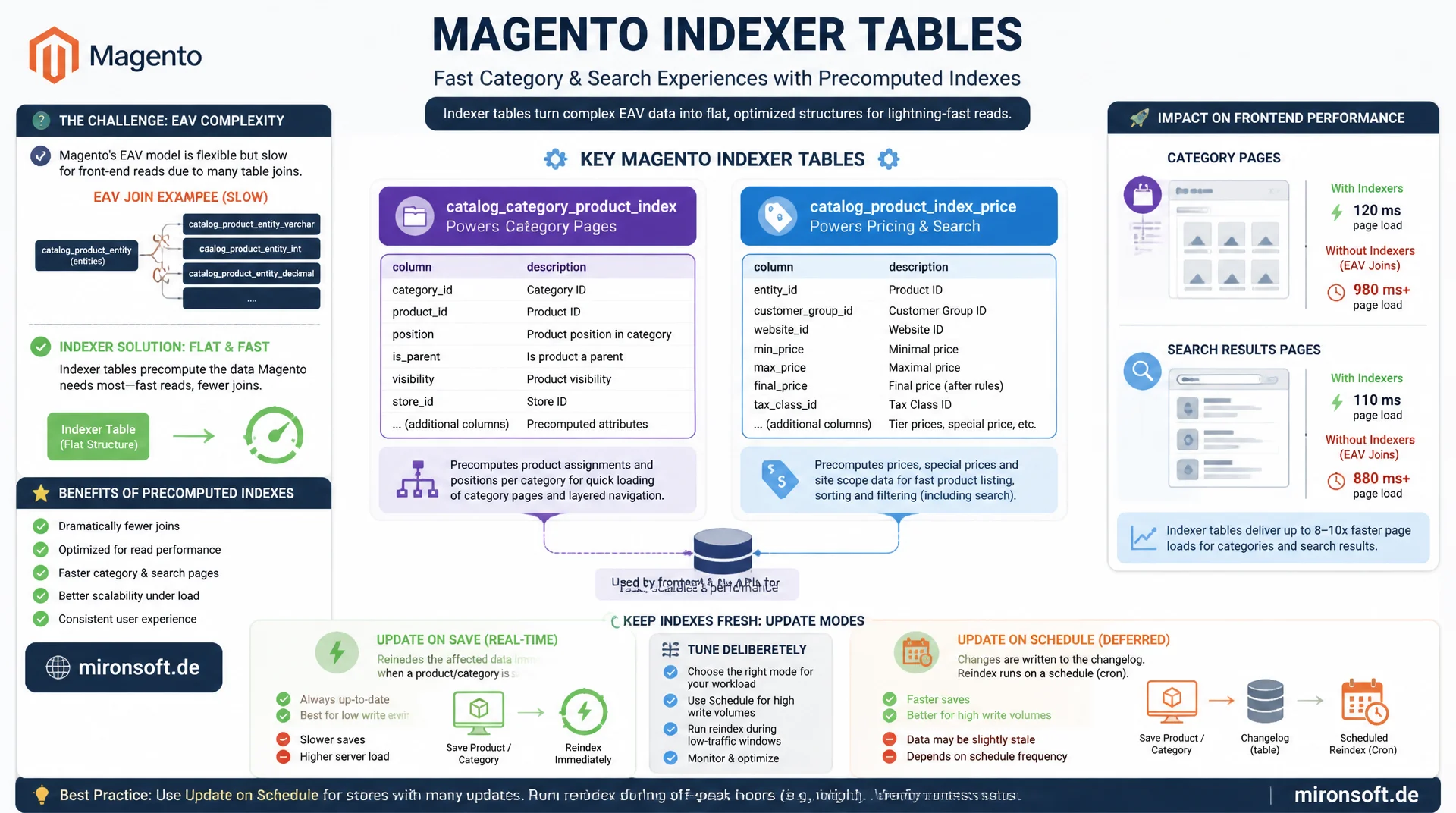
Indexer tables are the backbone of Magento performance on category and search pages because they replace EAV joins with precomputed, flat structures. Once you know the structure of catalog_category_product_index and catalog_product_index_price and how to place the Update on Save and Update on Schedule modes correctly, you can tune reindex runs deliberately instead of treating them as a black box.
Table of Contents
- 1. Why Magento needs indexer tables at all
- 2. catalog_category_product_index in detail
- 3. catalog_product_index_price in detail
- 4. Indexer modes: Update on Save vs. Update on Schedule
- 5. Changelog tables and mview mechanics
- 6. Reindex performance: full vs. partial and locking
- 7. Tuning: buffer pool and batch size configuration
- 8. Monitoring via indexer_state and CLI
- 9. Troubleshooting: stuck reindex jobs and deadlocks
- 10. Summary
- 11. FAQ
1. Why Magento needs indexer tables at all
Magento's product catalog is built on an EAV schema that is flexible for admin editing but becomes too expensive for read heavy frontend pages with many products. Indexer tables solve this problem by writing the results of expensive calculations, such as pricing, category assignment, and stock availability, into flat, wide tables ahead of time. Instead of computing price rules, customer group discounts, and website assignments live on every page load, Magento reads the finished values from the indexer tables.
Magento has several independent indexers, each with its own tables: price (catalog_product_index_price), category to product assignment (catalog_category_product_index), stock status (cataloginventory_stock_status), search, and more. Each of these indexer tables has its own lifecycle, its own reindex logic, and its own configuration via indexer.xml. Understanding which table gets updated by which change is a prerequisite for targeted tuning, instead of running a blanket "reindex all" for every performance issue.
The database side view of indexer tables is fundamentally different from the view of the raw EAV schema: here it is not about avoiding joins, but about write load, locking behavior, and how often and how expensive a rebuild is. A store with 200,000 products and multiple website customer group combinations can produce a price index table with several million rows, whose reindex time directly affects operational stability.
2. catalog_category_product_index in detail
The catalog_category_product_index table stores which product belongs to which category, including sort position and visibility per store. The columns category_id, product_id, position, is_parent, store_id, and visibility together form the basis of every category page query. Without this indexer table, Magento would have to resolve the category tree structure and all visibility attributes from the EAV schema live on every category request, which incurs significant join overhead with deep category trees and many store views.
The is_parent column matters here, distinguishing between direct assignment and inherited assignment from subcategories, along with the anchor category logic, where a product in a subcategory must also appear in the parent anchor category. This denormalization is exactly why catalog_category_product_index contains significantly more rows on a store with a deep category hierarchy than the raw catalog_category_product assignment table, which holds only direct assignments.
DESCRIBE catalog_category_product_index;
-- +--------------+---------------------+------+-----+---------+----------------+
-- | Field        | Type                | Null | Key | Default | Extra          |
-- +--------------+---------------------+------+-----+---------+----------------+
-- | category_id  | int(10) unsigned    | NO   | PRI | 0       |                |
-- | product_id   | int(10) unsigned    | NO   | PRI | 0       |                |
-- | position     | int(11)             | NO   |     | 0       |                |
-- | is_parent    | smallint(5) unsigned| NO   |     | 0       |                |
-- | store_id     | smallint(5) unsigned| NO   | PRI | 0       |                |
-- | visibility   | smallint(5) unsigned| NO   | PRI | 0       |                |
-- +--------------+---------------------+------+-----+---------+----------------+

-- How many products are visible in a given category for a given store
SELECT COUNT(*) FROM catalog_category_product_index
WHERE category_id = 24 AND store_id = 1 AND visibility IN (2,4);

-- Row count comparison: raw assignment table vs. denormalized index table
SELECT
  (SELECT COUNT(*) FROM catalog_category_product) AS raw_assignments,
  (SELECT COUNT(*) FROM catalog_category_product_index) AS index_rows;
3. catalog_product_index_price in detail
The price indexer is the most complex among the indexer tables, because it maps several dimensions at once: website, customer group, and depending on configuration also date for time limited special prices. The main table catalog_product_index_price contains the columns entity_id, customer_group_id, website_id, tax_class_id, price, final_price, min_price, and max_price. On a store with three customer groups and two websites, this alone produces up to six rows per product in this one indexer table.
Computing the final_price takes into account special prices, catalog price rules, tier prices, and tax classes, which would be too expensive to compute in real time on every page load. This is exactly why this indexer table exists as a precomputed result, which needs to be recalculated on a price rule change, an attribute change, or a product save. With complex price rules containing many conditions, computing this one table alone can account for the largest share of a store's total reindex time.
DESCRIBE catalog_product_index_price;
-- +-------------------+------------------+------+-----+---------+
-- | Field             | Type             | Null | Key | Default |
-- +-------------------+------------------+------+-----+---------+
-- | entity_id         | int(10) unsigned | NO   | PRI | 0       |
-- | customer_group_id | int(10) unsigned | NO   | PRI | 0       |
-- | website_id        | smallint unsigned| NO   | PRI | 0       |
-- | tax_class_id       | int(11)         | NULL |     | NULL    |
-- | price             | decimal(20,4)    | NULL |     | NULL    |
-- | final_price        | decimal(20,4)   | NULL |     | NULL    |
-- | min_price          | decimal(20,4)   | NULL |     | NULL    |
-- | max_price          | decimal(20,4)   | NULL |     | NULL    |
-- +-------------------+------------------+------+-----+---------+

-- Estimate table growth: rows = products * customer groups * websites
SELECT
  (SELECT COUNT(*) FROM catalog_product_entity) AS products,
  (SELECT COUNT(*) FROM customer_group) AS customer_groups,
  (SELECT COUNT(*) FROM store_website WHERE website_id > 0) AS websites,
  (SELECT COUNT(*) FROM catalog_product_index_price) AS actual_rows;
4. Indexer modes: Update on Save vs. Update on Schedule
Every indexer in Magento can be switched between "Update on Save" (synchronous) and "Update on Schedule" (asynchronous via cron), controlled through bin/magento indexer:set-mode. In synchronous mode, the affected indexer table is recalculated directly on every product save, which is barely noticeable for a single product but leads to massive lock times during a bulk import of thousands of products, because every row triggers a full reindex cycle individually.
In scheduled mode, Magento instead only writes an entry into a changelog table (more on that in the next section), and the actual reindex runs bundled via a cron job, typically configured on a per minute cadence. For production environments with regular imports or ERP synchronization, "Update on Schedule" is almost always the right choice, because it decouples the write load on the indexer tables from the actual transaction. The downside: changes are not visible immediately, only after the next cron run, which needs to be taken into account for time critical price promotions.
# Check current indexer mode for all indexers
bin/magento indexer:show-mode

# Switch price and category indexers to scheduled mode
bin/magento indexer:set-mode schedule catalog_product_price catalog_category_product

# Force a full reindex once after switching mode
bin/magento indexer:reindex catalog_product_price catalog_category_product
5. Changelog tables and mview mechanics
In scheduled mode, Magento uses the mview system (Materialized View), which maintains its own changelog table for every indexer, for example catalog_product_price_cl for the price indexer. On every relevant change, such as a product or price rule update, a database trigger writes an entry with the affected entity_id into this changelog table instead of updating the indexer table immediately. The cron job indexer_update_all_views reads these changelogs, processes them in batches, and updates only the actually affected rows in the target indexer table.
The advantage of this mechanism is efficiency on small, frequent changes. Instead of recalculating the entire indexer table on every change, only the actually changed product IDs get processed. The downside shows up when changelog tables themselves grow uncontrolled, for example because a bulk update runs without batch processing and the changelog table accumulates millions of entries before the cron can work through them. In that case, processing the changelog table itself becomes the bottleneck.
-- Inspect changelog table backlog for the price indexer
SELECT COUNT(*) AS pending_entries FROM catalog_product_price_cl;

-- Check the current version pointer that mview tracks per indexer view
SELECT * FROM mview_state WHERE view_id = 'catalog_product_price_cl';

-- Manually clear a changelog table (only after confirming a full reindex ran)
TRUNCATE TABLE catalog_product_price_cl;
6. Reindex performance: full vs. partial and locking
A full reindex (bin/magento indexer:reindex) recalculates the entire indexer table, usually via a replace table strategy: Magento populates a temporary table with the _replica suffix and only swaps it atomically against the production table at the end. This minimizes lock time for read access during the reindex, but temporarily doubles the storage requirement, because both table versions exist in parallel.
A partial reindex via the mview changelog mechanism updates only affected rows directly in the production indexer table, without a table swap. This is significantly faster for small change volumes, but can cause more row lock conflicts than a single, bundled full reindex if there are very many concurrent small updates. On stores with a very large catalog and frequent ERP synchronization, it pays off to regularly measure reindex duration and check it against the cron intervals, because a reindex that takes longer than the cron interval leads to overlapping runs and a growing queue.
7. Tuning: buffer pool and batch size configuration
The batch size for reindex operations can be configured via indexer.xml in the respective module, Magento processes products in batches of 500 to 1000 rows per run by default. A batch size that is too small increases overhead through many small transactions, a batch size that is too large increases memory demand and the duration of individual transactions, which raises the risk of lock wait times on concurrent writes to the indexer tables. The sensible value range depends heavily on server hardware and product complexity and should be tested empirically.
At the MySQL level, the InnoDB buffer pool is also decisive for indexer tables, because full reindex runs write and read large volumes of data. Temporarily setting innodb_flush_log_at_trx_commit to 2 can noticeably improve write performance during a planned batch reindex, but should be reverted afterward for data safety reasons. innodb_log_file_size should also be sized large enough that long reindex transactions are not throttled by frequent checkpoint flushes.
-- Check current InnoDB log and buffer pool settings relevant for reindex load
SHOW VARIABLES LIKE 'innodb_buffer_pool_size';
SHOW VARIABLES LIKE 'innodb_log_file_size';
SHOW VARIABLES LIKE 'innodb_flush_log_at_trx_commit';

-- Temporarily relax durability for a large scheduled reindex batch (revert after)
SET GLOBAL innodb_flush_log_at_trx_commit = 2;
8. Monitoring via indexer_state and CLI
The indexer_state table stores the current status of every indexer: valid, invalid, or working. An indexer that stays invalid permanently even though cron runs regularly indicates a failed reindex run, often visible in var/log/exception.log or var/log/system.log. The CLI command bin/magento indexer:status reads the same information in a readable form and should be part of every monitoring dashboard for Magento stores.
In addition, the cron table cron_schedule with the job codes indexer_update_all_views and indexer_reindex_all_invalid provides information about how long individual reindex runs take and how often they fail. Monitoring that tracks the average runtime of these jobs over time catches growing indexer table problems early, before they cause visible frontend delays.
9. Troubleshooting: stuck reindex jobs and deadlocks
A common symptom with overloaded indexer tables is deadlocks between concurrently running reindex processes and simultaneous admin saves. MySQL logs such cases in the InnoDB status, retrievable via SHOW ENGINE INNODB STATUS, under the "LATEST DETECTED DEADLOCK" section. A common cause is a combination of synchronous indexer mode and a concurrent bulk import, where many parallel processes try to update the same rows of the price or category index table.
A stuck reindex job that neither completes nor fails often blocks the associated _replica table or leaves a lock on the changelog table. The pragmatic fix is to identify the affected process (SHOW PROCESSLIST), terminate it safely, and explicitly restart the indexer with bin/magento indexer:reindex [indexer_name]. For recurring problems, it is worth checking whether bulk imports fundamentally run outside peak hours and with the scheduled indexer mode, instead of writing synchronously against the production indexer tables.
Comparison: indexer modes and their DB impact
| Aspect | Update on Save | Update on Schedule |
|---|---|---|
| Write load per save | Immediate, full reindex cycle | Minimal, changelog entry only |
| Bulk import behavior | Lock time per row, very slow | Bundled batches via cron |
| Freshness | Visible immediately | Delayed until next cron run |
| Production recommendation | Only sensible for very small catalogs | Standard for production stores |
| Deadlock risk | Higher with concurrent saves | Lower, controlled batch cadence |
Mironsoft
Magento indexer tuning and database optimization
Reindex runs slowing down your operations?
We analyze your indexer tables, check modes, batch sizes, and changelog backlogs, and build a cron setup that reliably completes reindex runs within the intervals.
Indexer audit
Systematically check modes, runtimes, and changelog tables
Batch tuning
Match batch sizes and InnoDB parameters to your catalog
Deadlock fixes
Schedule imports and reindex so lock conflicts are avoided
10. Summary
The indexer tables in Magento replace expensive EAV joins with precomputed, flat structures and are therefore a central building block of frontend performance. catalog_category_product_index denormalizes category assignments including anchor logic, catalog_product_index_price denormalizes price calculations across website and customer group dimensions. The "Update on Schedule" mode decouples write load from the actual admin transaction via changelog tables and the mview system and is almost always the right choice for production stores.
Anyone who wants to tune indexer tables deliberately should adapt batch sizes in indexer.xml to their own server hardware, size InnoDB parameters like buffer pool and log file size for reindex runs, and regularly monitor indexer_state as well as the changelog tables. Deadlocks and stuck reindex jobs mostly arise from the combination of synchronous mode and concurrent bulk imports, which is why clean cron scheduling is the most effective lever against unstable reindex runs.
Magento Indexer Tables: The Essentials at a Glance
Core tables
catalog_category_product_index for category assignment, catalog_product_index_price for prices per website and customer group.
Mode recommendation
Update on Schedule for production stores, Update on Save only for very small catalogs.
Changelog backlog
Regularly check catalog_product_price_cl and related tables for backlog.
Tuning levers
Batch size in indexer.xml, InnoDB buffer pool, and log file size for reindex runs.