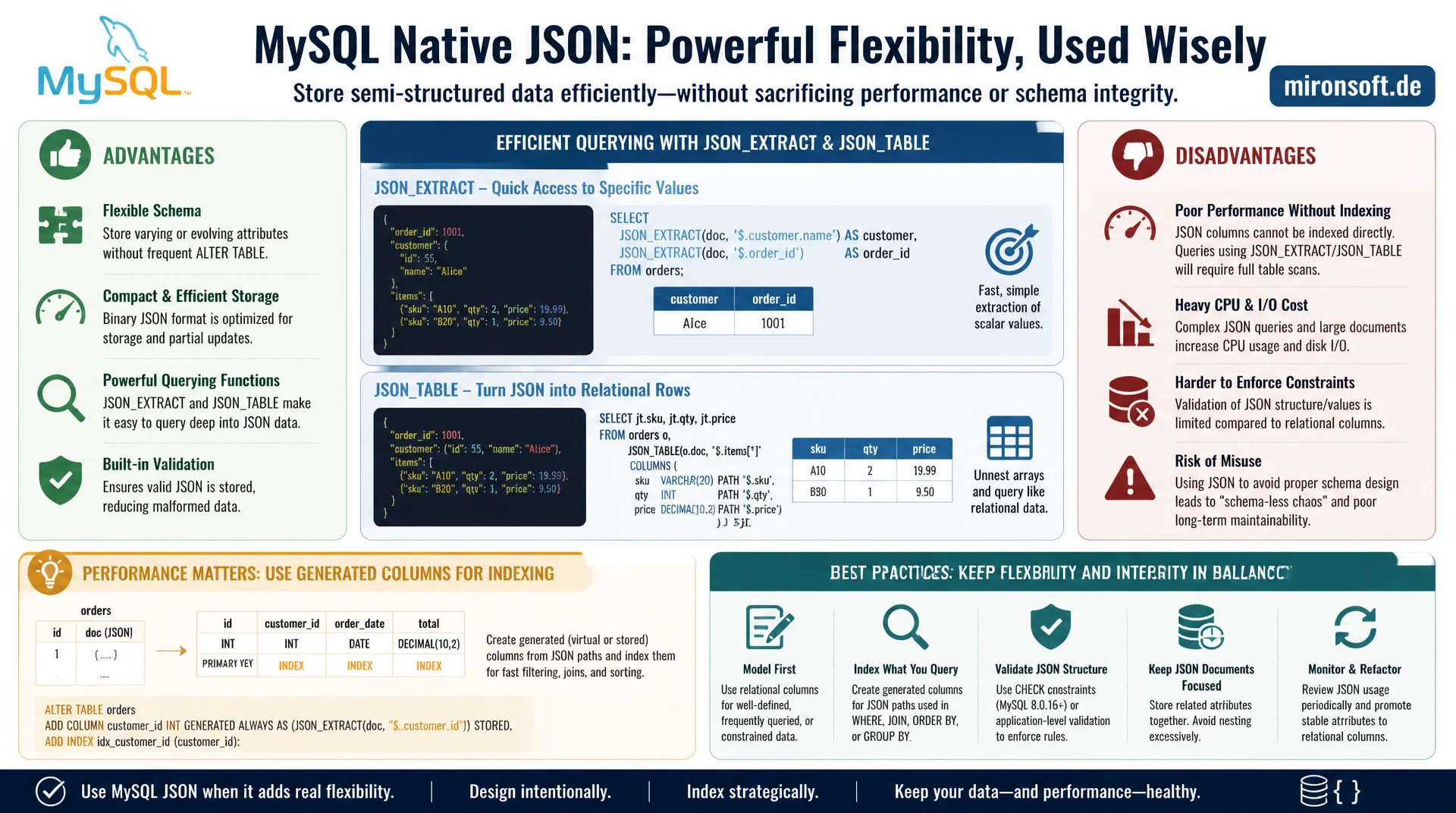
when JSON helps and when it breaks your schema
The native JSON type lets you store semi-structured data directly in MySQL and query it efficiently with JSON_EXTRACT and JSON_TABLE. Without generated columns for indexing, however, JSON queries stay slow, and without clear criteria for its use, JSON quickly turns into an excuse for missing schema design.
Table of Contents
- 1. The native JSON type in MySQL
- 2. JSON_EXTRACT and the path syntax
- 3. JSON_TABLE: turning JSON into relational rows
- 4. Generated columns for indexing
- 5. Multi-value indexes for JSON arrays
- 6. When JSON is the right choice
- 7. When a normalized schema is better
- 8. Write operations: JSON_SET and partial updates
- 9. JSON approaches compared
- 10. Summary
- 11. FAQ
1. The native JSON type in MySQL
Since MySQL 5.7, a native JSON data type exists that differs fundamentally from plain storage as TEXT. MySQL validates the syntax internally on insert and stores the document in a binary format optimized for fast read access to individual values, instead of having to reparse the complete text on every query. An invalid JSON document is rejected immediately with an error on INSERT or UPDATE, which guarantees data quality at the database level.
The native type brings along a whole set of JSON-specific functions that let you extract, modify and aggregate values without burdening the application with parsing. This is especially useful for use cases with variable or frequently changing structure, such as product attributes with different fields per category, external API responses cached raw, or configuration objects that are rarely queried structurally but often read and written as a whole.
An important distinction here is between JSON as a storage format and JSON as a full replacement for relational design. The native JSON type elegantly solves the storage problem but does not remove the need to think about a suitable indexing strategy for frequently queried or business-critical fields, covered in detail later in this article.
-- Native JSON column with automatic validation on write
CREATE TABLE product_attribute (
  id BIGINT UNSIGNED NOT NULL AUTO_INCREMENT,
  sku VARCHAR(64) NOT NULL,
  attributes JSON NOT NULL,
  PRIMARY KEY (id)
) ENGINE=InnoDB DEFAULT CHARSET=utf8mb4;

INSERT INTO product_attribute (sku, attributes) VALUES
  ('SHOE-001', '{"color": "black", "size": [40, 41, 42], "material": "leather"}'),
  ('SHIRT-002', '{"color": "blue", "fit": "slim", "sleeve": "long"}');

-- Invalid JSON is rejected immediately at insert time
-- INSERT INTO product_attribute (sku, attributes) VALUES ('X', '{invalid}');
-- ERROR 3140 (22032): Invalid JSON text
2. JSON_EXTRACT and the path syntax
JSON_EXTRACT reads individual values from a JSON document using a path expression that starts with $ and references object keys as well as array indexes. The shorthand arrow syntax -> is an alias for JSON_EXTRACT, while ->> additionally converts the result from a JSON value into an unquoted string, which in practice is almost always the right choice for comparisons and sorting.
These extraction functions let you filter specifically on embedded values without loading the entire document into the application and parsing it there. For occasional queries or admin tools this is entirely sufficient, but for frequently executed queries in production you additionally need an index, because JSON_EXTRACT without an index has to parse the complete document for every row.
-- Extract a single value with the arrow operator
SELECT sku, attributes->>'$.color' AS color
FROM product_attribute
WHERE attributes->>'$.color' = 'black';

-- Equivalent explicit form
SELECT sku, JSON_UNQUOTE(JSON_EXTRACT(attributes, '$.color')) AS color
FROM product_attribute;

-- Nested path and array access
SELECT sku, attributes->>'$.size[0]' AS first_available_size
FROM product_attribute
WHERE JSON_CONTAINS(attributes, '41', '$.size');
3. JSON_TABLE: turning JSON into relational rows
JSON_TABLE, available since MySQL 8.0, converts a JSON document or array into a virtual, relational result with real rows and columns that can be used directly in JOINs, WHERE clauses and aggregations. This is especially valuable when a JSON array contains several similar entries, such as product variants or order line items, that you want to treat like normal table rows without physically normalizing them.
The advantage over multiple individual JSON_EXTRACT calls lies in the ability to unfold an array into multiple output rows. Without JSON_TABLE, array elements would have to be post-processed in the application or simulated with cumbersome, hard-to-read JSON_EXTRACT chains per index, which is not practical anyway for variable array lengths.
-- Expand a JSON array of order line items into relational rows
SELECT o.id AS order_id, items.sku, items.qty, items.price
FROM orders o,
JSON_TABLE(
  o.line_items,
  '$[*]' COLUMNS (
    sku    VARCHAR(64) PATH '$.sku',
    qty    INT         PATH '$.qty',
    price  DECIMAL(10,2) PATH '$.price'
  )
) AS items
WHERE o.status = 'completed';

-- Aggregate over the expanded rows directly in SQL
SELECT items.sku, SUM(items.qty) AS total_sold
FROM orders o,
JSON_TABLE(o.line_items, '$[*]'
  COLUMNS (sku VARCHAR(64) PATH '$.sku', qty INT PATH '$.qty')
) AS items
GROUP BY items.sku
ORDER BY total_sold DESC;
4. Generated columns for indexing
MySQL cannot place a regular B-tree index directly on a JSON path, because JSON columns themselves are not directly indexable. The solution is a generated column that derives the desired value from the document via JSON_EXTRACT and materializes it as a regular, indexable column. With STORED instead of VIRTUAL, the value is physically stored on disk, which makes the index faster but costs extra disk space.
This pattern is the central building block for performant JSON queries in production: for every frequently filtered or sorted JSON field, a generated column with a matching index is created. The application keeps accessing the field transparently through the JSON field, while the optimizer automatically uses the index on the generated column for suitable queries, without the query itself needing to change.
-- Generated column extracts the color value for indexing
ALTER TABLE product_attribute
  ADD COLUMN color VARCHAR(32)
    GENERATED ALWAYS AS (attributes->>'$.color') STORED,
  ADD INDEX idx_color (color);

-- The optimizer now uses the index transparently
EXPLAIN SELECT sku FROM product_attribute WHERE color = 'black';
-- key: idx_color (index used, no full JSON scan needed)

-- Without the generated column, MySQL parses every JSON document
EXPLAIN SELECT sku FROM product_attribute
WHERE attributes->>'$.material' = 'leather';
-- type: ALL (full table scan, JSON parsed for every row)
5. Multi-value indexes for JSON arrays
For the common case where a JSON array contains multiple values that each need to be searchable individually, such as tags or category IDs, MySQL has offered multi-value indexes since version 8.0.17. Unlike a regular index, which maps exactly one value per row, a multi-value index can reference multiple entries per row, so a row can be found via any one of its array values.
A multi-value index is created with the CAST(... AS ... ARRAY) function inside the index definition and works well combined with MEMBER OF, JSON_CONTAINS and JSON_OVERLAPS. For tag systems or multi-valued category assignments this is often the more pragmatic alternative to a dedicated many-to-many junction table, especially when the values are rarely queried standalone but mostly read together with the parent document.
-- Multi-value index on a JSON array of tag strings
ALTER TABLE product_attribute
  ADD COLUMN tags JSON,
  ADD INDEX idx_tags ((CAST(tags AS CHAR(32) ARRAY)));

UPDATE product_attribute
SET tags = '["sale", "new-arrival", "bestseller"]'
WHERE sku = 'SHOE-001';

-- Uses the multi-value index to find matching rows
SELECT sku FROM product_attribute
WHERE 'sale' MEMBER OF (tags->'$');
6. When JSON is the right choice
JSON columns fit well for data with variable, unpredictable or frequently changing structure, where a rigid table schema would force either many nullable columns or an elaborate entity-attribute-value model. Classic examples are product attributes with category-dependent fields, external API responses cached raw, or configuration objects that are rarely queried structurally but often read and written as a whole.
JSON is equally suitable for audit logs and event payloads, where different event types carry different extra data and full relational normalization would create more complexity than it solves. In all these cases it is decisive that the most frequently filtered fields are indexed through generated columns, so the flexibility of JSON does not come at the cost of query performance.
7. When a normalized schema is better
As soon as a field is regularly needed for filtering, sorting, aggregation or foreign key relationships, a regular, normalized schema is almost always the better choice over JSON. Referential integrity cannot be enforced by the database within a JSON document, meaning invalid or orphaned references stay unnoticed until the application explicitly checks them. Aggregate functions across many rows are also noticeably slower on JSON values than on native numeric or date columns, even with generated columns as a workaround.
A good practical test: if a field appears in more than half of all queries against the table, shows up in JOIN conditions, or needs its own business logic validation, it belongs as a dedicated column in the schema, not in the JSON document. JSON should remain the exception for genuinely variable data, not the default way to defer schema design decisions.
8. Write operations: JSON_SET and partial updates
For changing individual values within a JSON document, MySQL offers JSON_SET, JSON_REPLACE and JSON_REMOVE, which let you modify specific paths without reassembling and writing back the entire document in the application. Important to know: at the storage level, the complete document is still rewritten, InnoDB has no real partial update of individual JSON paths at the row level, which can cause noticeable I/O for very large documents with high write frequency.
For use cases with frequent, small changes to large JSON documents, it is therefore worth carefully checking whether a separate table for the frequently changed fields makes more sense, while stable, rarely changed extra data stays in the JSON document. This hybrid strategy combines the flexibility of JSON with the write efficiency of regular columns.
-- Update a single nested value without rewriting the whole document manually
UPDATE product_attribute
SET attributes = JSON_SET(attributes, '$.color', 'navy')
WHERE sku = 'SHOE-001';

-- Remove a key entirely
UPDATE product_attribute
SET attributes = JSON_REMOVE(attributes, '$.material')
WHERE sku = 'SHOE-001';

-- Append a value to an existing array
UPDATE product_attribute
SET attributes = JSON_ARRAY_APPEND(attributes, '$.size', 43)
WHERE sku = 'SHOE-001';
9. JSON approaches compared
The following overview arranges the various techniques for handling JSON data in MySQL by use case and performance characteristics.
| Approach | Use case | Indexable | Recommendation |
|---|---|---|---|
| JSON_EXTRACT without index | Rare, ad hoc queries | No | Acceptable for admin tools |
| Generated column + index | Frequently filtered single values | Yes | Standard for production queries |
| Multi-value index | Tags, multi-valued assignments | Yes | Alternative to a many-to-many table |
| Normalized column | Foreign keys, aggregation, validation | Yes | Always preferred for core fields |
The common thread: JSON without accompanying generated columns is fine for occasional queries, but not for production load. As soon as a value is regularly filtered, there is no way around a generated column with an index or, for centrally important business data, a fully normalized column.
10. Summary
The native JSON type in MySQL solves a real problem: storing semi-structured, variable data without an elaborate entity-attribute-value design. JSON_EXTRACT and JSON_TABLE make this data queryable efficiently, but only generated columns with an index prevent every query from having to parse the complete document. Multi-value indexes extend that for array values like tags.
The most important design decision remains: JSON for genuinely variable, rarely structurally queried data, a normalized schema for everything regularly filtered, sorted, aggregated or linked via foreign keys. Anyone who draws that line consistently gets the flexibility of JSON without accepting the downsides of an unstructured schema.
JSON Columns in MySQL: The Essentials at a Glance
Use the native type
The JSON type validates syntax on write and stores values in an optimized binary format.
Generated columns for speed
Map frequently filtered JSON values via GENERATED ALWAYS AS plus an additional index.
JSON_TABLE for arrays
Converts JSON arrays into real, joinable rows, ideal for order line items or variants.
Know the boundary
Foreign keys, frequent aggregation and core business logic belong in the normalized schema.