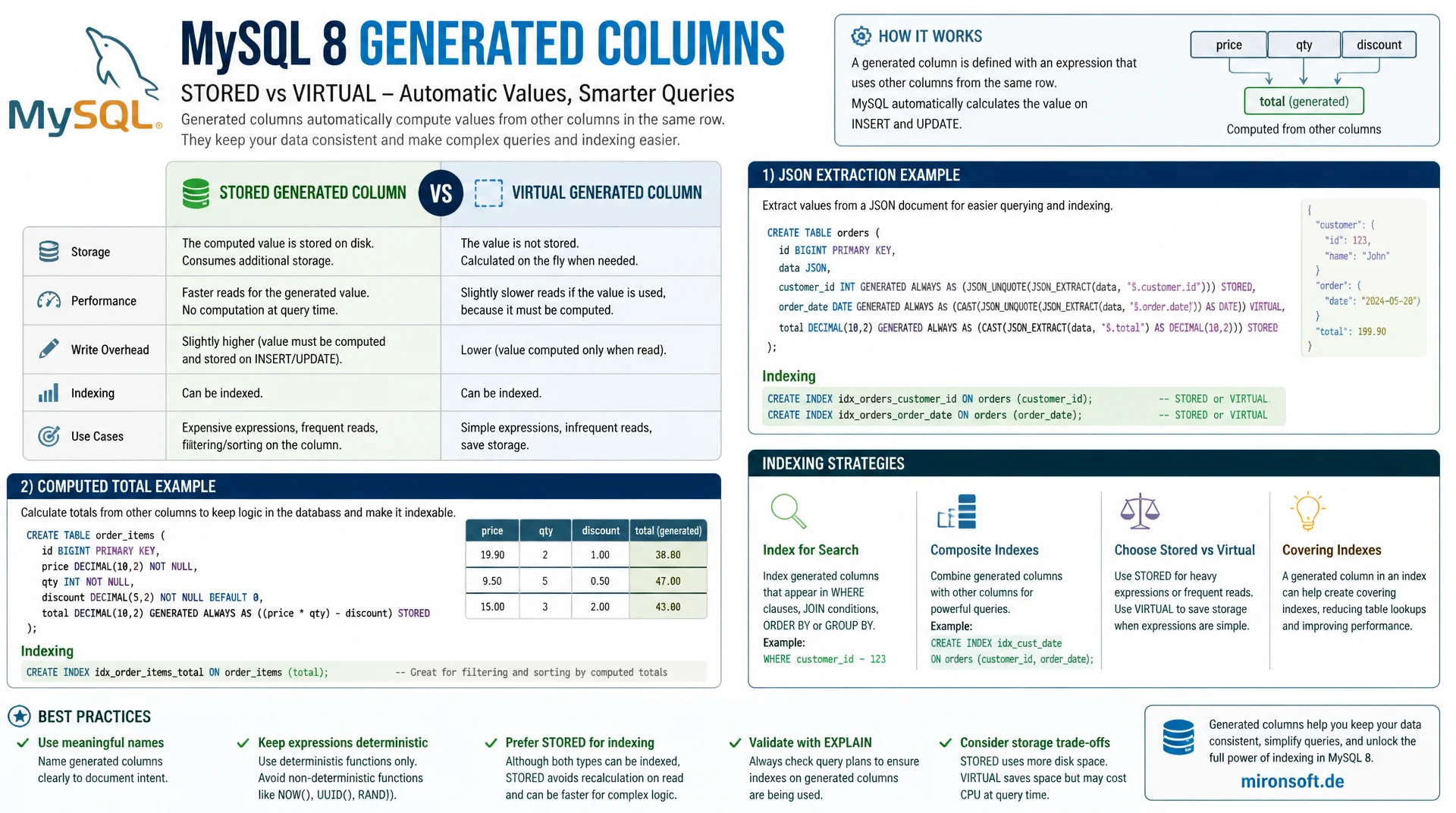
for faster queries on computed values
Generated columns automatically compute a value from other columns in the same row and, unlike plain expressions in a WHERE clause, can be indexed directly. This article explains the difference between STORED and VIRTUAL, shows indexing strategies, and covers concrete use cases for JSON extraction and computed totals in MySQL 8.
Table of Contents
- 1. What generated columns are: STORED vs. VIRTUAL
- 2. Syntax and definition in detail
- 3. Indexing generated columns
- 4. Use case: extracting and indexing JSON values
- 5. Use case: computed totals and metrics
- 6. Performance comparison: generated column vs. alternatives
- 7. Limitations and pitfalls
- 8. Migrating existing tables
- 9. Combining generated columns with triggers and constraints
- 10. Summary
- 11. FAQ
1. What generated columns are: STORED vs. VIRTUAL
A generated column is a table column whose value is not written directly but automatically computed from an expression that references other columns in the same row. MySQL offers two variants for this: VIRTUAL and STORED. A VIRTUAL generated column is recomputed on every read access and occupies no additional disk space, while a STORED generated column physically stores its computed value in the table and recomputes and updates it on every write to the base columns.
The decisive practical difference lies in the interaction with indexes. Both variants can be indexed, but for VIRTUAL columns the index entry is likewise recomputed from the expression on every write without the computed value itself being stored, while for STORED columns both the value and the index are physically materialized. For read heavy use cases with less frequent writes, STORED is usually the better choice, because the value does not need to be recomputed on every read.
Since MySQL 5.7, generated columns have been natively available as a server feature, without requiring triggers or application logic to maintain redundant columns. That is a significant advantage over the earlier practice of manually maintaining computed values in application code or via BEFORE INSERT/BEFORE UPDATE triggers, which was error prone and easily got out of sync whenever someone changed the base columns outside the intended path.
-- VIRTUAL: computed on every read, no extra disk storage
CREATE TABLE products (
  id INT PRIMARY KEY AUTO_INCREMENT,
  price DECIMAL(10,2) NOT NULL,
  tax_rate DECIMAL(4,2) NOT NULL DEFAULT 19.00,
  price_with_tax DECIMAL(10,2) AS (price * (1 + tax_rate / 100)) VIRTUAL
);

-- STORED: computed and physically written on every write
CREATE TABLE orders (
  id INT PRIMARY KEY AUTO_INCREMENT,
  net_total DECIMAL(10,2) NOT NULL,
  tax_amount DECIMAL(10,2) NOT NULL,
  gross_total DECIMAL(10,2) AS (net_total + tax_amount) STORED
);
2. Syntax and definition in detail
The syntax of a generated column follows the pattern column_name data_type GENERATED ALWAYS AS (expression) [VIRTUAL | STORED], where the short form AS (expression) without the GENERATED ALWAYS keyword also works and is used more commonly in practice. If VIRTUAL or STORED is not explicitly specified, MySQL defaults to VIRTUAL. The expression may reference any number of other columns in the same row and use deterministic MySQL functions such as JSON_EXTRACT, SUBSTRING, or arithmetic operations, but must not contain subqueries, references to other tables, or non-deterministic functions such as NOW() or RAND().
This restriction to deterministic, row local expressions is not accidental but a deliberate design decision: a generated column must always return the same value for the same input, so that replication, backups, and indexing work consistently. An expression that depends on the current time or on another table would violate this guarantee and is therefore technically disallowed.
-- Adding a generated column to an existing table
ALTER TABLE products
  ADD COLUMN discount_price DECIMAL(10,2)
  AS (ROUND(price * 0.9, 2)) STORED;

-- Allowed: deterministic expressions referencing only this row's columns
-- Not allowed: subqueries, other tables, NOW(), RAND(), UUID()
ALTER TABLE products
  ADD COLUMN name_slug VARCHAR(255)
  AS (LOWER(REPLACE(name, ' ', '-'))) STORED;
3. Indexing generated columns
The actual performance gain from generated columns comes from their indexability. Without a generated column, an expression such as WHERE JSON_EXTRACT(data, '$.status') = 'active' cannot be indexed directly, MySQL would have to parse and evaluate the JSON structure of every row at runtime for every query, forcing a full table scan on large tables. If you create the same expression as a generated column and index it, the optimizer can use the index directly for range and equality queries, exactly as with a regular column.
Importantly, MySQL automatically recognizes when a query uses an expression that exactly matches the definition of an indexed generated column, even if the query itself does not reference the column by name. A query with WHERE JSON_EXTRACT(data, '$.status') = 'active' therefore automatically uses the index on the corresponding generated column, provided the expression matches exactly, including capitalization and parenthesization. This match should always be verified with EXPLAIN after creating the index.
-- Without a generated column: JSON_EXTRACT cannot be indexed directly,
-- MySQL must parse the JSON document on every row for every query
SELECT id FROM events WHERE JSON_EXTRACT(payload, '$.status') = 'active';
-- EXPLAIN shows: type ALL, full table scan

-- With an indexed generated column, the same expression uses the index
ALTER TABLE events
  ADD COLUMN status VARCHAR(32)
  AS (JSON_UNQUOTE(JSON_EXTRACT(payload, '$.status'))) STORED,
  ADD INDEX idx_status (status);

-- MySQL recognizes the matching expression automatically
SELECT id FROM events WHERE JSON_EXTRACT(payload, '$.status') = 'active';
-- EXPLAIN now shows: type ref, key idx_status
4. Use case: extracting and indexing JSON values
The most common use case for generated columns in modern MySQL applications is indexing values inside a JSON column. Applications that store flexible, loosely structured data in a JSON column, such as event payloads, configuration objects, or product attributes with a variable structure, normally lose the ability to efficiently filter by individual fields inside the JSON document. Generated columns solve exactly this dilemma by extracting individual, frequently queried JSON fields as regular, indexable columns, while retaining the full flexibility of the JSON column for less frequently queried fields.
In practice, you typically pick the two or three JSON fields most commonly used in WHERE clauses for extraction as generated columns, while the rest of the JSON document remains unchanged. This is a pragmatic middle ground between the full flexibility of a pure document store and the performance of a rigidly normalized relational schema, without having to accept the drawbacks of a complete schema redesign.
-- Products table with flexible JSON attributes
CREATE TABLE products (
  id INT PRIMARY KEY AUTO_INCREMENT,
  name VARCHAR(255) NOT NULL,
  attributes JSON NOT NULL,
  -- Extract the two most frequently filtered attributes as indexed columns
  brand VARCHAR(100)
    AS (JSON_UNQUOTE(JSON_EXTRACT(attributes, '$.brand'))) STORED,
  in_stock TINYINT(1)
    AS (JSON_EXTRACT(attributes, '$.stock') > 0) STORED,
  INDEX idx_brand (brand),
  INDEX idx_in_stock (in_stock)
);

-- Efficient filtering without ever touching the raw JSON document
SELECT id, name FROM products
WHERE brand = 'Acme' AND in_stock = 1;
5. Use case: computed totals and metrics
Alongside JSON extraction, precomputed aggregates and metrics are a second, very common area of application for generated columns. A gross amount derived from net and tax, a full text search score built from several weighted fields, or a normalized sort key that strips capitalization and special characters from a product name can all be modeled as generated columns, instead of being recomputed on every read or maintained redundantly in the application layer.
A practical example from e-commerce is a normalized search key that strips accented characters, special characters, and capitalization from a product name, to enable consistent, case insensitive sorting and prefix searches without having to apply a function to the original column on every query. Because this transformation is deterministic, it is ideally suited to a STORED generated column with its own index.
-- Normalized, indexable sort/search key derived from a display name
CREATE TABLE products (
  id INT PRIMARY KEY AUTO_INCREMENT,
  display_name VARCHAR(255) NOT NULL,
  search_key VARCHAR(255)
    AS (LOWER(REPLACE(REPLACE(REPLACE(display_name,
        'ä','ae'), 'ö','oe'), 'ü','ue'))) STORED,
  INDEX idx_search_key (search_key)
);

-- Case-insensitive prefix search using the index, not a runtime function
SELECT id, display_name FROM products
WHERE search_key LIKE 'stuehle%';
| Approach | Indexable | Maintenance effort | Consistency guarantee |
|---|---|---|---|
| Runtime expression | No, table scan | No extra effort | Always current |
| Redundant column + trigger | Yes | High, trigger maintenance | Risky with bulk updates |
| Generated column VIRTUAL | Yes | None, maintained automatically | Guaranteed by the server |
| Generated column STORED | Yes, fastest read access | None, maintained automatically | Guaranteed by the server |
6. Performance comparison: generated column vs. alternatives
Comparing generated columns against the previously common alternative of a redundant column plus a manual trigger, the advantage shows up primarily in the consistency guarantee. A BEFORE UPDATE trigger that maintains a redundant column runs reliably on every regular UPDATE statement, but can be skipped by direct bulk operations via LOAD DATA INFILE or certain replication related edge cases, leading to inconsistent data. A generated column, by contrast, is computed by the server itself at a deeper level and cannot, by design, get out of sync, because the value cannot be written directly at all.
In pure runtime terms compared to a functional index, which MySQL 8.0.13 additionally introduced as a direct feature, both approaches are nearly equivalent for simple cases, a functional index also internally creates an invisible generated column. The practical difference is that an explicit generated column, as a named column, can also be used directly in SELECT lists, sorting, and grouping, while a purely functional index exists only for indexing itself and is not directly visible in the result.
Mironsoft
Schema design and query performance for MySQL
Slow filters on JSON columns or computed values?
We identify frequently filtered JSON fields and computed expressions in your schema and replace slow table scans with indexed generated columns, without losing the flexibility of your data model.
Schema audit
Identifying JSON fields and expressions with high filter frequency
Generated columns
Implementing STORED and VIRTUAL columns with matching indexes
Migration
Online schema changes without downtime for existing tables
7. Limitations and pitfalls
Generated columns have clear technical limits. The defining expression must not contain subqueries, must not reference user variables, and must not use non-deterministic functions such as NOW(), RAND(), or CONNECTION_ID(), because these would violate the consistency guarantee between value and index. Foreign keys on VIRTUAL generated columns were also not possible before MySQL 5.7.6, but have generally been allowed since then, provided the referencing engine supports it.
A less obvious pitfall concerns STORED generated columns on very wide tables under heavy write load, because every change to a base column triggers a recomputation and an additional physical write for the derived column, which can noticeably reduce write throughput when there are many dependent generated columns per row. For tables with extremely high write frequency and rare reads of the computed value, a VIRTUAL column or a purely functional index may therefore be the better choice.
8. Migrating existing tables
Retroactively adding a generated column to an already production sized table requires care regarding locking behavior. In MySQL 8.0, adding a VIRTUAL generated column is executed as a pure metadata change and therefore blocks neither reads nor writes to any meaningful degree, because no existing row needs to be physically touched. Adding a STORED generated column, on the other hand, requires a full recomputation and rewrite of the table, which can take considerable time with several million rows and, depending on the chosen ALGORITHM, can be blocking.
For production migrations on large tables it is therefore advisable to either fall back on an online schema change tool such as pt-online-schema-change or gh-ost, or to use a two stage approach: first add the column as VIRTUAL, validate the effect in production, and only then switch to STORED if needed, once read access turns out to be the dominant factor.
-- Cheap, metadata-only change: adding a VIRTUAL column
ALTER TABLE large_table
  ADD COLUMN full_name VARCHAR(255)
  AS (CONCAT(first_name, ' ', last_name)) VIRTUAL,
  ALGORITHM=INSTANT;

-- Expensive: converting to STORED requires rewriting every row
ALTER TABLE large_table
  MODIFY COLUMN full_name VARCHAR(255)
  AS (CONCAT(first_name, ' ', last_name)) STORED,
  ALGORITHM=INPLACE, LOCK=NONE;
9. Combining generated columns with triggers and constraints
Generated columns can be meaningfully combined with CHECK constraints, which have actually been enforced since MySQL 8.0.16. A typical pattern is a generated column that models a validation rule, combined with a CHECK constraint built on top of the computed value, for example to ensure that a status derived from several fields only falls within a defined set of valid values.
Caution is required when combining this with classic triggers: a BEFORE INSERT trigger cannot, in principle, write to a generated column, since its value is only computed by the server after the trigger has run. Anyone who tries to write a value directly into a generated column inside a trigger gets a clear error. This strict separation is intentional and prevents conflicting write attempts between trigger logic and server side computation.
10. Summary
Generated columns solve a classic dilemma between flexible data modeling and efficient indexing, by making computed values, whether extracted from JSON documents or aggregated from several columns, available as regular, indexable columns. The choice between VIRTUAL and STORED depends on the ratio of read to write load: VIRTUAL saves disk space and write overhead, STORED delivers faster reads because the value is already materialized.
Compared to the historical alternative of redundant columns plus manually maintained triggers, generated columns offer a server guaranteed consistency that cannot get out of sync even under bulk operations. For migrations on large, production tables, the cautious route via VIRTUAL with ALGORITHM=INSTANT is recommended, before switching to STORED if needed.
Generated columns for faster queries: the essentials at a glance
STORED vs. VIRTUAL
STORED materializes the value physically, VIRTUAL recomputes it on every read.
Indexability
Both variants are indexable, MySQL automatically recognizes matching expressions as index candidates.
Main use cases
JSON field extraction for indexing, computed totals, normalized sort and search keys.
Migration
VIRTUAL with ALGORITHM=INSTANT is cheap, STORED requires a full rewrite of the table.