the underestimated InnoDB detail
Gap locks are among the least understood mechanisms of InnoDB and regularly trigger surprising lock waits in practice, without any specific row seeming to be affected. This article explains what gap locks actually are, why InnoDB needs them under REPEATABLE READ to prevent phantom reads, and how next-key locks work as a combination of record lock and gap lock.
Table of contents
- 1. What gap locks are and why InnoDB needs them
- 2. Next-key locks: record lock plus gap lock
- 3. Phantom reads and why REPEATABLE READ must prevent them
- 4. Gap locks in practice: examples with indexes
- 5. Unexpected lock waits caused by gap locks
- 6. READ COMMITTED noticeably reduces gap locks
- 7. Insert intention locks
- 8. Unique index vs. secondary index in locking
- 9. Gap locks with auto-increment and range queries
- 10. Summary
- 11. FAQ
1. What gap locks are and why InnoDB needs them
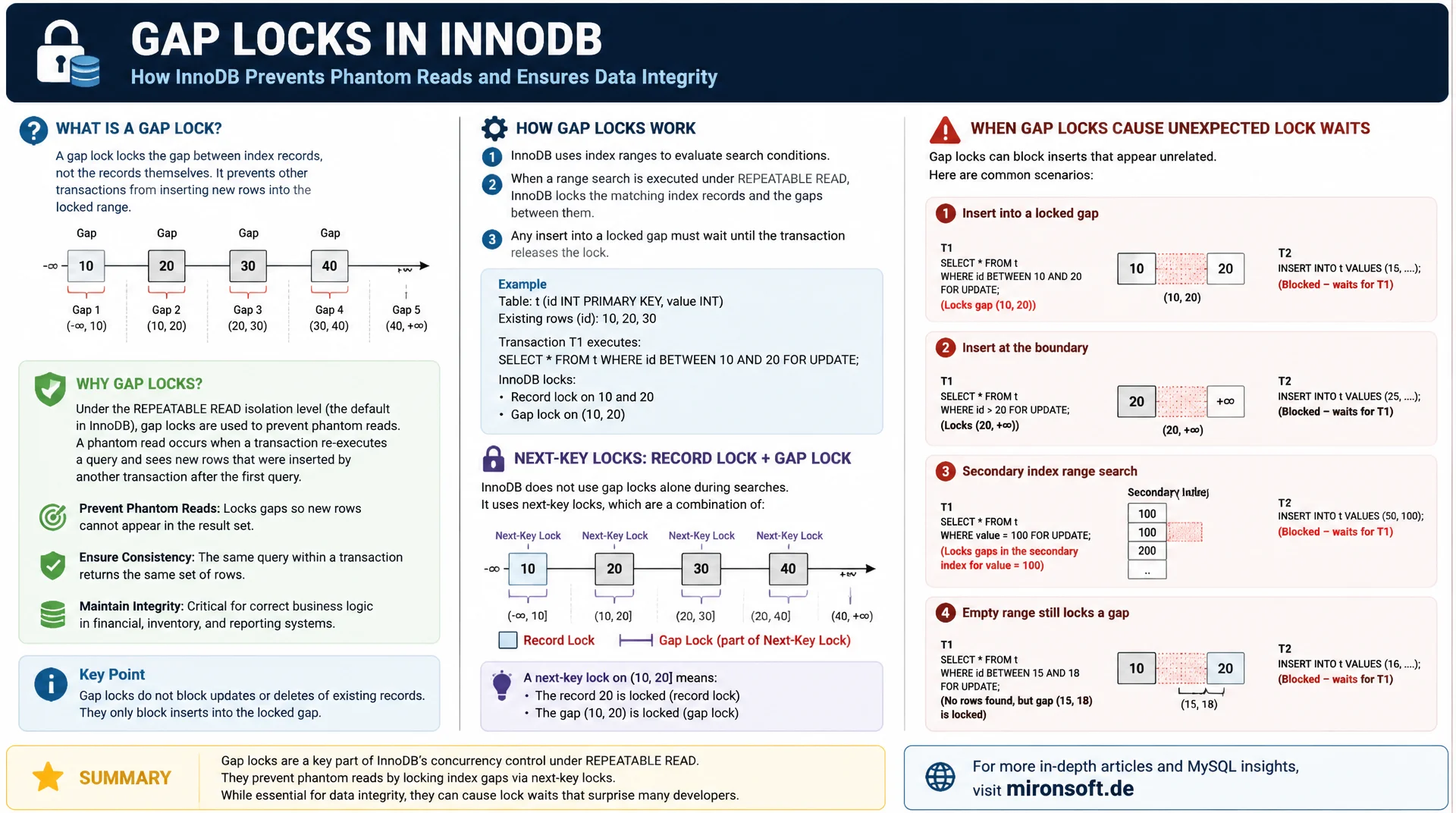
A gap lock does not lock a specific row, but the gap between two neighbouring index entries, or the range before the first or after the last entry of an index. This lock prevents other transactions from inserting new rows within that gap for as long as the holding transaction remains active. Unlike a record lock, which protects an existing row, a gap lock protects an empty range where no row exists yet.
The reason for this unusual mechanism lies in InnoDB's default isolation level REPEATABLE READ. Without gap locks, a transaction could run a range query with SELECT ... FOR UPDATE, another transaction could concurrently insert a new row into exactly that range and commit, and a second identical read by the first transaction would suddenly see an additional row. This phenomenon is called a phantom read, and gap locks are InnoDB's mechanism for deliberately preventing it.
Important for understanding this: gap locks are pure locks against inserting, they do not prevent reading. Two transactions can easily hold a gap lock on the same gap at the same time, since gap locks do not exclude each other, whether in shared or exclusive mode. Only the attempt to insert a new row into the locked range causes a conflict and thereby a potential lock wait.
This article walks step by step through the practical side of gap locks and next-key locks: from the basic mechanics, through concrete examples with indexes, to the strategies that deliberately reduce unwanted lock waits, without having to give up InnoDB's consistency guarantees.
2. Next-key locks: record lock plus gap lock
A next-key lock is the default form of locking InnoDB uses under REPEATABLE READ for most row access. It combines a record lock on a specific index row with a gap lock on the gap immediately before it. In practice this means: if a row with value 50 in an index is locked, InnoDB locks not only that row, but also the entire range between the previous index value, say 40, and 50 itself.
This combination explains why InnoDB reliably prevents phantom reads on range queries under REPEATABLE READ: a query like SELECT * FROM orders WHERE amount BETWEEN 40 AND 50 FOR UPDATE sets next-key locks across the whole affected span, so neither existing rows can be changed nor new rows inserted into that range until the transaction completes. At the upper end of the index structure, past the last entry, InnoDB uses a special supremum pseudo-record so that the range after the last existing row can also be covered by a next-key lock.
At the lower end of the index structure, before the very first entry, the same logic applies in reverse: InnoDB locks the range before the smallest existing index value as soon as a query includes that value. This symmetry ensures that next-key locks apply seamlessly across the entire value range of a column, regardless of whether the queried range sits at the beginning, in the middle, or at the end of the existing values.
-- Next-key lock: record lock on the row plus gap lock before it
START TRANSACTION;

SELECT * FROM orders WHERE amount BETWEEN 40 AND 50 FOR UPDATE;
-- InnoDB locks the matching rows AND the gaps between them,
-- preventing inserts of new rows with amount in that range

-- This insert from another session would have to wait:
-- INSERT INTO orders (amount) VALUES (45);

COMMIT;
3. Phantom reads and why REPEATABLE READ must prevent them
A phantom read occurs when a transaction runs a range query twice and sees additional rows on the second run that another transaction has meanwhile inserted and committed. The SQL standard officially allows phantom reads under REPEATABLE READ, but InnoDB's implementation deliberately goes further and additionally prevents them in most cases, which is one of the reasons InnoDB's REPEATABLE READ is stricter than the standard's minimum requirement.
For plain SELECT queries without a locking clause, the MVCC snapshot already takes care of this, since newly inserted rows from other transactions simply are not visible in the snapshot. For writing access such as UPDATE, DELETE and SELECT ... FOR UPDATE, the snapshot alone is not enough, since these operations always have to work with the latest data. Here, gap locks and next-key locks take over the task of preventing phantom reads by actively blocking new inserts, instead of just providing an older view of existing data.
A special case that is often overlooked concerns DELETE statements with a range condition: even if no single row remains in the locked range anymore because it was already deleted, the next-key lock on the gap stays in place until the transaction commits. Other transactions still cannot insert new rows into this seemingly empty range, a behaviour that surprises many developers on their first contact with InnoDB's locking model.
4. Gap locks in practice: examples with indexes
A particularly illustrative example of gap locks is a table with a status column containing the values 10, 20 and 30, with a secondary index on that column. If a transaction locks the row with status 20 through SELECT ... FOR UPDATE, InnoDB sets a next-key lock covering both the row with status 20 and the range between 10 and 20. Another transaction's attempt to insert a new row with status 15 is thereby blocked, even though status 15 does not yet exist in the table and at first glance seems unrelated to the original WHERE condition.
This behaviour surprises many developers who expect a lock on status 20 to affect only that one row. In practice this frequently leads to seemingly baseless lock waits for parallel inserts into the same value range of an indexed column, for example continuously assigned order numbers, timestamps, or sequentially increasing IDs being inserted concurrently by several sessions.
-- Table: orders(id PK, status INT, INDEX idx_status(status))
-- Existing status values: 10, 20, 30

-- Session A
START TRANSACTION;
SELECT * FROM orders WHERE status = 20 FOR UPDATE;
-- Next-key lock covers status = 20 AND the gap (10, 20]

-- Session B, concurrently
START TRANSACTION;
INSERT INTO orders (status) VALUES (15);
-- BLOCKS: 15 falls inside the gap locked by session A,
-- even though session A never touched a row with status 15
5. Unexpected lock waits caused by gap locks
The most common practical consequence of gap locks is lock waits that seem inexplicable at first glance, because the affected transactions appear to work on different rows. A typical scenario: several parallel processes insert orders with sequential order numbers into a table with a secondary index on that number. Every insert briefly sets an insert intention lock, which can collide with gap locks from other, still open transactions, especially if one of them stays open for an unusually long time.
A second common symptom is deadlocks caused by gap locks, as described in detail in the separate article of this series on MySQL deadlocks. Since several transactions can concurrently hold compatible gap locks in shared mode on the same range, but conflict when trying to convert those gap locks into actual insert locks, wait cycles arise that do not look like classic row conflicts at first glance. Diagnosing this through SHOW ENGINE INNODB STATUS often shows lock_mode X locks gap before rec as a hint that a pure gap conflict is involved, rather than a record conflict.
In practice this pattern is frequently observed in Magento inventory management or similar systems, where several parallel worker processes insert records with increasing IDs into the same indexed column. As long as all workers operate in the same order and with as short transactions as possible, the risk stays low, but as soon as a single worker blocks longer through an external API call, the queue of remaining workers backs up on exactly that gap.
| Isolation level | Gap locks on SELECT ... FOR UPDATE | Phantom read protection | Lock wait risk |
|---|---|---|---|
| REPEATABLE READ (default) | active | strong | higher |
| READ COMMITTED | largely reduced | lower | lower |
| Unique index, exact match | record lock only | not needed | low |
| Secondary index, range query | full range | strong | highest |
6. READ COMMITTED noticeably reduces gap locks
Under the isolation level READ COMMITTED, InnoDB significantly reduces the use of gap locks. The reason is that READ COMMITTED does not guarantee a consistent snapshot for the entire transaction duration and therefore does not need the same strict phantom read protection as REPEATABLE READ. For range queries with SELECT ... FOR UPDATE, InnoDB under READ COMMITTED only sets record locks on actually existing, matching rows, not gap locks on the ranges between them.
This reduction makes READ COMMITTED a practical option for use cases with high parallel insert load into the same value range of an indexed column, for example systems with very many concurrent orders or log entries. The trade-off: you give up the additional phantom read protection of REPEATABLE READ, but gain a noticeably reduced frequency of lock waits. This trade-off should be made deliberately per use case, not globally for the entire database.
Importantly, switching to READ COMMITTED does not apply retroactively to already running transactions, only to transactions started after the switch. Anyone who wants to change the isolation level only for specific insert-heavy code paths, such as a bulk import endpoint, should do so deliberately through SET TRANSACTION ISOLATION LEVEL directly before that particular transaction, instead of changing the session or even global default.
-- Under READ COMMITTED, gap locks are largely avoided
SET TRANSACTION ISOLATION LEVEL READ COMMITTED;
START TRANSACTION;

SELECT * FROM orders WHERE status = 20 FOR UPDATE;
-- Only a record lock on the matching row(s), no gap lock

-- This insert from another session now succeeds immediately
-- INSERT INTO orders (status) VALUES (15);

COMMIT;
Mironsoft
MySQL performance, data modelling and InnoDB tuning
Unexplained lock waits on parallel inserts?
We analyse whether gap locks are slowing down your parallel insert load, check whether READ COMMITTED fits specific use cases, and tune your index structure deliberately against unnecessary lock ranges.
Lock analysis
Identify gap-lock-related wait times through SHOW ENGINE INNODB STATUS
Isolation consulting
Apply READ COMMITTED deliberately for insert-heavy use cases
Index design
Unique index strategies to reduce gap lock ranges
7. Insert intention locks
An insert intention lock is a special variant of the gap lock that InnoDB automatically sets before every INSERT into a locked gap. Unlike a regular gap lock, which does not block other gap locks in the same range, an insert intention lock signals the concrete intent to insert a new row at exactly that position. Two insert intention locks at different positions within the same gap do not block each other, as long as the exact insert positions differ.
This nuance matters for understanding parallel inserts: if two transactions concurrently insert different new values into the same gap, for example 12 and 17 between the existing values 10 and 20, both inserts can complete successfully in parallel, since their insert intention locks mark different positions within the gap. Only once a regular gap lock or next-key lock from another, still open transaction already claims that range exclusively does the insert intention lock have to wait.
In SHOW ENGINE INNODB STATUS, an insert intention lock appears with the hint lock_mode X locks gap before rec insert intention, clearly distinguishable from a regular gap lock without that suffix. This textual marker helps considerably with diagnosis, because it immediately shows whether a waiting transaction actually wants to insert or merely wants to lock an already existing row for reading or writing.
8. Unique index vs. secondary index in locking
A decisive difference in gap lock behaviour exists between exact access through a unique index and access through a secondary, non-unique index. If a transaction searches through a unique index, such as the primary key, for exactly one value with an equality condition, InnoDB sets only a record lock on that one row, without an additional gap lock. The reason: since the index is unique, no other row with the same value can exist, a phantom read in this narrow sense is logically excluded.
It is different with a secondary, non-unique index, or with a range query on a unique index: here InnoDB generally sets next-key locks that cover the entire affected range including the gaps. This distinction explains why an exact access through the primary key leads to unexpected lock waits far less often than access through a secondary index with the same WHERE conditions, even when both queries seemingly target the same single row.
This insight can be used deliberately for schema design: wherever possible, columns frequently accessed through SELECT ... FOR UPDATE should be modelled as a unique index, for example through a composite unique index made up of several business-unique columns, rather than relying on a plain, non-unique secondary index. The extra effort in schema planning pays off through noticeably reduced gap lock conflicts under high concurrency.
-- Unique index equality lookup: record lock only, no gap lock
START TRANSACTION;
SELECT * FROM orders WHERE id = 4711 FOR UPDATE;  -- id is the PRIMARY KEY
-- other inserts near id=4711 are NOT blocked

-- Secondary, non-unique index equality lookup: next-key lock
START TRANSACTION;
SELECT * FROM orders WHERE status = 20 FOR UPDATE;  -- status has a secondary index
-- gap before and around status=20 IS locked, inserts nearby may block
9. Gap locks with auto-increment and range queries
Columns with AUTO_INCREMENT use their own, special locking mechanism, distinct from regular gap locks. The classic AUTO_INCREMENT lock, controlled through the parameter innodb_autoinc_lock_mode, ensures that sequential values are assigned without gaps or duplicates even under parallel inserts, without requiring classic gap locks across the whole value range for that. In the default mode (interleaved), this special lock is held only briefly for the value assignment itself, not for the entire transaction duration.
This mechanism illustrates that not every lock in InnoDB is a gap lock in the narrow sense, even though both concepts are often mentioned in the same breath, because both become primarily relevant during inserts.
For range queries with BETWEEN or comparison operators such as < and > on an indexed column, InnoDB, on the other hand, sets regular next-key locks across the entire queried range. The larger the queried range, the more rows and gaps get locked, which can lead to significant lock wait accumulation under REPEATABLE READ for wide range queries. Deliberately limiting the queried range, for example by splitting a large range query into several smaller transactions, noticeably reduces the number of gap locks held at once.
The parameter innodb_autoinc_lock_mode knows three values: 0 (traditional) holds the lock for the entire INSERT statement, 1 (consecutive, default) only for the actual value assignment, and 2 (interleaved) allows the highest concurrency, but can lead to gaps in the value sequence with mixed INSERT types. Mode 2 is unsuitable for statement-based replication, since the order of assigned values is no longer deterministically reproducible there.
10. Summary
A gap lock locks the gap between two index entries, not a specific row, and exists solely to prevent phantom reads under InnoDB's default isolation level REPEATABLE READ. A next-key lock combines this gap lock with a record lock on the associated row and is the default form of locking for most writing access. In practice this mechanism regularly causes lock waits that seem inexplicable at first glance, because parallel transactions appear to affect different rows, but in fact want to insert into the same locked range.
Anyone wanting to deliberately work around gap locks has several tools: minimise access through a secondary index in favour of a unique index, consider READ COMMITTED for insert-heavy use cases where the additional phantom read protection is not strictly needed, and design range queries as narrowly as possible. Understanding these mechanisms, instead of accepting lock waits as an opaque black box, lets you tune InnoDB's locking behaviour deliberately for your own application.
Gap locks and next-key locks: the essentials at a glance
Gap lock
Locks the gap between index values, prevents inserts, no conflict with other gap locks.
Next-key lock
Record lock plus gap lock before it, default form of locking under REPEATABLE READ for range access.
Working around it
Prefer unique index access, consider READ COMMITTED for insert-heavy cases.
Diagnosis
SHOW ENGINE INNODB STATUS: locks gap before rec indicates a pure gap conflict.