a practical methodology, not guesswork
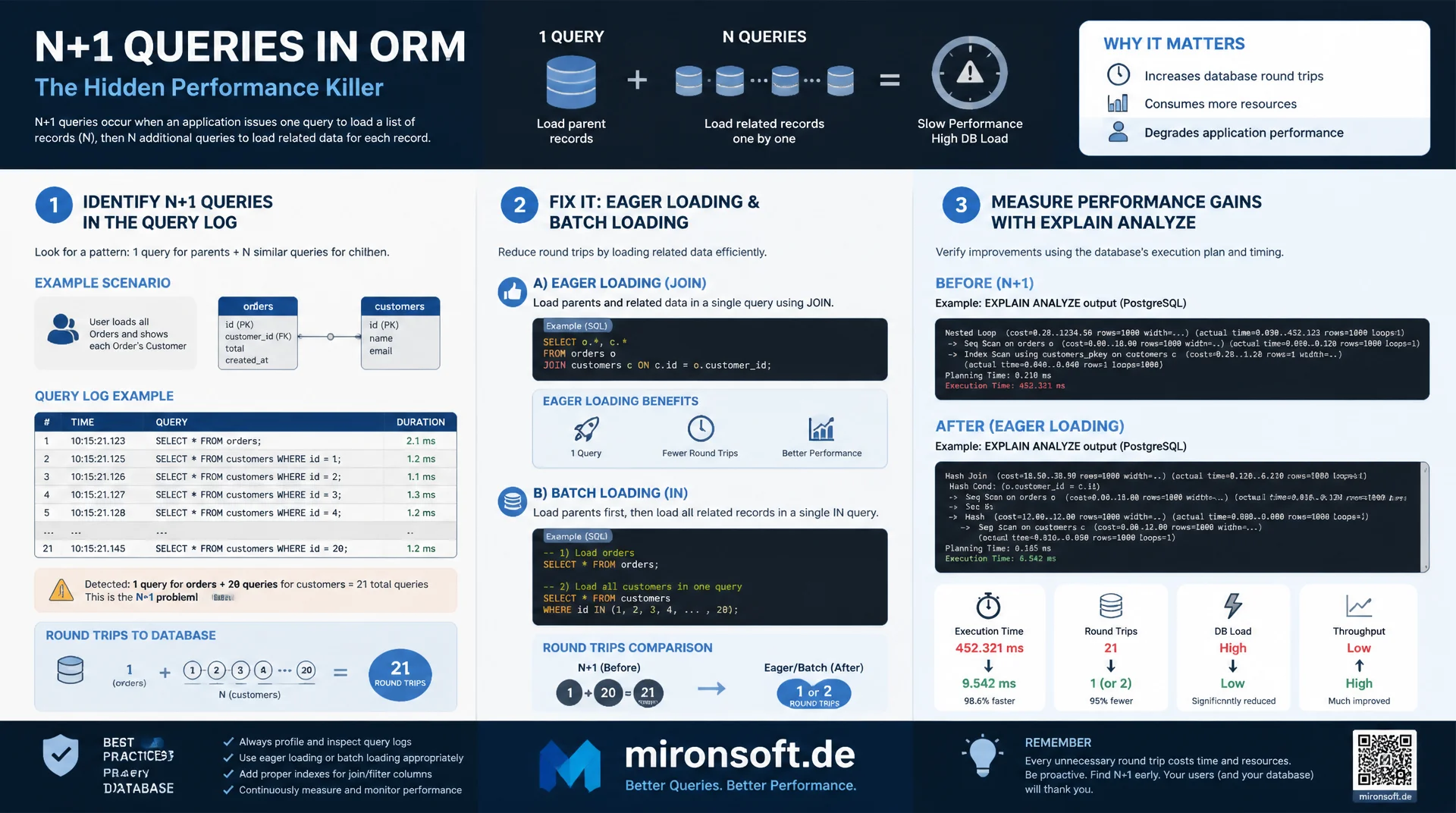
N+1 queries almost always emerge unnoticed from ORM generated code and add up under load to hundreds of extra database round trips per page view. This methodology shows how to systematically spot N+1 queries in the query log, fix them with eager loading and batch loading, and measure the actual performance gain with EXPLAIN ANALYZE.
Table of Contents
- 1. What the N+1 problem actually is
- 2. How N+1 queries emerge in ORM code
- 3. Spotting N+1 queries in the general query log
- 4. Finding N+1 queries with APM and query counters
- 5. Fix: eager loading and JOINs
- 6. Fix: batch loading with IN clauses
- 7. When N+1 is acceptable
- 8. N+1 in Doctrine, Eloquent, and Hibernate
- 9. Performance measurement with EXPLAIN ANALYZE
- 10. Summary
- 11. FAQ
1. What the N+1 problem actually is
The N+1 problem describes an access pattern in which an application first runs a single query to load a list of N records, and then issues a further separate query for each of those N records to fetch related data. Instead of one efficient query, N plus one database round trips result, hence the name. For a list of 50 orders where the customer is loaded for each one, that is not two but 51 requests to MySQL.
What makes the N+1 problem insidious is how invisible it is during everyday development. With a local test database containing ten records, the difference between a JOIN query and eleven individual queries barely registers, both complete in a few milliseconds. Only in production, when a list suddenly contains 500 instead of 10 entries, does the latency of the individual queries add up to noticeable seconds of wait time, while the JOIN variant remains nearly constant. This exact nonlinearity makes N+1 queries one of the most common performance killers in data driven applications.
Conceptually, the N+1 problem is not a MySQL specific quirk but a pattern that appears anywhere a programming language iterates over a collection and implicitly triggers further database access per iteration. The cause almost always lies in the abstraction layer between application and database, usually an ORM that offers convenient access to related objects without developers directly seeing the number of SQL queries behind it.
-- The "1" query: load a page of orders
SELECT id, customer_id, total, created_at FROM orders
ORDER BY created_at DESC
LIMIT 50;

-- The "N" queries: one lookup per order to fetch the related customer
-- Repeated 50 times with a different customer_id each time
SELECT id, name, email FROM customers WHERE id = 101;
SELECT id, name, email FROM customers WHERE id = 204;
SELECT id, name, email FROM customers WHERE id = 305;
-- ... 47 more identical-shaped queries follow
2. How N+1 queries emerge in ORM code
ORMs such as Doctrine, Eloquent, or Hibernate map database tables to objects and allow related entities to be loaded through simple property access, for example $order->getCustomer()->getName(). This exact convenience is the most common cause of N+1 queries. By default, many ORM relations work with lazy loading, meaning the related entity is not loaded up front but only once the code actually accesses it. As long as only a single object is involved, this does not matter. But once a loop runs over a list of objects and accesses the relation on every iteration, each access triggers its own database query.
The N+1 problem becomes especially tricky inside nested templates or view layers, where the database access is visually far removed from the actual query call. A developer rendering an order list who writes {{ order.customer.name }} inside the template loop sees no database query at first glance, because the lazy loading logic works in the background. This exact separation between visible code and actual query execution makes code review alone unreliable for detecting N+1 queries, only analysis at the database level helps here.
3. Spotting N+1 queries in the general query log
The most reliable way to spot N+1 queries is through MySQL's own general query log or slow query log, because every actually executed query shows up here regardless of the application layer. Enabling general_log temporarily during a single test request, such as loading an order overview, reveals the pattern immediately: one query with LIMIT 50, followed by fifty nearly identical queries that differ only in the WHERE value.
This signature, many structurally identical queries with different literal values in quick succession, is the clearest detection marker for N+1 queries in the log. Tools like pt-query-digest automatically normalize the queries by replacing literals with placeholders, which makes fifty individual WHERE id = ? queries visible as a single pattern executed fifty times. A glance at the count column in the digest output immediately reveals which queries appear suspiciously often in a short span.
# Enable general query log temporarily for one diagnostic request
mysql -e "SET GLOBAL general_log = 1; SET GLOBAL general_log_file = '/tmp/general.log';"

# Trigger the suspected N+1 code path (e.g. loading an order list page)
curl -s https://shop.example.test/admin/orders > /dev/null

mysql -e "SET GLOBAL general_log = 0;"

# Aggregate the resulting log and look for repeated query shapes
pt-query-digest /tmp/general.log | head -n 40
4. Finding N+1 queries with APM and query counters
Alongside pure log analysis, application performance monitoring tools such as Blackfire, New Relic, or even simple query counters built into the ORM itself provide a faster diagnosis. Many frameworks offer a query count per request in debug mode, Doctrine via the Symfony profiler toolbar, Laravel via the Debugbar package. If the number of queries per request grows unexpectedly with the size of the loaded data set instead of staying constant, that is a strong sign of an N+1 problem.
A simple but effective practice is setting a hard upper bound for queries per request in the development environment, for example through an assertion statement in integration tests that fails once more than a fixed number of queries are executed for a given endpoint. That way, a newly introduced N+1 problem is caught already in the CI pipeline, long before it becomes a noticeable issue in production with real data volumes. These query budget tests have proven to be the most effective early warning mechanism against N+1 queries in many teams.
5. Fix: eager loading and JOINs
The most direct fix for N+1 queries is eager loading, where the relation is explicitly loaded up front instead of on access. At the SQL level this usually means a JOIN that combines all needed data into a single query. In Doctrine this happens via JOIN FETCH in DQL, in Eloquent via the with() method, in Hibernate via JOIN FETCH in HQL or criteria API fetch joins. The effect is the same in every case, N+1 queries become one.
An important consideration with JOIN based eager loading is the resulting data volume. Loading a one to many relation, such as orders with all related line items, via a JOIN duplicates every order row for every related line item, which can bloat the result set when there are many line items per order. For such cases, a combination of a main query and a targeted batch fetch, described in the next section, is often preferable to a single JOIN.
-- N+1 pattern: 1 query for orders, then N queries for customers
SELECT id, customer_id, total FROM orders ORDER BY created_at DESC LIMIT 50;
-- followed by 50x: SELECT * FROM customers WHERE id = ?

-- Eager loading fix: a single JOIN resolves both in one round trip
SELECT o.id, o.total, o.created_at, c.id AS customer_id, c.name, c.email
FROM orders o
INNER JOIN customers c ON c.id = o.customer_id
ORDER BY o.created_at DESC
LIMIT 50;
6. Fix: batch loading with IN clauses
When a direct JOIN is unfavorable due to bloated result sets, for example with deeply nested or several parallel relations, batch loading is the preferred alternative. Instead of issuing a separate query for each of the N records, all needed foreign keys are first collected and the related records are loaded in exactly one further query via an IN clause. N+1 queries become exactly two, regardless of how large N is.
This pattern is exactly what Doctrine implements with IN (:ids) subqueries, what Eloquent implements internally through automatic eager loading via with(), and what the Facebook DataLoader approach implements in GraphQL APIs. When implementing this yourself, it is important to bound the size of the IN list, MySQL processes very large IN lists with thousands of values increasingly inefficiently, which is why batches of a few hundred ids per query have proven practical.
-- Step 1: load the parent records
SELECT id, customer_id, total FROM orders ORDER BY created_at DESC LIMIT 50;

-- Step 2: collect all distinct customer_id values from the result
-- (e.g. 101, 204, 305, ... up to 50 distinct ids)

-- Step 3: batch-load all related customers in a single query
SELECT id, name, email FROM customers
WHERE id IN (101, 204, 305, 412, 588);
-- Application code then maps customers back to orders in memory
7. When N+1 is acceptable
Not every apparent N+1 problem must be fixed. With a fixed, small upper bound on N, for example a detail page with at most five related images, the overhead of five additional queries is negligible in practice, especially when those queries run against indexed primary keys and are answered in sub millisecond time. The effort of adding code to introduce a JOIN or batch loading can, in such cases, increase maintenance burden without producing a measurable performance gain.
It becomes critical only once N grows with the data volume, for example in paginated lists, exports, or reports, where the number of rows is not controlled by the application but determined by the data volume in the system. The rule of thumb for prioritization is: if N is strictly bounded and small due to UI constraints such as pagination, the N+1 problem can be tolerated. If N scales with database size, it must be fixed before the application runs in production under real load.
8. N+1 in Doctrine, Eloquent, and Hibernate
In Doctrine, the N+1 problem typically emerges with ManyToOne and OneToMany associations using default lazy loading. The fix comes through ->leftJoin() combined with ->addSelect() in QueryBuilder calls or directly via JOIN FETCH in DQL strings. In Laravel's Eloquent, the cause is almost always the missing call to with() before a loop over a collection result, the Eloquent debugbar shows affected spots with a clear query count per request.
Hibernate carries the N+1 SELECTS anti pattern as one of the longest documented manifestations of the problem, solved via FetchType.EAGER in moderation, @BatchSize annotations for batch loading, or explicit JOIN FETCH clauses in HQL. Important across all three frameworks: blanket eager loading of every relation creates its own problem, namely unnecessarily large result sets for queries that do not need the relation at all. The fix should therefore always be tailored to the concrete use case, not applied globally to all relations of an entity.
-- What Doctrine's JOIN FETCH / Eloquent's with() ultimately produce:
-- a single statement instead of one query per related order line item
SELECT o.id, o.total, li.id AS line_item_id, li.product_id, li.qty
FROM orders o
LEFT JOIN order_line_items li ON li.order_id = o.id
WHERE o.customer_id = 42
ORDER BY o.created_at DESC;

-- EXPLAIN reveals whether the join actually uses an index
-- on order_line_items.order_id, not a full table scan per order
EXPLAIN SELECT o.id, li.id FROM orders o
LEFT JOIN order_line_items li ON li.order_id = o.id
WHERE o.customer_id = 42;
9. Performance measurement with EXPLAIN ANALYZE
To prove the actual effect of fixing an N+1 query, a subjective impression is not enough. EXPLAIN ANALYZE provides the actual execution time including every intermediate step for the JOIN or batch variant, while for the N+1 variant the sum of the individual latencies of all N+1 queries must be measured, for example via the general query log with timestamps or through application profiling. The difference is usually stark in practice, because every individual network round trip to the database carries its own latency overhead that adds up linearly with N+1 queries.
A meaningful measurement compares three values side by side: the total number of database queries, the total latency from the first to the last query end, and the CPU time on the database server. In a typical migration from 51 individual queries to a JOIN, total latency often drops from several hundred milliseconds to a low two digit millisecond range, while CPU load on the database server also drops noticeably due to the elimination of repeated connection setups and parsing steps.
| Pattern | Query count (N=50) | Typical latency | When suitable |
|---|---|---|---|
| Lazy loading (N+1) | 51 queries | Several hundred ms | Only for a fixed, small, constant N |
| Eager loading (JOIN) | 1 query | A few ms | One to one or small one to many |
| Batch loading (IN) | 2 queries | A few ms | Large or multiple one to many relations |
| DataLoader batching | 1-2 queries per field | A few ms | GraphQL APIs with nested fields |
Mironsoft
Query performance audits for ORM based applications
Suspect N+1 queries in your application?
We analyze your query log, identify N+1 patterns in ORM code, and implement eager loading or batch loading exactly where it actually delivers performance, measured and proven.
Query log analysis
Systematic detection of N+1 patterns with pt-query-digest
ORM refactoring
Targeted eager loading and batch loading in Doctrine, Eloquent, Hibernate
CI query budgets
Setting up automated tests against new N+1 regressions
10. Summary
N+1 queries almost always emerge implicitly through lazy loading in ORMs and stay invisible in small test environments, because the effect only becomes noticeable as data volume grows. The most reliable way to detect them is at the database level itself, the general query log or query counters in the framework, not code review alone, because lazy loading hides database access behind unremarkable property access. A recurring pattern of structurally identical queries with different literal values is the clear detection marker.
The fix comes through eager loading with JOINs for simple relations or batch loading with IN clauses for larger one to many relationships, with the choice depending on the size of the result set. Not every N+1 problem needs fixing, with a fixed small N the effort is often higher than the benefit. It becomes critical once N grows with the data volume. Query budget tests in the CI pipeline prevent new N+1 queries from reaching production unnoticed.
Detecting and avoiding N+1 queries: the essentials at a glance
Cause
Lazy loading in ORMs triggers a separate database query per iteration over a list.
Detection
General query log with pt-query-digest or query counters in the framework profiler, not code review alone.
Fix
JOIN based eager loading for small relations, batch loading with IN clauses for large ones.
Prevention
Query budget tests in CI that fail when too many queries run per request.