Column order matters more than column count
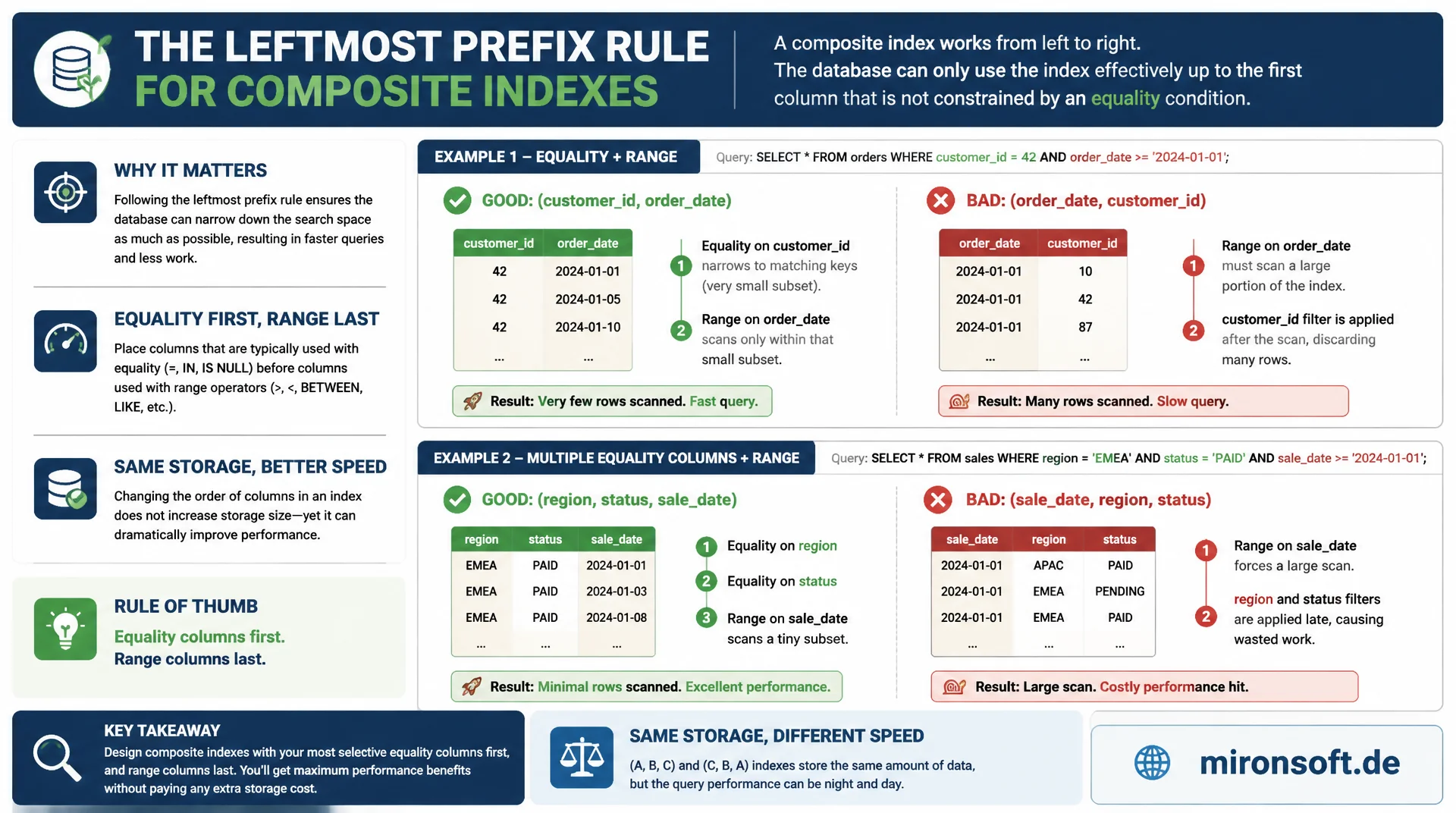
A composite index with the right columns in the wrong order is often worthless to the optimizer. The leftmost prefix rule determines which part of a composite index can be used at all, and putting equality columns before range columns squeezes noticeably faster queries out of the same index without any extra storage.
Table of contents
- 1. What a composite index really is
- 2. Understanding the leftmost prefix rule
- 3. Column order: equality before range
- 4. Factoring selectivity into column choice
- 5. Composite index versus multiple single-column indexes
- 6. Verifying index usage with EXPLAIN
- 7. Practical design: a composite index step by step
- 8. Common mistakes in composite index design
- 9. Composite index strategies compared
- 10. Summary
- 11. FAQ
1. What a composite index really is
A composite index is a single B-tree index across multiple columns of a table, sorted first by the first column, then by the second, then by the third, and so on. It is not a collection of several single-column indexes but one continuous sort structure. This exact property makes column order the most important decision in the entire index design, because it determines which queries can use the index at all.
In practice you often see composite indexes that contain the right columns but in an order that is useless for the actual query patterns. An index on (status, created_at, customer_id) barely helps a query that filters by customer_id and sorts by created_at, even though all three columns are present. The B-tree is sorted by status first, and the optimizer cannot use the rest of the structure without scanning every relevant status group.
Anyone designing a composite index therefore has to think from the query outward, not from the table inward. The question is not "which columns get filtered often" but "in what order are they used together in WHERE, JOIN, and ORDER BY". This mindset separates a composite index that actually works from one that exists but gets ignored by the optimizer on almost every query.
2. Understanding the leftmost prefix rule
The leftmost prefix rule states that MySQL can only use a composite index efficiently if the query uses the columns starting from the left, without skipping any column. For an index on (a, b, c), the optimizer can efficiently serve queries on a, on a, b, or on a, b, c. A query that filters only on b or only on c cannot use this index for a range scan, because the B-tree has no entry point without a known value for a.
This rule is why a single well planned composite index can often replace several single-column indexes, while a poorly planned composite index acts like an index on just the first column even though it contains three columns. The practical test is simple: write down the WHERE conditions actually used, sort them by frequency of equality filters, and check whether the composite index's column order matches that pattern.
-- Composite index over three columns, ordered (a, b, c)
CREATE TABLE orders (
  id BIGINT UNSIGNED NOT NULL AUTO_INCREMENT,
  status TINYINT NOT NULL,
  customer_id INT UNSIGNED NOT NULL,
  created_at DATETIME NOT NULL,
  total_amount DECIMAL(10,2) NOT NULL,
  PRIMARY KEY (id),
  KEY idx_customer_status_created (customer_id, status, created_at)
) ENGINE=InnoDB;

-- Uses the leftmost prefix (customer_id) -- index range scan
EXPLAIN SELECT * FROM orders WHERE customer_id = 4821;

-- Uses the full prefix (customer_id, status) -- index range scan
EXPLAIN SELECT * FROM orders WHERE customer_id = 4821 AND status = 2;

-- Cannot use the index for a range scan: status is not the leftmost column
EXPLAIN SELECT * FROM orders WHERE status = 2;
-- type: ALL, key: NULL -- full table scan, leftmost prefix rule violated
3. Column order: equality before range
The second core rule of composite index design: columns with equality filters (=) belong before columns with range filters (>, <, BETWEEN, LIKE 'prefix%'). The reason lies in how the B-tree works. As long as only equality conditions are checked, the tree stays constrained to an exact value at every level, and the next column remains fully sorted and usable. As soon as a range condition applies, the remaining subtree becomes a range within which the next column can no longer be used in sorted order.
A composite index on (customer_id, created_at, status) for the query customer_id = 4821 AND created_at > '2026-01-01' AND status = 2 only uses the first two columns efficiently as an index access. The filter on status then has to be checked row by row within the found range, because the range on created_at destroys the sort order for status. Swapping the order to (customer_id, status, created_at) makes both customer_id and status equality accesses, leaving only created_at as a range, which usually leaves far fewer rows to check.
This rule is not absolute. If a range column is extremely selective and the following equality column barely distinguishes values, reversing the order can occasionally make sense. As a starting point for ninety percent of cases, though, "equality before range" remains the most reliable rule for a composite index that works.
-- Range column placed before the equality column: only the first column
-- of the index is used for narrowing, status is checked row by row
CREATE INDEX idx_created_status ON orders (created_at, status);

EXPLAIN SELECT id FROM orders
WHERE created_at > '2026-01-01' AND status = 2\G
-- key_len: 5 (only created_at contributes to the index range)
-- rows: 48213 -- most rows still have to be filtered after the range scan

-- Equality column first, range column last: both conditions narrow the scan
CREATE INDEX idx_status_created ON orders (status, created_at);

EXPLAIN SELECT id FROM orders
WHERE created_at > '2026-01-01' AND status = 2\G
-- key_len: 6 (status and created_at both contribute)
-- rows: 1840 -- status already narrows the range before created_at applies
4. Factoring selectivity into column choice
Besides ordering by equality and range, the selectivity of individual columns also matters. A column with high selectivity, meaning many distinct values relative to the row count, narrows the search space more than a column with few distinct values when placed at the same position in a composite index. A customer_id column with tens of thousands of distinct values is more selective than a status column with five possible states, even if both are used as equality filters.
For two equally ranked equality columns, the more selective column should tend to sit further left in the composite index, because it narrows the B-tree range faster. This rule of thumb is subordinate to the leftmost prefix rule and the equality-before-range rule though: the composite index must first match the actual query pattern, and only then do you optimize among the equality columns by selectivity. A detailed look at cardinality and ANALYZE TABLE follows in a dedicated article on that topic.
5. Composite index versus multiple single-column indexes
A common misconception is that multiple single-column indexes achieve the same effect as a well planned composite index. MySQL can combine multiple single-column indexes for a query with the index merge optimization, but this strategy is almost always slower than a single matching composite index, because two separate tree traversals and a subsequent intersection in memory are required. A composite index instead delivers the result directly from a single sorted structure.
The advantage of single-column indexes lies in flexibility: they support any query that filters exactly that one column, regardless of other conditions. A composite index is more targeted but also more narrowly scoped due to the leftmost prefix rule. In practice, for core queries with stable filter combinations the composite index almost always wins, while rare, unpredictable ad hoc filters favor single-column indexes.
-- Two single-column indexes: requires an index merge
CREATE INDEX idx_customer_id ON orders (customer_id);
CREATE INDEX idx_status ON orders (status);

EXPLAIN SELECT id FROM orders WHERE customer_id = 4821 AND status = 2\G
-- type: index_merge
-- Extra: Using intersect(idx_customer_id,idx_status); Using where

-- One composite index: single sorted structure, no intersection needed
DROP INDEX idx_customer_id ON orders;
DROP INDEX idx_status ON orders;
CREATE INDEX idx_customer_status ON orders (customer_id, status);

EXPLAIN SELECT id FROM orders WHERE customer_id = 4821 AND status = 2\G
-- type: ref
-- Extra: Using index -- direct, single index access, no merge step
6. Verifying index usage with EXPLAIN
No composite index design is complete without verifying actual usage with EXPLAIN. The key column shows which index was actually chosen, and key_len shows how many bytes of the index were actually used for the access. A shorter key_len than the full index length often indicates that not all columns of the composite index were actually used, usually because a range condition ended usage of the next column early.
The ref column shows whether a constant value, another column, or a function result was used for the access, while rows gives the estimated number of rows examined. A composite index that reduces row count from millions to a few hundred is effective. If rows stays high despite a composite index, either the column order does not match the query pattern, or the selectivity of the leading columns is not sufficient.
EXPLAIN SELECT id, total_amount FROM orders
WHERE customer_id = 4821 AND status = 2
ORDER BY created_at DESC LIMIT 20\G

*************************** 1. row ***************************
           id: 1
  select_type: SIMPLE
        table: orders
         type: ref
possible_keys: idx_customer_status_created
          key: idx_customer_status_created
      key_len: 7
          ref: const,const
         rows: 34
        Extra: Using index condition; Backward index scan
7. Practical design: a composite index step by step
Practical composite index design follows a fixed process. First, collect the queries actually executed against the affected table from the slow query log or performance schema. Next, identify the equality filters, the range filters, and the ORDER BY column for each query. Equality columns go into the index first, sorted by descending selectivity, followed by the single range or sort column.
In the third step, check whether the same column combination is shared by several frequent queries, since a composite index automatically covers all leftmost prefixes as well. An index on (customer_id, status, created_at) then serves both the query with all three conditions and the simpler query with only customer_id, without needing a second index. Finally, test the composite index with EXPLAIN against the real queries and use ANALYZE TABLE to make sure the statistics are current.
One last practical step concerns superfluous indexes: after adding a new composite index, check with sys.schema_redundant_indexes whether existing single-column indexes have become redundant because of the new composite index, and remove them to reduce write load and storage usage.
-- Step 1: inspect existing redundant indexes after adding a composite index
SELECT table_name, redundant_index_name, dominant_index_name
FROM sys.schema_redundant_indexes
WHERE table_schema = 'shop';

-- Step 2: drop an index made redundant by the new composite index
ALTER TABLE orders DROP INDEX idx_customer_id;

-- Step 3: refresh optimizer statistics after structural changes
ANALYZE TABLE orders;
8. Common mistakes in composite index design
The most common mistake is creating a composite index in the order columns appear in the CREATE TABLE statement instead of the order the query pattern needs. The physical column order of the table has no bearing whatsoever on the sensible index order. A second common mistake is creating too many overlapping composite indexes "just in case", which do not speed up any query but slow down every INSERT and UPDATE operation, because every index has to be maintained on every write.
A third mistake involves functions on indexed columns: WHERE DATE(created_at) = '2026-07-23' prevents a composite index on created_at from being used, because the stored value must first be computed before the comparison happens. The fix is a range comparison created_at >= '2026-07-23' AND created_at < '2026-07-24', which can use the index unchanged, or, since MySQL 5.7, a functional index on the computed expression.
9. Composite index strategies compared
The overview below summarizes how different approaches to composite index design perform, measured by optimizer hit rate and write maintenance overhead.
| Strategy | Example | Effect | Verdict |
|---|---|---|---|
| Copy table column order | (id, status, customer_id) |
Rarely matches the query pattern | Uncertain |
| Range column first | (created_at, customer_id) |
Second column not usable in sort order | Inefficient |
| Equality before range | (customer_id, status, created_at) |
Full prefix use, few rows to check | Recommended |
| Several single-column indexes instead | KEY(customer_id), KEY(status) |
Requires index merge, costlier than one composite index | Usually suboptimal |
| Most selective equality column first | (customer_id, status) |
Fastest narrowing of the B-tree range | Recommended |
The comparison shows there is no universally "correct" set of columns as long as the order is wrong. Two composite indexes with identical columns but a different order behave like two completely different indexes to the optimizer. That is why a short look at the real WHERE clauses of your most important queries pays off before every CREATE INDEX.
Mironsoft
MySQL performance, index design, and query optimization
Slow queries despite existing indexes?
We analyze your slow query logs, check existing composite indexes against actual query patterns, and design index strategies the optimizer will provably use.
Index audit
Verify existing composite indexes against real queries with EXPLAIN
Index design
Plan new composite indexes by leftmost prefix and selectivity
Redundancy cleanup
Identify superfluous single-column indexes and reduce write load
10. Summary
A composite index is a single, continuous B-tree over multiple columns, and its usefulness depends almost entirely on column order. The leftmost prefix rule determines which subset of the columns can be used for an index access at all. Equality filters belong before range filters, because they do not widen the B-tree range for following columns. Among several equality columns, the most selective column usually wins the leading spot.
Practical design always starts with the actual queries, not the table structure, and gets verified with EXPLAIN using key_len and rows. A well planned composite index often replaces several single-column indexes and, thanks to the leftmost prefix property, automatically covers simpler queries too. Applying these rules consistently gets you measurably more effect per byte of storage from every new composite index.
Designing composite indexes correctly: the essentials
Leftmost prefix rule
A composite index on (a, b, c) covers queries on a, a, b, and a, b, c, but never b or c alone.
Equality before range
Always place equality columns before the single range or sort column in a composite index.
Verify with EXPLAIN
key_len and rows show whether the composite index is really being used in full.
Avoid redundancy
Check sys.schema_redundant_indexes and drop single-column indexes made redundant by composite indexes.