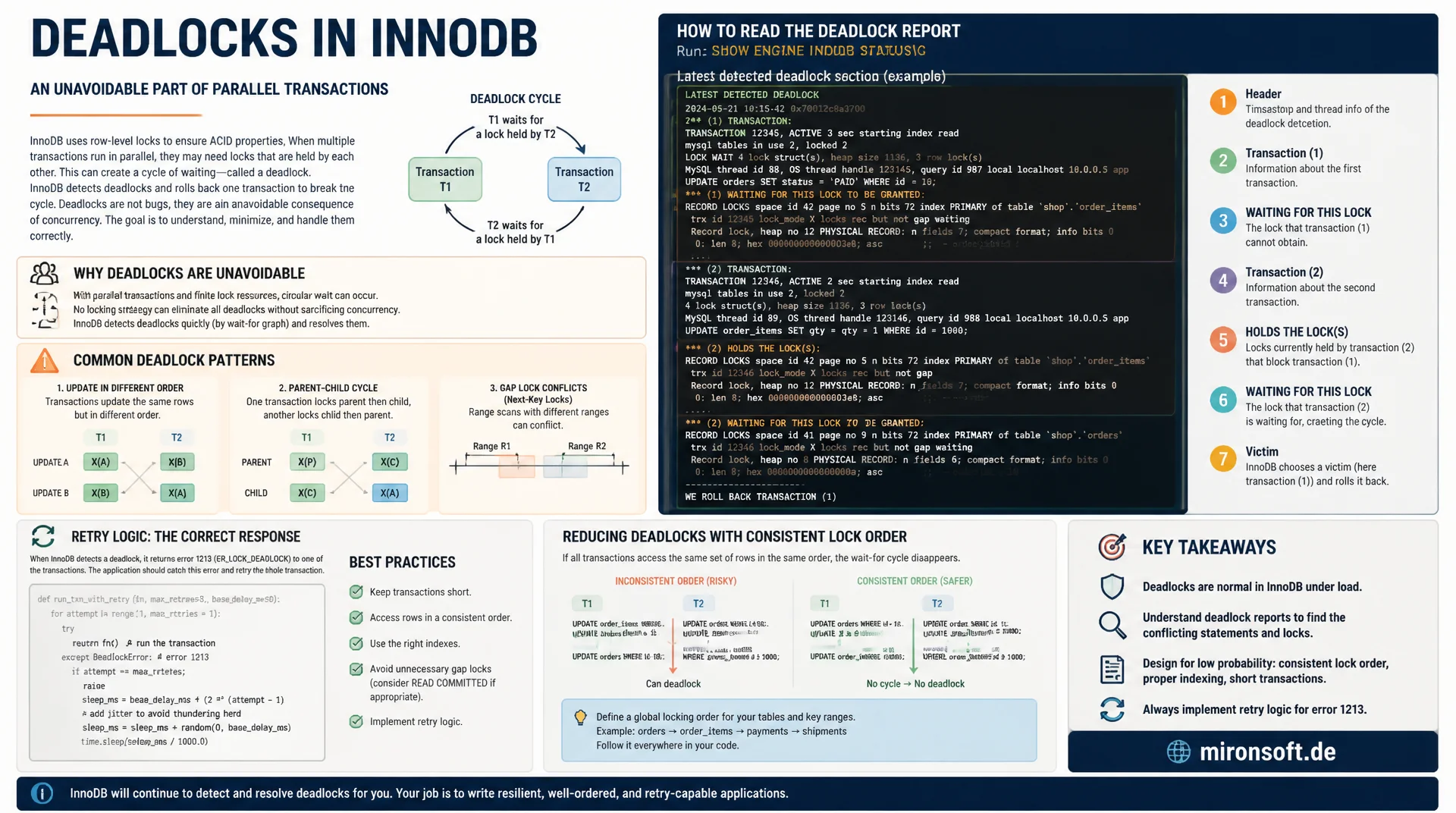
and avoiding them systematically
A deadlock in InnoDB is not a bug, it is an unavoidable consequence of parallel transactions blocking each other. This article shows how to read the deadlock report from SHOW ENGINE INNODB STATUS, which patterns keep recurring in practice, and how retry logic together with consistent lock order systematically reduces deadlocks.
Table of contents
- 1. What a deadlock in InnoDB actually is
- 2. SHOW ENGINE INNODB STATUS: reading the deadlock report
- 3. Common deadlock patterns: cross-order updates
- 4. Deadlocks from foreign keys and gap locks
- 5. Implementing retry logic in the application
- 6. Consistent lock order as a prevention strategy
- 7. innodb_deadlock_detect and innodb_lock_wait_timeout
- 8. Monitoring through Performance Schema and INNODB_TRX
- 9. Telling deadlocks and lock wait timeouts apart
- 10. Summary
- 11. FAQ
1. What a deadlock in InnoDB actually is
A deadlock occurs in InnoDB when two or more transactions are each waiting for a lock held by another one of the involved transactions, and this mutual wait state offers no way out. Transaction A holds a lock on row 1 and waits for row 2, while transaction B simultaneously holds row 2 and waits for row 1. Without intervention, both transactions would wait indefinitely.
InnoDB resolves this situation not by chance, but through an active detection mechanism. An internal deadlock detector periodically walks the wait-for graph of all waiting transactions and identifies cycles. Once a cycle is found, InnoDB picks the transaction with the lowest estimated rollback cost, usually the one with fewer modified rows, as the victim and automatically rolls it back with an internal ROLLBACK. The other transaction can then proceed.
A deadlock is therefore not a sign of a broken database, but a normal, if undesirable, result of parallel write access. The affected application receives error 1213 (ER_LOCK_DEADLOCK) and must decide for itself how to react. This article shows how to systematically analyse deadlocks and make them noticeably rarer through deliberate transaction design.
2. SHOW ENGINE INNODB STATUS: reading the deadlock report
The most important command for diagnosing a deadlock is SHOW ENGINE INNODB STATUS. In the LATEST DETECTED DEADLOCK section, InnoDB logs both involved transactions, the locks each held and requested, and which transaction was rolled back as the victim. This report shows the exact SQL statement, the affected index and the lock type for each transaction, which considerably simplifies reconstructing the cause.
Important: InnoDB only stores the most recently detected deadlock, older incidents get overwritten. For a persistent history, innodb_print_all_deadlocks = ON should be set, which additionally writes every deadlock to the error log file. Without this setting, the information is lost as soon as the next deadlock occurs, which makes retroactive analysis of sporadically occurring deadlocks much harder.
-- Read the deadlock report immediately after an application
-- reports error 1213 (ER_LOCK_DEADLOCK)
SHOW ENGINE INNODB STATUS\G

-- Excerpt from the LATEST DETECTED DEADLOCK section:
-- ------------------------
-- LATEST DETECTED DEADLOCK
-- ------------------------
-- *** (1) TRANSACTION:
-- TRANSACTION 421589, ACTIVE 2 sec starting index read
-- mysql tables in use 1, locked 1
-- LOCK WAIT 3 lock struct(s), heap size 1136, 2 row lock(s)
-- MySQL thread id 42, query id 88123 updating
-- UPDATE accounts SET balance = balance - 50 WHERE id = 2
-- *** (1) WAITING FOR THIS LOCK TO BE GRANTED:
-- RECORD LOCKS space id 45 page no 4 n bits 80 index PRIMARY
-- of table `shop`.`accounts` trx id 421589 lock_mode X locks rec but not gap
-- waiting
-- *** (2) TRANSACTION:
-- TRANSACTION 421590, ACTIVE 1 sec starting index read
-- UPDATE accounts SET balance = balance + 50 WHERE id = 1
-- *** (2) HOLDS THE LOCK(S):
-- RECORD LOCKS space id 45 page no 3 n bits 80 index PRIMARY
-- of table `shop`.`accounts` trx id 421590 lock_mode X locks rec but not gap
-- *** WE ROLL BACK TRANSACTION (1)

-- Persist every deadlock into the error log, not just the last one
SET GLOBAL innodb_print_all_deadlocks = ON;
3. Common deadlock patterns: cross-order updates
The most common deadlock pattern in practice is the cross-order update: two transactions access the same two rows, but in a different order. Transaction A first updates account 1, then account 2. Transaction B, running concurrently, first updates account 2, then account 1. If both run in parallel, each transaction holds a lock that the other transaction needs for its second step, a classic deadlock cycle.
This pattern occurs particularly often in money transfers, stock updates in order systems, or batch jobs that process several rows of a table in the order they appear in the input data, rather than in a stable, deterministic order such as primary key order. A second common pattern arises from UPDATE statements with different WHERE conditions that address the same set of rows through different indexes and thereby lock them in a different order, even when the application code looks consistent at first glance.
-- Session A
START TRANSACTION;
UPDATE accounts SET balance = balance - 50 WHERE id = 1;
-- ... application logic runs here ...
UPDATE accounts SET balance = balance + 50 WHERE id = 2;
COMMIT;

-- Session B, running concurrently, updates in reverse order
START TRANSACTION;
UPDATE accounts SET balance = balance - 20 WHERE id = 2;
-- ... application logic runs here ...
UPDATE accounts SET balance = balance + 20 WHERE id = 1;
COMMIT;

-- Classic deadlock: A holds id=1, waits for id=2
-- B holds id=2, waits for id=1
4. Deadlocks from foreign keys and gap locks
A less obvious source of deadlocks is foreign key constraints. When inserting a dependent record, InnoDB automatically places a lock on the referenced row in the parent table, to make sure that row is not deleted concurrently. If several transactions concurrently insert records referencing the same parent row, they compete for that implicit lock, which, combined with other locks, can cause deadlocks that at first glance seem unrelated to the actual application logic.
A second, frequently overlooked cause is gap locks under REPEATABLE READ. When several transactions concurrently insert rows into the same index range, for example ascending values into a column with a secondary index, the gap locks and insert intention locks set in the process can block each other. This behaviour is covered in detail in a separate article in this series about gap locks and next-key locks, but is important enough as a deadlock cause to mention here: under READ COMMITTED, these specific deadlocks occur noticeably less often, because fewer gap locks are set there.
5. Implementing retry logic in the application
Because InnoDB resolves a deadlock by rolling back one of the involved transactions, the application must be prepared to catch error 1213 and re-execute the affected transaction. Without this retry logic, a deadlock results in a visible error for the user, even though the operation would very likely succeed on a second attempt, since the competing transaction has meanwhile finished.
A robust retry strategy limits the number of attempts, usually to three to five, and adds a short, ideally slightly randomised backoff between attempts, to prevent several simultaneously failed transactions from immediately colliding again. It is important that the entire transaction, not just the last failed statement, gets retried, since InnoDB discards the whole transaction on a deadlock rollback.
-- Pseudocode-style application logic (PHP-like)
-- Retry the entire transaction on deadlock, not just the failed statement

max_attempts = 4
attempt = 0

while attempt < max_attempts:
    try:
        db.query("START TRANSACTION")
        db.query("UPDATE accounts SET balance = balance - 50 WHERE id = 1")
        db.query("UPDATE accounts SET balance = balance + 50 WHERE id = 2")
        db.query("COMMIT")
        break  -- success, exit retry loop
    except DeadlockError as e:  -- MySQL error 1213
        db.query("ROLLBACK")
        attempt += 1
        sleep(random_between(50, 200) * attempt)  -- ms, exponential-ish backoff
        continue
    except Exception as e:
        db.query("ROLLBACK")
        raise e  -- do not retry on non-deadlock errors
6. Consistent lock order as a prevention strategy
The most effective prevention strategy against deadlocks is to lock rows in every transaction consistently in the same order, usually sorted by primary key. Instead of updating rows in the order they appear in the application code or in the input data, they are explicitly sorted before access. If every transaction consistently locks in ascending ID order, the cyclic wait state that constitutes a deadlock cannot arise in the first place.
For batch processing affecting several rows of the same table, an explicit ORDER BY clause in the underlying SELECT queries pays off, before rows are updated individually. That forces a deterministic access order across all transactions and, in many cases, reduces the number of observable deadlocks by more than 90 percent, without requiring changes to application logic or data model.
| Pattern | Deadlock risk | Recommended approach | Effect |
|---|---|---|---|
| Random update order | high | sort rows by ID beforehand | prevents cyclic wait states |
| No retry logic | high | catch deadlock error, retry the transaction | user never sees an error |
| Long transactions with many rows | medium | shrink batches, keep transactions short | fewer locks held simultaneously |
| REPEATABLE READ with many inserts | medium | consider READ COMMITTED where semantics allow | fewer gap locks |
7. innodb_deadlock_detect and innodb_lock_wait_timeout
InnoDB offers the parameter innodb_deadlock_detect, which keeps active deadlock detection enabled by default. On systems with extremely high concurrency, where the deadlock detector itself creates noticeable overhead by walking the wait-for graph, this detection can be disabled. In that case, only innodb_lock_wait_timeout applies, 50 seconds by default: a waiting transaction that exceeds this time is aborted with error 1205, even if there was no real deadlock, only a long held lock.
For the vast majority of production systems, innodb_deadlock_detect should stay enabled, since an immediately detected deadlock resolves considerably faster than waiting for a long timeout. Only in very specific high-load scenarios with thousands of concurrent transactions, where the detector itself becomes the bottleneck, is disabling it a sensible option, combined with a noticeably lower lock wait timeout.
-- Inspect deadlock detection and lock wait timeout settings
SHOW VARIABLES LIKE 'innodb_deadlock_detect';
SHOW VARIABLES LIKE 'innodb_lock_wait_timeout';

-- Lower the timeout for latency-sensitive OLTP workloads
SET GLOBAL innodb_lock_wait_timeout = 10;

-- Disable active detection only for very high concurrency systems
-- where the detector itself becomes a bottleneck
-- SET GLOBAL innodb_deadlock_detect = OFF;
8. Monitoring through Performance Schema and INNODB_TRX
Besides reactive analysis through SHOW ENGINE INNODB STATUS, deadlock risk can be observed proactively through information_schema.INNODB_TRX. This table lists all actively running transactions, including their start time, current status and number of held locks. Long running transactions holding many locks are the most likely candidates for future deadlocks and can therefore be identified before the first incident even occurs.
The Performance Schema offers an even more detailed view of current wait situations between transactions through the data_lock_waits table, including the respective blocking and blocked thread ID. Combined with a regular monitoring job that queries this table and alerts on an unusually high number of concurrent wait situations, deadlock hotspots can be identified long before they become a production problem.
Mironsoft
MySQL performance, data modelling and InnoDB tuning
Recurring deadlocks in production?
We analyse your deadlock reports, identify the underlying access patterns, and set up retry logic as well as consistent lock ordering so deadlocks become measurably rarer.
Deadlock analysis
Systematically evaluate SHOW ENGINE INNODB STATUS reports
Code review
Uncover lock order and missing retry logic in application code
Monitoring setup
Detect deadlock hotspots early through Performance Schema
9. Telling deadlocks and lock wait timeouts apart
A deadlock and a lock wait timeout are two different errors that are often confused in practice. A deadlock (error 1213) arises from a genuine cyclic wait state and is actively detected and resolved by InnoDB, usually within milliseconds. A lock wait timeout (error 1205), on the other hand, arises when a transaction simply waits too long for a lock without any cycle being present, for example because the lock holding transaction itself runs for an extremely long time or was forgotten and never committed.
This distinction matters for error handling: a deadlock can almost always be resolved by simply retrying the transaction, since the blocking transaction has already been rolled back. A lock wait timeout, on the other hand, often points to a structural problem, such as a forgotten transaction in another session, and a simple retry frequently leads to the same timeout again if the cause is not fixed.
10. Summary
A deadlock in InnoDB is a normal, actively detected and automatically resolved incident under parallel transactions, not a system failure. SHOW ENGINE INNODB STATUS provides the necessary detail for analysis in the LATEST DETECTED DEADLOCK section, complemented by innodb_print_all_deadlocks for a persistent history. The most common cause is the inconsistent order in which transactions lock the same rows, which can be avoided by consistently sorting by primary key.
Application-side retry logic is not a workaround, but a necessary part of any robust transaction processing, since InnoDB fundamentally cannot prevent deadlocks, only resolve them. Anyone who systematically analyses deadlocks through SHOW ENGINE INNODB STATUS, establishes consistent lock order in application code, and implements retry logic with backoff reduces the frequency of deadlocks in practice to a negligible level.
MySQL deadlocks: the essentials at a glance
Diagnosis
SHOW ENGINE INNODB STATUS, LATEST DETECTED DEADLOCK section, complemented by innodb_print_all_deadlocks=ON.
Most common cause
Cross-order updates: two transactions lock the same rows in a different order.
Prevention
Lock rows consistently sorted by primary key, keep transactions short.
Reaction
Catch error 1213, retry the whole transaction with backoff, not just the last statement.