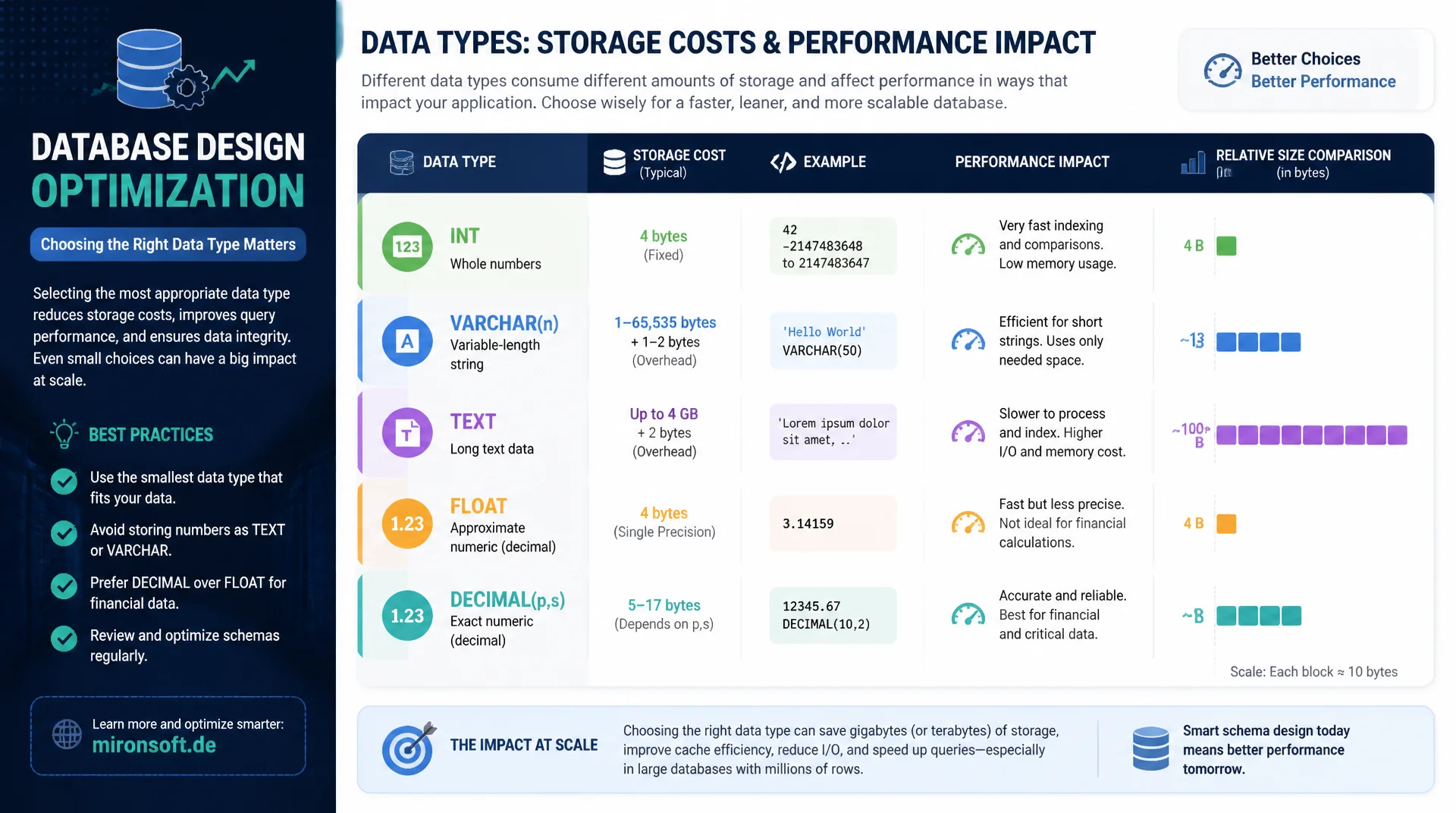
Save Storage and Improve Performance
An oversized INT, a VARCHAR field that should really be TEXT, or FLOAT instead of DECIMAL for money add up in large tables to significant, often overlooked storage cost and performance loss. Choosing the right data type is one of the cheapest optimizations in the entire database design. This article explains the most important data type decisions with concrete sizing rules.
Table of Contents
- 1. Why data type choice matters so much
- 2. Sizing integer types correctly
- 3. VARCHAR vs. TEXT: which type when
- 4. DECIMAL vs. FLOAT for money
- 5. ENUM: pros and cons in detail
- 6. Date and time: DATE, DATETIME, TIMESTAMP
- 7. NULL vs. NOT NULL: storage and index impact
- 8. Practical sizing rules and auditing existing data
- 9. Data types compared directly
- 10. Summary
- 11. FAQ
1. Why data type choice matters so much
Choosing the right data type affects three layers at once: storage on disk, memory usage in the buffer pool, and query performance. An overly generous data type not only wastes disk space, it also takes up more space in the already limited buffer pool, meaning less data can be kept in the fast RAM cache at the same time. In a table with a few thousand rows the effect is negligible, but in a table with a hundred million rows the same mistake can waste several gigabytes of memory.
A second, often underestimated effect concerns indexes: every extra byte in an indexed column is stored not once but for every index entry, which multiplies the effect for columns indexed multiple times. Choosing the right data type is therefore not a cosmetic detail but one of the few optimizations that can be implemented directly in the schema, without application code changes, without additional hardware, and without architectural rework.
2. Sizing integer types correctly
MySQL offers five integer types of different sizes: TINYINT at 1 byte, SMALLINT at 2 bytes, MEDIUMINT at 3 bytes, INT at 4 bytes and BIGINT at 8 bytes. A common mistake is reflexively defining practically every numeric column as INT, even when the value range doesn't require it at all. A status field with five possible values doesn't need an INT with a range up to over two billion, a TINYINT with a range up to 255 is entirely sufficient and saves three bytes per row.
Primary keys deserve particular care, because InnoDB's primary key physically sorts the entire table as a clustered index and is also stored as a reference in every secondary index. A BIGINT primary key instead of a sufficient INT UNSIGNED doubles the storage cost of every secondary index entry. The rule of thumb: for tables expected to stay under 4 billion rows, INT UNSIGNED is enough; for anything above that, such as very large log tables, BIGINT UNSIGNED is needed.
-- Compare storage impact of integer types on a primary key
CREATE TABLE order_status_correct (
    id INT UNSIGNED AUTO_INCREMENT PRIMARY KEY,      -- 4 bytes, up to 4.29 billion
    status TINYINT UNSIGNED NOT NULL,                -- 1 byte, up to 255 values
    order_id INT UNSIGNED NOT NULL,                  -- 4 bytes, matches parent key type
    created_at DATETIME NOT NULL
) ENGINE=InnoDB;

-- Oversized, wastes space in every secondary index reference
CREATE TABLE order_status_wasteful (
    id BIGINT AUTO_INCREMENT PRIMARY KEY,             -- 8 bytes, rarely needed
    status INT NOT NULL,                               -- 4 bytes for 5 possible values
    order_id BIGINT NOT NULL,
    created_at DATETIME NOT NULL
) ENGINE=InnoDB;

-- Check actual value range before choosing a type
SELECT MIN(status), MAX(status), COUNT(DISTINCT status) FROM order_status_correct;
3. VARCHAR vs. TEXT: which type when
VARCHAR(n) stores a variable-length string up to n characters directly in the data row, along with a length prefix of 1 or 2 bytes depending on whether n exceeds 255. TEXT, on the other hand, is treated by InnoDB under certain conditions as a so-called off-page column, where only a reference sits in the actual row and the real content is stored in separate overflow pages. This has direct performance consequences: a SELECT that reads many TEXT columns potentially generates additional page accesses, while short VARCHAR fields sit in the same page as the rest of the row.
The practical rule: for fields with a known, bounded maximum length, such as email addresses, product names or SKUs, VARCHAR with a realistic length limit is almost always the right choice. TEXT is suited for genuinely unbounded content like product descriptions, blog article bodies or free-text comments. A common anti-pattern is VARCHAR(255) as a blanket default length for every text field, regardless of actual content, which neither saves storage nor improves data integrity through sensible length constraints.
-- Realistic column sizing based on actual content constraints
CREATE TABLE products (
    id INT UNSIGNED AUTO_INCREMENT PRIMARY KEY,
    sku VARCHAR(32) NOT NULL,               -- bounded, known max length
    name VARCHAR(150) NOT NULL,             -- bounded, realistic product name length
    short_description VARCHAR(500),         -- bounded, still fits in-row usually
    description TEXT,                       -- unbounded, potentially large content
    UNIQUE KEY uq_sku (sku)
) ENGINE=InnoDB;

-- Find columns with unrealistic VARCHAR lengths in an existing schema
SELECT table_name, column_name, character_maximum_length
FROM information_schema.columns
WHERE table_schema = 'shop_db'
  AND data_type = 'varchar'
  AND character_maximum_length >= 255
ORDER BY character_maximum_length DESC;
4. DECIMAL vs. FLOAT for money
For monetary amounts, DECIMAL(m,d) is the only correct data type, never FLOAT or DOUBLE. FLOAT and DOUBLE are binary floating-point types that cannot represent certain decimal numbers exactly, similar to how a third cannot be written exactly as a finite decimal. In calculations involving money this leads to tiny rounding errors that can add up across many transactions into noticeable discrepancies, a problem that is completely unacceptable in accounting systems and payment processing.
DECIMAL, by contrast, stores numbers as an exact decimal representation, defined via total digits (m) and decimal places (d). For most currencies, DECIMAL(10,2) is enough for amounts up to 99,999,999.99, though cryptocurrencies or applications with very small fractions may need more decimal places. The storage cost of DECIMAL is slightly higher than FLOAT, but this small overhead is worth every extra byte for correct financial calculations.
-- Correct: exact decimal representation for money
CREATE TABLE invoices (
    id INT UNSIGNED AUTO_INCREMENT PRIMARY KEY,
    amount_net DECIMAL(10,2) NOT NULL,
    tax_rate DECIMAL(4,2) NOT NULL,
    amount_gross DECIMAL(10,2) NOT NULL
) ENGINE=InnoDB;

-- Demonstrate the rounding problem with FLOAT
-- SELECT 0.1 + 0.2;                    -- exact with DECIMAL: 0.30
-- With FLOAT/DOUBLE this can yield 0.30000000000000004 internally,
-- causing mismatches in financial reconciliation over many rows
5. ENUM: pros and cons in detail
ENUM internally stores not the text value but a compact numeric index that refers to the value list defined in the schema. With up to 255 possible values, ENUM takes up only 1 byte, which is considerably more compact than an equivalent VARCHAR field. For fields with a small, stable value list, such as an order status with values new, paid, shipped and cancelled, ENUM is therefore both storage-efficient and self-documenting, since the allowed values are directly visible in the schema.
The decisive downside of ENUM shows up on changes: adding a new value requires an ALTER TABLE command that, for large tables and certain value changes, can trigger a full table rebuild instead of a fast metadata change. Additionally, an ENUM's value list cannot be conveniently referenced from another table, which for frequently changing or application-managed status values leads to a separate lookup table with a foreign key as the more flexible alternative.
-- ENUM: compact and self-documenting for a small, stable value set
CREATE TABLE orders (
    id INT UNSIGNED AUTO_INCREMENT PRIMARY KEY,
    status ENUM('new', 'paid', 'shipped', 'cancelled') NOT NULL DEFAULT 'new'
) ENGINE=InnoDB;

-- Adding a new value requires an ALTER TABLE, potentially a table rebuild
ALTER TABLE orders MODIFY status
    ENUM('new', 'paid', 'shipped', 'cancelled', 'refunded') NOT NULL DEFAULT 'new';

-- More flexible alternative for frequently changing status values
CREATE TABLE order_statuses (
    id TINYINT UNSIGNED PRIMARY KEY,
    code VARCHAR(20) NOT NULL UNIQUE
) ENGINE=InnoDB;
6. Date and time: DATE, DATETIME, TIMESTAMP
MySQL offers several data types for time values that are frequently confused. DATE stores only a date without a time and takes 3 bytes, ideal for birth dates or delivery dates without a time component. DATETIME stores date and time without a timezone reference in 5 bytes plus optional fractional-second precision, and the stored value stays unchanged regardless of session timezone. TIMESTAMP, by contrast, internally stores UTC and automatically converts to the session timezone on read and write, but takes only 4 bytes, making it more compact than DATETIME.
The practically relevant difference lies in the value range and timezone behavior: TIMESTAMP is limited to the range from 1970 to 2038, which is sufficient for most use cases but can become problematic for historical data or dates far in the future. For cross-timezone applications with users in different regions, TIMESTAMP is usually the better choice, because the automatic conversion avoids errors from manual timezone handling in application code.
-- Choosing the right temporal type per use case
CREATE TABLE events (
    id INT UNSIGNED AUTO_INCREMENT PRIMARY KEY,
    event_date DATE NOT NULL,                    -- date only, 3 bytes
    created_at TIMESTAMP DEFAULT CURRENT_TIMESTAMP,  -- UTC-based, 4 bytes
    scheduled_for DATETIME NOT NULL               -- no timezone conversion, 5 bytes
) ENGINE=InnoDB;
7. NULL vs. NOT NULL: storage and index impact
Every nullable column in a table needs an additional bit in the row's so-called null bitmap area, so the storage cost is small but not zero. The actually relevant effect of NULL shows up in the query optimizer and in indexes: comparisons against NULL require the explicit syntax IS NULL or IS NOT NULL, since normal comparison operators with NULL always return UNKNOWN instead of TRUE or FALSE, which can lead to unexpectedly empty result sets in WHERE clauses when developers overlook this.
As a general practical recommendation: columns should only be defined as nullable when the absence of a value has a genuinely valid, distinguishable business meaning, such as an optional delivery date that isn't yet known. For columns that should really always have a value, NOT NULL with a sensible DEFAULT value is the more robust choice, because it surfaces faulty application logic earlier as a constraint violation instead of a silent data inconsistency.
-- Find nullable columns that might not need to be nullable
SELECT table_name, column_name, is_nullable, column_default
FROM information_schema.columns
WHERE table_schema = 'shop_db'
  AND is_nullable = 'YES'
ORDER BY table_name, column_name;

-- Common trap: NULL comparisons never match with standard operators
-- SELECT * FROM orders WHERE cancelled_at = NULL;   -- always empty result
-- SELECT * FROM orders WHERE cancelled_at IS NULL;  -- correct
8. Practical sizing rules and auditing existing data
For new tables, a small checklist helps: choose integer columns based on the actual value range, don't reflexively use INT. Base VARCHAR lengths on realistic business rules, don't default to 255 across the board. Store monetary amounts exclusively as DECIMAL. Use ENUM only for genuinely stable, small value lists. Choose temporal types according to their actual use case, don't default to DATETIME for everything.
For existing databases, a regular audit via information_schema is worthwhile to identify the largest tables and the data types used within them. Such an analysis often shows that a large share of storage consumption traces back to a handful of tables with suboptimal data type decisions, whose correction has a disproportionately large effect on total storage consumption and buffer pool efficiency.
-- Identify the largest tables as candidates for a data type audit
SELECT
    table_name,
    ROUND(data_length / 1024 / 1024, 2) AS data_mb,
    ROUND(index_length / 1024 / 1024, 2) AS index_mb,
    table_rows
FROM information_schema.tables
WHERE table_schema = 'shop_db'
ORDER BY (data_length + index_length) DESC
LIMIT 10;
9. Data types compared directly
The following table summarizes the most important data types by storage cost and typical use case.
| Data type | Storage cost | Typical use | Common mistake |
|---|---|---|---|
| TINYINT | 1 byte | Status fields, flags, small counters | INT instead of TINYINT for 5 status values |
| VARCHAR(n) | n+1 or n+2 bytes | Names, SKUs, short text | Blanket VARCHAR(255) for everything |
| DECIMAL(m,d) | Variable by m,d | Money, exact calculations | FLOAT instead of DECIMAL for money |
| ENUM | 1 to 2 bytes | Small, stable value lists | ENUM for frequently changing values |
| TIMESTAMP | 4 bytes | Timezone-aware timestamps | TIMESTAMP for dates past 2038 |
None of these data types is inherently wrong, what matters is a deliberate choice based on the actual value range and use case, instead of a reflexive default decision applied identically to every column.
Mironsoft
Schema reviews and database design consulting
How much storage are your data types wasting?
We analyze your schema, identify oversized column types, and deliver a prioritized list of concrete changes with measurable impact on storage consumption and buffer pool efficiency.
Schema audit
Check every column type against actual value ranges
Migration plan
Safe order of data type changes without downtime
Design guidelines
Binding data type standards for new tables across your team
10. Summary
Choosing the right data type is one of the most effective and simultaneously cheapest optimizations in database design. Integer types should be chosen based on the actual value range, not reflexively as INT. VARCHAR with a realistic length limit is the right choice for bounded text fields, TEXT for genuinely unbounded content. Monetary amounts belong exclusively in DECIMAL columns, never in FLOAT or DOUBLE.
ENUM saves storage for small, stable value lists but becomes inflexible with frequent changes. Temporal types should be chosen according to their actual timezone needs and value range. A regular audit via information_schema reliably reveals where suboptimal data type decisions unnecessarily tie up storage and buffer pool capacity.
Choosing the right data types, the essentials at a glance
Integers
Choose TINYINT through BIGINT based on the actual value range, especially for primary keys.
Text
VARCHAR with realistic length for bounded fields, TEXT only for genuinely unbounded content.
Money
Always DECIMAL for exact calculations, never FLOAT or DOUBLE for monetary amounts.
Auditing
Regularly check information_schema.tables and .columns for optimization potential.