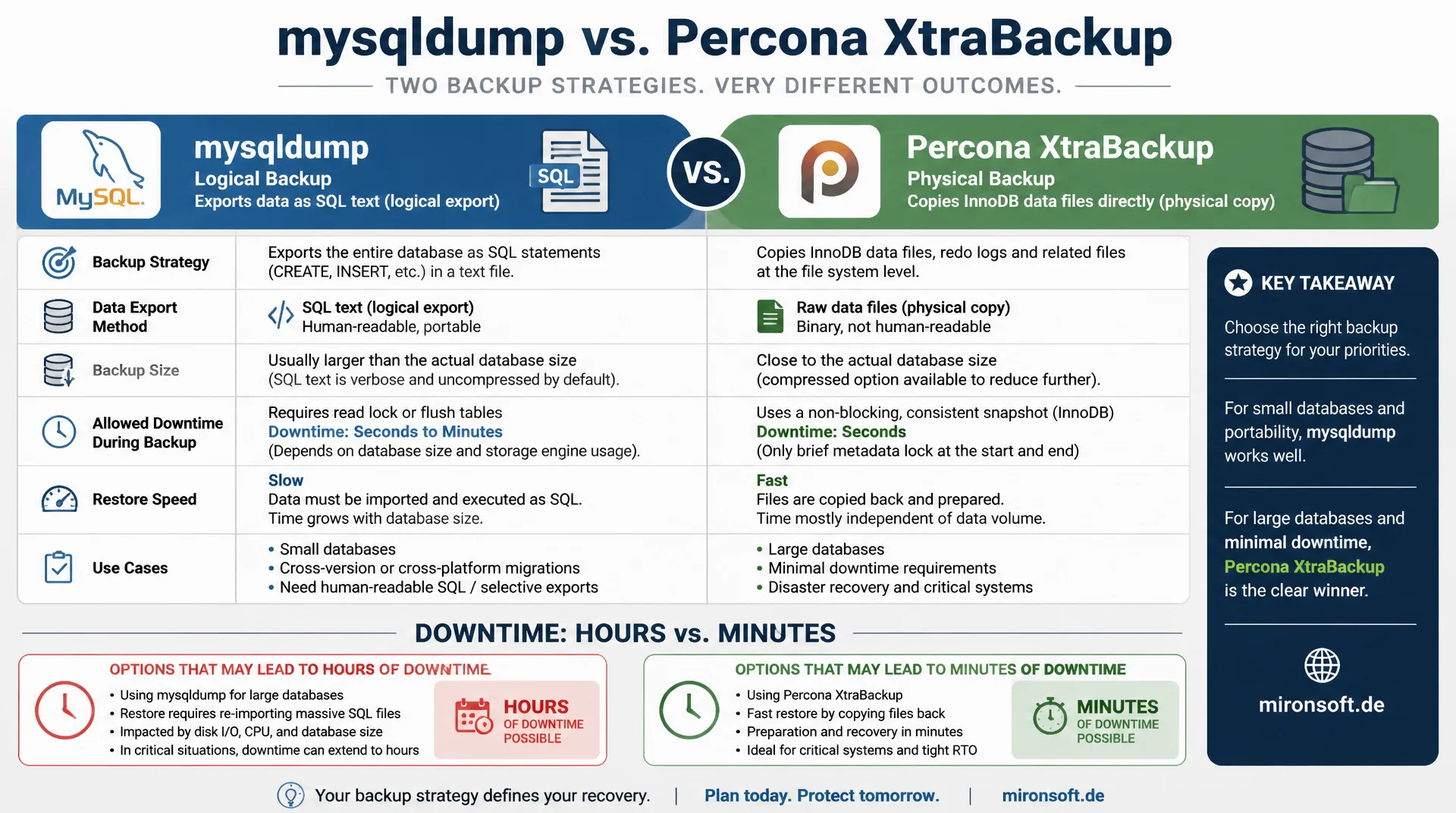
logical against physical backup, consistency against restore speed
mysqldump and XtraBackup solve the same task in fundamentally different ways: one exports data as SQL text, the other copies the data files directly. Which backup strategy fits your database size, allowed downtime and required restore speed decides between hours and minutes of downtime when it matters.
Table of contents
- 1. Logical versus physical backups
- 2. mysqldump in detail
- 3. Percona XtraBackup in detail
- 4. Incremental backups with XtraBackup
- 5. Restore speed compared
- 6. Ensuring consistency
- 7. Automation and retention strategies
- 8. Encryption and offsite storage
- 9. Why backups need a restore test
- 10. Summary
- 11. FAQ
1. Logical versus physical backups
Every backup strategy for MySQL starts with a basic decision: logical or physical backup. mysqldump produces a logical backup, a text based collection of SQL statements that represent the database structure and all data as CREATE TABLE and INSERT statements. XtraBackup, on the other hand, creates a physical backup by copying the actual InnoDB data files at the block level, without taking the detour through SQL.
This difference affects every aspect of the backup strategy: speed, lock time, portability and restore duration. A logical backup can easily be loaded into a different MySQL version or even a different database system, because it consists of portable SQL. A physical backup, on the other hand, restores considerably faster, but is tied to the same MySQL version and storage engine configuration as the source server.
2. mysqldump in detail
mysqldump has been part of every MySQL installation since forever and fits smaller databases or situations where portability matters more than speed. The option --single-transaction is essential for InnoDB tables: it starts the dump inside a single transaction with repeatable read isolation and thereby allows a consistent backup without locking tables for writes.
Without --single-transaction, mysqldump falls back by default to FLUSH TABLES WITH READ LOCK, which locks every table completely for the duration of the dump and is usually unacceptable in production systems. The big drawback of mysqldump remains speed: at several hundred gigabytes of database size, a full dump can take several hours, because every row is written as text and has to be parsed and executed as SQL again on restore.
# Create a consistent logical backup with mysqldump
mysqldump \
  --single-transaction \
  --routines --triggers --events \
  --master-data=2 \
  --quick \
  -u backup_user -p shop_db | gzip > /backup/shop_db_$(date +%F).sql.gz

# Restore from a compressed dump
gunzip < /backup/shop_db_2026-07-23.sql.gz | mysql -u root -p shop_db
3. Percona XtraBackup in detail
XtraBackup copies the InnoDB data files directly from the filesystem while the server keeps running, and records, in parallel, every change that happens during the copy through the InnoDB redo log. After the actual copy, a separate --prepare step applies this redo log to the copied files to bring them into a consistent state, exactly the way InnoDB would after a hard server crash.
The decisive advantage of XtraBackup over mysqldump is that no long table locks are needed throughout the entire backup process and the server stays fully writable the whole time. For databases in the terabyte range, XtraBackup is therefore often the only practical backup strategy, because a logical backup would simply take too long to run daily.
# Create a physical full backup with XtraBackup
xtrabackup --backup \
  --target-dir=/backup/full/$(date +%F) \
  --user=backup_user --password="$BACKUP_PW"

# Prepare the backup (apply redo log, bring it into a consistent state)
xtrabackup --prepare --target-dir=/backup/full/$(date +%F)

# Restore: clear the data directory and copy the backup back
systemctl stop mysql
xtrabackup --copy-back --target-dir=/backup/full/2026-07-23
chown -R mysql:mysql /var/lib/mysql
systemctl start mysql
4. Incremental backups with XtraBackup
A key advantage of XtraBackup over mysqldump is the ability to run true incremental backups. After an initial full backup, XtraBackup stores only the pages that have actually changed since the last backup on every subsequent run, identified through the LSN, the log sequence number of InnoDB. This drastically reduces backup size and backup duration for daily backups, while mysqldump always has to export the entire dataset.
A typical backup strategy combines a weekly full backup with daily incremental backups in between. On restore, the full backup is applied first, followed by every incremental backup in the correct order onto the prepared state, before a final --prepare step without --apply-log-only makes the dataset fully consistent.
# Incremental backup based on the last full backup
xtrabackup --backup \
  --target-dir=/backup/incr/day1 \
  --incremental-basedir=/backup/full/2026-07-23 \
  --user=backup_user --password="$BACKUP_PW"

# Prepare the full backup but keep the redo log open for further increments
xtrabackup --prepare --apply-log-only --target-dir=/backup/full/2026-07-23

# Apply the incremental backup
xtrabackup --prepare --apply-log-only \
  --target-dir=/backup/full/2026-07-23 \
  --incremental-dir=/backup/incr/day1

# Bring the final state into a consistent state (last increment without apply-log-only)
xtrabackup --prepare --target-dir=/backup/full/2026-07-23
5. Restore speed compared
Restore speed is where the two approaches differ the most, and often the deciding factor when choosing a backup strategy. A mysqldump restore has to parse every row as an SQL statement, maintain indexes while inserting and check constraints, which costs considerable time on large tables. XtraBackup, by contrast, copies back already finished, indexed InnoDB pages without the database having to process the data again.
In practice, this means: for a 200 gigabyte database, a mysqldump restore can take several hours, while an XtraBackup restore is often finished in under 30 minutes, essentially limited only by the copy speed of the storage system. For any backup strategy with a defined recovery time objective, this difference should be measured, not assumed.
| Criterion | mysqldump | XtraBackup |
|---|---|---|
| Backup type | Logical, SQL text | Physical, data files |
| Lock time | None with --single-transaction on InnoDB | None, server stays fully writable |
| Restore speed at 200 GB | Several hours | Usually under 30 minutes |
| Incremental backups | Not natively possible | Native through LSN based increments |
| Portability | High, works across versions | Tied to the same MySQL version |
6. Ensuring consistency
Consistency is not automatic with either tool, it must be actively enforced. With mysqldump, only --single-transaction combined with InnoDB tables guarantees a consistent snapshot, because MyISAM tables do not support transactions and still need to be locked instead. A mixed database with InnoDB and MyISAM tables therefore requires special attention in the backup strategy, since MyISAM tables would otherwise undermine the consistency guarantee.
With XtraBackup, consistency is ensured through the InnoDB redo log: changes that happen during the copy are logged and applied afterwards in the --prepare step, so the finished backup matches the database state at exactly one consistent point in time. It matters that innodb_flush_log_at_trx_commit and sync_binlog are set to safe values in production, so the redo log itself does not show gaps against actually committed transactions.
7. Automation and retention strategies
A resilient backup strategy automates not just creation but also the retention and cleanup of old backups according to a clear schedule. A common retention rule keeps daily backups for seven days, weekly backups for four weeks and monthly backups for twelve months, to cover both short term mistakes and problems discovered much later.
Cron jobs or systemd timers should run backup scripts with clear exit codes and failure notifications, since a silently failed backup only gets noticed on the next restore attempt, when it is already too late. A monitoring check that verifies the newest backup file is not older than the expected interval belongs in every production backup strategy.
# Retention cleanup: remove daily backups older than 7 days
find /backup/daily -name "*.sql.gz" -mtime +7 -delete
find /backup/full -maxdepth 1 -mtime +28 -exec rm -rf {} \;

# Monitoring check: newest backup must not be older than 26 hours
newest=$(find /backup/daily -name "*.sql.gz" -mtime -2 | wc -l)
if [[ "$newest" -eq 0 ]]; then
  echo "[ALERT] No recent backup found" | mail -s "Backup alert" ops@mironsoft.de
fi
8. Encryption and offsite storage
Backups contain the same sensitive data as the production database and therefore need to meet the same protection standards. XtraBackup supports native encryption through --encrypt=AES256 directly during creation, while mysqldump output is encrypted through a separate pipe into openssl enc or gpg. In both cases, the keys must be stored separately from the backups themselves, with restricted access.
Just as important as encryption is offsite storage: a backup that lives on the same physical server or in the same data center as the production database does not protect against hardware failure, fire, or a compromised server. A solid backup strategy automatically replicates backups into an independent object storage like S3 or a second data center, ideally with immutable storage against later tampering.
# Create an XtraBackup with native encryption
xtrabackup --backup \
  --target-dir=/backup/encrypted/$(date +%F) \
  --encrypt=AES256 --encrypt-key-file=/etc/mysql/backup.key \
  --user=backup_user --password="$BACKUP_PW"

# Encrypt mysqldump output with gpg and upload it to S3
mysqldump --single-transaction -u backup_user -p shop_db \
  | gzip | gpg --encrypt --recipient backups@mironsoft.de \
  > /backup/shop_db_$(date +%F).sql.gz.gpg

aws s3 cp /backup/shop_db_$(date +%F).sql.gz.gpg \
  s3://mironsoft-backups-offsite/mysql/ --storage-class STANDARD_IA
9. Why backups need a restore test
A backup that has never been successfully restored is only an unconfirmed assumption, not a working backup strategy. In practice, restores fail for surprisingly mundane reasons: missing permissions, a target directory sized too small, an incompatible MySQL version, or a backup job that has been silently failing for weeks without anyone noticing.
Regular, automated restore tests on an isolated instance uncover such problems before real data loss occurs. A simple but effective approach is to automatically restore the current backup onto a test server every night and verify through a checksum or row count that the restored dataset is plausible, before the next working day begins.
Mironsoft
MySQL backup, restore automation and operational safety
Backups you can actually rely on when it counts?
We design backup strategies matched to database size and recovery time objective, automate creation and retention, and set up regular restore tests so the first real restore is not the first test.
Backup design
Choosing mysqldump, XtraBackup or a combination matched to data volume and downtime budget
Automation
Setting up incremental backups, retention rules and alerting for failed runs
Restore tests
Regular, automated restoration tests with verification of data integrity
10. Summary
The choice between mysqldump and XtraBackup is not a matter of taste, it depends directly on database size, allowed downtime and required restore speed. mysqldump stays useful for small databases and portable, cross-version backups, while XtraBackup is clearly ahead from medium to large data volumes through faster restore and true incremental backups.
Regardless of the chosen tool: consistency must be actively enforced, retention and cleanup belong automated, backups must be encrypted and stored offsite, and only a regularly tested restore proves that the backup strategy actually works when it matters.
Backup Strategies mysqldump vs. XtraBackup: the essentials at a glance
mysqldump
Logical backup, portable and simple, but slow on restore and without native increments.
XtraBackup
Physical backup, fast restore, true incremental backups, but tied to a specific version.
Consistency
--single-transaction for mysqldump, InnoDB redo log for XtraBackup, both must be actively enforced.
Restore test
An untested backup is no guarantee. Regular automated restores are mandatory.