Which server requirements, caching layers, and scaling strategies a production Magento store actually needs
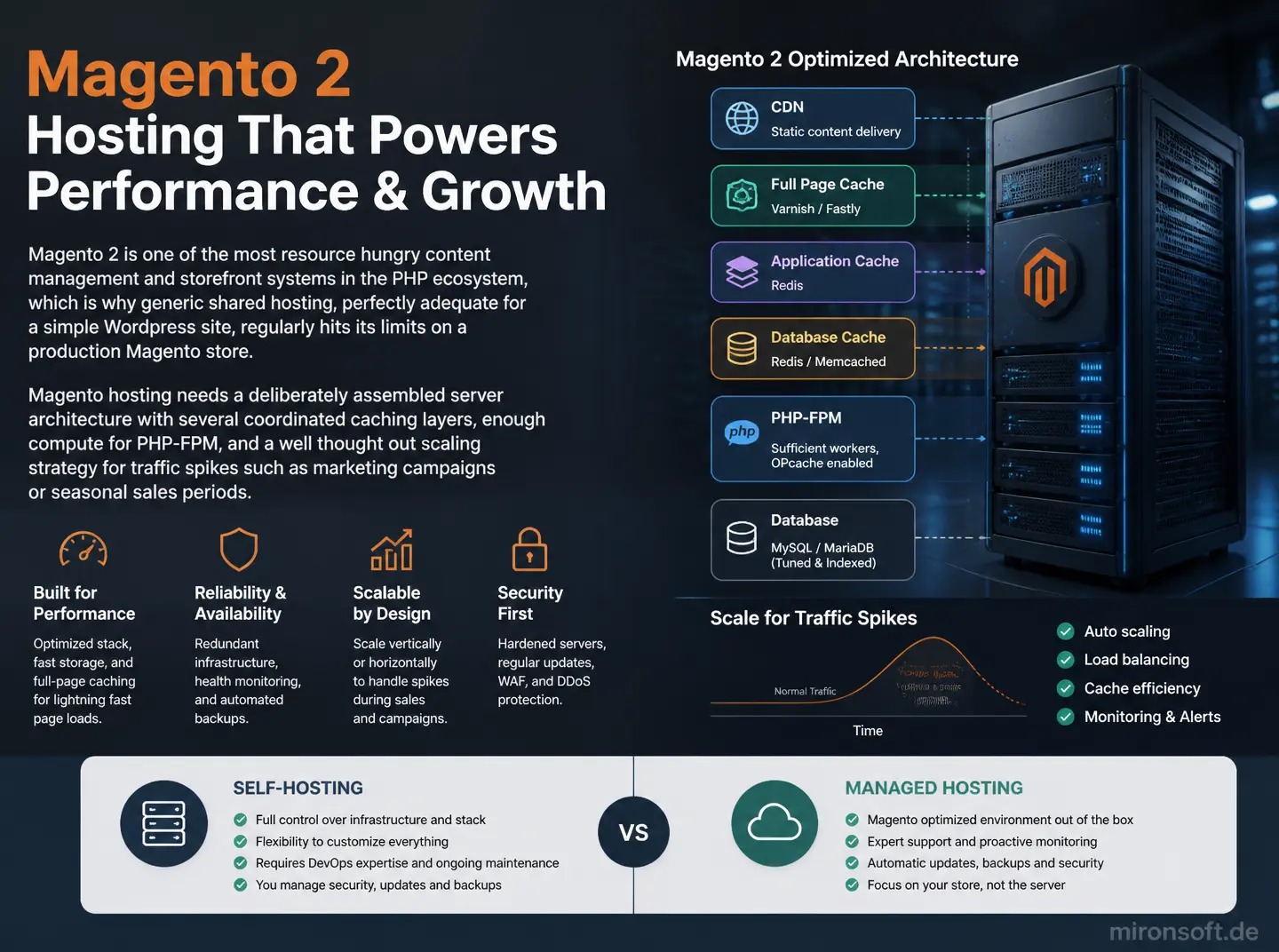
Magento 2 is one of the most resource hungry content management and storefront systems in the PHP ecosystem, which is why generic shared hosting, perfectly adequate for a simple Wordpress site, regularly hits its limits on a production Magento store. Magento hosting needs a deliberately assembled server architecture with several coordinated caching layers, enough compute for PHP-FPM, and a well thought out scaling strategy for traffic spikes such as marketing campaigns or seasonal sales periods. This article places the key requirements and helps decide between self-hosting and managed hosting.
Table of Contents
- 1. Why generic shared hosting does not work for Magento 2
- 2. Server requirements at a glance: PHP, MySQL/MariaDB, Redis, OpenSearch
- 3. Scaling: vertical and horizontal scaling for traffic spikes
- 4. Configuring caching layers correctly
- 5. Planning maintenance windows and zero-downtime deployment
- 6. Monitoring and alerting for production Magento environments
- 7. Security aspects of hosting: patches, firewall, and backups
- 8. Weighing self-hosting against managed Magento hosting
- 9. Hosting options compared
- 10. Summary
- 11. FAQ
1. Why generic shared hosting does not work for Magento 2
Magento 2 renders pages server side through complex layout XML processing, an extensive event observer system, and, particularly in the Adobe Commerce world, additional business logic layers, needing considerably more CPU and memory than a typical PHP application. Classic shared hosting strictly limits exactly those resources per customer to run many sites on one server, which in practice leads to timeouts, failed cron jobs, and, in the worst case, a storefront customers cannot reach at all.
On top of that, Magento 2 requires specific PHP extensions, a matching PHP version, and control over PHP-FPM process settings that are either unavailable or cannot be tuned sufficiently on typical shared hosting. A production Magento store therefore needs at minimum a dedicated virtual server, in practice usually a combination of several specialized servers for web, database, and caching.
2. Server requirements at a glance: PHP, MySQL/MariaDB, Redis, OpenSearch
For PHP-FPM, the process count should be tuned to the actually available CPU cores and the average memory footprint of a PHP process, instead of copying an arbitrary default setting, since too few processes cause queuing and too many cause memory pressure. MySQL or MariaDB as the primary database benefits heavily from a sufficiently sized InnoDB buffer pool, since Magento's complex EAV data model generates many joins that get noticeably slower with insufficient cache memory.
Redis typically takes on several roles at once for Magento, namely session storage, the object cache backend, and often the full page cache as well, so enough memory has to be allocated for Redis to avoid eviction under load. OpenSearch or Elasticsearch handles product search and facet navigation and should run on its own server rather than alongside the web server for larger catalogs, to avoid resource contention during indexing runs.
3. Scaling: vertical and horizontal scaling for traffic spikes
Vertical scaling, growing a single server with more CPU cores and memory, is the simplest way to absorb more load short term, but eventually hits a technical and economic ceiling. For predictable traffic spikes such as Black Friday or a major marketing campaign, temporary vertical scaling is often enough, provided the underlying infrastructure, such as a cloud platform, actually supports scaling up on short notice.
Horizontal scaling instead distributes load across several web servers behind a load balancer, adding complexity for session management and shared access to media files, but offering considerably more capacity headroom for sustained traffic growth. For most midsize Magento stores, well sized vertical scaling combined with clean caching is enough, horizontal scaling only pays off from a significant, sustained level of traffic.
# Calculate PHP-FPM pool size from available resources
# Example: 8 CPU cores, average 80 MB per PHP process, 6 GB reserved memory
echo "Recommended max_children: $(( 6144 / 80 ))"
# -> 76, in practice usually set pm.max_children to 70-80% of that
4. Configuring caching layers correctly
Magento's full page cache drastically reduces server load for repeatedly accessed, non personalized pages, but it has to be configured correctly with Varnish or Redis as the backend, including clean cache invalidation on price or stock changes. Without that invalidation, the storefront shows stale prices, which can have both legal and business consequences.
In addition to the full page cache, a CDN for static assets such as images, CSS, and JavaScript pays off, moving delivery geographically closer to end users and relieving the actual web server of that load. This multi layered caching architecture, from the browser through the CDN and full page cache to the object cache in Redis, needs to be designed as one system, not a collection of independent point measures.
5. Planning maintenance windows and zero-downtime deployment
A Magento deployment involving static content deployment and a cache rebuild can take several minutes depending on store size, during which the storefront would be unreachable without proper safeguards. A symlink based zero-downtime deployment strategy builds the new version alongside the running one and only switches over once a health check succeeds, so customers never notice the update.
For regular, planned maintenance such as security updates, a fixed, communicated maintenance window outside peak business hours is still worth keeping, even when zero-downtime deployment is technically possible, to leave enough room for troubleshooting without customer pressure if something unexpected happens.
6. Monitoring and alerting for production Magento environments
Without active monitoring, performance problems often go unnoticed until customers complain or revenue impact becomes visible. A sensible monitoring setup tracks at minimum the response times of critical pages such as the product page and checkout, PHP-FPM process utilization, Redis memory usage, and the length of the cron job queue, since a growing cron backlog is often an early indicator of deeper problems.
Alerting thresholds should be set so an alert is actually actionable, instead of firing a notification on every minor fluctuation, since a team that constantly receives irrelevant alerts eventually starts ignoring genuinely critical ones.
7. Security aspects of hosting: patches, firewall, and backups
Besides Magento's own security patches, covered in more depth in this series' maintenance article, the underlying server infrastructure also needs regular operating system and software updates, a properly configured firewall with a minimal open attack surface, and a web application firewall against known attack patterns. Backups need to be not just created regularly but also regularly tested for actual restorability, since an untested backup is often worthless when it matters.
For Magento stores handling payment data or other sensitive customer data, the hosting infrastructure additionally needs to meet relevant compliance requirements such as PCI DSS, which means considerably more effort on a self run server than with a managed hosting provider specialized in exactly that.
8. Weighing self-hosting against managed Magento hosting
A self run server offers full control over every configuration detail, but requires in-house know-how for server administration, security updates, and incident response, which smaller teams often cannot maintain permanently. Managed Magento hosting takes over those tasks for an ongoing fee and usually already comes with a performant standard architecture preconfigured for Magento.
The right choice depends heavily on team size and internal capacity: a company without its own system administration is usually better off with managed hosting, while a company with an established DevOps structure and specific infrastructure requirements can benefit from self-hosting.
9. Hosting options compared
The table below compares the main hosting options for a production Magento store.
| Hosting Option | Control | Internal Effort | Recommended For |
|---|---|---|---|
| Shared hosting | Very low | Low, but unsuitable | Not recommended for production stores |
| Own virtual/dedicated server | Full | High, own know-how needed | Teams with an established DevOps structure |
| Managed Magento hosting | Medium, configurable | Low, provider handles operations | Companies without their own system administration |
| Cloud with autoscaling | High but complex | Medium to high | Stores with strongly fluctuating traffic |
Mironsoft
Magento development, module consulting, and system architecture
A Magento project that needs a second opinion or experienced execution?
We build custom Magento modules, advise on architecture decisions, and take on complex implementations, from service contract planning to production-ready deployment.
Architecture Consulting
Have module and system architecture thought through properly before you build.
Custom Module Development
Build custom Magento modules cleanly, following best practices.
Code Review & Audit
Have existing modules reviewed for performance, security, and maintainability.
10. Summary
Magento Hosting: The Essentials at a Glance
Core idea
Magento hosting needs a deliberately assembled architecture of PHP, database, Redis, and search index instead of generic shared hosting.
Key distinction
Vertical scaling is enough for most midsize stores, horizontal scaling only pays off with sustained high traffic.
Biggest risk
Missing cache invalidation that shows stale prices or stock levels in the storefront.
Success criterion
The store stays reachable and performant even during traffic spikes such as marketing campaigns.