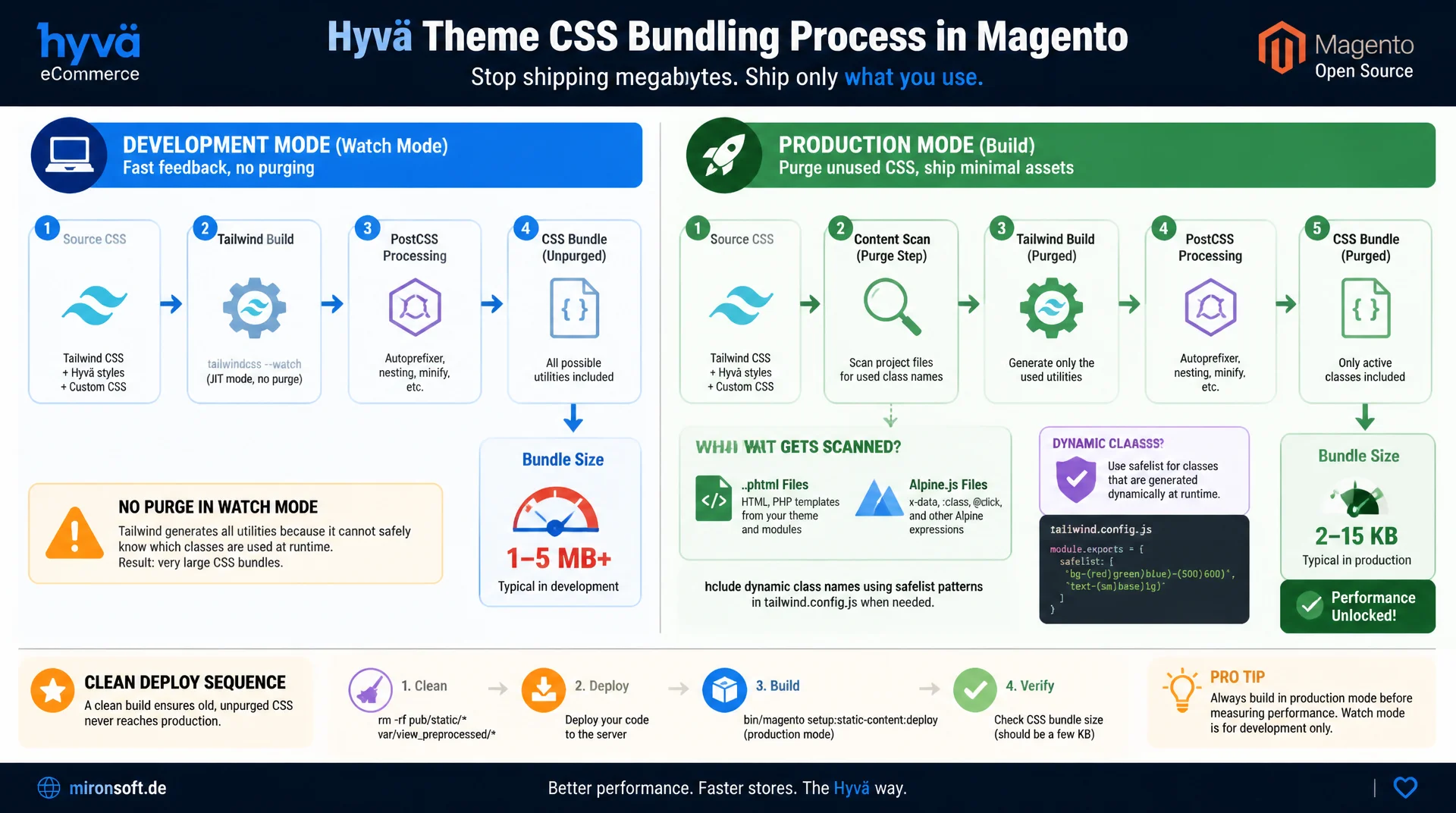
from 3 MB of unpurged CSS to a lean production build
A freshly scaffolded Hyvä theme ships a CSS bundle of several megabytes in development mode, because Tailwind CSS deliberately does not purge in watch mode. The CSS purge step in the production build scans every phtml and Alpine.js file for class names actually in use and shrinks the stylesheet down to a few kilobytes, provided dynamic class names are handled correctly and the deploy sequence runs cleanly.
Table of Contents
- 1. Why unpurged Hyvä CSS grows to 3 MB
- 2. How the Tailwind scanner detects class names
- 3. Dynamic class names in phtml and Alpine: why safelisting is needed
- 4. npm run watch vs. production build in the Docker setup
- 5. Minification with Lightning CSS and cssnano
- 6. The deploy sequence: getting the CSS purge to the storefront
- 7. Verifying file size: du -h, ls -la and a CI budget
- 8. Third-party modules and content globs
- 9. CSS purge compared: unpurged dev build vs. purged production build
- 10. Summary
- 11. FAQ
1. Why unpurged Hyvä CSS grows to 3 MB
A freshly scaffolded Hyvä theme delivers a CSS bundle in development mode that quickly grows to 2 to 3 MB, unminified and without CSS purge. The reason lies in how Tailwind CSS itself is built: the framework theoretically generates thousands of utility classes, because every combination of color, spacing, breakpoint and state such as hover, focus or dark produces its own rule. Without CSS purge, all of these rules end up in the shipped stylesheet, even though only a fraction of them is actually used in the real phtml markup.
During development with npm run watch this is intentional: every newly written class should be available instantly, without waiting for a rebuild cycle. The price for that is size, not incorrectness. It only becomes critical when this unpurged bundle accidentally ends up in production: load times increase, Lighthouse scores drop, and the storefront loads CSS rules for classes that do not occur a single time anywhere in the project. The CSS purge step in the production build is therefore not an afterthought optimization but a structural part of the build pipeline, without which Hyvä themes cannot keep their core performance promise.
2. How the Tailwind scanner detects class names
Tailwind CSS does not contain a classic compiler that parses HTML in the conventional sense. Instead, the scanner that drives CSS purge works as a pure text tokenizer: it reads every file in the configured content paths, typically *.phtml, *.js and *.html inside the theme directory, and looks for strings that look like a valid CSS class. There is no execution of PHP or JavaScript, no template evaluation, just a rule-based search for whitespace-free character sequences that match Tailwind's syntax.
That means the CSS purge mechanism only recognizes a class if it appears as a complete, contiguous string in the source code. class="bg-blue-600 text-white p-4" is recognized, and all three classes are kept in the final bundle. The scanner has no concept of semantics, it only does string matching. This exact property is what makes the purge process predictable and fast, but it is also the root of the most common Hyvä mistake: as soon as class names are assembled from substrings at runtime, the scanner only sees the fragments, not the result.
3. Dynamic class names in phtml and Alpine: why safelisting is needed
In Hyvä phtml templates and Alpine.js components it is tempting to assemble class names dynamically, for example class="text-<?= $color ?>-500" or an Alpine binding like :class="'bg-' + status + '-100'". For the CSS purge scanner there is no complete class at that point, only the fragments text- and -500, or bg- and -100. Since none of these substrings match a valid Tailwind utility, the associated CSS rule gets removed during CSS purge, and the browser simply lacks the styling, often visible only for a particular status value and therefore hard to reproduce.
The solution is safelisting: classes the scanner cannot statically detect are explicitly excluded from removal, either as a fixed list of individual class names or as a regex pattern covering a whole group. The better approach, though, is to rewrite dynamic constructions so that complete class names appear in the source code, for example via a lookup map with fixed values per status. That reduces the safelist scope and keeps CSS purge in the Hyvä theme precise instead of hollowing it out with blanket exceptions.
// tailwind.config.js (excerpt) - safelist for dynamically built class names
export default {
  content: [
    './app/design/frontend/Mironsoft/default/**/*.phtml',
    './app/design/frontend/Mironsoft/default/**/*.js',
  ],
  safelist: [
    // Alpine :class="'bg-' + status + '-100'" cannot be detected by the scanner
    'bg-green-100', 'bg-red-100', 'bg-amber-100',
    'text-green-700', 'text-red-700', 'text-amber-700',
    // Regex pattern covers a whole group of dynamic color classes at once
    { pattern: /^(bg|text)-(red|green|amber)-(100|500|700)$/ },
  ],
}
4. npm run watch vs. production build in the Docker setup
The Mark Shust Docker setup has two fundamentally different commands for the Tailwind build. npm run watch, run inside the theme directory, starts development mode: unminified, without CSS purge, with a file watcher for instant rebuilding on every change. The generated stylesheet is deliberately complete and can easily reach 2 to 3 MB, because speed on save matters more here than file size.
For production use, bin/npm --prefix app/design/frontend/[Vendor]/[Theme]/web/tailwind run build is used instead, executed through the Docker wrapper. This command activates the full production mode of Tailwind CSS v4: CSS purge via the scanner, subsequent minification, and merging all layers into a single, compact file. The difference between the two modes is not gradual but categorical, because watch is never meant for production use. Anyone who accidentally deploys the watch output ships unpurged, unminified CSS to real visitors, often without noticing right away, since the page still looks visually correct.
# Development: unpurged, unminified, instant rebuild on save
bin/npm --prefix app/design/frontend/Mironsoft/default/web/tailwind run watch

# Check dev bundle size (typically 2-3 MB, unpurged)
du -h src/pub/static/frontend/Mironsoft/default/en_US/Magento_Theme/css/styles.css
# 2.9M  src/pub/static/frontend/Mironsoft/default/en_US/Magento_Theme/css/styles.css

# Production: runs the Tailwind scanner, purges unused classes, minifies via Lightning CSS
bin/npm --prefix app/design/frontend/Mironsoft/default/web/tailwind run build

# Check production bundle size after the CSS purge step
du -h app/design/frontend/Mironsoft/default/web/tailwind/css/styles.css
# 28K   app/design/frontend/Mironsoft/default/web/tailwind/css/styles.css
5. Minification with Lightning CSS and cssnano
After CSS purge, Tailwind CSS v4 automatically runs a minification step built on Lightning CSS, a parser and transformer written in Rust that works noticeably faster than the previously common combination of PostCSS and cssnano. Lightning CSS removes whitespace and comments, shortens color values, merges identical rules and optimizes selectors without changing the cascade. For projects that additionally run a classic PostCSS pipeline step, cssnano remains a common alternative with a comparable result.
The effect of minification is noticeably smaller than that of CSS purge itself, but by no means negligible. While the CSS purge step typically shrinks the file by over 95 percent, the subsequent minification adds another 10 to 20 percent savings on top, mainly through whitespace removal and shorter selector notation. Both steps together typically turn a 3 MB development bundle into a production file between 15 and 40 KB, depending on how many individual utility combinations a theme actually uses.
{
  "scripts": {
    "watch": "tailwindcss -i ./css/source.css -o ./css/styles.css --watch",
    "build": "NODE_ENV=production tailwindcss -i ./css/source.css -o ./css/styles.css --minify"
  },
  "devDependencies": {
    "@tailwindcss/cli": "^4.0.0",
    "lightningcss": "^1.25.0"
  }
}
6. The deploy sequence: getting the CSS purge to the storefront
A frequently overlooked point: a successful CSS purge in the build step does not yet mean the purged file actually reaches the storefront. Magento caches compiled assets in var/view_preprocessed and publishes them to pub/static/frontend. If old, unpurged versions remain there, the server keeps serving the large file regardless of how small the freshly built CSS actually is.
The correct deploy sequence therefore always starts with clearing the caches: rm -rf var/view_preprocessed/* pub/static/frontend/* in the Magento root, followed by bin/magento setup:static-content:deploy en_US -t [Vendor]/[Theme] -f, which regenerates the freshly purged and minified CSS file and places it in the static content directory. Only the final command bin/magento cache:flush ensures that Magento's internal full page cache and configuration cache no longer reference the old file hash version. If any of these three steps is skipped, especially clearing var/view_preprocessed, the frontend occasionally still shows stale, unpurged CSS, even though the CSS purge process itself ran correctly.
#!/usr/bin/env bash
# deploy-css.sh - deploy purged production CSS to the storefront
set -euo pipefail

cd /var/www/html

# 1. Remove stale compiled assets (must run first)
rm -rf var/view_preprocessed/*
rm -rf pub/static/frontend/*

# 2. Rebuild static content from the purged, minified source
bin/magento setup:static-content:deploy en_US -t Mironsoft/default -f

# 3. Flush Magento caches so hashed asset URLs update
bin/magento cache:flush

echo "[OK] Purged CSS deployed to storefront"
7. Verifying file size: du -h, ls -la and a CI budget
Whether the CSS purge actually took effect can be checked in seconds. The command du -h pub/static/frontend/[Vendor]/[Theme]/en_US/Magento_Theme/css/styles.css shows the actual file size on disk, and ls -la additionally provides a timestamp and exact byte count. A value in the low double-digit KB range signals a successful CSS purge run, while a value in the MB range almost always indicates that either the wrong build command ran or a stale cache is being served.
Teams that want to catch regressions early benefit from a size budget in the CI pipeline: a simple shell script checks the file size against a fixed threshold, say 100 KB, after every build and fails the build once that threshold is exceeded. This prevents an accidentally too-broad content glob or an overly generous safelist from silently reaching the production environment. A CSS purge budget in the CI pipeline is therefore a simple but effective safeguard against creeping bundle size growth.
#!/usr/bin/env bash
# ci-css-budget.sh - fail the build if purged CSS exceeds the size budget
set -euo pipefail

CSS_FILE="app/design/frontend/Mironsoft/default/web/tailwind/css/styles.css"
BUDGET_KB=100

actual_kb=$(du -k "$CSS_FILE" | cut -f1)

if (( actual_kb > BUDGET_KB )); then
  echo "[ERROR] CSS bundle is ${actual_kb} KB, budget is ${BUDGET_KB} KB" >&2
  exit 1
fi

echo "[OK] CSS bundle is ${actual_kb} KB (within ${BUDGET_KB} KB budget)"
8. Third-party modules and content globs
The Tailwind scanner only searches the paths configured in the content array, typically app/design/frontend/[Vendor]/[Theme]/**/*.phtml along with the corresponding JavaScript files of the theme itself. Class names living in third-party modules outside these globs, for example in a separately installed module or an extension with its own phtml files in a different vendor directory, are simply not seen by the CSS purge scanner and are therefore removed from the final bundle.
The result: a module ships seemingly correct HTML with valid Tailwind classes, but without matching CSS, because the rule was removed during CSS purge. The solution is to widen the content path in the Tailwind setup so it covers all relevant vendor directories, not just the active theme. With frequently changing or numerous third-party modules, a central pattern such as app/design/frontend/**/*.phtml is more sensible than individual, hard-coded paths per module.
9. CSS purge compared: unpurged dev build vs. purged production build
The difference between unpurged development CSS and a purged production bundle is most visible in a direct comparison of the key figures. It affects not only raw file size, but directly impacts load time, perceived performance and Lighthouse score, especially on mobile connections with limited bandwidth.
| Metric | Unpurged Dev Build | Purged Production Build | Effect |
|---|---|---|---|
| CSS file size | ~2.9 MB | ~28 KB | Roughly a factor of 100 smaller |
| HTTP response (gzip) | ~480 KB | ~9 KB | Significantly less transfer volume |
| Load time (simulated 3G) | ~1.8 s | ~0.2 s | Noticeably faster interactivity |
| Lighthouse performance | ~62 | ~96 | Better Core Web Vitals score |
| Utility classes used | all generated (~34,000) | only used ones (~450) | Only actually referenced classes |
The table shows why a clean CSS purge is not a cosmetic detail, but pays directly into business metrics such as conversion rate and bounce rate. A shop that accidentally ships unpurged CSS noticeably loses time to interactive, without any functional bug in the code whatsoever.
10. Summary
CSS purge in Hyvä themes solves a structural problem in Tailwind CSS: development mode deliberately generates a complete, multi-megabyte stylesheet, because speed on save matters more than file size. The Tailwind scanner works as a pure text tokenizer over phtml and JavaScript files and only keeps classes that appear as a complete string in the source code. Dynamic constructions such as class="text-<?= $color ?>-500" or Alpine bindings with string concatenation escape this detection and need safelisting or a switch to complete class names.
The path from 3 MB to a few KB runs through the right build command, minification with Lightning CSS, and a complete deploy sequence of cache clearing, static content deploy and cache flush. A size budget in the CI pipeline makes regressions visible immediately, before an overly broad content glob or a sprawling safelist undoes the effect of the CSS purge again.
CSS Purge in Hyvä Themes: The Key Points at a Glance
Scanner mechanics
The Tailwind scanner searches as a text tokenizer for complete class names in phtml and JS. No semantics, only string matching.
Safelist instead of breakage
Dynamically assembled class names need safelisting, otherwise CSS purge silently removes the associated rule.
watch vs. build
npm run watch is unpurged and unminified. Only bin/npm ... run build delivers the production-ready bundle.
Deploy sequence
rm -rf var/view_preprocessed and pub/static/frontend, then setup:static-content:deploy and cache:flush, in that order.
11. FAQ: CSS Purge in Hyvä Themes
1What is CSS purge in a Hyvä theme?
2Why does the Hyvä CSS grow so large in dev mode?
3How does the Tailwind scanner detect class names?
4Why doesn't class="text-<?= $color ?>-500" work?
5What is safelisting and when do you need it?
6watch vs. production build?
7What role does Lightning CSS play?
8Why delete var/view_preprocessed?
9How do I check CSS purge success?
10Why is CSS missing for a third-party module?
Mironsoft
Tailwind CSS, Hyvä themes and performance optimization for Magento 2
Is your storefront's CSS bundle too big?
We analyze your Hyvä theme, set up the CSS purge process correctly, replace fragile dynamic class names with safe patterns, and make sure the deploy sequence actually gets the purged CSS onto the storefront.
CSS purge audit
Check bundle size, safelist scope and content globs for weak spots
Build pipeline
Set up production build, minification and deploy sequence cleanly
CI integration
Integrate a CSS size budget into the pipeline and prevent regressions