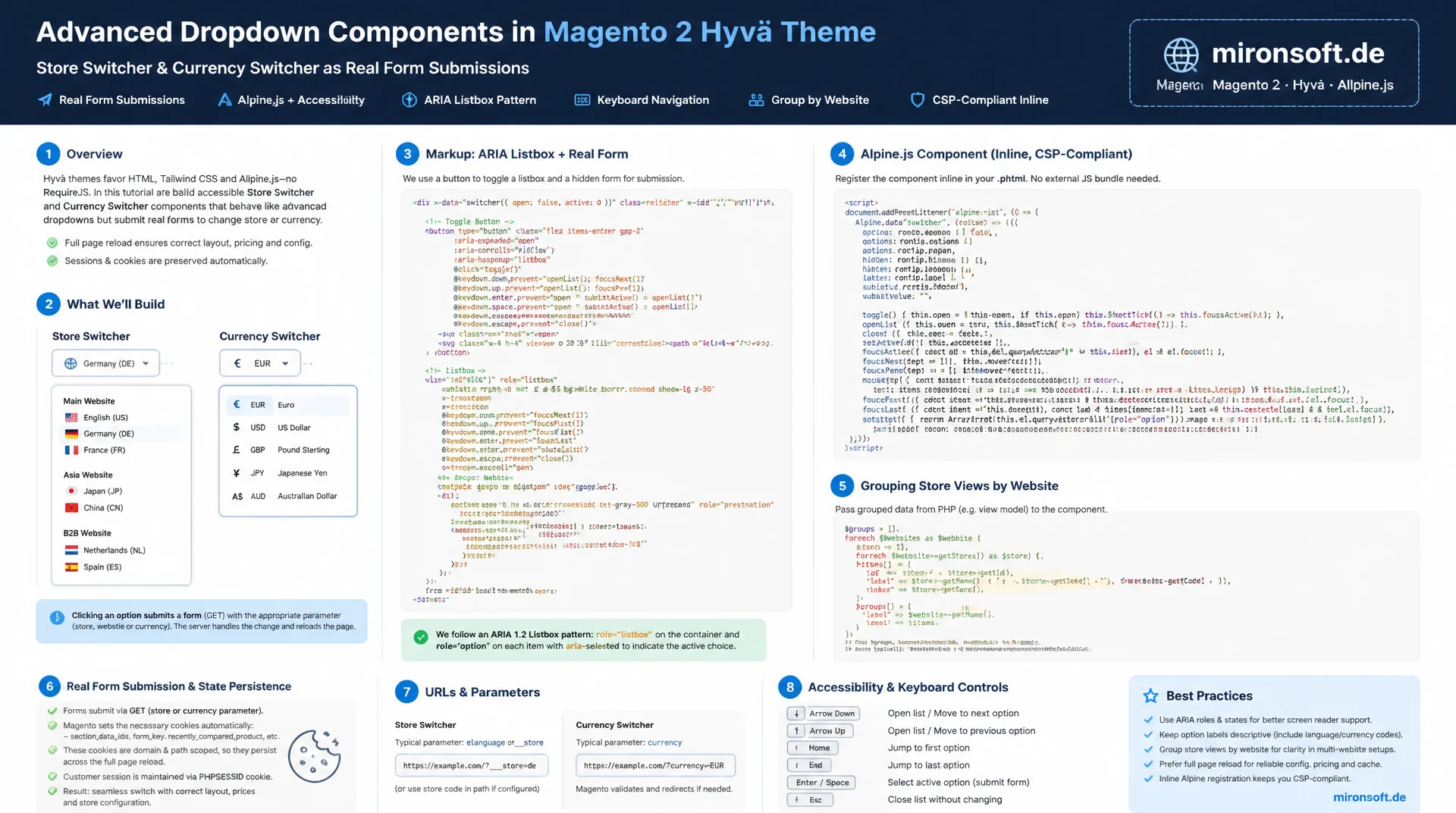
an accessible Alpine dropdown instead of Luma UI-Components
The store switcher and the currency switcher in the header are not ordinary dropdowns: both must trigger a real form submit to a Magento controller so a cookie and session get updated on the server and survive a full page reload. This article shows how to build both components as an accessible Alpine.js dropdown in the Hyvä header, including the ARIA listbox pattern, keyboard control, grouping by website for many store views, and CSP-compliant inline registration, all without shipping any extra JavaScript bundle.
Table of Contents
- 1. Why These Two Header Dropdowns Deserve Their Own Deep Dive
- 2. The Magento Data Model Behind It
- 3. Why a Real Form Submit Is Non-Negotiable
- 4. Alpine Foundation: x-data, the open State, and the Trigger Button
- 5. Accessibility: the ARIA Listbox Pattern and Keyboard Control
- 6. The Second Component: Its Own Form, Its Own Controller
- 7. Handling Many Store Views: Grouping and a Scroll Area
- 8. CSP and Performance: No Extra JS Bundle
- 9. Both Dropdown Approaches Compared
- 10. Summary
- 11. FAQ
1. Why These Two Header Dropdowns Deserve Their Own Deep Dive
Generic Alpine tutorials usually cover mobile navigation, modal dialogs, or replacing Luma UI-Components with a custom component architecture. The store switcher and the currency switcher in the header break that pattern, because neither is a purely client-side widget. Clicking an entry in this dropdown has to trigger a real request to a Magento controller that sets a session variable and writes a cookie, without that server round trip the selection is nothing more than superficial UI state and is lost on the next page load.
This is exactly where many naive Alpine implementations fail, treating both components like an ordinary dropdown menu: x-model bound to a local variable, done. It looks right, but it has zero effect on the store context or the price display. The following sections cover the full picture: the backend data model, the mandatory form submit, the Alpine structure for the trigger and the listbox, the ARIA pattern for accessibility, and the specifics of the second component with its own controller.
2. The Magento Data Model Behind It
Before a single line of Alpine code goes into the template, it has to be clear where the data for the store switcher comes from. The list of visible store views comes from \Magento\Store\Model\Store::getAvailableStoreViews(), or preferably in a ViewModel from StoreManagerInterface::getStores() filtered on isActive() and the current website scope. Every store view implements \Magento\Store\Api\Data\StoreInterface and exposes a code, a name, a website assignment, and the base URL needed for the context switch. A clean ViewModel bundles this data into a simple array of code, label, and website name that then gets serialized as JSON into a data-* attribute.
The currency dropdown uses its own, structurally similar model: \Magento\Directory\Model\Currency exposes the currency codes enabled for the store via getConfigAllowCurrencies(), while StoreInterface::getAvailableCurrencyCodes() returns the subset allowed for the current store scope. For each code, the PHP Intl extension or Magento's CurrencyInterface can resolve a symbol and a localized name. Both data sources, store views as well as currencies, are prepared in the ViewModel and not fetched from within the Alpine code, Alpine only ever receives the finished list as JSON, no API calls of its own.
3. Why a Real Form Submit Is Non-Negotiable
The actual switch runs in Magento through \Magento\Store\Controller\Store\SwitchAction. This controller expects two request parameters: ___store with the target store code and ___from_store with the code of the originating store view. The controller validates that the target store is reachable, sets the store cookie, and then redirects to a matching URL in the new store context. A store switcher that never fires this request changes nothing about prices, translations, or store-specific CMS content, no matter how convincing the UI looks.
That is why the Alpine dropdown still keeps a classic HTML <form> with method="post", submitted programmatically as soon as an option is selected. Alpine handles the presentation layer only: opening and closing the dropdown, showing the current selection, filling the hidden form field. The following excerpt shows the complete phtml template with the form, trigger button, and listbox:
<?php
/** @var \Magento\Framework\View\Element\Template $block */
/** @var \Magento\Store\Model\Store $currentStore */
?>
<div class="relative" x-data="storeSwitcher()" @click.outside="open = false" @keydown.escape.window="open = false">
  <form id="store-switcher-form" action="<?= $block->escapeUrl($block->getSwitchUrl()) ?>" method="post">
    <input type="hidden" name="___store" x-bind:value="selectedStoreCode">
    <input type="hidden" name="___from_store" value="<?= $block->escapeHtmlAttr($currentStore->getCode()) ?>">
    <input type="hidden" name="uenc" value="<?= $block->escapeHtmlAttr($block->getCurrentBase64Url()) ?>">
  </form>

  <button
    type="button"
    @click="open = !open"
    :aria-expanded="open.toString()"
    aria-haspopup="listbox"
    aria-controls="store-switcher-listbox"
    class="inline-flex items-center gap-2 rounded-lg border border-gray-300 px-3 py-2 text-sm font-medium hover:bg-gray-50"
  >
    <span x-text="selectedStoreLabel"></span>
    <svg class="h-4 w-4" :class="{ 'rotate-180': open }" fill="none" viewBox="0 0 24 24" stroke="currentColor"><path stroke-linecap="round" stroke-linejoin="round" stroke-width="2" d="M19 9l-7 7-7-7"/></svg>
  </button>

  <ul
    x-show="open"
    x-cloak
    id="store-switcher-listbox"
    role="listbox"
    aria-label="Store view"
    class="absolute z-20 mt-2 max-h-72 w-64 overflow-y-auto rounded-lg border border-gray-200 bg-white py-1 shadow-lg"
  >
    <template x-for="storeView in storeViews" :key="storeView.code">
      <li
        role="option"
        :aria-selected="storeView.code === selectedStoreCode"
        @click="selectStore(storeView)"
        @keydown.enter="selectStore(storeView)"
        tabindex="0"
        class="cursor-pointer px-4 py-2 text-sm hover:bg-orange-50"
        x-text="storeView.name"
      ></li>
    </template>
  </ul>
</div>
4. Alpine Foundation: x-data, the open State, and the Trigger Button
The Alpine component behind this dropdown is deliberately kept lean. A single open boolean controls the visibility of the list, selectedStoreCode and selectedStoreLabel hold the current selection in client state so the button label and the checkmark in the list react instantly, without waiting on the server round trip. Two directives are mandatory for clean dropdown behavior: @click.outside closes the dropdown as soon as a click lands outside it, and @keydown.escape.window closes it regardless of which element currently holds focus.
Registration happens centrally through alpine:init, so the component can be reused both in the desktop header and, if needed, in the mobile navigation. The store view data itself does not come from a fetch request but from a data-store-views attribute that the phtml template fills server-side with json_encode(). That keeps the dropdown functional on first render without an extra HTTP request, which matters in particular for Core Web Vitals.
// Register the Alpine component once, reused by header.phtml and the mobile menu
document.addEventListener('alpine:init', () => {
  Alpine.data('storeSwitcher', () => ({
    open: false,
    selectedStoreCode: 'default',
    selectedStoreLabel: 'Default Store View',
    storeViews: [],

    init() {
      // storeViews is injected server-side as JSON, see the phtml template
      this.storeViews = JSON.parse(this.$el.dataset.storeViews || '[]');
      const current = this.storeViews.find((view) => view.code === this.selectedStoreCode);
      if (current) {
        this.selectedStoreLabel = current.name;
      }
    },

    selectStore(storeView) {
      this.selectedStoreCode = storeView.code;
      this.selectedStoreLabel = storeView.name;
      this.open = false;
      // Real form submission: the switch controller sets a cookie and redirects
      this.$el.closest('[x-data]').querySelector('#store-switcher-form').submit();
    },
  }));
});
5. Accessibility: the ARIA Listbox Pattern and Keyboard Control
A dropdown that only works with a mouse locks out keyboard and screen reader users. The ARIA combobox/listbox pattern solves this with clear roles: the trigger button carries aria-haspopup="listbox" and a reactive :aria-expanded, the list itself gets role="listbox", and each item gets role="option" with aria-selected. That way a screen reader correctly announces that this is a selection list, which option is currently chosen, and whether the list is currently open.
For keyboard control, @keydown.enter alone is not enough. A complete listbox pattern supports arrow keys for navigating between options as well as Home and End for jumping to the beginning and end of the list. Roving tabindex is the more robust alternative to classic tab focus inside the list: only the currently active option is reachable via Tab, the arrow keys move focus programmatically. The following pattern applies unchanged to both header dropdowns:
// Roving-tabindex keyboard navigation for the store dropdown listbox
Alpine.data('storeSwitcherKeyboard', () => ({
  activeIndex: 0,

  onArrowDown() {
    this.activeIndex = Math.min(this.activeIndex + 1, this.storeViews.length - 1);
    this.focusActiveOption();
  },

  onArrowUp() {
    this.activeIndex = Math.max(this.activeIndex - 1, 0);
    this.focusActiveOption();
  },

  onHome() {
    this.activeIndex = 0;
    this.focusActiveOption();
  },

  onEnd() {
    this.activeIndex = this.storeViews.length - 1;
    this.focusActiveOption();
  },

  focusActiveOption() {
    const options = this.$refs.listbox.querySelectorAll('[role="option"]');
    const target = options[this.activeIndex];
    if (target) {
      target.focus();
    }
  },
}));
6. The Second Component: Its Own Form, Its Own Controller
Structurally, the currency dropdown is very similar to the store dropdown, but it hangs off a different controller: \Magento\Directory\Controller\Currency\SwitchAction. It expects the parameter currency with the ISO currency code and, on success, writes the chosen currency into the session, tied to the current store scope. Unlike the store switch, there is no ___from_store parameter here, since the currency changes within the same store view and no store context switch takes place.
This dropdown also needs its own hidden form, submitted programmatically via Alpine as soon as a currency is chosen. The symbol and code can be displayed client-side from the already server-prepared list, without Alpine ever needing to know exchange rates or formatting logic, the actual price conversion stays entirely server-side in Magento's Currency model.
<?php
/** @var \Magento\Directory\Block\Currency $block */
?>
<div class="relative" x-data="currencySwitcher()" @click.outside="open = false" @keydown.escape.window="open = false">
  <form id="currency-switcher-form" action="<?= $block->escapeUrl($block->getSwitchCurrencyUrl()) ?>" method="post">
    <input type="hidden" name="currency" x-bind:value="selectedCurrencyCode">
  </form>

  <button
    type="button"
    @click="open = !open"
    :aria-expanded="open.toString()"
    aria-haspopup="listbox"
    aria-controls="currency-switcher-listbox"
    class="inline-flex items-center gap-2 rounded-lg border border-gray-300 px-3 py-2 text-sm font-medium hover:bg-gray-50"
  >
    <span x-text="selectedCurrencyCode"></span>
  </button>

  <ul
    x-show="open"
    x-cloak
    id="currency-switcher-listbox"
    role="listbox"
    aria-label="Currency"
    class="absolute right-0 z-20 mt-2 w-40 rounded-lg border border-gray-200 bg-white py-1 shadow-lg"
  >
    <template x-for="currency in currencies" :key="currency.code">
      <li
        role="option"
        :aria-selected="currency.code === selectedCurrencyCode"
        @click="selectCurrency(currency)"
        tabindex="0"
        class="cursor-pointer px-4 py-2 text-sm hover:bg-orange-50 flex justify-between"
      >
        <span x-text="currency.code"></span>
        <span x-text="currency.symbol" class="text-gray-400"></span>
      </li>
    </template>
  </ul>
</div>
7. Handling Many Store Views: Grouping and a Scroll Area
Shops with multiple websites and store groups quickly end up with twenty or more store views, and a flat dropdown becomes unwieldy fast. The store dropdown should therefore group the options by website, with its own heading per group, and wrap the whole list in a container with a bounded height and overflow-y-auto. Alpine handles the grouping client-side from the already prepared raw data, so no extra server logic is needed for the display.
Iterating over nested groups follows the same x-for pattern as a flat list, just with an additional outer loop over the websites. A stable :key per store view matters so Alpine correctly maps DOM nodes on re-render instead of needlessly recreating them. For the currency dropdown, grouping is rarely necessary since the number of enabled currencies usually stays manageable, but the same scroll pattern protects against overly long lists there too.
// Group store views by website so long lists stay scannable
Alpine.data('groupedStoreSwitcher', () => ({
  open: false,
  websites: [],

  init() {
    const raw = JSON.parse(this.$el.dataset.storeViews || '[]');
    const grouped = {};
    raw.forEach((view) => {
      if (!grouped[view.websiteName]) {
        grouped[view.websiteName] = { name: view.websiteName, storeViews: [] };
      }
      grouped[view.websiteName].storeViews.push(view);
    });
    this.websites = Object.values(grouped);
  },
}));
8. CSP and Performance: No Extra JS Bundle
A key advantage of this approach: neither the store dropdown nor the currency dropdown needs an extra JavaScript bundle. Alpine.js is already loaded globally in the Hyvä theme, the components simply register on top of it via alpine:init. That keeps the amount of JavaScript shipped per page constant, regardless of how many dropdown components are used in the header.
Every inline <script> block that registers an Alpine component must then be secured with $hyvaCsp->registerInlineScript() in the template, so the Content Security Policy knows the generated hash and does not block the script. Without this registration, the dropdown simply would not work in environments with an active CSP, because the browser discards the inline script. A quick look at the browser console for CSP violation messages therefore belongs in the standard checklist after every deploy.
9. Both Dropdown Approaches Compared
The difference between the classic Luma dropdown and a custom-built Alpine dropdown for the store switcher and the currency switcher shows up most clearly in bundle size, accessibility, and maintainability.
| Criterion | Luma UI-Component Dropdown | Alpine Dropdown in the Header | Effect |
|---|---|---|---|
| Bundle size | Dedicated Knockout widget + loader | 0 KB extra, Alpine already loaded | No extra HTTP request |
| Accessibility | No native ARIA listbox pattern | role="listbox"/"option", keyboard control | Screen-reader friendly |
| Form correctness | Often an implicit reload via data attributes | Explicit form submit to SwitchAction | Cookie/session reliably set |
| Maintainability | Knockout bindings hard to follow | x-data directly in the phtml, no build chain | Faster onboarding |
| CSP compatibility | Inline templates often hard to hash | registerInlineScript() per block | Strict CSP without unsafe-inline |
In practice, this means the effort of building both components from scratch as an Alpine dropdown is manageable, since no separate JavaScript bundle, no extra build pipeline, and no Knockout context needs to be maintained. The only added effort lies in careful ARIA markup and the explicit form submit, both tasks that once solved cleanly can be reused for every future project.
Mironsoft
Hyvä development, Alpine components, and accessible Magento frontends
Header dropdowns that actually work reliably?
We build store and currency selection as an accessible Alpine dropdown in your Hyvä header, including a correct form submit, the ARIA listbox pattern, and CSP-compliant inline registration.
Header audit
Reviewing existing header dropdowns for accessibility and CSP compliance
Alpine implementation
Dropdown with ARIA listbox, keyboard control, and a real form submit
Multi-store setup
Grouping by website for shops with many store views
10. Summary
A clean store dropdown and a clean currency dropdown in the Hyvä header are not mere UI exercises, they require an understanding of the Magento data model and its corresponding switch controllers. Store::getAvailableStoreViews() supplies the raw data for store selection, \Magento\Directory\Model\Currency supplies the raw data for currency selection. Both switches must go through a real form submit to SwitchAction, because only that way do the cookie and session get updated server-side, and the page reload retains the chosen state.
Alpine.js handles the presentation layer only: opening and closing the dropdown, keeping ARIA attributes in sync, keyboard control with arrow keys and Escape, grouping by website for many store views. Since Alpine is already available globally in the Hyvä theme, neither component adds an extra JavaScript bundle, as long as every inline script block is correctly cleared for the Content Security Policy via registerInlineScript().
Store and Currency Selection in the Hyvä Header: The Key Takeaways
Data model
StoreInterface and the Currency model supply the raw data in the ViewModel, serialized as JSON for Alpine.
Real form submit
___store, ___from_store, and currency must be sent to the respective SwitchAction.
Accessibility
ARIA listbox pattern with role="listbox"/"option", roving tabindex, and Escape handling.
Performance & CSP
No extra bundle, Alpine already loaded, registerInlineScript() per inline block.