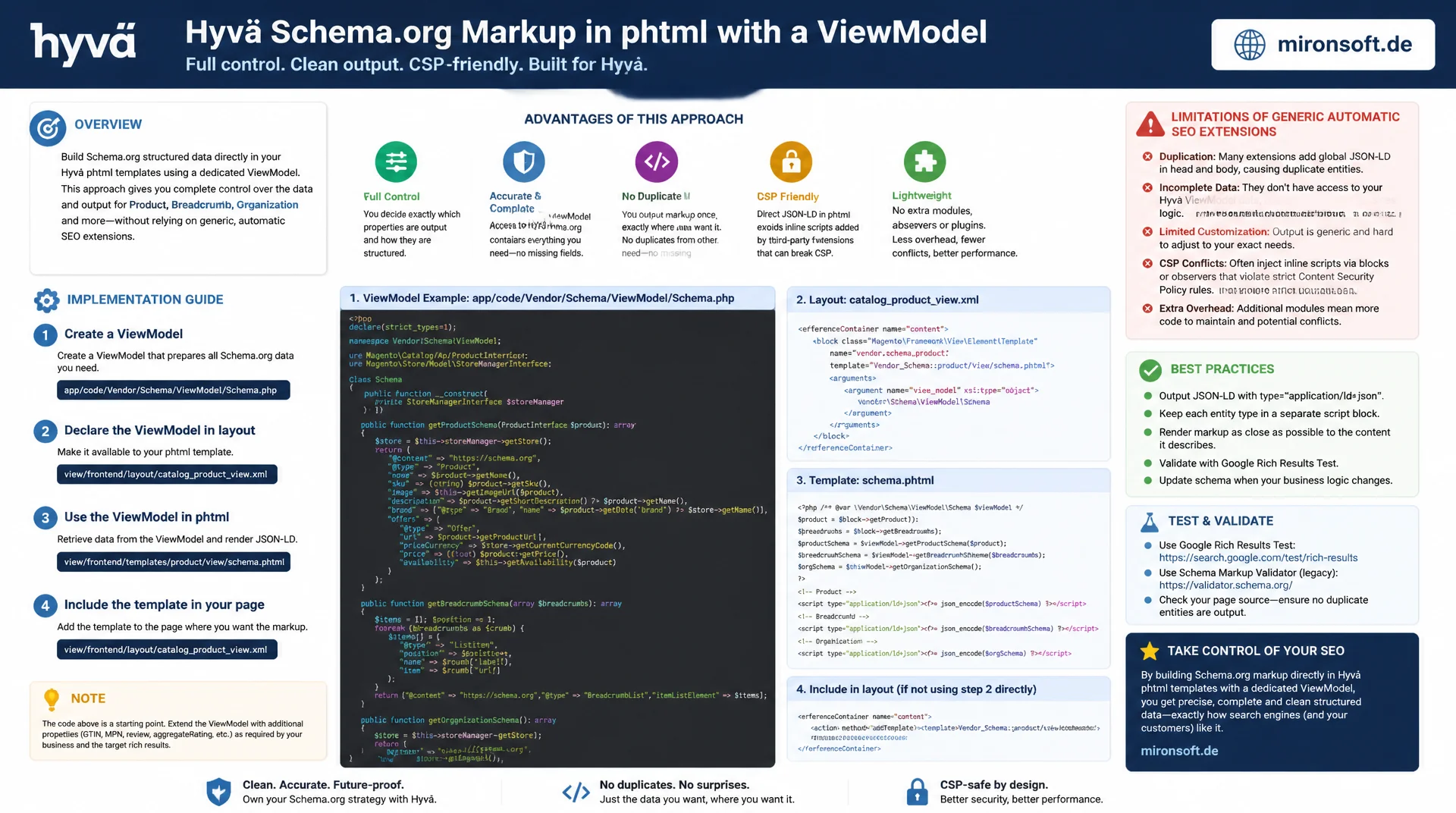
instead of via plugin or generic SEO extension
Generic SEO extensions often produce Schema.org markup that is duplicated or incomplete, because they have no access to the actual Hyvä ViewModel data. Building Hyvä Schema.org markup directly in the phtml template through a dedicated ViewModel gives full control over Product, Breadcrumb and Organization data, without extra module overhead and without conflicts with the CSP setup.
Table of Contents
- 1. Why Schema.org markup belongs directly in the template, not a plugin
- 2. Adding the JSON-LD foundation to Hyvä phtml templates
- 3. Integrating Product schema directly in product/view.phtml
- 4. BreadcrumbList schema in the Hyvä breadcrumbs.phtml
- 5. Organization and WebSite schema globally in default.phtml
- 6. A clean ViewModel pattern for schema data
- 7. Testing and validating Schema.org markup
- 8. Performance considerations
- 9. Common pitfalls with Schema.org markup in Hyvä
- 10. Summary
- 11. FAQ
1. Why Schema.org markup belongs directly in the template, not a plugin
A generic SEO extension has no idea about the actual data structure of a Hyvä theme. It typically fetches product data through its own, separate data layer and produces Schema.org markup that has nothing to do with what the theme has already loaded through its ViewModel. Anyone who instead outputs Hyvä Schema.org markup directly in the phtml template accesses exactly the data the block already uses for the visible rendering: price, availability, ratings, image paths. No second data source is created that can drift out of sync after a price update or an attribute change.
The second reason is avoiding duplicate output. Many Magento extensions for SEO ship their own Product schema, injected via plugin or observer. If Hyvä Schema.org markup is active in the template at the same time, two <script type="application/ld+json"> blocks with the same @type end up on the same page. Google handles this unpredictably, deciding which of the two markups applies, and Rich Results tests report warnings about conflicting values. Markup embedded directly in the theme, on the other hand, can be switched on and off deliberately, without having to disable a third-party module.
The third reason is the missing overhead. A generic SEO extension frequently loads its own collections, its own repository calls and its own configuration values, purely to fill schema properties. In the Hyvä ViewModel, this data is usually already present, because it is needed for the regular page rendering anyway. Producing Hyvä Schema.org markup in the template means, in practice, no additional database query, no additional module layer, just a formatting task on objects that are already loaded.
2. Adding the JSON-LD foundation to Hyvä phtml templates
The basic structure for Hyvä Schema.org markup is identical in every template: a <script type="application/ld+json"> tag whose content is produced from a PHP array with json_encode(). Placement matters, at the end of the respective phtml template, right before the closing root element of the block, so the markup stays associated with the right content and is not accidentally rendered multiple times through nested block includes. For flags, JSON_UNESCAPED_SLASHES | JSON_UNESCAPED_UNICODE is recommended, so URLs stay readable and special characters do not appear as escape sequences.
There is a subtlety around CSP compatibility that is often overlooked in practice: browsers do not execute application/ld+json as JavaScript, so a script-src directive normally does not block this content. Even so, the Hyvä CSP module by default inspects every inline <script> tag regardless of its type attribute once default-src is configured restrictively. Before Hyvä Schema.org markup goes live, the page should therefore be tested in CSP report-only mode, to make sure no violation is reported.
Conflicts with the Hyvä CSP module arise almost exclusively when JSON-LD output is mixed with real inline logic, for instance when a real JavaScript inline block follows in the same template, such as an Alpine initialization. For pure JSON-LD blocks, registering a nonce via $hyvaCsp is generally not required, because no executable code is present. As soon as a real inline JavaScript block follows in the same template, though, it must be registered as usual through $hyvaCsp->registerInlineScript(), so the Hyvä CSP module does not block it.
<?php
/** @var \Magento\Catalog\Block\Product\View $block */
/** @var \Mironsoft\Schema\ViewModel\SchemaViewModel $schemaViewModel */
$schemaViewModel = $viewModels->require(\Mironsoft\Schema\ViewModel\SchemaViewModel::class);
$productSchema = $schemaViewModel->getProductSchema($block->getProduct());
?>

<div class="product-info-main">
  <!-- Regular Hyvä product markup above -->

  <script type="application/ld+json">
<?= /* @noEscape */ json_encode($productSchema, JSON_UNESCAPED_SLASHES | JSON_UNESCAPED_UNICODE) ?>
  </script>
</div>
3. Integrating Product schema directly in product/view.phtml
For Product schema, the biggest benefit of Hyvä Schema.org markup directly in the template is that Offer and AggregateRating are populated from the very same objects that also drive the visible price and rating display. A separate SEO extension would have to load these values again and risks discrepancies, for instance when price rules or special prices are not accounted for identically. The properties sku, name, image, brand and offers.price can be derived directly from the Product object already loaded in the block.
For offers.availability, the most reliable source is $product->isSalable() or the stock item data, not a static value. If this property is missing or set incorrectly, the Google Rich Results Test reports a warning, and the product can be disadvantaged in shopping results. aggregateRating should only be output when reviews actually exist, since an empty or fabricated rating violates Google's Schema.org guidelines.
{
  "@context": "https://schema.org",
  "@type": "Product",
  "name": "Hyvä Performance Sneaker Pro",
  "sku": "HYVA-SNK-001",
  "image": [
    "https://mironsoft.de/media/catalog/product/h/y/hyva-snk-001-1.jpg"
  ],
  "brand": {
    "@type": "Brand",
    "name": "Mironsoft Gear"
  },
  "offers": {
    "@type": "Offer",
    "url": "https://mironsoft.de/hyva-performance-sneaker-pro.html",
    "priceCurrency": "EUR",
    "price": "129.00",
    "availability": "https://schema.org/InStock",
    "itemCondition": "https://schema.org/NewCondition"
  },
  "aggregateRating": {
    "@type": "AggregateRating",
    "ratingValue": "4.6",
    "reviewCount": "38"
  }
}
4. BreadcrumbList schema in the Hyvä breadcrumbs.phtml
The Hyvä breadcrumbs template already holds the crumbs as a structured array, typically with label and link per entry. For Hyvä Schema.org markup in the form of BreadcrumbList, this array only needs to be mapped into itemListElement, with position starting at 1 and incrementing by one per entry. The last entry, usually the current page, should not get its own item with a URL, since Google does not expect a clickable target URL for the final position.
It is important that this markup is only rendered once per page. Since breadcrumbs.phtml in Hyvä themes can sometimes be included in several areas, for example on category and product pages with slightly different layouts, the JSON-LD output should live in exactly one place in the block tree, not repeated in every calling instance.
{
  "@context": "https://schema.org",
  "@type": "BreadcrumbList",
  "itemListElement": [
    {
      "@type": "ListItem",
      "position": 1,
      "name": "Home",
      "item": "https://mironsoft.de/"
    },
    {
      "@type": "ListItem",
      "position": 2,
      "name": "Shoes",
      "item": "https://mironsoft.de/shoes.html"
    },
    {
      "@type": "ListItem",
      "position": 3,
      "name": "Hyvä Performance Sneaker Pro"
    }
  ]
}
5. Organization and WebSite schema globally in default.phtml
Unlike Product or BreadcrumbList schema, Organization and WebSite schema do not belong in individual content blocks, but exactly once on every page. The right place for this Hyvä Schema.org markup is either directly in the root template's default.phtml, or, more cleanly, in a dedicated block placed in the head container via layout XML. That makes the output centrally controllable and lets it be disabled without touching a template.
WebSite with a potentialAction of type SearchAction lets Google display a sitelinks search box in the search result, provided the internal search route is correctly configured as a URL template with a {search_term_string} placeholder. The sameAs list in the Organization schema should only contain genuine, actively maintained social media profiles, since outdated or wrong links tend to hurt the Knowledge Graph association rather than help it.
{
  "@context": "https://schema.org",
  "@graph": [
    {
      "@type": "Organization",
      "@id": "https://mironsoft.de/#organization",
      "name": "Mironsoft",
      "url": "https://mironsoft.de",
      "logo": "https://mironsoft.de/media/logo/mironsoft-logo.png",
      "sameAs": [
        "https://www.linkedin.com/company/mironsoft",
        "https://github.com/mironsoft"
      ]
    },
    {
      "@type": "WebSite",
      "@id": "https://mironsoft.de/#website",
      "url": "https://mironsoft.de",
      "name": "mironsoft.de",
      "publisher": { "@id": "https://mironsoft.de/#organization" },
      "potentialAction": {
        "@type": "SearchAction",
        "target": "https://mironsoft.de/catalogsearch/result/?q={search_term_string}",
        "query-input": "required name=search_term_string"
      }
    }
  ]
}
6. A clean ViewModel pattern for schema data
Once Hyvä Schema.org markup touches more than one template, a dedicated ViewModel class pays off, declared as an ArgumentInterface and injected into the relevant block via layout XML. Instead of scattering array construction and formatting logic across phtml templates, a SchemaViewModel class encapsulates this logic in one place, testable and reusable across product, category and homepage templates.
Access to stock, price and review data runs through injected repository and service interfaces, not through direct model instances in the template. That keeps the phtml file free of business logic and makes Hyvä Schema.org markup independent of later changes to the data source, for example if ratings come from an external review service instead of Magento_Review in the future.
<?php

declare(strict_types=1);

namespace Mironsoft\Schema\ViewModel;

use Magento\Catalog\Api\Data\ProductInterface;
use Magento\Framework\View\Element\Block\ArgumentInterface;
use Magento\Review\Model\ResourceModel\Review\Summary\CollectionFactory as ReviewSummaryCollectionFactory;
use Magento\Store\Model\StoreManagerInterface;

/**
 * Provides Schema.org structured data for product templates.
 */
final class SchemaViewModel implements ArgumentInterface
{
    /**
     * @param StoreManagerInterface $storeManager Store manager for base URLs and currency
     * @param ReviewSummaryCollectionFactory $reviewSummaryCollectionFactory Factory for rating summaries
     */
    public function __construct(
        private readonly StoreManagerInterface $storeManager,
        private readonly ReviewSummaryCollectionFactory $reviewSummaryCollectionFactory
    ) {
    }

    /**
     * Builds a Product schema array ready for json_encode().
     *
     * @param ProductInterface $product Loaded product entity
     * @return array<string, mixed>
     */
    public function getProductSchema(ProductInterface $product): array
    {
        // @phpstan-ignore-next-line StoreInterface::getBaseUrl() missing on interface
        $baseUrl = $this->storeManager->getStore()->getBaseUrl();

        $schema = [
            '@context' => 'https://schema.org',
            '@type' => 'Product',
            'name' => $product->getName(),
            'sku' => $product->getSku(),
            'offers' => [
                '@type' => 'Offer',
                'url' => $baseUrl . $product->getUrlKey() . '.html',
                'priceCurrency' => $this->storeManager->getStore()->getCurrentCurrencyCode(),
                'price' => number_format((float) $product->getFinalPrice(), 2, '.', ''),
                'availability' => $product->isSalable()
                    ? 'https://schema.org/InStock'
                    : 'https://schema.org/OutOfStock',
            ],
        ];

        $rating = $this->getAggregateRating((int) $product->getId());
        if ($rating !== null) {
            $schema['aggregateRating'] = $rating;
        }

        return $schema;
    }

    /**
     * Loads an aggregate rating summary for a product without an extra per-request query.
     *
     * @param int $productId Product entity id
     * @return array<string, string>|null Aggregate rating schema or null when no reviews exist
     */
    private function getAggregateRating(int $productId): ?array
    {
        $summary = $this->reviewSummaryCollectionFactory->create()
            ->addFieldToFilter('entity_pk_value', ['eq' => $productId])
            ->getFirstItem();

        if (!$summary->getReviewsCount()) {
            return null;
        }

        return [
            '@type' => 'AggregateRating',
            'ratingValue' => (string) $summary->getRatingSummary(),
            'reviewCount' => (string) $summary->getReviewsCount(),
        ];
    }
}
7. Testing and validating Schema.org markup
Every change to Hyvä Schema.org markup should be checked before deployment with the Google Rich Results Test and, in addition, with the general Schema.org validator. The Rich Results Test shows concretely which rich result types a page qualifies for and which properties are reported as missing, while the Schema.org validator checks more strictly for pure specification conformance, regardless of whether Google actually uses the property for rich results at all.
In practice, the most commonly missing properties are priceCurrency on Offer, availability on out-of-stock variants and reviewCount on AggregateRating. All three are typically reported by the Rich Results Test as a warning, not an error, which is easy to miss. A sensible testing workflow therefore checks not only whether valid JSON is output at all, but also spot-checks individual product pages with and without reviews, with and without a special price, to cover edge cases.
8. Performance considerations
Since Hyvä Schema.org markup is part of the regular block HTML, it is automatically cached alongside the existing block cache tags of that block. When the cache tag for a product is invalidated, for example on a price change, the same event also invalidates the schema markup contained within it, without any separate caching logic being necessary.
Things get critical with rating data if the SchemaViewModel class runs its own database query for the review summary on every page load, instead of reusing values already present in the product collection load. If the rating summary is already loaded for the visible star rating anyway, the ViewModel should reuse that same instance rather than querying it a second time through its own collection. On category and listing pages with many products, one extra query per product quickly adds up to a measurable latency increase.
9. Common pitfalls with Schema.org markup in Hyvä
The most common mistake is duplicate markup: a generic SEO extension stays active while custom Hyvä Schema.org markup is output in the theme at the same time. Both sources produce the same @type with partially differing values, which in the worst case leads Google to ignore both markups. Before introducing custom schema markup, it is worth checking which installed extensions already output JSON-LD, and disabling that feature there specifically.
Other classic mistakes involve price data without priceCurrency, missing availability values for sold-out variants, and invalid JSON from manual string concatenation instead of json_encode(). The table below contrasts the unsafe approaches with the recommended patterns.
| Task | Unsafe / Error-Prone | Recommended Pattern | Benefit |
|---|---|---|---|
| Embedding schema markup | Generic SEO extension and custom template active at once | Disable the extension feature, output full markup in the ViewModel | No duplicate JSON-LD |
| Price data | Price as a string without priceCurrency | priceCurrency explicitly from store configuration | Compatible with Google Merchant |
| Availability | Missing availability property | Derive availability from isSalable() | Rich Results without warnings |
| Breadcrumbs | Static markup hardcoded | itemListElement built dynamically from the breadcrumb block | Stays correct after category restructuring |
| Loading rating data | Own DB query on every page load | Reuse the existing summary from the block cache | No additional latency |
| JSON output | Manual string concatenation | json_encode() with JSON_UNESCAPED_SLASHES | Always valid JSON |
The table shows a consistent pattern: almost every failure case arises because a property is not derived from a reliable, already existing data source, but is static, incomplete, or maintained twice in parallel. Anyone who consistently populates Hyvä Schema.org markup from ViewModel methods instead of from templates avoids most of these pitfalls from the start.
Mironsoft
Hyvä theme development, structured data and technical SEO for Magento 2
Schema.org markup that actually shows up in Rich Results?
We audit existing Schema.org markup in your Hyvä shop, remove duplicate output from generic SEO extensions, and implement Product, Breadcrumb and Organization schema cleanly through a dedicated ViewModel pattern.
Schema Markup Audit
Rich Results test, validator check and analysis for duplicate JSON-LD
Structured Data Implementation
Product, BreadcrumbList and Organization schema as a ViewModel pattern
SEO Technical Consulting
CSP compatibility, caching strategy and testing workflow for schema data
10. Summary
Embedding Hyvä Schema.org markup directly in the theme instead of via a generic plugin solves several problems at once: it prevents duplicate JSON-LD output, accesses the same data already loaded in the block, and can be cached cleanly alongside the block cache tags. Product, BreadcrumbList and Organization schema can be integrated with reasonable effort directly in product/view.phtml, breadcrumbs.phtml and default.phtml, once the data source is clearly defined.
The most sustainable path leads through a dedicated SchemaViewModel, injected as an ArgumentInterface, that centrally encapsulates the formatting logic instead of scattering it across several templates. That keeps Hyvä Schema.org markup testable, maintainable and independent of future changes to the underlying data source.
Anyone who regularly checks with the Google Rich Results Test and the Schema.org validator which properties are actually output catches missing priceCurrency or availability values early, before they hurt rich results. Combined with a clear separation from any generic SEO extensions running in parallel, this produces a robust, performant schema setup across the entire Hyvä shop.
Hyvä Schema.org Markup Directly in the Theme, the Essentials
Direct instead of generic
Schema.org markup from existing ViewModel data instead of a generic SEO extension, no data drift.
No duplicate markup
Disable extensions with their own JSON-LD running in parallel before custom schema markup goes live.
ViewModel pattern
SchemaViewModel as an ArgumentInterface encapsulates the logic, testable and reusable across all templates.
Caching & testing
Block cache tags handle invalidation automatically, check with the Rich Results Test before every deployment.