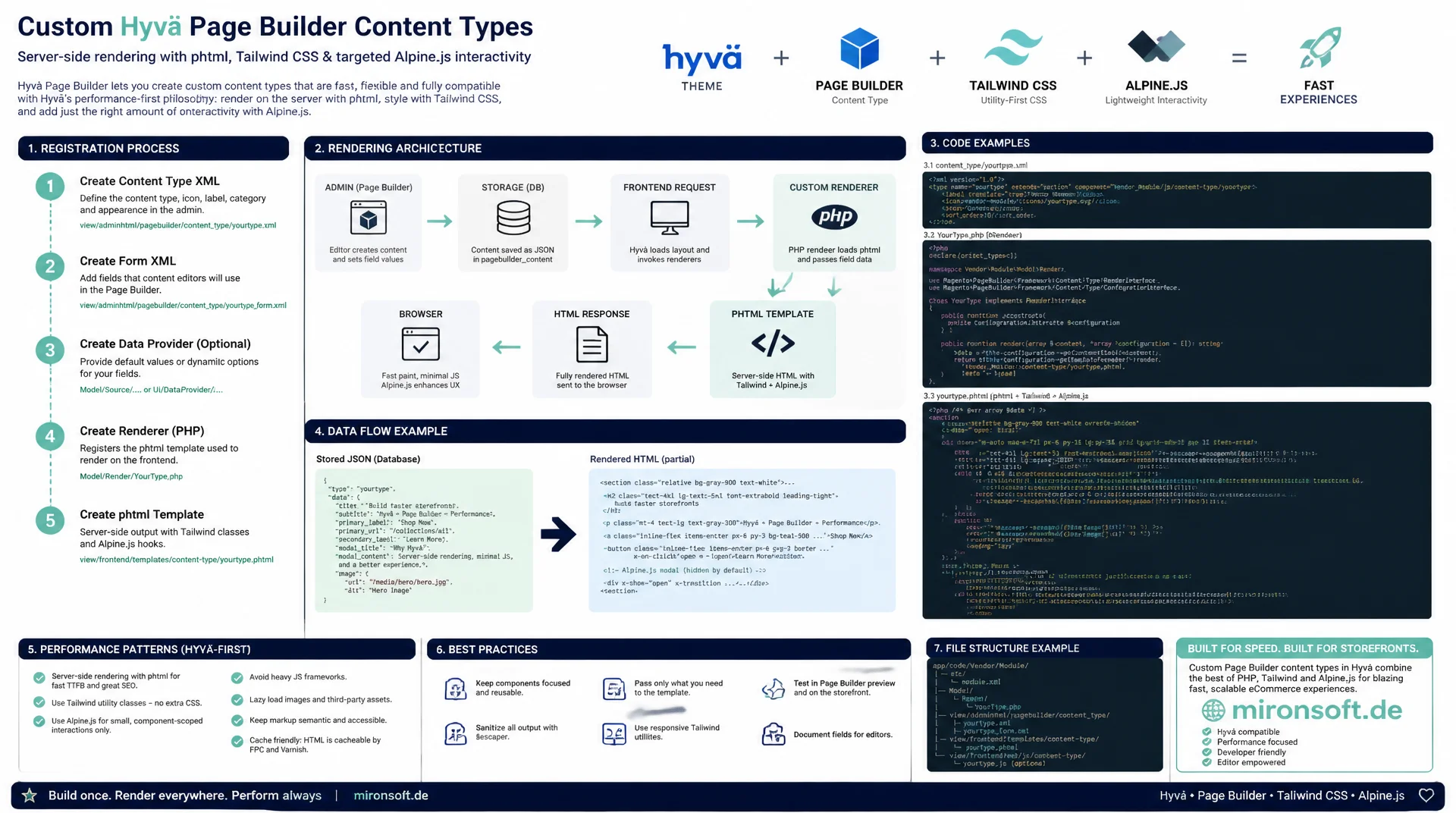
from the master format to the Alpine.js component
Custom Hyvä Page Builder content types are not built with Knockout widgets, they are rendered server side with phtml and Tailwind classes, plus targeted Alpine.js interactivity. This guide covers registration, rendering architecture and performance patterns with real code examples.
Table of Contents
- 1. Why Page Builder plays a special role in Hyvä
- 2. Architecture: a master format renderer instead of Knockout widget rendering
- 3. Registering a custom content type
- 4. Building a rendering template in the Hyvä style
- 5. Adding Alpine.js interactivity to custom content types
- 6. Understanding the master format parser and placeholder conversion
- 7. Keeping the admin editor preview and frontend rendering consistent
- 8. Performance for custom content types
- 9. Migrating existing Luma Page Builder content to Hyvä rendering
- 10. Summary
- 11. FAQ
1. Why Page Builder plays a special role in Hyvä
In Luma, Page Builder content is rendered on the client through Knockout.js widgets: every content type ships its own RequireJS component that translates the stored master format into DOM elements in the browser. That means extra JavaScript bundles, Knockout bindings and a rendering chain that directly contradicts the technologies Hyvä deliberately avoids. Hyvä Page Builder content types solve this problem at the architectural level: the hyva-themes/magento2-page-builder compatibility module replaces the entire client side rendering pipeline with server side PHP rendering.
For editors nothing changes in the admin editor, they keep using the familiar drag and drop interface from Magento_PageBuilder. The real difference is on the frontend: instead of hydrating Knockout components, Hyvä reads the stored content tree on the server and renders every node through its own phtml template. That turns Hyvä Page Builder content types into fully fledged, CSP compliant parts of the theme, without loading any extra bundle JavaScript or jQuery dependencies.
2. Architecture: a master format renderer instead of Knockout widget rendering
Page Builder stores content in the so called master format, an HTML structure with data-content-type attributes, nested containers and style information. In Luma, a client side converter picks up this structure and binds a Knockout component for every node. With Hyvä Page Builder content types, a PHP renderer walks the entire tree instead: it traverses the structure tree once on the server, resolves the matching template for each node type and renders the result directly into the page.
This architectural choice has tangible consequences. There is no runtime hydration in the browser, no extra network requests for widget definitions and no layout shift from components that get attached afterward. The mapping from content type name to template happens declaratively through content_type.xml, which means Hyvä Page Builder content types are embedded in the regular Hyvä rendering cycle just like normal block templates, and can be styled with Tailwind classes like any other theme fragment.
3. Registering a custom content type
A new content type needs at least two declaration files: content_type.xml defines the name, label, icon and available appearances, while appearance.xml defines the form fields editors fill in inside the Page Builder editor. Both files follow the same declarative pattern as other Magento configuration files and live per module under etc/pagebuilder/.
<!-- app/code/Mironsoft/PageBuilder/etc/pagebuilder/content_type.xml -->
<?xml version="1.0"?>
<content_types xmlns:xsi="http://www.w3.org/2001/XMLSchema-instance"
    xsi:noNamespaceSchemaLocation="urn:magento:module:Hyva_PageBuilder:etc/pagebuilder/content_type.xsd">
    <type name="feature-callout" label="Feature Callout" icon="icon-feature-callout" component="Magento_PageBuilder/js/content-type">
        <appearances>
            <appearance name="default" default="true"
                template="Mironsoft_PageBuilder::content-type/feature-callout/default.phtml"/>
            <appearance name="highlighted"
                template="Mironsoft_PageBuilder::content-type/feature-callout/highlighted.phtml"/>
        </appearances>
    </type>
</content_types>

<!-- app/code/Mironsoft/PageBuilder/etc/pagebuilder/feature-callout/appearance.xml -->
<?xml version="1.0"?>
<appearances xmlns:xsi="http://www.w3.org/2001/XMLSchema-instance"
    xsi:noNamespaceSchemaLocation="urn:magento:module:Magento_PageBuilder:etc/appearance.xsd">
    <appearance name="default">
        <elements>
            <element name="headline">
                <converter component="Magento_PageBuilder/js/content-type/text/converter" property="headline"/>
            </element>
            <element name="text">
                <converter component="Magento_PageBuilder/js/content-type/text/converter" property="text"/>
            </element>
            <element name="background_color">
                <converter component="Magento_PageBuilder/js/converter/style-attribute" property="background-color"/>
            </element>
        </elements>
    </appearance>
</appearances>
The template attribute value in content_type.xml is the crucial Hyvä specific addition: it points to the phtml template the PHP renderer uses for this appearance. Without this entry Hyvä falls back to a generic template that outputs the form field values unformatted. Anyone registering Hyvä Page Builder content types cleanly should also use a distinct module namespace in the name attribute, so there is no collision with core content types such as banner or row.
4. Building a rendering template in the Hyvä style
The actual rendering template is a regular phtml template that receives the field values stored in the master format as an array. The key difference from a generic Page Builder theme: instead of core CSS classes like pagebuilder-content-type or Bootstrap grid classes, Hyvä Page Builder content types use nothing but Tailwind utility classes that match the theme's existing design system.
<?php
/** @var \Magento\Framework\View\Element\Template $block */
/** @var array $data */
// $data is provided by the Hyvä PageBuilder renderer with all master-format field values
$data = $block->getData('content_type_data') ?? [];
$headline = (string) ($data['headline'] ?? '');
$text = (string) ($data['text'] ?? '');
$backgroundColor = (string) ($data['background_color'] ?? '#0f172a');
?>
<div class="not-prose rounded-2xl p-6 sm:p-8 my-6" style="background-color: <?= $block->escapeHtmlAttr($backgroundColor) ?>;">
    <?php if ($headline !== ''): ?>
    <p class="text-white text-xl font-bold mb-2"><?= $block->escapeHtml($headline) ?></p>
    <?php endif; ?>
    <?php if ($text !== ''): ?>
    <div class="text-white text-sm prose prose-invert max-w-none">
        <?= /* @noEscape */ $text ?>
    </div>
    <?php endif; ?>
</div>
It also pays off to reuse the spacing and typography scales from the Tailwind configuration instead of defining custom pixel values. That way Hyvä Page Builder content types stay visually consistent with the rest of the theme, even when editors freely combine content blocks. HTML fields such as text must be output deliberately unescaped since they already contain formatted, editorially produced HTML, while plain string fields always go through escapeHtml.
5. Adding Alpine.js interactivity to custom content types
As soon as a content type needs more than static markup, for example tabs or an accordion, Alpine.js comes into play, since it is loaded globally in Hyvä anyway. No extra bundle, no separate RequireJS module: the interactivity is declared directly as an x-data attribute in the template, which keeps Hyvä Page Builder content types interactive without violating the CSP configuration.
<?php
/** @var \Mironsoft\PageBuilder\Block\ContentType\Tabs $block */
// Tabs are stored as repeatable child elements in the master format
$tabs = $block->getTabs(); // array<int, array{label: string, html: string}>
?>
<div class="not-prose my-6" x-data="{ active: 0 }">
    <div class="flex flex-wrap gap-2 border-b border-slate-200 mb-4">
        <?php foreach ($tabs as $index => $tab): ?>
        <button
            type="button"
            @click="active = <?= (int) $index ?>"
            :class="active === <?= (int) $index ?> ? 'border-orange-600 text-orange-700' : 'border-transparent text-slate-500'"
            class="px-4 py-2 border-b-2 font-semibold text-sm transition-colors"
        ><?= $block->escapeHtml($tab['label']) ?></button>
        <?php endforeach; ?>
    </div>
    <?php foreach ($tabs as $index => $tab): ?>
    <div x-show="active === <?= (int) $index ?>" x-cloak class="prose prose-sm max-w-none">
        <?= /* @noEscape */ $tab['html'] ?>
    </div>
    <?php endforeach; ?>
</div>
It is important to control the active tab index through x-show and Alpine bindings rather than a mustache expression, since Page Builder templates are pre rendered on the server and there is no runtime template interpolation. For text output inside Alpine components the same rule applies as everywhere else in the theme: use x-text instead of curly braces, so no unresolved placeholder is ever visible even with JavaScript disabled. That keeps Hyvä Page Builder content types with Alpine logic both maintainable and CSP safe.
6. Understanding the master format parser and placeholder conversion
Page Builder stores formatting information such as text color, alignment or padding as an HTML encoded data-pb-style attribute. When rendering Hyvä Page Builder content types, this attribute first has to be decoded, then split into a list of key value pairs and finally mapped onto a set of allowed Tailwind classes. Skipping this step and copying style attributes straight into inline styles opens the door to CSP violations and inconsistent styling.
<?php

declare(strict_types=1);

namespace Mironsoft\PageBuilder\Model\MasterFormat;

/**
 * Decodes Page Builder master-format style attributes into whitelisted Tailwind utility classes.
 */
class StyleAttributeResolver
{
    /** @var string[] */
    private const ALLOWED_KEYS = ['text-align', 'background-color', 'padding'];

    /**
     * Convert a raw data-pb-style attribute string into Tailwind classes.
     *
     * @param string $rawStyle
     * @return string
     */
    public function toTailwindClasses(string $rawStyle): string
    {
        // Master format stores style as HTML-encoded "key: value;" pairs
        $decoded = html_entity_decode($rawStyle, ENT_QUOTES | ENT_HTML5);
        $pairs = array_filter(array_map('trim', explode(';', $decoded)));
        $classes = [];

        foreach ($pairs as $pair) {
            [$key, $value] = array_pad(explode(':', $pair, 2), 2, '');
            $key = trim($key);
            if (!in_array($key, self::ALLOWED_KEYS, true)) {
                continue;
            }
            $classes[] = $this->mapToTailwind($key, trim($value));
        }

        return implode(' ', array_filter($classes));
    }

    /**
     * Map a single CSS key/value pair to its Tailwind utility equivalent.
     *
     * @param string $key
     * @param string $value
     * @return string
     */
    private function mapToTailwind(string $key, string $value): string
    {
        return match ($key) {
            'text-align' => 'text-' . $value,
            'padding' => 'p-4',
            default => '',
        };
    }
}
Typical pitfalls show up when content is pasted from Word or Google Docs into the Page Builder editor: special characters get double encoded, and nested content types can carry encoded quotation marks that are not fully resolved by a single decode pass. For robust Hyvä Page Builder content types it is therefore recommended to run the decode step once centrally in the renderer instead of repeating it in every single template.
7. Keeping the admin editor preview and frontend rendering consistent
The Page Builder editor in the admin still uses its own Knockout based preview template, regardless of the fact that the frontend renders through Hyvä phtml. If the preview and frontend templates drift visually apart, editors lose trust in the what you see is what you get preview, and the back and forth between editorial staff and development increases.
In practice it helps to maintain shared values such as spacing, font sizes and color palettes in a central configuration and reference them from both the Knockout preview template and the phtml frontend template, instead of maintaining them twice independently. That keeps the preview for Hyvä Page Builder content types in sync with the actual rendering in the store, even after design adjustments.
A regular visual comparison between the admin preview iframe and the published page is a good test routine, ideally automated through screenshot diffs in the CI pipeline. This catches drift before editors notice it in production.
8. Performance for custom content types
Since Hyvä Page Builder content types already avoid any extra bundle JavaScript, performance optimization shifts toward images and heavier components such as sliders. Images inside a content type should generally get loading="lazy", while slider content types additionally benefit from an intersection observer that only loads image sources once they reach the viewport.
// Lazy-load slider images inside Page Builder content types only once visible
document.addEventListener('DOMContentLoaded', () => {
    const sliders = document.querySelectorAll('[data-pagebuilder-slider]');

    const observer = new IntersectionObserver((entries, obs) => {
        entries.forEach((entry) => {
            if (!entry.isIntersecting) {
                return;
            }
            const slider = entry.target;
            slider.querySelectorAll('img[data-src]').forEach((img) => {
                img.src = img.dataset.src;
                img.removeAttribute('data-src');
            });
            obs.unobserve(slider);
        });
    }, { rootMargin: '200px 0px' });

    sliders.forEach((slider) => observer.observe(slider));
});
Since Hyvä ships no RequireJS at all, the overhead of module definitions and asynchronous loading of AMD dependencies that Luma would need for every slider content type simply does not exist. In practice this approach noticeably lowers Largest Contentful Paint, because Hyvä Page Builder content types only trigger image load once visitors actually scroll.
9. Migrating existing Luma Page Builder content to Hyvä rendering
The big advantage during migration: the HTML stored in the master format itself does not change when switching from Luma to Hyvä, since it lives in the database independently of the rendering layer. Switching to Hyvä Page Builder content types only affects the rendering layer on the frontend, not the stored content itself.
Breaking changes typically show up for content types that relied on jQuery UI plugins or third party slider libraries in Luma, for which no Hyvä template exists yet. If the mapping is missing from content_type.xml, Hyvä renders an empty or generic fallback instead of the expected content, which in the worst case only surfaces during a spot check.
A solid test strategy is to systematically list every content type appearance used across CMS pages and categories before the theme switch, and check it against the available Hyvä templates. Only once every used appearance has a matching phtml template can you be confident that Hyvä Page Builder content types cover the entire existing content library.
Many teams underestimate how differently content type rendering turns out depending on the chosen approach. The overview below compares common pitfalls when building custom Hyvä Page Builder content types against the recommended pattern.
| Task | Unsafe / Inefficient | Recommended Pattern | Benefit |
|---|---|---|---|
| Frontend rendering | Generic Page Builder CSS classes | Custom phtml template with Tailwind classes | Consistent design system, no CSS bloat |
| Interactivity | Extra bundle JavaScript / Knockout widget | Alpine.js x-data directly in the template | No extra bundle, CSP compliant |
| Images in content type | Eager loading all images | loading="lazy" plus intersection observer | Better LCP scores, less data volume |
| Admin preview | Preview template drifts from the frontend | Shared design tokens for preview and frontend | Consistent WYSIWYG for editors |
| Content type registration | Overriding core templates directly | Custom content_type.xml with its own namespace | Upgrade safe, no core conflicts |
| Style attributes | Copying inline styles unchecked | Validating style attributes and mapping to Tailwind | No CSS chaos, CSP clean |
Mironsoft
Hyvä frontend development and Page Builder integration for Magento 2
Need custom Page Builder content types for your Hyvä theme?
We register, render and style custom Hyvä Page Builder content types, migrate existing Luma content and ensure performant, CSP compliant rendering without any extra bundle JavaScript.
Content Type Development
Register custom content types with content_type.xml, phtml templates and Alpine.js
Page Builder Migration
Analyze existing Luma content and move it over to Hyvä rendering
Hyvä Frontend Design
Tailwind based styling and performance tuning for content building blocks
10. Summary
Custom Hyvä Page Builder content types solve a fundamental architectural problem: they replace the client side Knockout rendering chain from Luma with server side phtml rendering that needs no extra bundle JavaScript and can be styled consistently with Tailwind classes. Registration happens declaratively through content_type.xml and appearance.xml, and the actual rendering is handled by a regular phtml template with escaped field values.
Interactivity is added through Alpine.js, which is already loaded globally in Hyvä, while performance optimization mainly focuses on lazy loading images and sliders. The master format itself stays unchanged in the database when switching from Luma to Hyvä, so migration primarily affects the rendering layer, not the stored content.
Anyone who builds Hyvä Page Builder content types consistently around these patterns from the start avoids later refactoring: preview and frontend templates stay in sync, style attributes are handled deliberately instead of copied raw, and every new content type fits seamlessly into the theme's existing design system.
Hyvä Page Builder Content Types: The Essentials at a Glance
Content Type Registration
content_type.xml and appearance.xml declare the name, appearances and form fields, and the template attribute points to the phtml rendering template.
Master Format Rendering
A PHP renderer walks the structure tree on the server instead of hydrating Knockout widgets in the browser. Style attributes are decoded and mapped under control.
Alpine.js Interactivity
Tabs, accordions and similar interactions run through x-data, x-show and x-text, without loading any extra bundle JavaScript.
Performance & Migration
Lazy loading for images and sliders, shared design tokens for preview and frontend, systematic appearance matching before a theme switch.