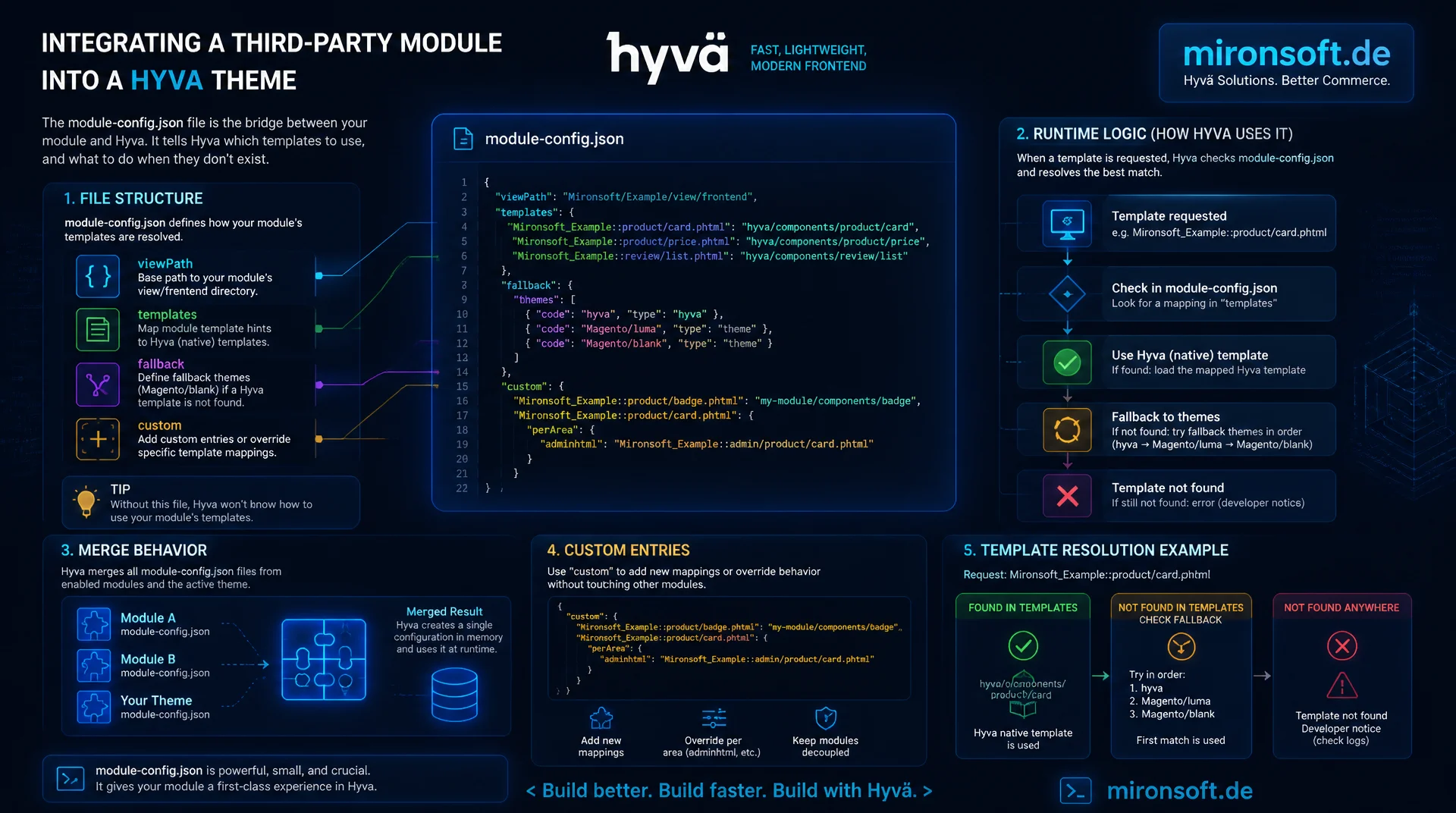
Structure, purpose, and custom entries for the compatibility layer
Anyone integrating a third-party module into a Hyva theme sooner or later runs into the module-config.json file. It decides, per module, whether native Hyva templates apply or whether the frontend output falls back to a fallback theme like Magento/blank. This article explains the structure, runtime logic, merge behavior, and custom entries of module-config.json step by step.
Table of contents
- 1. Context: what module-config.json actually solves
- 2. File structure: fields and schema
- 3. Runtime evaluation: hyva-themes/module-fallback
- 4. Adding custom entries: step by step
- 5. Interaction with layout XML and ViewModel
- 6. Priority and merge behavior across theme inheritance
- 7. Common mistakes
- 8. Best practices
- 9. module-config.json in comparison
- 10. Summary
- 11. FAQ
1. Context: what module-config.json actually solves
The module-config.json file is Hyva's theme-wide compatibility registry. It lives under app/design/frontend/<Vendor>/<theme>/etc/module-config.json and is read by Hyva's theme fallback mechanism, the so-called Hyva Compatibility Modules system, to decide per Magento module whether that module has native Hyva template overrides or whether frontend rendering for that module's pages must fall back to a compatibility or blank rendering path. This is exactly the problem module-config.json solves: controlled, per-module management of a compatibility layer, instead of a hard theme fork for every third-party package.
Without module-config.json, any team integrating a Luma module that hasn't been ported yet would either have to fork the entire theme or risk unstyled Luma fragments showing up in the Hyva frontend. With a well-maintained module-config.json file, the decision stays declarative: one entry per module, a clear fallback path, no scattered conditions in template code. That makes module-config.json a central building block of any Hyva theme architecture, especially in projects with many grown third-party extensions from the Luma world.
2. File structure: fields and schema
Structurally, module-config.json is a flat JSON object whose top-level keys are the fully qualified Magento module names, such as Vendor_Module. Each key references a configuration object with a fixed set of fields. The hyva-compatible field is a boolean and marks whether the module ships native Hyva templates or is designed to render without a fallback. The fallback-theme field is a string, usually Magento/blank, and defines which theme serves as the rendering base when no Hyva override exists. priority is an integer and controls the order in which multiple matching compatibility entries are evaluated. requires is an array listing module dependencies that must be satisfied before the entry takes effect.
These four fields form the core schema of module-config.json, exactly as the official hyva-themes/module-fallback package expects it. Additional, project-specific fields are ignored by the standard reader but can be evaluated in custom ViewModels, for example to carry extra metadata for a compatibility dashboard. The following JSON structure shows the complete schema for two example modules, one with native Hyva support, one falling back to Magento/blank.
{
  "// comment": "module-config.json: Hyva theme-level compatibility registry",
  "Magento_Catalog": {
    "hyva-compatible": true,
    "fallback-theme": null,
    "priority": 100,
    "requires": []
  },
  "Vendor_LegacyReviews": {
    "hyva-compatible": false,
    "fallback-theme": "Magento/blank",
    "priority": 50,
    "requires": ["Magento_Review"]
  },
  "Vendor_ThirdPartySlider": {
    "hyva-compatible": false,
    "fallback-theme": "Magento/blank",
    "priority": 20,
    "requires": []
  }
}
3. Runtime evaluation: hyva-themes/module-fallback
At runtime, module-config.json is not read directly by the frontend controller, but through the Composer package hyva-themes/module-fallback. This package registers a renderer selector that, on every block resolution, checks which module is responsible for the current layout handle, then looks up in the merged module-config.json whether hyva-compatible is set to true. If so, the regular Hyva templates from the active theme apply. If hyva-compatible is set to false, the renderer switches to the theme stored in fallback-theme, usually Magento/blank, and serves the classic templates there, though without fully loading the Luma-specific assets.
Module detection itself is based on the Magento module list from app/etc/config.php combined with the layout handles a block triggers. module-config.json only ever provides the decision basis, not the rendering logic itself. This exact separation makes module-config.json swappable and testable: a module can be switched from fallback to native without a code change, as soon as a Hyva compatibility module exists for that third-party package. That is the actual efficiency gain over hard-wired conditions in the template.
4. Adding custom entries: step by step
For a third-party module that isn't Hyva-compatible yet, the process follows a fixed pattern. First, check whether a Hyva compatibility module already exists for the package, usually searchable via Composer. If none exists, add a custom entry to the theme's own module-config.json that explicitly sets the module to hyva-compatible: false and defines a fallback-theme. Next, verify that the fallback theme itself is installed, since Magento/blank is available in the vendor directory by default, whereas a custom fallback theme may need to be pulled in via Composer.
In the third step, priority is set so it doesn't collide with existing entries, especially when several compatibility packages reference the same module. Finally, the cache is invalidated and the page is checked in the frontend. The following example shows a concrete entry for a fictitious third-party review module that doesn't yet ship native Hyva templates, together with the corresponding Composer command.
{
  "// composer require": "composer require hyva-themes/magento2-magefan-blog-compatibility:^1.3",
  "Fooman_ReviewBooster": {
    "hyva-compatible": false,
    "fallback-theme": "Magento/blank",
    "priority": 30,
    "requires": ["Magento_Review", "Magento_Catalog"]
  }
}
5. Interaction with layout XML and ViewModel
The fallback status from module-config.json doesn't only affect the plain template selection, it can also be queried in layout XML and a ViewModel to render blocks conditionally. A typical pattern: a ViewModel reads a module's fallback status from module-config.json and exposes a simple boolean method, for example isHyvaCompatible(string $moduleName). In layout XML, the block is then only included if that ViewModel value checks out in the template, which prevents a fallback block from also shipping a Hyva-specific component that doesn't even exist on the blank rendering path.
This combination of module-config.json, layout XML, and ViewModel is especially relevant on composite pages, for example product pages where a core block runs natively in Hyva while a third-party block still remains in fallback mode. The following layout XML fragment shows how a block is coupled to the fallback status of module-config.json via a ViewModel alias, without wiring conditional logic into the container itself.
<!-- catalog_product_view.xml: conditional block wiring based on module-config.json fallback status -->
<page xmlns:xsi="http://www.w3.org/2001/XMLSchema-instance"
      xsi:noNamespaceSchemaLocation="urn:magento:framework:View/Layout/etc/page_configuration.xsd">
    <body>
        <referenceContainer name="content">
            <block class="Magento\Framework\View\Element\Template"
                   name="review.booster.compat"
                   template="Fooman_ReviewBooster::review-booster.phtml">
                <arguments>
                    <!-- ViewModel reads the merged module-config.json at render time -->
                    <argument name="module_config_view_model" xsi:type="object">
                        Mironsoft\HyvaCompat\ViewModel\ModuleFallback
                    </argument>
                </arguments>
            </block>
        </referenceContainer>
    </body>
</page>
6. Priority and merge behavior across theme inheritance
Hyva themes typically inherit from a parent theme, such as hyva-themes/magento2-default-theme-csp, and every theme in that chain can bring its own module-config.json. At runtime, all module-config.json files along the theme inheritance are merged, with an entry in the child theme overriding an identically named entry in the parent theme. The priority additionally decides which entry wins when several compatibility packages independently register the same module name, for example because two different Hyva compatibility extensions cover the same third-party module.
For your own theme development this means: a child theme should only override the module-config.json entries that actually differ, and leave the rest to inheritance. A helper or ViewModel that evaluates the merged state programmatically makes this inheritance logic visible and testable in code, instead of relying on implicit behavior. The following PHP class reads the merged module-config.json via the Hyva compatibility package and exposes the result to templates in a typed way.
<?php

declare(strict_types=1);

namespace Mironsoft\HyvaCompat\ViewModel;

use Magento\Framework\View\Element\Block\ArgumentInterface;
use Magento\Framework\Component\ComponentRegistrarInterface;
use Magento\Framework\Component\ComponentRegistrar;
use Magento\Framework\Filesystem\Driver\File;

/**
 * ViewModel that reads the merged module-config.json across the active theme
 * inheritance chain and exposes the fallback status per module to templates.
 */
final class ModuleFallback implements ArgumentInterface
{
    /** @var array<string, array{hyva-compatible: bool, fallback-theme: ?string, priority: int, requires: string[]}> */
    private array $mergedConfig = [];

    /**
     * @param ComponentRegistrarInterface $componentRegistrar Resolves theme paths for module-config.json lookups.
     * @param File $fileDriver Filesystem driver used to read raw JSON files.
     * @param string[] $themePaths Ordered list of theme directories, parent first, child last.
     */
    public function __construct(
        private readonly ComponentRegistrarInterface $componentRegistrar,
        private readonly File $fileDriver,
        private readonly array $themePaths,
    ) {
    }

    /**
     * Checks whether a given Magento module has a native Hyva-compatible entry
     * after merging module-config.json across all inherited themes.
     *
     * @param string $moduleName Fully qualified module name, e.g. "Vendor_Module".
     * @return bool True if the merged entry marks the module as hyva-compatible.
     */
    public function isHyvaCompatible(string $moduleName): bool
    {
        $config = $this->getMergedConfig();

        return (bool) ($config[$moduleName]['hyva-compatible'] ?? false);
    }

    /**
     * Returns the fallback theme configured for a module, or null if none applies.
     *
     * @param string $moduleName Fully qualified module name, e.g. "Vendor_Module".
     * @return string|null Fallback theme path, e.g. "Magento/blank".
     */
    public function getFallbackTheme(string $moduleName): ?string
    {
        $config = $this->getMergedConfig();

        return $config[$moduleName]['fallback-theme'] ?? null;
    }

    /**
     * Builds the merged module-config.json by reading each theme in the
     * inheritance chain and letting later (child) entries win on conflicts.
     *
     * @return array<string, array{hyva-compatible: bool, fallback-theme: ?string, priority: int, requires: string[]}>
     */
    private function getMergedConfig(): array
    {
        if ($this->mergedConfig !== []) {
            return $this->mergedConfig;
        }

        $merged = [];
        foreach ($this->themePaths as $themePath) {
            $file = $themePath . '/etc/module-config.json';
            if (!$this->fileDriver->isExists($file)) {
                continue;
            }

            /** @var array<string, array{hyva-compatible: bool, fallback-theme: ?string, priority: int, requires: string[]}> $decoded */
            $decoded = json_decode($this->fileDriver->fileGetContents($file), true) ?? [];
            $merged = array_replace($merged, $decoded);
        }

        return $this->mergedConfig = $merged;
    }
}
An important side effect of this merge behavior: if an entry in a child theme is accidentally created with a lower priority than in the parent theme, module-config.json may end up preferring the parent entry, even though the child entry is actually more current. That's why priority should always be assigned deliberately and consistently across the entire theme chain, not randomly per module.
7. Common mistakes
The most common mistake when working with module-config.json is forgetting to invalidate the cache after a change. Since the merged configuration is cached internally by Hyva, a plain file change without bin/magento cache:flush means the old fallback decision remains active, even though the file already looks correct. A second classic mistake is the wrong spelling of the module name: vendor_module in lowercase or with a hyphen instead of an underscore is not recognized by module-config.json, because the reader expects exactly the internal Magento module name as registered in app/etc/config.php.
A third source of errors is priority conflicts, when several compatibility packages register the same module name with a different priority. Without deliberate prioritization, the load order of the Composer packages decides which entry in module-config.json ultimately wins, which can lead to inconsistent behavior between development and production environments if the composer.lock file isn't identical. A missing or misspelled fallback-theme, say a typo in Magento/blank, also causes a silent failure: Hyva then doesn't fall back to the expected theme and, in the worst case, delivers a blank page.
8. Best practices
For a maintainable module-config.json, a consistent naming convention is recommended: adopt module names exactly as they appear in app/etc/config.php, never abbreviate or rewrite them. Every change to module-config.json belongs under version control, ideally with a clear commit message naming the affected third-party module, so later priority conflicts stay traceable in the Git log. After every change, a full cache flush should follow, and, for layout or ViewModel changes, a fresh static content deployment, before the result is verified in the frontend.
Equally important is a manual functional test of the affected page after every change to module-config.json, since an incorrectly set hyva-compatible doesn't always cause a visible error but sometimes only a silent performance loss from duplicate assets being loaded. The following command sequence shows the recommended deploy sequence after a change to module-config.json.
#!/usr/bin/env bash
# Deploy sequence after editing module-config.json
set -euo pipefail

# 1. Rebuild Tailwind CSS if templates changed alongside module-config.json
bin/npm --prefix app/design/frontend/Mironsoft/default/web/tailwind run build

# 2. Remove stale preprocessed views and static assets (always first!)
cd src && rm -rf var/view_preprocessed/* pub/static/frontend/*

# 3. Redeploy static content for the affected theme
bin/magento setup:static-content:deploy de_DE -t Mironsoft/default -f

# 4. Flush the cache so the merged module-config.json is re-read
bin/magento cache:flush

# 5. Manually verify the affected module's frontend page
bin/magento cache:status
9. module-config.json in comparison
Whether module-config.json is properly maintained or not directly affects a Hyva project's maintenance effort, compatibility, debugging time, and performance. The following table compares both scenarios.
| Aspect | Without maintained module-config.json | With a properly maintained module-config.json |
|---|---|---|
| Maintenance effort | Theme fork per third-party module, high manual effort | One declarative entry per module, centrally versioned |
| Compatibility | Unstyled Luma fragments possible in the Hyva frontend | Controlled fallback to Magento/blank without breakage |
| Debugging | Unclear whether a module renders natively or via fallback | Status per module readable directly from the file |
| Performance | Duplicate assets loaded due to faulty fallback detection | Only the assets actually needed per fallback status |
| Theme inheritance | Priority conflicts between parent and child theme unclear | Merge behavior documented and testable via ViewModel |
In practice: projects with a properly maintained module-config.json need noticeably less manual rework on Magento minor updates, because new third-party modules can be onboarded with just an additional entry instead of yet another theme fork.
10. Summary
module-config.json is Hyva's central control file for the compatibility layer: it decides per module whether native Hyva templates or a fallback theme like Magento/blank applies, instead of forcing every third-party module into its own theme fork. The schema with hyva-compatible, fallback-theme, priority, and requires is deliberately kept lean and is evaluated at runtime by the Composer package hyva-themes/module-fallback. Custom entries can be added quickly as soon as a third-party module doesn't yet ship native Hyva support.
Via layout XML and ViewModel, the fallback status from module-config.json can be translated into conditional block rendering in a targeted way. On theme inheritance, all module-config.json files along the chain are merged, with child entries winning and priority resolving conflicts between multiple compatibility packages. Anyone who consistently runs a cache flush and static content deployment after every change, and spells module names exactly, avoids the most common sources of error around module-config.json.
module-config.json in Hyva Themes, the essentials at a glance
Purpose
Compatibility registry per module instead of a theme fork. Decides between native Hyva templates and a fallback theme.
Schema
hyva-compatible, fallback-theme, priority, requires per module key.
Runtime
Evaluated by hyva-themes/module-fallback on every block resolution, independent of template code.
Inheritance
Parent and child theme are merged, child entries and priority decide in case of conflicts.
11. FAQ: hyva-themes/module-config.json explained
1What is module-config.json in Hyva Themes?
2Where exactly is the module-config.json file located?
3What does the hyva-compatible field do?
4Which fallback theme is typically used?
5How is module-config.json evaluated at runtime?
6How do I add a custom entry?
7What happens with theme inheritance and multiple files?
8Why isn't my change taking effect?
9Can I evaluate module-config.json in layout XML or a ViewModel?
10Most common mistake with module name spelling?
Mironsoft
Hyva theme development, compatibility layer, and Magento 2 frontend architecture
Want to integrate third-party modules cleanly into Hyva?
We maintain module-config.json entries, build native Hyva templates for your Luma modules, and ensure a clean, tested compatibility setup without theme forks.
Compatibility audit
Review existing module-config.json entries and resolve priority conflicts
Native porting
Move Luma modules to native Hyva templates, instead of staying in fallback permanently
CI integration
Automate deploy sequences for cache flush and static content deployment