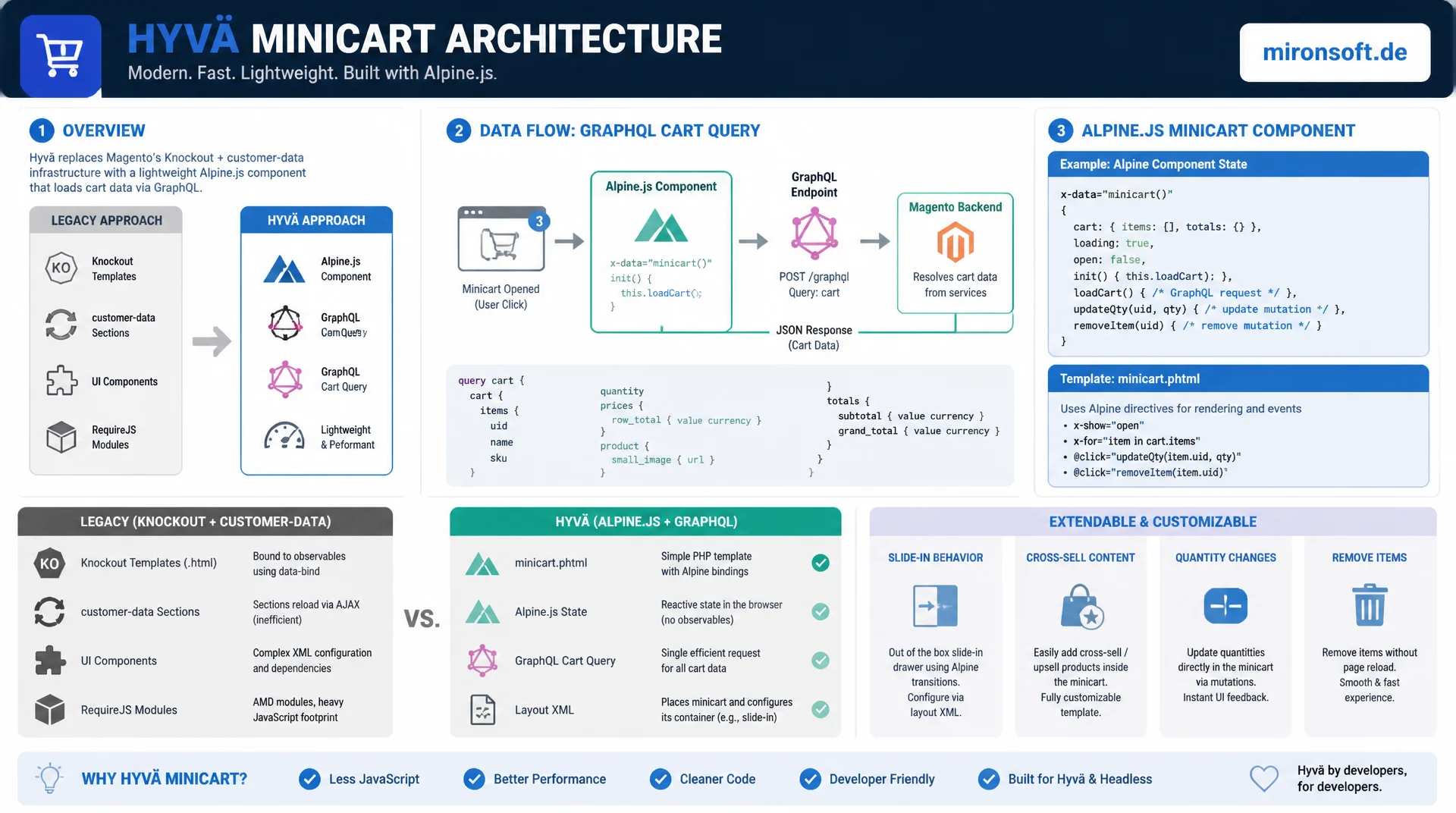
Behavior and presentation without Knockout, without jQuery
The Hyvä minicart replaces Knockout templates and customer-data sections with a lean Alpine.js component model that loads its data directly through a GraphQL cart query. Anyone customizing it works with minicart.phtml, Alpine state and layout XML instead of Knockout observables, RequireJS modules and UI components, and gets a component that can be extended in a targeted way: icon, slide-in behavior, cross-sell content and quantity changes.
Table of contents
- 1. Structure of the Hyvä minicart component
- 2. Customizing the minicart icon and badge
- 3. Extending the minicart content
- 4. Customizing slide-in/dropdown behavior
- 5. Customizing and extending the minicart GraphQL queries
- 6. Quantity changes and removing items
- 7. Custom events and component communication
- 8. Styling with Tailwind CSS v4
- 9. Performance: lazy loading and caching the minicart data
- 10. Summary
- 11. FAQ
1. Structure of the Hyvä minicart component
The Hyvä minicart lives, at its core, in a single template file: app/design/frontend/Mironsoft/default/Magento_Checkout/templates/cart/minicart.phtml, which overrides the parent theme hyva-themes/magento2-default-theme-csp. The root container carries x-data="initMinicart()", an Alpine factory function that encapsulates the entire state of the component: loading state, panel visibility, loaded cart data and error information. Instead of Knockout observables built with ko.observable() and a separate .html template per binding, the Hyvä minicart works with a single JavaScript object whose properties Alpine binds directly to the markup through x-text, x-show and x-for.
The cart data itself no longer comes from the server-rendered customer-data storage, but from a GraphQL cart query that the Alpine component fires with fetch() against the /graphql endpoint. That replaces the entire mechanism built around Magento_Customer/js/customer-data, private content sections and the global customer-data-invalidate event. Anyone customizing this component has to work in two places: the markup and Alpine directives in minicart.phtml, and the GraphQL query that supplies the raw data.
What matters for the presentation of the Hyvä minicart is that the Hyvä block mechanism stays intact: $block->getChildNames() is still iterated to hook in additional blocks such as cross-sell widgets or shipping hints. Alpine only replaces client-side reactivity, not Magento's server-side block system. That separation is essential when extending it without giving up layout XML control.
<!-- app/design/frontend/Mironsoft/default/Magento_Checkout/templates/cart/minicart.phtml -->
<?php
/** @var \Magento\Checkout\Block\Cart\Sidebar $block */
/** @var \Hyva\Theme\ViewModel\HyvaCsp $hyvaCsp */
$hyvaCsp = $viewModels->require(\Hyva\Theme\ViewModel\HyvaCsp::class);
?>
<div
x-data="initMinicart()"
x-init="fetchSummaryOnly()"
@private-content-loaded.window="fetchSummaryOnly()"
class="relative"
>
<!-- Trigger button: icon + badge, see section 2 -->
<button
type="button"
@click="open = true; !hydrated && fetchCart()"
class="relative inline-flex items-center justify-center p-2"
:aria-expanded="open.toString()"
aria-controls="minicart-panel"
>
<span class="sr-only">Open cart</span>
<!-- inline SVG icon lives here, no icon font -->
</button>
<!-- Slide-in panel, see section 4 -->
<div
id="minicart-panel"
x-show="open"
x-cloak
role="dialog"
aria-modal="true"
@click.away="open = false"
@keydown.escape.window="open = false"
class="absolute right-0 mt-2 w-96 bg-white rounded-2xl shadow-xl border border-slate-200"
>
<template x-if="loading">
<div class="p-6 text-sm text-slate-500">Loading cart …</div>
</template>
<template x-if="!loading && cart.items.length === 0">
<div class="p-6 text-sm text-slate-500">Your cart is empty.</div>
</template>
<template x-for="item in cart.items" :key="item.uid">
<div class="flex gap-3 p-4 border-b border-slate-100">
<img :src="item.product.thumbnail.url" :alt="item.product.name" class="w-16 h-16 object-cover rounded-lg" loading="lazy">
<div class="flex-1">
<p class="text-sm font-semibold" x-text="item.product.name"></p>
<p class="text-xs text-slate-500" x-text="item.quantity + ' x ' + item.prices.price.value + ' EUR'"></p>
</div>
</div>
</template>
<?= $block->getChildHtml('minicart.extra') ?>
</div>
</div>
<script>
<?= /* @noEscape */ '' ?>
</script>
<?php $hyvaCsp->registerInlineScript(); ?>
2. Customizing the minicart icon and badge
The icon of the Hyvä minicart is deliberately not an icon font, but an inline <svg> sitting directly in the markup of minicart.phtml. That matches the requirement to avoid loading additional custom fonts: an SVG path costs no extra font request, can be colored through Tailwind classes (w-6 h-6 text-slate-700) and reacts to hover: and focus-visible: states without any extra work. Anyone who wants to customize the icon in the header simply swaps the SVG path or wires in a second icon set through a dedicated icons.phtml partial included via $block->getChildHtml().
The item count in the badge is pure reactive Alpine state: x-show="cart.total_quantity > 0" on a small <span> positioned absolutely over the icon, with x-text="cart.total_quantity" as its content. Because total_quantity is part of the GraphQL cart query, the badge updates automatically as soon as the component resynchronizes after a mutation, with no manual DOM update required. That is the core advantage when extending the presentation of the minicart panel: a single reactive state drives the icon, badge and panel content at the same time.
The visibility logic for an empty cart deserves particular attention. Without x-cloak, the badge briefly flashes before Alpine has hydrated, because the server markup has no initial value to work with. Combining x-cloak in CSS (Hyvä already ships [x-cloak] { display: none !important; } in its base stylesheet) with an initial total_quantity: null in Alpine state prevents the Hyvä minicart from briefly showing a wrong number on the first page load.
3. Extending the minicart content
Cross-sell products, free-shipping-threshold hints or discount banners can be hooked into the Hyvä minicart without touching the core logic of minicart.phtml. The clean approach goes through layout XML: a dedicated block gets registered as a child of the minicart block, for example <referenceBlock name="minicart"><block class="Mironsoft\MinicartExtend\Block\FreeShippingHint" name="minicart.freeshipping.hint" template="Mironsoft_MinicartExtend::minicart/freeshipping-hint.phtml" /></referenceBlock>. In minicart.phtml, the block is then output at the desired spot via $block->getChildHtml('minicart.freeshipping.hint'), exactly matching the existing Hyvä pattern of child block iteration.
For the free-shipping-threshold hint, a ViewModel class reads the configured threshold from Magento\Shipping\Model\Config respectively the relevant carrier configuration and passes it as a data attribute to the panel. The progress bar itself stays reactive: x-bind:style="{ width: Math.min(100, (cart.prices.grand_total.value / freeShippingThreshold) * 100) + '%' }". That way the bar updates automatically as soon as the cart value shifts because of a quantity change, without the server having to be asked again.
Cross-sell products are ideally fetched through their own GraphQL query as soon as the minicart is opened, instead of being embedded in every page response. That keeps the initial payload small and avoids the minicart dragging along cross-sell data on every product page click that the user might never actually see.
<?php
declare(strict_types=1);

namespace Mironsoft\MinicartExtend\ViewModel;

use Magento\Framework\View\Element\Block\ArgumentInterface;
use Magento\Shipping\Model\Config as ShippingConfig;
use Magento\Store\Model\StoreManagerInterface;

/**
 * Provides the free shipping threshold used by the Hyva minicart hint block.
 */
final class FreeShippingThreshold implements ArgumentInterface
{
    /**
     * @param ShippingConfig $shippingConfig Reads active carrier configuration.
     * @param StoreManagerInterface $storeManager Resolves the current store scope.
     */
    public function __construct(
        private readonly ShippingConfig $shippingConfig,
        private readonly StoreManagerInterface $storeManager,
    ) {
    }

    /**
     * Returns the configured free shipping subtotal for the current store, or null if disabled.
     *
     * @return float|null
     */
    public function getThreshold(): ?float
    {
        $storeId = (int) $this->storeManager->getStore()->getId();
        $value = $this->shippingConfig->getValue('freeshipping/free_shipping_subtotal', $storeId);

        return $value !== null ? (float) $value : null;
    }
}
4. Customizing slide-in/dropdown behavior
Opening and closing the Hyvä minicart is pure Alpine behavior through x-show="open" combined with x-transition directives, with no jQuery slideToggle() or hand-written CSS keyframes involved. For the desktop dropdown, x-transition:enter="transition ease-out duration-200" x-transition:enter-start="opacity-0 scale-95" x-transition:enter-end="opacity-100 scale-100" is enough, while the mobile drawer variant slides in horizontally: x-transition:enter-start="translate-x-full" x-transition:enter-end="translate-x-0". Both variants live in the same component, controlled purely through Tailwind breakpoint classes on the panel container.
Closing on an outside click is handled by @click.away="open = false" directly on the panel root. In addition, @keydown.escape.window="open = false" catches the Escape key globally, which is indispensable for keyboard users. Without these two directives, the panel stays open whenever the user clicks anywhere else on the page, something that regularly shows up as a bug in usability testing.
Focus management is the part most often forgotten when teams customize it: on open, focus should jump programmatically to the first interactive element inside the panel (x-init="$watch('open', value => value && $nextTick(() => $refs.closeButton.focus()))"), and back to the triggering button on close. The panel itself needs role="dialog", aria-modal="true" and a descriptive aria-label so screen readers announce the context switch correctly.
5. Customizing and extending the minicart GraphQL queries
The standard GraphQL cart query already delivers items, prices and total_quantity, but as soon as the Hyvä minicart needs to be extended, for example with a per-item discount hint, the core schema is no longer enough. The clean approach is a dedicated module with an etc/schema.graphqls extension that appends an additional field to CartItemInterface instead of modifying Magento's core schema. The resolver gets registered through etc/graphql/di.xml and implements Magento\Framework\GraphQl\Query\ResolverInterface.
Overreporting is the biggest performance risk for minicart GraphQL queries: fetching a complete product fragment with description, meta data and every image variant out of convenience loads unnecessary payload every time the minicart opens. The query should contain exactly the fields minicart.phtml actually renders, nothing more. A dedicated GraphQL fragment per view (fragment MinicartItemFields on CartItemInterface) makes that discipline visible and reusable in the codebase.
# GraphQL query used by the Alpine minicart component
# File reference: Mironsoft_MinicartExtend/etc/schema.graphqls extends CartItemInterface

query MinicartData($cartId: String!) {
  cart(cart_id: $cartId) {
    id
    total_quantity
    items {
      uid
      quantity
      product {
        name
        sku
        thumbnail {
          url
        }
      }
      prices {
        price {
          value
          currency
        }
      }
      # Custom field added via Mironsoft_MinicartExtend, not part of core schema
      free_shipping_remaining
    }
    prices {
      grand_total {
        value
        currency
      }
    }
  }
}

# schema.graphqls extension (custom module)
type CartItemInterface {
  free_shipping_remaining: Float
    @resolver(class: "Mironsoft\\MinicartExtend\\Model\\Resolver\\FreeShippingRemaining")
}
6. Quantity changes and removing items
Quantity changes in the Hyvä minicart go through x-model.debounce.500ms on the quantity field, so that a GraphQL mutation is not fired on every keystroke. Only after 500 milliseconds of inactivity does Alpine fire the @change handler, which sends the updateCartItems mutation against /graphql. In the meantime, the interface already shows the new value, a classic optimistic-UI pattern: the local Alpine state updates immediately while the mutation runs in the background.
If the mutation fails, for example because stock is insufficient, the Hyvä minicart has to restore the previous value and show an inline error message next to the affected item. The Alpine state keeps both the last confirmed and the optimistically set value per item UID, so a rollback is possible without a full refetch. Removing an item follows the same pattern with the removeItemFromCart mutation: the entry disappears from the local list immediately, but gets reinserted if the GraphQL call fails.
// app/design/frontend/Mironsoft/default/Magento_Checkout/web/js/minicart.js
function initMinicart() {
  return {
    open: false,
    loading: true,
    hydrated: false,
    cart: { items: [], total_quantity: 0, prices: { grand_total: { value: 0 } } },
    pendingQuantities: {},
    errors: {},

    async fetchCart() {
      this.loading = true;
      const response = await this.graphqlQuery(MINICART_QUERY, { cartId: this.getCartId() });
      this.cart = response.data.cart;
      this.hydrated = true;
      this.loading = false;
    },

    // Debounced via x-model.debounce.500ms in the template, called on @change
    async updateQuantity(uid, newQuantity) {
      const previous = this.cart.items.find((item) => item.uid === uid).quantity;
      this.optimisticSet(uid, newQuantity);

      try {
        const response = await this.graphqlMutation(UPDATE_CART_ITEMS_MUTATION, {
          cartId: this.getCartId(),
          cartItemUid: uid,
          quantity: newQuantity,
        });
        this.cart = response.data.updateCartItems.cart;
        delete this.errors[uid];
        window.dispatchEvent(new CustomEvent('minicart-updated', { detail: { quantity: this.cart.total_quantity } }));
      } catch (error) {
        this.optimisticSet(uid, previous);
        this.errors[uid] = 'Quantity could not be updated';
      }
    },

    async removeItem(uid) {
      const backup = [...this.cart.items];
      this.cart.items = this.cart.items.filter((item) => item.uid !== uid);

      try {
        const response = await this.graphqlMutation(REMOVE_ITEM_MUTATION, {
          cartId: this.getCartId(),
          cartItemUid: uid,
        });
        this.cart = response.data.removeItemFromCart.cart;
        window.dispatchEvent(new CustomEvent('minicart-updated', { detail: { quantity: this.cart.total_quantity } }));
      } catch (error) {
        this.cart.items = backup;
        this.errors[uid] = 'Item could not be removed';
      }
    },

    optimisticSet(uid, quantity) {
      const item = this.cart.items.find((entry) => entry.uid === uid);
      if (item) {
        item.quantity = quantity;
      }
    },
  };
}
7. Custom events and component communication
The trigger button in the header, the minicart panel and the product page live in different templates and therefore in different Alpine components. Instead of coupling them through nested x-data hierarchies, they communicate through native browser events: window.dispatchEvent(new CustomEvent('minicart-updated', { detail: { quantity } })) after every successful mutation, and window.addEventListener('minicart-updated', handler) everywhere that needs to react to the new item count.
This pattern replaces the global jQuery event bus that Luma themes use through Magento_Customer/js/customer-data and the customer-data-invalidate event. On the product detail page, the "Add to Cart" button fires the same minicart-updated event after the addProductsToCart mutation completes, so the Hyvä minicart in the header updates without the product page and the minicart having to know anything about each other. This decoupling makes it easy to reuse it in further contexts, for example a sticky-header variant or a separate mobile menu.
8. Styling with Tailwind CSS v4
Tailwind CSS v4 uses a CSS-first approach: instead of a JavaScript configuration file, a @theme block in app/design/frontend/Mironsoft/default/Magento_Theme/web/tailwind/tailwind.css defines the design tokens, for example --color-minicart-badge: oklch(0.65 0.2 25);. These tokens are then available as utility classes such as bg-minicart-badge throughout the entire Hyvä minicart, without needing to maintain an additional CSS file.
Responsive behavior is resolved purely through breakpoint prefixes: on mobile the panel is a fixed drawer via fixed inset-y-0 right-0 w-full, and from the sm: breakpoint on it becomes a positioned dropdown with sm:absolute sm:inset-auto sm:right-0 sm:top-full sm:w-96 sm:rounded-2xl. Both variants share the same Alpine logic for open, only the Tailwind classes on the panel container differ depending on screen size.
States such as hover, focus and disabled are expressed exclusively through Tailwind modifiers: disabled:opacity-50 disabled:cursor-not-allowed on the quantity field during a running mutation, focus-visible:ring-2 focus-visible:ring-offset-2 on the close button for keyboard users, group-hover:bg-slate-50 on the item row for visual feedback. None of this behavior needs any CSS outside the Tailwind utility classes.
9. Performance: lazy loading and caching the minicart data
From the Full Page Cache's point of view, the Hyvä minicart is private content: its content differs per customer and must not end up in the cached HTML shell of the page. The server therefore only delivers an empty container with x-data="initMinicart()", while the actual cart data is fetched client-side through GraphQL. That keeps the page itself fully cacheable and moves the one piece of variable information, the masked cart ID respectively the customer token, into browser storage instead of the HTML response.
To avoid a full cart query firing against /graphql on every single page load, a two-stage loading behavior pays off: on the first render, the component only requests a lean total_quantity summary (see fetchSummaryOnly() in section 1) to populate the badge. The full item list, including images and prices, is only fetched once the user actually opens the panel, a classic lazy-loading pattern that avoids unnecessary GraphQL requests on pages where the user never expands the minicart.
On top of that, the last known summary value can be cached in sessionStorage so a page transition does not briefly drop the badge to zero before the new GraphQL response arrives. As soon as a mutation changes the cart data, the cache entry gets updated, and the minicart-updated event from section 7 keeps every instance of the minicart panel on the page in sync.
// sessionStorage payload cached under key "mironsoft-minicart-summary"
// Read on x-init before the first GraphQL summary request completes,
// avoids a visible flash of "0" while the network request is in flight.
{
  "cartId": "a1b2c3d4e5f6g7h8i9j0k1l2m3n4o5p6",
  "totalQuantity": 3,
  "grandTotal": {
    "value": 129.90,
    "currency": "EUR"
  },
  "cachedAt": "2026-07-23T09:14:02.000Z"
}
To avoid the Hyvä minicart being refetched too often, a single trigger point per session is usually enough: opening the panel itself. All further updates happen event-driven after mutations, not through periodic polling. That keeps the number of GraphQL requests to a minimum without the minicart ever feeling stale.
| Task | Knockout/jQuery minicart | Hyvä minicart with Alpine | Benefit |
|---|---|---|---|
| Loading cart data | Customer-data sections + Ajax reload | GraphQL cart query via fetch() | Only the needed fields, no section overhead |
| Updating the item count badge | jQuery event customer-data-invalidate | Reactive Alpine state (x-text) | Automatic UI update, no DOM handling |
| Open/close animation | jQuery slideToggle() + manual CSS | x-transition directives | Declarative, no animation JS needed |
| Cart quantity change | Knockout data-bind + full-page Ajax | x-model.debounce + updateCartItems mutation | No full reload, optimistic UI |
| Showing cross-sell content | Block class + separate .html Knockout template | Layout XML block + getChildHtml() in minicart.phtml | Stays inside the existing Hyvä block system |
The comparison shows a consistent pattern: where Knockout and jQuery need their own infrastructure of observables, sections and global events, the Hyvä minicart only needs a single Alpine object plus GraphQL mutations. That reduces not just the amount of JavaScript, but also the number of places where a mistake can creep in when customizing it.
10. Summary
Customizing the Hyvä minicart means working on three levels at once: the markup and Alpine directives in minicart.phtml, the GraphQL cart query together with its own schema extensions, and the Tailwind CSS presentation for the mobile drawer and desktop dropdown. Icon and badge are pure Alpine state with no custom fonts, cross-sell content is hooked in through layout XML and getChildHtml(), and quantity changes run through debounced GraphQL mutations with optimistic UI updates.
Anyone extending it should consistently separate the server-side block system from client-side Alpine reactivity: layout XML controls which blocks exist, Alpine controls how they behave. For performance, the simple rule is that the minicart is treated as private content, loads its data only when needed, and distributes state changes through native CustomEvents instead of global jQuery events. That keeps the Hyvä minicart fast, maintainable and fully compatible with the Full Page Cache.
Customizing the Hyvä Minicart: The Essentials at a Glance
Component structure
minicart.phtml with x-data="initMinicart()", data comes from a GraphQL cart query instead of Knockout observables.
Extensibility
Cross-sell, shipping hints and custom blocks run through layout XML and getChildHtml(), the Hyvä block mechanism stays intact.
Interaction
x-transition for slide-in/dropdown, debounced quantity changes with updateCartItems and removeItemFromCart mutations.
Performance & caching
Private content for FPC compatibility, lazy loading the full data only on open, sessionStorage cache for the badge.
11. FAQ: Customizing the Hyvä Minicart
1What is the Hyvä minicart and how does it differ from Luma?
2Where is the central file of the Hyvä minicart?
3How do I update the item count reactively?
4How do I add cross-sell products?
5How does focus management work on open?
6How do I extend the GraphQL cart query?
7How does quantity change work without a page reload?
8How do the icon and panel communicate?
9Is the minicart FPC-compatible?
10How do I avoid unnecessary GraphQL requests?
Mironsoft
Hyvä Themes, Alpine.js and GraphQL for Magento 2
Want the Hyvä minicart to do more?
We customize the Hyvä minicart to fit your requirements: cross-sell content, free-shipping-threshold hints, custom GraphQL fields and a slide-in behavior that matches your design, all built on Alpine.js and Tailwind CSS v4.
Minicart audit
Analysis of the existing minicart component for performance, accessibility and FPC compatibility
Feature extension
Building cross-sell, free-shipping thresholds and custom GraphQL fields into the minicart
Design customization
Slide-in behavior, icon and Tailwind styling matching your corporate design