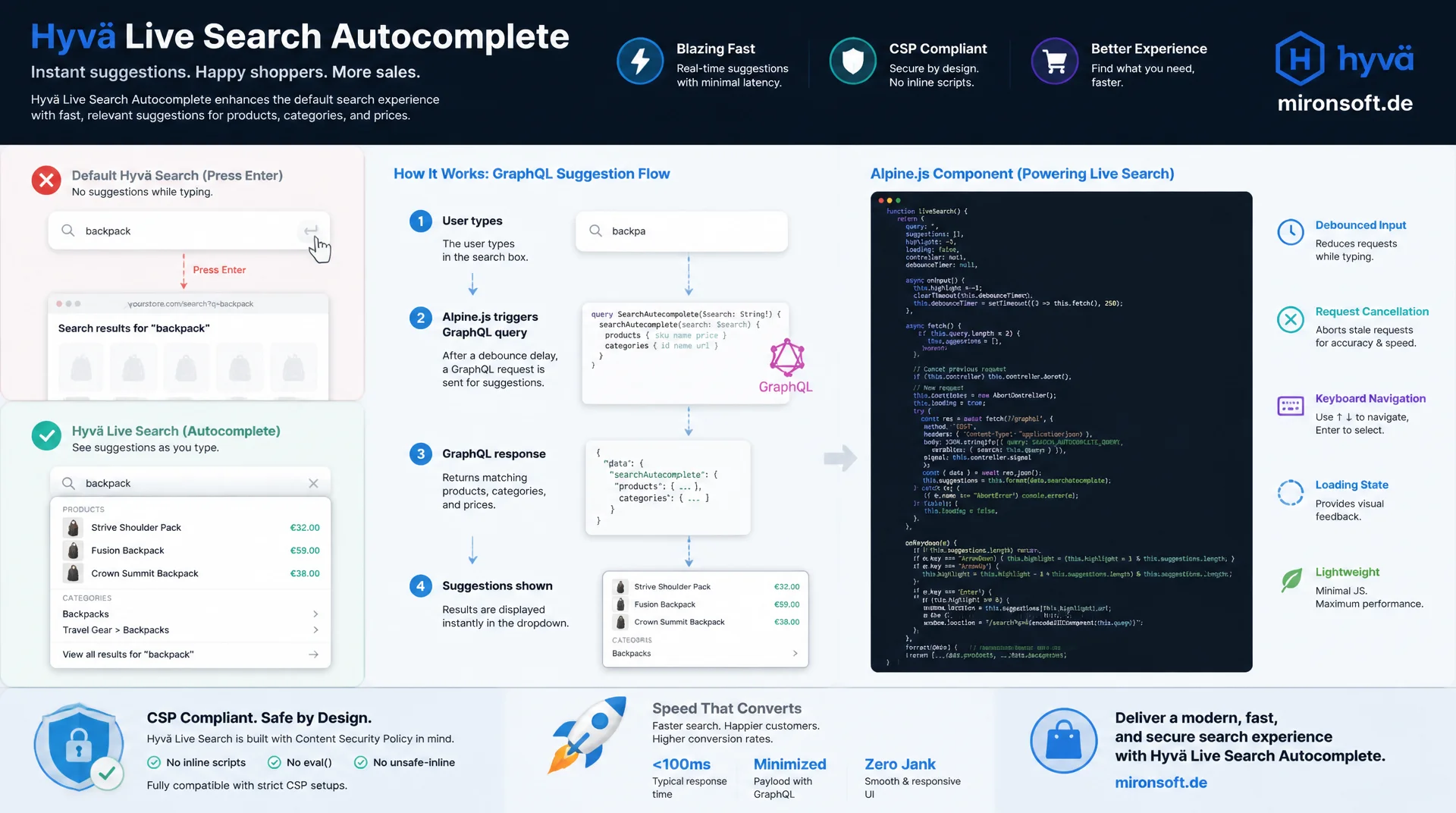
from the GraphQL query to an accessible Alpine component
Hyvä's default search box only jumps to the results page once you press Enter, showing no suggestions while you type. Live Search autocomplete in the Hyvä header closes exactly that gap: a GraphQL suggestion query returns products, categories, and prices, a lean Alpine.js component handles debouncing, request cancellation, and keyboard navigation, and CSP-compliant rendering keeps the shop safe and fast at the same time.
Table of Contents
- 1. Starting Point: Standard Search vs. Live Search Autocomplete
- 2. Architecture of the Hyvä Header Search
- 3. The GraphQL Autocomplete Query
- 4. The Alpine.js Autocomplete Component
- 5. Keyboard Navigation and Accessibility
- 6. Rendering the Suggestions
- 7. CSP Compliance
- 8. Performance
- 9. Tracking and Analytics
- 10. Summary
- 11. FAQ
1. Starting Point: Standard Search vs. Live Search Autocomplete
By default, Hyvä ships a plain quick search box that points to the standard Magento search controller and only jumps to the results page once you press Enter, with no real suggestions while typing. For many shops that is not enough: customers are used to Amazon and Google, where matching products, categories, and prices show up the moment they start typing. Live Search autocomplete in the Hyvä header closes exactly that gap, an extended search that fetches suggestions in the background over GraphQL while the user is still typing.
Anyone running Adobe Live Search or an Elasticsearch or OpenSearch based search already gets relevance-ranked results through the GraphQL interface, but still has to decide how that data reaches the frontend. Without a dedicated autocomplete component, the power of the search engine goes unused because the header still shows nothing more than a plain input field. Autocomplete in the Hyvä header connects that powerful backend search with a frontend component that cleanly ties together suggestions, keyboard navigation, and accessibility.
The effort for such an extension is manageable if you stick to Hyvä's existing structure: instead of building the search from scratch, the existing header search component is extended with Alpine.js state, a GraphQL query, and a few CSP-compliant script blocks. This article walks through exactly that path, from the architecture through the query to a fully accessible Live Search autocomplete component in the Hyvä header.
2. Architecture of the Hyvä Header Search
By default, the header search in Hyvä lives at templates/header/search.phtml inside the theme's Magento_Search module and is included in header.phtml as a child block. For Live Search autocomplete in the Hyvä header, this file gets overridden in the custom theme and the plain input field is replaced with an Alpine x-data container that manages the query string, result list, loading state, and active index.
On the layout side, the autocomplete component is wired in via default.xml or a block reference inside the header container, so the order of child elements stays untouched and $block->getChildNames() keeps iterating reliably. A dedicated ViewModel supplies configuration values such as the minimum query length, debounce time, and maximum suggestion count from the admin area to the phtml file, instead of hard-coding them in the template.
The snippet below shows the basic structure: an x-data root element with a combobox role, an input field carrying ARIA attributes, and a result list that only becomes visible once open. This structure is the foundation the rest of this Live Search autocomplete integration builds on.
<?php
/** @var \Hyva\Theme\ViewModel\HyvaCsp $hyvaCsp */
/** @var \Mironsoft\SearchAutocomplete\ViewModel\SearchAutocompleteConfig $searchConfig */
$hyvaCsp = $viewModels->require(\Hyva\Theme\ViewModel\HyvaCsp::class);
$searchConfig = $viewModels->require(\Mironsoft\SearchAutocomplete\ViewModel\SearchAutocompleteConfig::class);
?>
<div class="relative"
     x-data="hyvaLiveSearchAutocomplete({
         minChars: <?= (int) $searchConfig->getMinQueryLength() ?>,
         debounceMs: <?= (int) $searchConfig->getDebounceMs() ?>,
         maxSuggestions: <?= (int) $searchConfig->getMaxSuggestions() ?>
     })"
     @click.outside="closeSuggestions()"
     @keydown.escape.window="closeSuggestions()">

    <label for="live-search-autocomplete-input" class="sr-only">
        <?= $escaper->escapeHtml(__('Search')) ?>
    </label>

    <input
        id="live-search-autocomplete-input"
        type="search"
        name="q"
        autocomplete="off"
        role="combobox"
        aria-controls="live-search-autocomplete-listbox"
        aria-autocomplete="list"
        :aria-expanded="open ? 'true' : 'false'"
        :aria-activedescendant="activeIndex > -1 ? 'suggestion-' + activeIndex : null"
        x-model="query"
        @input.debounce="fetchSuggestions()"
        @keydown.arrow-down.prevent="moveActive(1)"
        @keydown.arrow-up.prevent="moveActive(-1)"
        @keydown.enter.prevent="selectActive()"
        class="w-full rounded-lg border border-gray-300 px-4 py-2 text-sm focus:outline-none focus:ring-2 focus:ring-orange-500"
        placeholder="<?= $escaper->escapeHtmlAttr(__('Search products...')) ?>"
    >

    <ul
        id="live-search-autocomplete-listbox"
        role="listbox"
        x-show="open && (results.length > 0 || !loading)"
        x-cloak
        class="absolute z-30 mt-2 w-full rounded-xl border border-gray-200 bg-white shadow-lg"
    >
        <template x-for="(item, index) in results" :key="item.sku">
            <li
                :id="'suggestion-' + index"
                role="option"
                :aria-selected="index === activeIndex"
                @mouseenter="activeIndex = index"
                @click="selectResult(item)"
                :class="{ 'bg-orange-50': index === activeIndex }"
                class="flex items-center gap-3 px-4 py-2 cursor-pointer"
            >
                <img :src="item.thumbnail" :alt="item.name" class="h-10 w-10 object-cover rounded" loading="lazy">
                <div class="flex flex-col">
                    <span class="text-sm text-gray-800" x-text="item.name"></span>
                    <span class="text-xs text-gray-500" x-text="item.price"></span>
                </div>
            </li>
        </template>
    </ul>
</div>
The ViewModel behind it follows the usual Hyvä pattern of a lean class implementing ArgumentInterface that supplies configuration values only, with no business logic and no direct GraphQL calls.
<?php

declare(strict_types=1);

namespace Mironsoft\SearchAutocomplete\ViewModel;

use Magento\Framework\App\Config\ScopeConfigInterface;
use Magento\Framework\View\Element\Block\ArgumentInterface;
use Magento\Store\Model\ScopeInterface;

/**
 * Provides Live Search autocomplete configuration values to the header search template.
 */
class SearchAutocompleteConfig implements ArgumentInterface
{
    private const XML_PATH_MIN_QUERY_LENGTH = 'mironsoft_searchautocomplete/general/min_query_length';
    private const XML_PATH_DEBOUNCE_MS = 'mironsoft_searchautocomplete/general/debounce_ms';
    private const XML_PATH_MAX_SUGGESTIONS = 'mironsoft_searchautocomplete/general/max_suggestions';

    /**
     * @param ScopeConfigInterface $scopeConfig Store configuration reader
     */
    public function __construct(
        private readonly ScopeConfigInterface $scopeConfig,
    ) {
    }

    /**
     * Returns the minimum number of characters before the first autocomplete request fires.
     *
     * @return int
     */
    public function getMinQueryLength(): int
    {
        return (int) $this->scopeConfig->getValue(
            self::XML_PATH_MIN_QUERY_LENGTH,
            ScopeInterface::SCOPE_STORE
        ) ?: 3;
    }

    /**
     * Returns the debounce delay in milliseconds applied before firing a request.
     *
     * @return int
     */
    public function getDebounceMs(): int
    {
        return (int) $this->scopeConfig->getValue(
            self::XML_PATH_DEBOUNCE_MS,
            ScopeInterface::SCOPE_STORE
        ) ?: 300;
    }

    /**
     * Returns the maximum number of product suggestions rendered in the autocomplete dropdown.
     *
     * @return int
     */
    public function getMaxSuggestions(): int
    {
        return (int) $this->scopeConfig->getValue(
            self::XML_PATH_MAX_SUGGESTIONS,
            ScopeInterface::SCOPE_STORE
        ) ?: 6;
    }
}
3. The GraphQL Autocomplete Query
The actual search intelligence comes from a dedicated GraphQL query that fetches category suggestions alongside the product search. The products query type returns everything needed for a compact product preview through search, pageSize, and fields such as sku, name, small_image, and price_range. For Live Search autocomplete, it is enough to cap pageSize at a small value like 5 or 6, since the autocomplete list is meant to be a quick pointer, not a full result set.
In addition to the product search, categoryList is queried with a name match filter to surface matching categories directly in the suggestions, a pattern that works equally well with Adobe Live Search and a classic Elasticsearch integration, as long as the schema supports categoryList. It is important to keep the query as lean as possible: every extra field adds response time, and in an autocomplete component every millisecond counts, since the user keeps typing while it runs.
Before the query is even sent, debouncing has to kick in on the frontend. Without it, every keystroke would trigger its own GraphQL request, meaning ten parallel requests for a ten-character search term, nine of which are wasted. The combination of debouncing in the Alpine code and a lean query is the foundation for a performant Live Search autocomplete in the Hyvä header.
query LiveSearchAutocomplete($search: String!, $pageSize: Int!) {
  products(search: $search, pageSize: $pageSize) {
    total_count
    items {
      sku
      name
      small_image {
        url
      }
      price_range {
        minimum_price {
          final_price {
            value
            currency
          }
        }
      }
    }
  }
  categoryList(filters: { name: { match: $search } }) {
    uid
    name
    url_path
  }
}
4. The Alpine.js Autocomplete Component
The heart of the component is an Alpine.js function with a clearly defined state: query for the current search term, results for the product list, loading for the loading state, and activeIndex for the position currently marked by the keyboard. This state lives entirely inside the x-data object and is never stored globally on the window object, which lets several independent search fields coexist on one page without conflicts.
The critical part is request cancellation: if a user keeps typing quickly while a GraphQL response is still in flight, the older response must not overwrite the newer one. An AbortController per component solves this elegantly, aborting the previous controller before every new fetch() call so that only the most recently started request actually sets results. Without this pattern, the Live Search autocomplete list flickers between old and new results while typing fast.
Error handling is part of the component code as well: an aborted request throws an AbortError that must be explicitly ignored, while genuine network errors are logged and shown to the user as a clearly communicated empty state. The code below shows the full component, including keyboard handling for the arrow keys and Enter.
// Alpine.js component: Live Search autocomplete with request cancellation
function hyvaLiveSearchAutocomplete(config) {
  return {
    query: '',
    results: [],
    categories: [],
    loading: false,
    open: false,
    activeIndex: -1,
    minChars: config.minChars,
    debounceMs: config.debounceMs,
    maxSuggestions: config.maxSuggestions,
    abortController: null,

    async fetchSuggestions() {
      if (this.query.trim().length < this.minChars) {
        this.results = [];
        this.open = false;
        return;
      }

      // Cancel the previous in-flight request before starting a new one
      if (this.abortController) {
        this.abortController.abort();
      }
      this.abortController = new AbortController();

      this.loading = true;
      this.activeIndex = -1;

      try {
        const response = await fetch('/graphql', {
          method: 'POST',
          headers: { 'Content-Type': 'application/json', 'Store': hyva.storeCode },
          signal: this.abortController.signal,
          body: JSON.stringify({
            query: window.liveSearchAutocompleteQuery,
            variables: { search: this.query, pageSize: this.maxSuggestions }
          })
        });

        const payload = await response.json();
        this.results = payload.data.products.items;
        this.categories = payload.data.categoryList;
        this.open = true;
      } catch (error) {
        // Ignore aborts caused by newer keystrokes, log real failures
        if (error.name !== 'AbortError') {
          console.error('Live Search autocomplete request failed', error);
        }
      } finally {
        this.loading = false;
      }
    },

    moveActive(step) {
      if (!this.open || this.results.length === 0) return;
      const count = this.results.length;
      this.activeIndex = (this.activeIndex + step + count) % count;
    },

    selectActive() {
      if (this.activeIndex > -1) {
        this.selectResult(this.results[this.activeIndex]);
      }
    },

    selectResult(item) {
      window.location.href = item.url ?? ('/catalog/product/view/sku/' + item.sku);
    },

    closeSuggestions() {
      this.open = false;
      this.activeIndex = -1;
    }
  };
}
5. Keyboard Navigation and Accessibility
A Live Search autocomplete component without keyboard support locks out a significant share of users, both screen reader users and anyone who navigates by habit with the keyboard. The ARIA role combobox on the input field, combined with role="listbox" on the result container and role="option" on each entry, is the foundation prescribed by the WAI-ARIA authoring pattern for exactly this use case.
The aria-activedescendant attribute tells screen readers which entry is currently marked without actually moving focus, focus stays in the input field while activeIndex is incremented and decremented with the arrow keys. Escape closes the suggestion list and resets activeIndex back to -1, Enter picks the currently marked suggestion or, if none is marked, triggers the regular full-text search.
Equally important is the aria-expanded binding on the input field, toggling dynamically between true and false, plus an sr-only label that communicates the field's purpose even without visible text. These details often decide, for an autocomplete in the Hyvä header implementation, whether it passes an accessibility audit against WCAG 2.1 AA.
6. Rendering the Suggestions
Each suggestion in the list typically shows a small product thumbnail, the name, and the price, compact enough to display several results at once, yet informative enough to support a purchase decision. The small_image field from the GraphQL response supplies the image URL, and price_range.minimum_price.final_price supplies the value and currency, so the price can be output directly with x-text in the template without any extra formatting logic.
Alongside products, category and CMS suggestions are part of a complete Live Search autocomplete in the Hyvä header. Categories typically appear in their own section above or below the product list, with an icon or label marking the result type. This keeps users from mistaking a category for a product.
For the case where no matches are found, the component needs an explicit empty state, a short hint text instead of an empty but still visible box. A good empty state ideally also suggests alternative actions, such as a link to the full search results page or to popular categories, so the user is not left stranded after an unsuccessful search.
{
  "data": {
    "products": {
      "total_count": 42,
      "items": [
        {
          "sku": "WT08-XS-Blue",
          "name": "Zoltan Wool Sweater",
          "small_image": { "url": "https://mironsoft.de/media/catalog/product/cache/wt08.jpg" },
          "price_range": {
            "minimum_price": {
              "final_price": { "value": 59.9, "currency": "EUR" }
            }
          }
        }
      ]
    },
    "categoryList": [
      { "uid": "Mg==", "name": "Sweaters", "url_path": "women/sweaters" }
    ]
  }
}
7. CSP Compliance
Hyvä enforces a strict Content Security Policy for good reason, allowing inline scripts only when they are explicitly registered through the HyvaCsp ViewModel. For the Live Search autocomplete component, that means every inline <script> block, whether it supplies the GraphQL query as a constant or registers Alpine components, must be immediately followed by a call to $hyvaCsp->registerInlineScript().
External script sources are not needed for this feature and should not be used, the entire autocomplete logic runs on Alpine.js, which is already part of the Hyvä theme, plus one lean, self-written JavaScript function. Anyone who instead loads an external autocomplete script from a CDN undermines the CSP configuration and adds both an extra attack surface and an external dependency that takes down the entire header search if the CDN goes down.
In practice, a single inline block in the layout that registers the Alpine function globally, followed by the matching registerInlineScript() call, is enough. That keeps Live Search autocomplete in the Hyvä header fully CSP-compliant, without needing extra nonce or hash exceptions in the shop's CSP configuration.
8. Performance
Debounce timing is the single biggest lever for the perceived performance of Live Search autocomplete. A value between 250 and 350 milliseconds has proven itself in practice: short enough that the search still feels responsive, long enough to meaningfully cut the number of unnecessary requests while typing fast. Values below 150 milliseconds bring almost no perceptible speed gain but noticeably increase server load.
Just as important is a minimum character count before the first request fires, typically three characters. A single letter returns far too many, barely relevant matches anyway, and on high-traffic shops would send unnecessary GraphQL requests to the search engine. As shown in the ViewModel example, this threshold can be controlled directly through system configuration without touching the code.
For frequently repeated search terms, an HTTP-level caching strategy pays off: Adobe Live Search caches suggestion responses server-side, and with a classic Elasticsearch integration, a short-lived full-page cache or an edge cache in front of the GraphQL endpoint can achieve similar effects. It matters that the cache key accounts for the search term, store view, and customer group, so no incorrect prices or visibility end up in the Live Search autocomplete suggestions.
9. Tracking and Analytics
Every completed Live Search autocomplete request is a signal for assortment and search optimization, so it should be pushed into the dataLayer. An event such as search_suggestion_shown, carrying the search term, result count, and timestamp, provides the data basis for later analysis of which search terms are typed often but clicked rarely.
At least as valuable is no-result tracking: if a user searches for a term for which Live Search autocomplete finds no products, that is a direct signal of an assortment gap, a missing synonym in the search engine, or a typo that a spelling correction could fix. An event such as search_no_results, populated with the exact search term, makes these cases analyzable in the analytics tool.
Technically, a window.dataLayer.push() call directly inside the fetchSuggestions() method of the Alpine component, again wrapped in a registered inline script block, is all that is needed. Important: tracking must never block or delay the actual request, it runs as a fire-and-forget call alongside rendering the suggestions.
The following patterns summarize the key differences between a naively implemented and a robust Live Search autocomplete in the Hyvä header.
| Task | Naive Approach | Recommended Hyvä Pattern | Benefit |
|---|---|---|---|
| Request on keystroke | No debounce, one request per keystroke | Debounced fetch (250-350 ms) | Less server load, smoother typing |
| Responses while typing fast | No request cancellation | AbortController per component | Always current, consistent suggestions |
| Inline script in the header | Unregistered <script> block | $hyvaCsp->registerInlineScript() | CSP-compliant, not blocked by the browser |
| Operating the suggestion list | Only reachable with the mouse | aria-activedescendant + arrow keys | Accessibility per WCAG 2.1 AA |
| Analyzing failed searches | No no-result tracking | dataLayer event search_no_results | Data basis for assortment optimization |
Taken together, this combination of patterns decides whether Live Search autocomplete in the Hyvä header is perceived as a noticeable improvement or as an additional source of bugs in the shop's header.
Mironsoft
Hyvä search, GraphQL integration, and frontend performance
Want Live Search autocomplete reliably integrated into your Hyvä header?
We implement GraphQL-based autocomplete components that are accessible, CSP-compliant, and fast, from the suggestion query to the finished Alpine.js component in the header.
GraphQL Integration
Designing and connecting suggestion queries for products, categories, and CMS content
Alpine Components
Implementing debounce, AbortController, and state handling for the Hyvä header
Accessibility Audit
Reviewing and retrofitting keyboard navigation and ARIA structure to WCAG 2.1 AA
10. Summary
A clean Live Search autocomplete integration in the Hyvä header solves a concrete problem: the standard quick search shows no suggestions while typing, even though the search engine in the background could already deliver relevance-ranked results. A lean GraphQL query, an Alpine.js component with debouncing and an AbortController, and ARIA-compliant markup turn the plain input field into a fully accessible search built directly into the header.
The biggest lever is bringing all the building blocks together consistently: CSP-compliant script registration, well-considered debounce timing, a meaningful empty state, and tracking events for both hits and failed searches. Anyone who plans for these points from the start ends up with autocomplete in the Hyvä header that not only feels fast but also measurably contributes to assortment and search optimization.
Live Search Autocomplete in the Hyvä Header: The Essentials at a Glance
GraphQL Query
A lean suggestion query with products and categoryList, limited to a handful of fields and a small pageSize.
Alpine State & Cancellation
Debounce, query/results/loading/activeIndex, and an AbortController per component prevent stale suggestions.
Accessibility & CSP
role="combobox", aria-activedescendant, and arrow-key navigation, every inline script block backed by registerInlineScript().
Performance & Tracking
Debounce 250-350 ms, minimum of 3 characters, a per-store-view cache strategy, and dataLayer events for hits and failed searches.