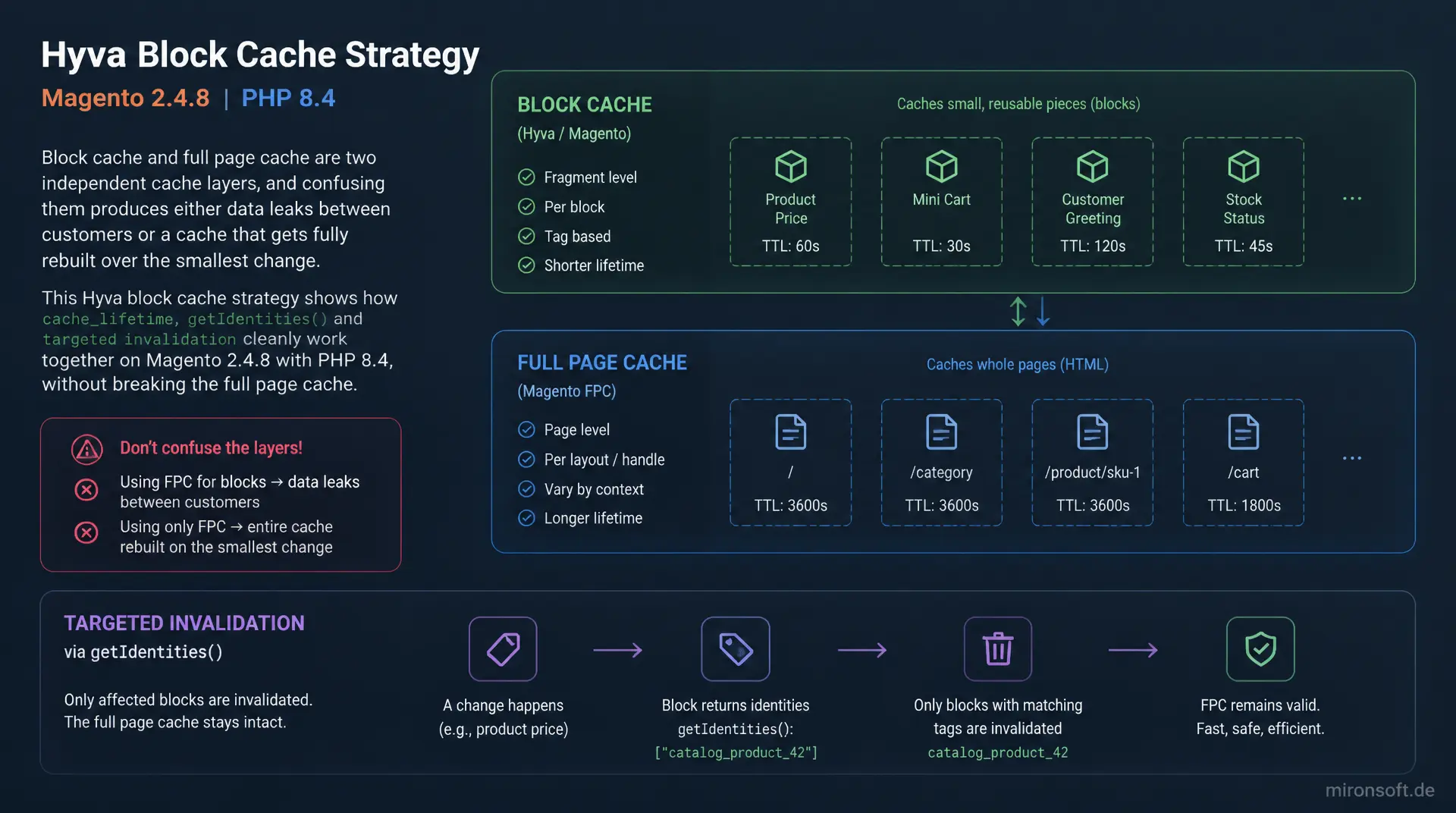
cache_lifetime and getIdentities() combined correctly
Block cache and full page cache are two independent cache layers, and confusing them produces either data leaks between customers or a cache that gets fully rebuilt over the smallest change. This Hyva block cache strategy shows how cache_lifetime, getIdentities() and targeted invalidation cleanly work together on Magento 2.4.8 with PHP 8.4, without breaking the full page cache.
Table of Contents
- 1. Block cache vs. full page cache: two cache layers you must not confuse
- 2. Setting cache_lifetime: which blocks are static, which must never be cached
- 3. Cache tags via getIdentities(): targeted invalidation instead of a global cache flush
- 4. Personalized blocks: private content and customer data sections instead of block cache
- 5. ViewModel caching pitfalls: why ViewModels themselves are never cached
- 6. Cache tag inheritance between parent and child blocks in layout XML
- 7. Debugging: checking the X-Magento-Cache-Debug header and cache tags in Varnish and Redis
- 8. Common mistake: overly aggressive or coarse cache tags break the full page cache
- 9. Best practices for custom modules: registering your own cache tags and invalidating precisely
- 10. Summary
- 11. FAQ
1. Block cache vs. full page cache: two cache layers you must not confuse
A solid Hyva block cache strategy does not start with the question of how much to cache, but with a clean separation of two layers that get mixed up constantly in practice: the full page cache and the block cache. The full page cache stores the entire rendered HTML response, keyed by URL, store, currency and customer group. On a cache hit, the response is served directly from Varnish or the built-in FPC backend before Magento's block system even boots for that request. Block cache operates one level below: it caches the output of individual blocks during the actual render pass, controlled per block via cache_lifetime and cache tags.
This is exactly where a deliberate block cache strategy pays off, in two scenarios. First, building or refreshing a full page cache entry costs time proportional to the entire block tree, and a well-configured block cache speeds up precisely that regeneration process once an FPC entry expires or gets invalidated by a tag. Second, on pages that are fundamentally not publicly cacheable, such as the customer account, the cart or checkout, the full page cache does not apply at all because Magento explicitly marks these layouts as non-cacheable. On exactly these pages, block cache is the only protective layer standing between the request and expensive blocks such as navigation, a footer CMS block, or the currency switcher.
Without a deliberate block cache strategy, developers often assume that with the full page cache enabled, everything is already cached, and leave cache_lifetime at the default value of null. A mega menu with several category queries then gets fully recomputed on every visit to a non-cacheable page like checkout, even though the category structure has not changed in days.
2. Setting cache_lifetime: which blocks are static, which must never be cached
The central lever of any block cache strategy is the getCacheLifetime() method, which any class derived from \Magento\Framework\View\Element\AbstractBlock can override. If it returns null, Magento's _loadCache() logic refuses any cache access for that block, and it is fully re-rendered on every request. An integer instead defines the time to live in seconds, after which a cached entry is considered stale even without tag invalidation. Static blocks such as the footer navigation, a CMS static block embedded in the header, or the language and currency switcher are good candidates for an explicit value like 86400, since they rarely change independently of customer or session.
The real danger of a careless block cache strategy lies in the combination of cache_lifetime and an incomplete cache key. Magento's getCacheKeyInfo() determines which dimensions influence a block's cache key, for example store ID or customer group ID. If a relevant dimension is missing from that array while the block still returns a positive cache_lifetime, the same cached HTML fragment gets served for requests that should actually show different content. The basic rule is therefore: only set cache_lifetime on blocks whose getCacheKeyInfo() fully captures every source of variance, and never include customer or session ID in the key, since that effectively duplicates the cache per customer and defeats the purpose of block cache.
3. Cache tags via getIdentities(): targeted invalidation instead of a global cache flush
Cache tags are the second building block of any block cache strategy and are controlled entirely independently of the cache key via getIdentities(). This method returns an array of string tags that Magento's full page cache module, Magento_PageCache, uses to know which cached pages or blocks belong to which entity. When a product is saved, a core observer collects the associated tags such as cat_p_123 and uses them to trigger invalidation precisely for the pages and fragments carrying that tag, while everything else remains untouched in cache.
Custom blocks implementing \Magento\Framework\DataObject\IdentityInterface must return granular, meaningful tags, for example mironsoft_badge_ followed by the product ID, never an empty array or the block's bare class name. An empty array means the block is practically never invalidated by an entity save and serves stale content until a manual cache flush. An overly generic tag, for example reusing the global product cache tag for every product regardless of the actual relationship, invalidates far more pages than necessary on every single product save, which is explored further in section 8.
<?php

declare(strict_types=1);

namespace Mironsoft\CatalogBadge\Block;

use Magento\Catalog\Model\Product;
use Magento\Framework\DataObject\IdentityInterface;
use Magento\Framework\View\Element\Template;
use Magento\Framework\View\Element\Template\Context;

/**
 * Product badge block that must invalidate whenever stock or price changes.
 */
class ProductBadge extends Template implements IdentityInterface
{
    /**
     * Cache tag prefix used for this block's identities.
     */
    private const CACHE_TAG = 'mironsoft_badge';

    /**
     * @param Context $context Block context injected by the framework.
     * @param Product $product Product the badge is rendered for.
     * @param array $data Additional block data.
     */
    public function __construct(
        Context $context,
        private readonly Product $product,
        array $data = []
    ) {
        parent::__construct($context, $data);
    }

    /**
     * Static blocks can use a long TTL, this block relies on tag invalidation instead.
     *
     * @return int Cache lifetime in seconds.
     */
    public function getCacheLifetime(): int
    {
        // One day is a safe upper bound; getIdentities() invalidates earlier when needed.
        return 86400;
    }

    /**
     * Returns the exact cache tags this block depends on.
     *
     * @return string[] Cache identity tags for targeted invalidation.
     */
    public function getIdentities(): array
    {
        return [
            self::CACHE_TAG . '_' . $this->product->getId(),
            Product::CACHE_TAG . '_' . $this->product->getId(),
        ];
    }
}
4. Personalized blocks: private content and customer data sections instead of block cache
Personalized content fundamentally does not belong in a block cache strategy, it belongs in Magento's private content mechanism from the Magento_PageCache module. The full page cache stores a page as a public HTML fragment with placeholders for private data such as customer greeting, cart counter or wishlist count. In the browser, customer-data.js loads these sections via Ajax and replaces the placeholders client-side, driven by customer_sections.xml, which defines which section gets invalidated by which controller action. This mechanism exists specifically so personalization never needs to be solved via cache_lifetime or getIdentities().
A widespread anti-pattern: instead of routing personalized fragments through private content sections, a developer sets cache_lifetime to null on the entire mini-cart block. That does prevent stale data, but throws away every cache benefit for that block. Worse is the reverse case: personalized data accidentally ends up in the cached, public HTML because a block with a positive cache_lifetime reads customer data that is not represented in the cache key, resulting in a real data leak between customers.
<!-- app/design/frontend/Mironsoft/default/Magento_Customer/layout/customer_account.xml -->
<page xmlns:xsi="http://www.w3.org/2001/XMLSchema-instance"
      xsi:noNamespaceSchemaLocation="urn:magento:framework:View/Layout/etc/page_configuration.xsd">
    <!-- The whole account dashboard is not publicly cacheable, so block cache is the only cache layer here -->
    <body>
        <referenceContainer name="content">
            <block class="Mironsoft\CatalogBadge\Block\CustomerGreeting"
                   name="customer.greeting"
                   template="Mironsoft_CatalogBadge::customer/greeting.phtml"
                   cacheable="false">
                <!-- Personalized data never gets a positive cache_lifetime -->
            </block>
        </referenceContainer>
    </body>
</page>
5. ViewModel caching pitfalls: why ViewModels themselves are never cached
One of the most common traps in a modern Hyva block cache strategy involves ViewModels. A ViewModel injected via ArgumentInterface is a plain PHP object, not a block instance. It implements neither getCacheLifetime() nor getIdentities() nor IdentityInterface, and is never touched by the block cache subsystem at all. The consequence: "the surrounding block is cached" and "the calculation in the ViewModel is expensive" are two independent facts. On a cache hit, the ViewModel simply never runs, because the complete block HTML comes straight from cache. On every cache miss, whether the first render, TTL expiry, or after tag invalidation, the ViewModel runs its calculation again at full cost, with no caching of its own.
For expensive ViewModel calculations tied to a block with a defined block cache strategy, for example aggregating price ranges for a configurable product, it is worth adding a dedicated caching layer directly in the ViewModel via \Magento\Framework\App\CacheInterface, with an explicit key built from product ID, store ID and customer group ID plus its own tags, independent of the block's own cache_lifetime. That creates a caching layer that still helps even on a block cache miss, something pure block-level caching cannot provide.
Equally important is the flip side: if a ViewModel used inside a block with a positive cache_lifetime reads data from \Magento\Customer\Model\Session or any other visitor-specific source, that data gets baked permanently into the cached HTML and served to unrelated customers, exactly the same class of bug as in section 2, just via the ViewModel instead of a block property. The fix is identical: never combine cache_lifetime above null with a ViewModel that reads session or customer data not represented in the cache key.
6. Cache tag inheritance between parent and child blocks in layout XML
Cache tags and cache_lifetime do not automatically propagate through Magento's block tree, and this is exactly the part of any block cache strategy that catches developers off guard most often. Layout XML builds a parent-child tree of blocks through nested referenceContainer and referenceBlock declarations. When a parent block with a set cache_lifetime renders, it recursively calls toHtml() on all children and caches the combined HTML as a single unit. A child block's own cache_lifetime and getIdentities() become practically meaningless for that render, because the parent's cache decision determines what gets stored.
If a genuinely dynamic child block, such as a cart counter or a session-dependent upsell hint, is nested inside a parent block with a set cache_lifetime, the dynamic content freezes into the parent's cached HTML on first render. The correct pattern is therefore to place truly dynamic sub-blocks either entirely outside the cached parent's cache boundary, for example in a separate, uncached sibling container, or to consistently route them through the private content sections from section 4, rather than relying on the block tree to naturally propagate the right cache behavior.
<!-- app/design/frontend/Mironsoft/default/Magento_Theme/layout/default.xml -->
<page xmlns:xsi="http://www.w3.org/2001/XMLSchema-instance"
      xsi:noNamespaceSchemaLocation="urn:magento:framework:View/Layout/etc/page_configuration.xsd">
    <body>
        <!-- Wrong: a cached parent silently freezes the dynamic child's output -->
        <referenceContainer name="header.container">
            <block class="Mironsoft\CatalogBadge\Block\HeaderWrapper"
                   name="header.wrapper.cached"
                   template="Mironsoft_CatalogBadge::header/wrapper.phtml">
                <!-- getCacheLifetime() returns 86400 on this block -->
                <block class="Mironsoft\CatalogBadge\Block\CartCounter"
                       name="cart.counter.dynamic"
                       template="Mironsoft_CatalogBadge::header/cart-counter.phtml"/>
            </block>
        </referenceContainer>

        <!-- Correct: the dynamic block sits outside the cached parent's toHtml() boundary -->
        <referenceContainer name="header.container">
            <block class="Mironsoft\CatalogBadge\Block\HeaderWrapper"
                   name="header.wrapper.cached"
                   template="Mironsoft_CatalogBadge::header/wrapper.phtml"/>
            <block class="Mironsoft\CatalogBadge\Block\CartCounter"
                   name="cart.counter.dynamic"
                   template="Mironsoft_CatalogBadge::header/cart-counter.phtml"
                   cacheable="false"/>
        </referenceContainer>
    </body>
</page>
7. Debugging: checking the X-Magento-Cache-Debug header and cache tags in Varnish and Redis
Without tools, any block cache strategy stays a guessing game. Magento and the upstream cache layer do offer useful debugging signals, though. The X-Magento-Cache-Debug header, enabled under Stores > Configuration > Advanced > System > Full Page Cache, reports HIT or MISS for the full page cache layer per request. A simple curl -I against a category or CMS URL immediately shows whether the FPC engaged at all, before worrying about block-level tags.
Block cache itself has no HTTP header equivalent, since it never reaches the HTTP layer directly: it consists of PHP-generated HTML fragments stored in the configured cache backend, typically Redis in a Magento 2.4.8 setup. In practice, check this via redis-cli inside the container, for example using SCAN against the database configured in the cache/frontend section of env.php, or with a temporary debug plugin on AbstractBlock::_loadCache() and _saveCache() that logs block ID, tag list, and stored TTL per request, but never modified directly in core.
# Check whether the full page cache layer served this request from cache
curl -sI https://shop.example.com/women/dresses.html | grep -i x-magento-cache-debug
# X-Magento-Cache-Debug: HIT

# Inspect Redis-backed block cache entries via the docker-magento wrapper
bin/cli redis-cli -n 1 --scan --pattern "*mironsoft_badge*"

# Flush only a specific cache type instead of the whole full page cache
bin/magento cache:clean full_page
8. Common mistake: overly aggressive or coarse cache tags break the full page cache
The most common structural mistake in a poorly thought-out block cache strategy is not too little caching, but caching that is too coarse. Two symmetric failure patterns show up constantly in practice. Overly coarse tags: a block or observer uses a single broad tag, or relies on the default identity that was never overridden, so every unrelated save event invalidates far more cached pages and blocks than necessary. Fixing a typo in a single product description then accidentally wipes every category page that references any product from the cache.
Overly aggressive invalidation: a custom observer on catalog_product_save_after calls CacheInterface::clean() with type full_page, or worse, \Magento\Framework\App\Cache\Manager::flush(['full_page']), instead of clearing only the specific tags of the saved product. The result: every visitor on every page hits a cold cache simultaneously, producing a visible TTFB spike right after any admin save, sometimes bad enough under load to look like a brief outage. The fix in both directions is the same discipline: identities must be as narrow as the actual dependency, and invalidation always goes through CacheInterface::clean(Zend_Cache::CLEANING_MODE_MATCHING_TAG, $tags) with the exact tag list, never a blanket type flush, unless a genuinely global change really does require it.
9. Best practices for custom modules: registering your own cache tags and invalidating precisely
Custom modules need a deliberate block cache strategy from the start, not as an afterthought fix. When building a custom block for Hyvä, with PHP 8.4 and constructor property promotion, that extends \Magento\Framework\View\Element\Template and implements \Magento\Framework\DataObject\IdentityInterface, define a stable tag prefix constant such as const CACHE_TAG = 'mironsoft_badge'; and build getIdentities() from that prefix plus the relevant entity ID, following the same pattern as Magento's own Product::CACHE_TAG. A matching observer on the entity's relevant *_save_after event resolves exactly which tags are affected and calls the injected CacheInterface::clean() with those tags only.
When invalidation depends on more than the entity's own ID, for example a stock-driven badge that must invalidate whenever a product's salable quantity crosses a threshold, hook into a targeted event such as cataloginventory_stock_item_save_after rather than piggybacking on catalog_product_save_after, and resolve the exact set of affected product and category tags inside that observer before calling clean(), so unrelated products stay untouched. This keeps a growing number of modules composable, without any of them accidentally becoming the reason the entire block cache strategy degrades into full page flushes.
<?php

declare(strict_types=1);

namespace Mironsoft\CatalogBadge\Observer;

use Magento\Catalog\Model\Product;
use Magento\Framework\App\CacheInterface;
use Magento\Framework\Event\Observer;
use Magento\Framework\Event\ObserverInterface;

/**
 * Invalidates only the cache tags affected by a saved product, never the whole full page cache.
 */
class InvalidateProductBadgeCache implements ObserverInterface
{
    /**
     * @param CacheInterface $cache Framework cache used for targeted tag cleaning.
     */
    public function __construct(
        private readonly CacheInterface $cache
    ) {
    }

    /**
     * Cleans exactly the tags belonging to the saved product's badge block.
     *
     * @param Observer $observer Event observer carrying the saved product.
     * @return void
     */
    public function execute(Observer $observer): void
    {
        /** @var Product $product */
        $product = $observer->getEvent()->getProduct();

        // Targeted invalidation: only this product's badge tag is cleaned.
        $this->cache->clean(
            \Zend_Cache::CLEANING_MODE_MATCHING_TAG,
            ['mironsoft_badge_' . $product->getId()]
        );
    }
}
Decisions compared directly: The following overview summarizes the most important choices of a block cache strategy and shows which pattern actually works in practice.
| Task | Wrong | Recommended pattern | Effect |
|---|---|---|---|
| Setting cache_lifetime | Leaving null on static blocks | Set an explicit TTL, e.g. 86400 | No unnecessary rendering on non-FPC pages |
| Implementing getIdentities() | Empty array or class name as tag | Granular tags per entity, e.g. cat_p_123 | Targeted instead of global invalidation |
| Invalidation after save | Flushing the entire full page cache | CacheInterface::clean() with a tag list | Cache hit rate stays intact for unrelated pages |
| Personalized data | cache_lifetime on a personalized block | Private content / customer data section | No data leak between customers |
| Child block in a cached parent | Nesting a dynamic block without checking | Pull dynamic blocks out of the cache boundary | No frozen session data baked into cache |
Mironsoft
Hyvä development, cache audits and Magento 2 operations
Block cache and full page cache not playing along?
We analyze cache_lifetime, getIdentities() and cache tag invalidation in your Hyvä store and implement a solid block cache strategy that does not break the full page cache.
Cache tag audit
Analysis of all block classes for cache_lifetime, getIdentities() and data leak risks
Implementation
Targeted invalidation via CacheInterface instead of a global cache flush after every save
Monitoring
X-Magento-Cache-Debug, Redis tags and Varnish logs under continuous watch
10. Summary
An effective block cache strategy is not a single switch, but the consistent separation of several responsibilities: cache_lifetime only on blocks with a complete cache key, granular getIdentities() tags instead of empty arrays or global class names, personalization exclusively through private content and customer data sections, dedicated caching in the ViewModel for expensive calculations, and a deliberate check of the cache boundaries between parent and child blocks in layout XML. Each of these measures on its own prevents a specific class of bug. Together they make the difference between a full page cache that reliably holds up, and one that has to be fully rebuilt over every small change.
The second crucial building block is visibility: without the X-Magento-Cache-Debug header, without a look into the Redis cache keys, and without the discipline of always invalidating through targeted tags rather than blanket flushes, any block cache strategy stays theory. Only the combination of clean implementation and continuous monitoring turns the full page cache into a reliable foundation instead of a source of bugs.
Hyva Block Cache Strategy: The Essentials at a Glance
cache_lifetime
Set only on blocks with a complete cache key, never include customer or session ID in the key.
getIdentities()
Granular tags per entity instead of an empty array or a global class name.
Personalization
Private content and customer data sections instead of cache_lifetime on dynamic blocks.
Debugging & mistakes
Check X-Magento-Cache-Debug, always invalidate via CacheInterface::clean() with an exact tag list.