GA4 channel groups, UTM discipline and dark social
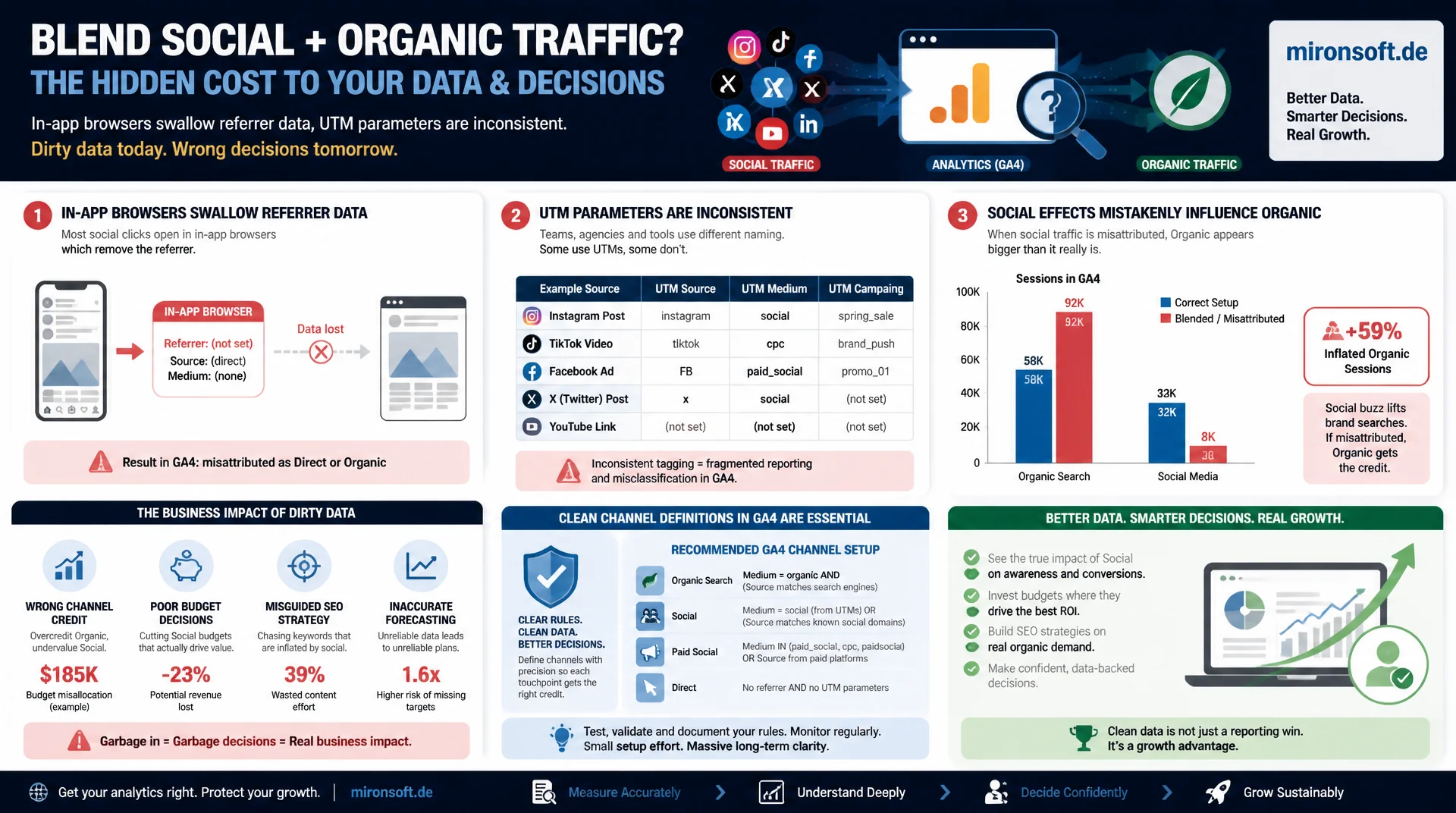
Social media traffic and organic traffic get blended together in many analytics setups, because in-app browsers swallow referrer data and UTM parameters are applied inconsistently. Without clean channel definitions in GA4, social effects wrongly end up in the organic channel and distort every decision based on those numbers.
Table of Contents
- 1. Why separating social and organic traffic matters
- 2. GA4 channel definitions: Organic Social vs. Organic Search
- 3. Building and maintaining consistent UTM parameters
- 4. Dark social and the blind spot in attribution
- 5. In-app browsers and their effect on referrer data
- 6. Attribution models: last-click, data-driven and their limits
- 7. Building GA4 explorations to separate channels
- 8. Common measurement mistakes with social vs. organic traffic
- 9. Traffic sources and attribution challenges compared
- 10. Summary
- 11. FAQ
1. Why separating social and organic traffic matters
Social media traffic and organic search traffic are frequently confused in practice, because both are perceived as "free" traffic with no direct media spend. Strategically, however, they are fundamentally different: organic traffic comes from targeted search with clear purchase intent, while social media traffic mostly comes from casual scrolling, often with no concrete purchase intent at the moment of the click. Anyone who measures both channels together makes budget and content decisions based on distorted data.
The problem gets worse technically, because many social platforms pass on referrer information incompletely or not at all, especially from mobile apps. Without consistent UTM tagging, a click from Instagram can end up, in the worst case, in the generic "Direct" category, or through a technical coincidence even get misinterpreted as an organic search click, if a platform uses intermediate redirect domains that GA4 recognizes as a search engine.
A clean separation of social media traffic and organic traffic is therefore not an academic exercise, it is the foundation of any solid channel performance analysis. Only someone who knows how much revenue actually comes from social campaigns versus organic search can weigh budgets, editorial plans, and SEO priorities against each other in a meaningful way.
2. GA4 channel definitions: Organic Social vs. Organic Search
By default, GA4 distinguishes between the default channel groups "Organic Search" and "Organic Social", based on an internal list of known domains and referrer patterns. A click from a domain recognized as a search engine lands in "Organic Search", a click from a domain recognized as a social platform lands in "Organic Social". The problem: this automatic detection is based on the referrer header, which simply does not work when the referrer is missing or stripped.
{
  "comment": "GA4 default channel matching logic (simplified)",
  "organic_search_condition": {
    "source_matches": ["google", "bing", "duckduckgo", "yahoo"],
    "medium_matches": ["organic"]
  },
  "organic_social_condition": {
    "source_matches": ["instagram.com", "facebook.com", "tiktok.com", "t.co", "linkedin.com"],
    "medium_matches": ["organic", "social", "(not set)"]
  },
  "risk": "Referrer missing or stripped by in-app browser -> falls back to (direct)/(none)"
}
For a reliable setup, it is worth building a custom channel group in GA4 that explicitly lists all relevant social media traffic sources, instead of relying entirely on default detection. Especially with newer or regional platforms, GA4 often does not automatically recognize the referrer as a social source, which puts these clicks incorrectly into "Organic Search" or "Referral".
3. Building and maintaining consistent UTM parameters
UTM parameters are the most reliable way to correctly attribute social media traffic independently of the referrer header, because they are explicitly transmitted in the URL and do not depend on the browser passing along the referrer. Every link posted on social platforms, whether organic or paid, should carry at least utm_source and utm_medium, following a fixed, documented naming convention across the whole team.
// UTM naming convention for organic social posts vs. paid social ads
// (documented in a shared spreadsheet, enforced via URL builder tool)

const organicSocialLink =
  "https://shop.example.com/blog/article-slug" +
  "?utm_source=instagram" +
  "&utm_medium=social" +
  "&utm_campaign=organic_july_2026";

const paidSocialLink =
  "https://shop.example.com/blog/article-slug" +
  "?utm_source=instagram" +
  "&utm_medium=paid_social" +
  "&utm_campaign=summer_sale_2026" +
  "&utm_content=carousel_ad_v2";

// GA4 must see medium=social vs medium=paid_social as distinct
// channels, otherwise organic and paid social get blended together
A common mistake is using the same utm_medium value for organic posts and paid ads. If both are marked as social, GA4 can no longer distinguish whether revenue came from a paid campaign or a free post, which makes ROI calculation for social media traffic completely impossible.
4. Dark social and the blind spot in attribution
Dark social refers to traffic generated through private channels such as WhatsApp, direct messages, email forwards, or copy-paste links, without any trackable referrer being transmitted. A link copied from an Instagram post and then sent to a friend via WhatsApp almost always lands in GA4 under the "Direct" category, even though the original trigger was clearly social media traffic.
This blind spot cannot be eliminated entirely, but it can be partly narrowed down: a noticeable, unexplained rise in direct traffic that coincides in time with a viral social media action is a strong indicator of dark social effects. Anyone who consistently uses UTM parameters even for content that is typically forwarded, such as discount promotions or giveaways, significantly reduces the share of unattributed traffic, even though a remainder always stays unmeasurable.
5. In-app browsers and their effect on referrer data
Instagram, TikTok, and Facebook open external links by default in their own in-app browser instead of the device's default browser. These in-app browsers transmit referrer information inconsistently, sometimes not at all, which systematically underrepresents social media traffic in analytics tools. A click from an Instagram story can therefore arrive as "(direct)/(none)", even though the origin was clearly social.
// Simplified detection: log referrer + UTM presence to spot
// in-app browser attribution gaps in raw analytics data

function logTrafficSource() {
  const params = new URLSearchParams(window.location.search);
  const hasUtm = params.has("utm_source");
  const referrer = document.referrer || "(none)";

  console.log({
    referrer,
    utm_source: params.get("utm_source") || "(missing)",
    likely_in_app_browser: !hasUtm && referrer === "",
    note: hasUtm
      ? "Attribution reliable via UTM"
      : "Attribution depends entirely on referrer, may be lost"
  });
}
For this reason, UTM tagging for social media traffic is not optional, it is mandatory. Anyone who relies on the referrer alone systematically loses a portion of actual social visits to the "Direct" category and thereby underestimates the real impact of social campaigns in every report.
6. Attribution models: last-click, data-driven and their limits
The data-driven attribution model, active by default in GA4, distributes the conversion value across multiple touchpoints in the customer path, instead of crediting the entire value to the last click. This is especially relevant for social media traffic, because social often sits at the beginning of the customer journey, as the first brand touchpoint, while the actual purchase happens days later via a direct search.
A pure last-click model would ignore this social touchpoint entirely and credit the whole conversion to organic search, even though social media traffic established the initial contact. Data-driven attribution partly corrects this, but remains a statistical estimate that is less reliable with low data volume. For smaller shops with limited traffic volume, comparing multiple models, for instance first-click against last-click, therefore delivers a more realistic picture of social's actual role in the journey.
7. Building GA4 explorations to separate channels
The Explorations feature in GA4 allows you to build custom reports that cleanly compare social media traffic and organic traffic, independent of the standard reports. A sensible starting point is a free-form exploration with the dimension "Session default channel group", segmented by conversion event, to see which channel actually contributes to purchases rather than just generating traffic volume.
{
  "exploration_type": "free_form",
  "dimensions": ["sessionDefaultChannelGroup", "sessionSource"],
  "metrics": ["sessions", "conversions", "totalRevenue"],
  "segments": {
    "organic_social": { "filter": "sessionDefaultChannelGroup == 'Organic Social'" },
    "organic_search": { "filter": "sessionDefaultChannelGroup == 'Organic Search'" }
  },
  "date_range": "last_90_days",
  "purpose": "Compare conversion rate and revenue per session between Social and Search"
}
These explorations often reveal a surprising pattern: social media traffic frequently generates a higher session volume but a lower conversion rate per session than organic search traffic, because users coming from search already bring more concrete purchase intent. Without this separated view, a blended average would misjudge both channels.
8. Common measurement mistakes with social vs. organic traffic
The most common mistake is missing or inconsistent UTM tagging on social posts, causing a significant portion of actual social media traffic to land in the "Direct" category and systematically underestimating channel performance. A second mistake is blending organic and paid social traffic through identical utm_medium values, which makes any ROI analysis impossible.
// WRONG: no UTM tagging, referrer inconsistent from in-app browsers
const badLink = "https://shop.example.com/blog/article-slug";

// WRONG: organic and paid social share the same utm_medium value
const confusingOrganic = "?utm_source=instagram&utm_medium=social";
const confusingPaid = "?utm_source=instagram&utm_medium=social&utm_campaign=ads";

// RIGHT: clear separation between organic and paid medium values
const clearOrganic = "?utm_source=instagram&utm_medium=organic_social";
const clearPaid = "?utm_source=instagram&utm_medium=paid_social";
A third mistake is completely ignoring dark social by interpreting any direct traffic as generic "brand awareness", without checking whether it coincides in time with a social media action. A fourth mistake concerns the attribution model: anyone who only looks at last-click systematically underestimates the contribution of social media traffic as an early touchpoint in the customer journey.
9. Traffic sources and attribution challenges compared
Not every traffic source carries the same attribution problems. The following overview ranks the most important sources by their measurability.
| Traffic source | Referrer reliability | Attribution risk | Recommended action |
|---|---|---|---|
| Organic Google search | High | Low | Default GA4 detection usually sufficient |
| Instagram/TikTok, in-app browser | Low | High, often lands as Direct | Consistent UTM tagging mandatory |
| Dark social (WhatsApp, copy-paste) | Very low | Very high, barely measurable | UTM on shareable content, indirect correlation |
| Paid social ads | High, with click IDs | Low with correct tagging | Dedicated utm_medium value separate from organic |
The table makes it clear: the more private and mobile the channel, the less reliable the automatic attribution. Social media traffic from in-app browsers and dark social channels therefore requires the most consistent manual tagging discipline across the entire analytics setup.
Mironsoft
GA4 attribution, tracking audits and channel analysis
Want social and organic traffic finally separated cleanly?
We set up custom GA4 channel groups, document UTM conventions for your whole team, and build explorations that make social and search traffic honestly comparable.
GA4 channel groups
Custom channel definitions instead of error-prone default detection
UTM governance
Team-wide naming conventions and URL builder templates
Exploration dashboards
Custom GA4 reports for an honest channel comparison
10. Summary
Social media traffic and organic traffic blend into one imprecise mass in many analytics setups, because in-app browsers swallow referrer data, UTM parameters are missing or inconsistently applied, and dark social is systematically misclassified as direct traffic. The result is budget and editorial decisions based on distorted numbers that correctly represent neither the real value of social campaigns nor the real value of organic search.
A clean separation requires custom GA4 channel groups, consistent and documented UTM conventions, a conscious understanding of dark social as an unavoidable remainder, and comparing multiple attribution models instead of relying purely on last-click. Anyone who implements these building blocks consistently can finally evaluate social media traffic and organic traffic fairly against each other.
Social media traffic vs. organic traffic: the essentials at a glance
UTM discipline is mandatory
Referrer data alone is not enough, in-app browsers transmit it unreliably or not at all.
Plan for dark social
A part of the social effect stays unmeasurable and lands as direct traffic, that is normal.
Separate organic and paid
Use different utm_medium values for organic and paid social traffic.
Compare attribution models
Last-click underestimates social as an early touchpoint, data-driven attribution partly corrects this.