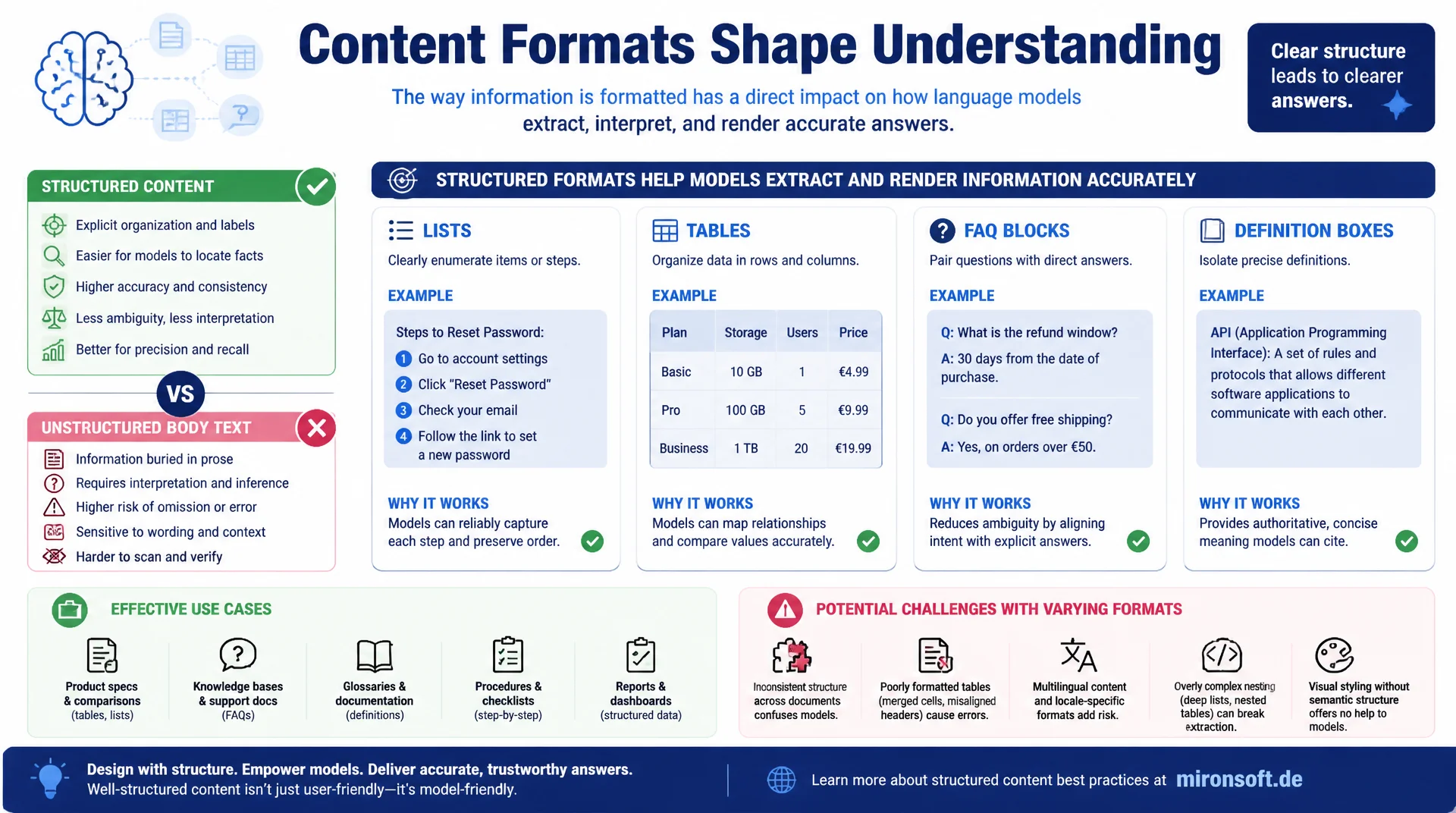
lists, tables, FAQ and definition boxes compared
Content formats increasingly determine whether a language model can reliably extract a piece of content and render it correctly in a generated answer. Body text without clear structure forces a model into interpretation, while lists, tables, FAQ blocks and definition boxes deliver information in a form that can be adopted directly into an answer with no room for interpretation.
Table of Contents
- 1. Why content formats are decisive for extraction
- 2. How language models break content into chunks
- 3. Lists: the most reliable extraction unit
- 4. Tables: structured comparisons for precise answers
- 5. FAQ blocks and their role in answer format
- 6. Definition boxes for unambiguous term explanations
- 7. Step-by-step formats for instructions
- 8. Structured data as an extraction booster
- 9. Content formats compared directly
- 10. Summary
- 11. FAQ
1. Why content formats are decisive for extraction
Language models do not answer search queries by reading and interpreting an entire web page like a human would, they extract relevant text passages and embed them into a new, generated answer. This extraction process works significantly more reliably with clearly structured content formats than with long, unstructured body text paragraphs in which multiple statements, conditions and exceptions are nested inside each other. A model that has to pull a single number or recommendation out of a six-sentence paragraph makes more mistakes than one extracting the same information from a clearly labeled list or table row.
This observation changes how content should be planned for GEO. It is not enough to provide factually correct information, the information also needs to exist in a content format that increases the likelihood of correct, complete extraction. Editorial teams writing exclusively in long body text paragraphs systematically lose visibility to competitors who additionally offer the same facts in lists, tables or FAQ blocks.
This article walks through which content formats are demonstrably extracted more reliably, how that technically relates to the chunk processing of language models, and how lists, tables, FAQ blocks, definition boxes and step-by-step formats can be concretely implemented in an article.
2. How language models break content into chunks
Retrieval systems behind AI search engines break a web page into smaller text segments before actual processing, so-called chunks, usually between 200 and 800 words, sometimes considerably smaller. Each chunk is embedded independently and checked separately for relevance against a search query. A content format like a list or a table usually stays intact within a chunk as a clearly bounded, semantically closed unit, while a long body text paragraph can be split in the middle of a chunk cut, losing the context of a statement.
These chunk boundaries are invisible to editorial teams, but their effect is measurable: a five-row table either survives as a whole or gets excluded entirely, while a body text paragraph can be cut at any point, separating a condition from its consequence. Structured content formats reduce this risk because their HTML structure (ul, ol, table, dl) gives the chunking algorithm clear boundaries where it typically cuts, instead of cutting in the middle of the format.
{
  "chunking_comparison": {
    "body_text_paragraph": {
      "risk": "high",
      "reason": "Condition and consequence can be split by a chunk boundary"
    },
    "unordered_list": {
      "risk": "low",
      "reason": "Semantically closed unit, chunking usually respects HTML block boundaries"
    },
    "table": {
      "risk": "low",
      "reason": "Rows and columns stay intact as a connected structure"
    },
    "faq_block": {
      "risk": "very low",
      "reason": "Question-answer pair is a minimal, complete unit of meaning"
    }
  }
}
3. Lists: the most reliable extraction unit
Of all content formats, lists get extracted most reliably by language models, because each list item represents a self-contained, clearly bounded unit of information. An ordered list with five steps or an unordered list with seven criteria gives the model an explicit segmentation it does not have to derive itself from body text. This pre-structuring significantly reduces the extraction error rate, especially for enumerations with many individual points that would easily become an unwieldy run-on sentence in body text form.
What matters for practical implementation is that every list item remains understandable on its own, even when extracted in isolation from the article context. A list item like "faster loading time" is meaningless without context, while "loading time under 2 seconds through image compression" remains a complete, usable statement even in isolation. This self-sufficiency of individual list items is the decisive difference between a list that gets extracted well and a list that looks visually structured but is still content-wise dependent on the surrounding body text.
4. Tables: structured comparisons for precise answers
Tables are the preferred content format for comparison data, because they deliver multi-dimensional information, for instance several products each with several attributes, in a form that machines can unambiguously map. A query like "which product has the longest warranty" can be answered precisely by a language model from a table with a warranty column, while the same information scattered across body text gets extracted considerably more error-prone, because the model has to derive the mapping between product name and warranty duration itself from sentence structure.
For implementation this means table headers should be precisely and unambiguously named, without abbreviations that remain unclear outside the article context. A column headed "Price" is more unambiguous than a column headed "$", because the language model does not have to additionally guess the column's meaning during extraction. In addition, every table row should form a complete statement on its own, so it remains understandable even when a single row is extracted in isolation.
<!-- Table structure with unambiguous, self-explanatory column headers -->
<table>
  <thead>
    <tr>
      <th>Content format</th>
      <th>Extraction reliability</th>
      <th>Typical use case</th>
    </tr>
  </thead>
  <tbody>
    <tr>
      <td>Ordered list</td>
      <td>Very high</td>
      <td>Step-by-step instructions</td>
    </tr>
    <tr>
      <td>Table</td>
      <td>High</td>
      <td>Multi-dimensional comparisons</td>
    </tr>
  </tbody>
</table>
5. FAQ blocks and their role in answer format
FAQ blocks are so effective among content formats because they mirror the question-answer structure in which language models formulate their own answers. A heading phrased as a question, followed by a concise, self-contained answer, matches almost exactly the format an AI search engine would output itself. This structural match significantly lowers the barrier for direct adoption, because the model barely needs to rephrase the answer to insert it into its own output.
In addition, FAQPage schema as structured data supports this effect by explicitly marking question and answer as a machine-readable pair, independent of the visual HTML structure. For editorial practice this means FAQ sections should not be treated as an optional appendix at the end of an article, but as a standalone, high-value content format that deliberately covers the most likely user questions on a topic with precise, independently understandable answers.
6. Definition boxes for unambiguous term explanations
An often underrated content format is the definition box: a short, visually set-off block of text that unambiguously explains a technical term in one to two sentences, usually right after its first mention in the article. For queries like "what does Generative Engine Optimization mean", language models preferably draw on such clearly bounded definitions, because they deliver a precise, context-independent answer instead of having to reconstruct a definition from several scattered sentence fragments.
The quality of a definition box depends heavily on its self-sufficiency. A good definition explains the term completely without requiring prior article context. A poor definition starts with "this refers to..." and implicitly references previous sentences, making it incomprehensible upon isolated extraction. For a strong GEO profile it pays off to formulate a standalone, reusable definition box for every central technical term of a topic cluster.
<!-- Self-contained definition box, right after the term's first mention -->
<div class="definition-box">
  <p>
    <strong>Generative Engine Optimization (GEO)</strong> refers to
    the deliberate optimization of content for visibility in generated
    answers from AI search systems such as ChatGPT, Perplexity or
    Google AI Overviews, as opposed to classic optimization for ranking
    positions in result lists.
  </p>
</div>
7. Step-by-step formats for instructions
For instructional content, the numbered step-by-step format is the most effective content format, because it makes an implicit temporal and logical order explicit. Language models can derive directly from a numbered list which step must be performed before which other step, whereas a description in body text form using phrases like "first", "then" and "finally" is interpreted more error-prone, especially if a paragraph gets cut by a chunk boundary.
HowTo schema as structured data complements this format by additionally marking each step machine-readably with position, title and description. For Magento and e-commerce related instructional content, such as installation steps or configuration guides, the combination of a numbered HTML list and HowTo schema is the most robust variant for ensuring a language model reproduces the order correctly instead of swapping or skipping steps.
{
  "@context": "https://schema.org",
  "@type": "HowTo",
  "name": "Optimizing content format for GEO",
  "step": [
    { "@type": "HowToStep", "position": 1, "name": "Identify body text", "text": "Mark paragraphs with several nested statements" },
    { "@type": "HowToStep", "position": 2, "name": "Convert to a list", "text": "Formulate each individual statement as a standalone list item" },
    { "@type": "HowToStep", "position": 3, "name": "Check structure", "text": "Test each item for comprehensibility in isolation" }
  ]
}
8. Structured data as an extraction booster
Beyond visual HTML structure, structured data in JSON-LD format additionally helps language models and retrieval systems correctly interpret the meaning of a content format independent of the surrounding design. Schema.org types like FAQPage, HowTo, Table (in the context of Dataset), or DefinedTerm provide a machine-readable layer that exists in addition to the visible HTML structure and still works when a crawler or retrieval system, for performance reasons, only processes CSS-rendered content to a limited extent.
It matters that structured data complements the visible structure rather than replacing it. A FAQPage schema without visible question-answer formatting in the HTML looks inconsistent and can be classified by some systems as potentially misleading markup. The most reliable practice always combines both layers: a visible, clearly structured content format in HTML plus matching Schema.org markup that machine-readably confirms the same structure.
{
  "@context": "https://schema.org",
  "@type": "DefinedTermSet",
  "name": "GEO terminology",
  "hasDefinedTerm": [
    {
      "@type": "DefinedTerm",
      "name": "Generative Engine Optimization",
      "description": "Optimizing content for visibility in generated AI answers rather than classic ranking positions"
    },
    {
      "@type": "DefinedTerm",
      "name": "Chunking",
      "description": "Breaking a web page into smaller text segments before relevance checking by retrieval systems"
    }
  ]
}
9. Content formats compared directly
The following table compares the key content formats by extraction reliability and typical use case.
| Content format | Extraction reliability | Best use case | Complementary schema |
|---|---|---|---|
| FAQ block | Very high | Answering direct user questions | FAQPage |
| Numbered list | Very high | Step-by-step instructions | HowTo |
| Table | High | Multi-dimensional comparisons | Dataset / Table |
| Definition box | High | Explaining terms unambiguously | DefinedTerm |
| Unstructured body text | Low | Narrative framing, context | No matching schema |
The table shows a clear pattern: the more explicitly a content format defines structure and meaning, the more reliably it gets extracted. Body text remains important for narrative framing and context, but should be deliberately complemented by structured formats whenever concrete, independently usable facts need to be conveyed.
Mironsoft
Content structure and structured data for GEO
Is your content even getting extracted correctly?
We audit existing articles for extraction friendliness, deliberately build out lists, tables and FAQ blocks, and add matching Schema.org markup for reliable AI visibility.
Format audit
Check existing content for body-text share and extraction risk
Restructuring
Derive lists, tables and definition boxes from existing body text
Schema markup
Cleanly implement FAQPage, HowTo and DefinedTerm
10. Summary
Choosing the right content formats increasingly determines whether a language model can reliably extract a piece of content and render it correctly in a generated answer. Lists and FAQ blocks achieve the highest extraction reliability because they deliver self-contained units of meaning. Tables are especially suited for multi-dimensional comparisons, definition boxes for unambiguous term explanations, and numbered step-by-step formats for instructions. Unstructured body text remains important for narrative framing but is the least reliable format for concrete, independently usable facts.
In addition, matching Schema.org markup such as FAQPage, HowTo and DefinedTerm further increases reliability, because it machine-readably confirms structure and meaning. The practical consequence for editorial teams: every central fact in an article should be available in a matching structured content format in addition to its narrative embedding, rather than existing exclusively in body text.
Content Formats for GEO: The Key Takeaways
Respect chunk boundaries
Lists, tables and FAQ blocks are more likely to survive chunk processing intact than body text.
Self-sufficiency per unit
Every list item, every table row must remain understandable even when extracted in isolation.
Structure plus schema
Always combine visible HTML format with matching Schema.org markup, never replace one with the other.
Match format to fact type
FAQ for questions, tables for comparisons, definition boxes for terms, numbered lists for instructions.