Correctly Marking Up Price, Availability, Reviews
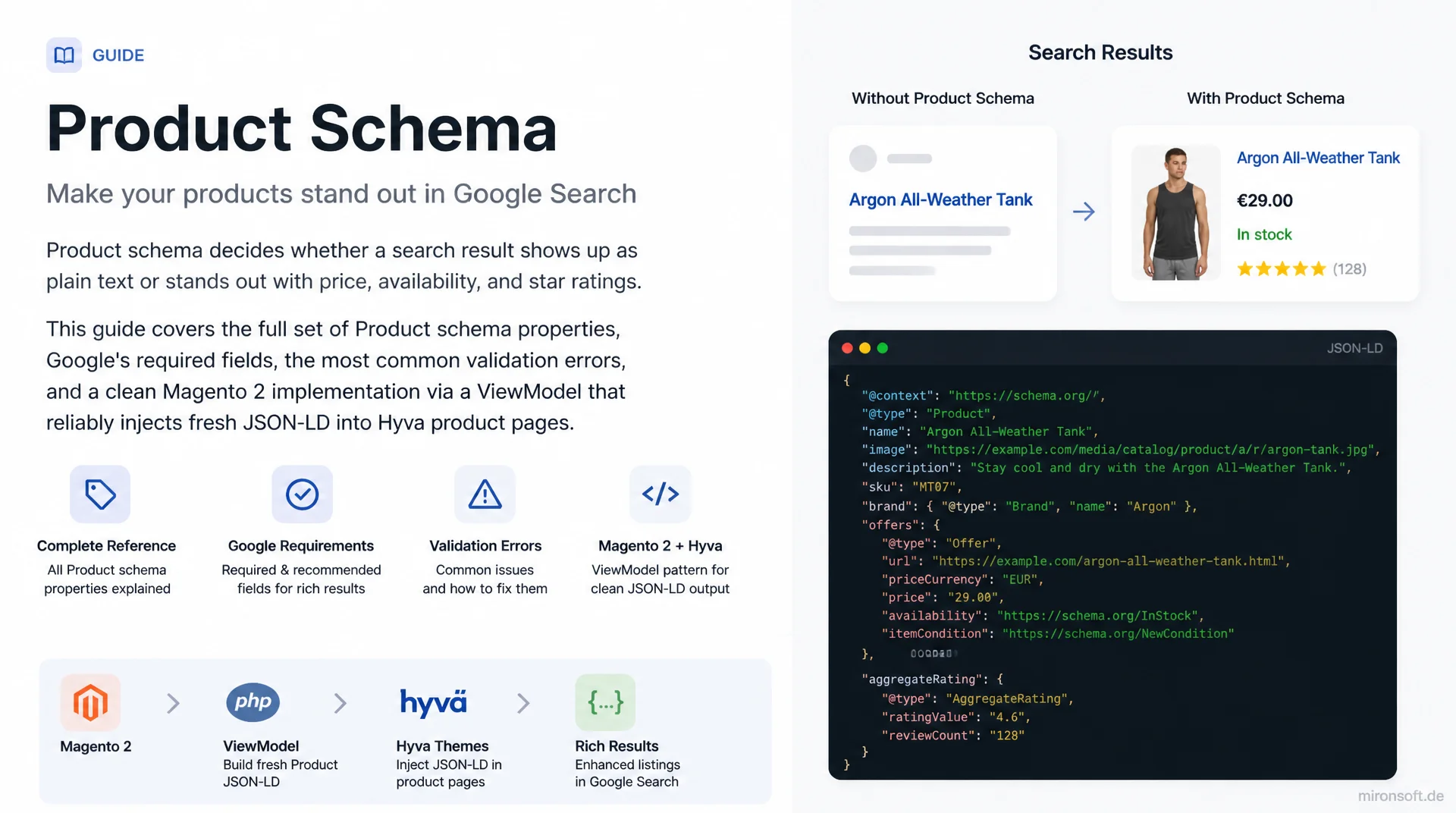
Product schema decides whether a search result shows up as plain text or stands out with price, availability, and star ratings. This guide covers the full set of Product schema properties, Google's required fields, the most common validation errors, and a clean Magento 2 implementation via a ViewModel that reliably injects fresh JSON-LD into Hyva product pages.
Table of Contents
- 1. Why Product schema determines visibility in search results
- 2. The most important Product schema properties at a glance
- 3. The Offers object: correctly marking up price, currency, and availability
- 4. AggregateRating and Review: marking up reviews without getting penalized
- 5. Required vs. recommended fields per Google's guidelines
- 6. Common validation errors and how to avoid them
- 7. Price and availability freshness: Google's update requirements
- 8. Validation with the Rich Results Test and Search Console
- 9. Magento 2 implementation: ViewModel and JSON-LD in Hyva
- 10. Summary
- 11. FAQ
1. Why Product schema determines visibility in search results
Product schema marks up structured data using the Schema.org vocabulary directly in the product page HTML and is the foundation for rich results such as price, availability status, and star ratings in Google Search. A search result with a visible price and rating stars visually stands out from the results list and measurably increases click-through rate compared to a plain text snippet, because users see the most important buying signals before they even click. For Magento stores with large catalogs, this is not a nice-to-have, it's a direct lever on organic traffic per product page.
Google also uses Product schema as a structured data source for the Merchant Center ecosystem and for Google Shopping results, provided the corresponding feeds are correctly linked. Incorrect or incomplete markup doesn't just cost you missed rich results, in repeated cases it can trigger manual actions against the entire domain once Google detects systematic mismatches between schema and visible content. Investing in clean Product schema pays off twice: higher click-through rate and lower risk of a rich-snippet suspension.
2. The most important Product schema properties at a glance
The Product type in Schema.org supports far more properties than are used in practice. The core is name, image, description, and sku as basic identification, complemented by brand as its own Brand object with a name property. For cross-border product identification, Google additionally expects at least one global identifier: gtin (or gtin8/gtin12/gtin13/gtin14 depending on the product category) or mpn combined with brand when no GTIN exists.
The offers object (type Offer or AggregateOffer for variants) carries price, currency, and availability and is by far the most important sub-structure for any sellable product. aggregateRating and review are optional but conversion-relevant, since they trigger star ratings in the search result. Additional recommended properties like color, size, material, or additionalProperty improve visibility in Google Shopping filters but are not decisive for the plain rich snippet in organic search.
{
  "@context": "https://schema.org",
  "@type": "Product",
  "name": "AirRun Pro Running Shoe",
  "image": [
    "https://mironsoft.de/media/catalog/product/airrun-pro-1.jpg",
    "https://mironsoft.de/media/catalog/product/airrun-pro-2.jpg"
  ],
  "description": "Lightweight running shoe with cushioned sole for road and light trail use.",
  "sku": "MS-AR-4102",
  "mpn": "AR4102-42",
  "gtin13": "4006381333931",
  "brand": {
    "@type": "Brand",
    "name": "Mironsoft Sports"
  },
  "aggregateRating": {
    "@type": "AggregateRating",
    "ratingValue": "4.6",
    "reviewCount": "312"
  },
  "offers": {
    "@type": "Offer",
    "url": "https://mironsoft.de/airrun-pro-running-shoe",
    "priceCurrency": "USD",
    "price": "89.90",
    "priceValidUntil": "2026-12-31",
    "availability": "https://schema.org/InStock",
    "itemCondition": "https://schema.org/NewCondition"
  }
}
3. The Offers object: correctly marking up price, currency, and availability
The offers object requires price and priceCurrency (an ISO 4217 code such as USD or EUR) as well as availability as a URL from the Schema.org vocabulary, such as https://schema.org/InStock, OutOfStock, PreOrder, or LimitedAvailability. A common mistake is providing the price as a string with a currency symbol instead of a plain number, such as "$89.90" instead of "89.90". This reliably produces a validation error in Google Search Console.
For products with variants (size, color), AggregateOffer represents the price range via lowPrice, highPrice, and offerCount, while each individual variant ideally gets its own Offer with its own sku and its own availability value. Google has also recommended priceValidUntil since 2023 to make a price's validity period explicit, along with shippingDetails and hasMerchantReturnPolicy as their own structured sub-objects, which become relevant for Google Shopping visibility together with the merchant listing guidelines.
{
  "@context": "https://schema.org",
  "@type": "Product",
  "name": "AirRun Pro Running Shoe",
  "offers": {
    "@type": "AggregateOffer",
    "priceCurrency": "USD",
    "lowPrice": "79.90",
    "highPrice": "94.90",
    "offerCount": "4",
    "offers": [
      {
        "@type": "Offer",
        "sku": "MS-AR-4102-40",
        "price": "89.90",
        "priceCurrency": "USD",
        "availability": "https://schema.org/InStock",
        "shippingDetails": {
          "@type": "OfferShippingDetails",
          "shippingRate": {
            "@type": "MonetaryAmount",
            "value": "4.90",
            "currency": "USD"
          },
          "shippingDestination": {
            "@type": "DefinedRegion",
            "addressCountry": "US"
          },
          "deliveryTime": {
            "@type": "ShippingDeliveryTime",
            "handlingTime": {
              "@type": "QuantitativeValue",
              "minValue": "0",
              "maxValue": "1",
              "unitCode": "DAY"
            },
            "transitTime": {
              "@type": "QuantitativeValue",
              "minValue": "1",
              "maxValue": "3",
              "unitCode": "DAY"
            }
          }
        },
        "hasMerchantReturnPolicy": {
          "@type": "MerchantReturnPolicy",
          "applicableCountry": "US",
          "returnPolicyCategory": "https://schema.org/MerchantReturnFiniteReturnWindow",
          "merchantReturnDays": "30"
        }
      }
    ]
  }
}
4. AggregateRating and Review: marking up reviews without getting penalized
aggregateRating requires ratingValue and reviewCount (or ratingCount) as required fields; bestRating and worstRating are optional, and default to 1 through 5 if left out. What matters most is that the marked-up ratings actually come from real customers and are visible on the page. Google explicitly prohibits self-created, purchased, or copied third-party reviews and consistently revokes rich-snippet eligibility for the offending domain when it finds violations.
A single review object without an accompanying aggregateRating is generally ignored by Google for product pages; review schema is only rich-result-eligible in combination with an overall rating. If you use a review system like Yotpo, Trustpilot, or a native Magento review module, you should compute aggregateRating directly from the database rather than maintaining it statically, so that reviewCount and ratingValue always match the star rating visible on the page.
5. Required vs. recommended fields per Google's guidelines
Google's structured data guidelines for Product explicitly distinguish between required and recommended properties. Required are name plus at least one of offers, review, or aggregateRating. A product with none of these three is not considered rich-result-eligible by Google. Within offers, price, priceCurrency, and availability are effectively mandatory, even though Schema.org itself technically lists them as optional.
Recommended but not mandatory are image, description, sku, mpn, gtin, brand, and for ratings the individual reviews via review. These fields don't directly increase rich-snippet eligibility, but they improve the quality of the Google Shopping integration and the match rate for product searches with specific filters like brand or item number. The practical rule of thumb for Magento stores: anything already maintained in the product data sheet should also flow into the schema, since the extra effort is close to zero with automated generation.
6. Common validation errors and how to avoid them
By far the most common error is a missing or incorrect availability field, followed by prices in the schema that diverge from the actually displayed price on the page, for example because a special price shows in the frontend but the regular price is in the schema. Google actively checks this match and flags the affected page in Search Console under "Unfixable issues" until the discrepancy is resolved.
Other typical errors: price as text with thousands separators or a currency symbol instead of a plain decimal, availability as free text instead of a full Schema.org URL, aggregateRating without a matching reviewCount, and multiple conflicting JSON-LD blocks for the same product on one page, often caused by an additional third-party module. Each of these errors can be avoided with one fixed rule: the schema must be generated from the same data source as the visible content, never from a separate, independently maintained structure.
// WRONG: price as text with currency symbol, availability as free text
{
  "offers": {
    "@type": "Offer",
    "price": "$89.90",
    "availability": "In Stock"
  }
}

// CORRECT: price as plain decimal, availability as full schema.org URL
{
  "offers": {
    "@type": "Offer",
    "priceCurrency": "USD",
    "price": "89.90",
    "availability": "https://schema.org/InStock"
  }
}

// WRONG: aggregateRating without reviewCount, ratingValue out of range
{
  "aggregateRating": {
    "@type": "AggregateRating",
    "ratingValue": "6"
  }
}

// CORRECT: matching reviewCount, ratingValue within the default 1 to 5 scale
{
  "aggregateRating": {
    "@type": "AggregateRating",
    "ratingValue": "4.6",
    "reviewCount": "312"
  }
}
7. Price and availability freshness: Google's update requirements
For Product rich results, Google requires price and availability to be updated at least every 30 days, even if the value hasn't actually changed. Otherwise the page silently loses its rich-snippet eligibility, without Search Console necessarily showing an error. For Magento stores with dynamic pricing this is usually uncritical, since the schema gets regenerated on every page view or cache refresh.
It becomes critical on heavily cached pages with a long Full Page Cache TTL: if a product page is served unchanged from cache for 90 days, the embedded schema goes stale too, even though the actual stock level may have changed long ago. The fix is to tie cache invalidation for price and availability to the same events that also update the visible price and stock, rather than defining a separate validity period for the schema.
8. Validation with the Rich Results Test and Search Console
The Google Rich Results Test checks a single URL or a code snippet against the current Google guidelines and shows exactly which properties are flagged as missing, invalid, or merely recommended, including a live preview of how the rich result would look in search. For development, this tool is indispensable because it surfaces errors before deployment, without waiting for the next Google crawl.
For ongoing monitoring at catalog scale, Google Search Console under "Enhancements" > "Products" is the right place: it aggregates errors across all indexed product pages and groups them by error type, such as "Missing field: price". A weekly look at this report uncovers systematic problems that individual spot checks with the Rich Results Test would miss, for example when a new attribute set in the catalog breaks the schema for an entire product category.
9. Magento 2 implementation: ViewModel and JSON-LD in Hyva
In Magento 2, generating Product schema strictly belongs in a ViewModel that implements ArgumentInterface and is wired into the product page layout XML via dependency injection, never in a Block class carrying business logic or hardcoded directly in the phtml template. The ViewModel reads price, availability, and rating directly from the same repositories and services that populate the visible product page (ProductRepositoryInterface, ReviewFactory, StockRegistryInterface), so schema and visible content are guaranteed to stay consistent.
In the Hyva theme, the generated JSON-LD is output via a dedicated phtml template in the catalog_product_view.xml layout handle, using a dedicated JSON encoder instead of manual string concatenation to rule out injection risks. Since Hyva doesn't use Knockout.js templates, the schema can be delivered as pure server-side rendering on the very first HTML response, which additionally improves crawlability because Google sees the schema without having to execute JavaScript first.
<!-- app/code/Mironsoft/SeoSuite/view/frontend/layout/catalog_product_view.xml -->
<page xmlns:xsi="http://www.w3.org/2001/XMLSchema-instance"
      xsi:noNamespaceSchemaLocation="urn:magento:framework:View/Layout/etc/page_configuration.xsd">
    <body>
        <referenceBlock name="product.info.main">
            <block class="Magento\Framework\View\Element\Template"
                   name="mironsoft.product.schema"
                   template="Mironsoft_SeoSuite::product/schema.phtml"
                   before="-">
                <arguments>
                    <!-- ViewModel provides Product schema data, decoupled from block logic -->
                    <argument name="view_model" xsi:type="object">Mironsoft\SeoSuite\ViewModel\ProductSchema</argument>
                </arguments>
            </block>
        </referenceBlock>
    </body>
</page>
<?php
/** @var Magento\Framework\View\Element\Template $block */
/** @var Mironsoft\SeoSuite\ViewModel\ProductSchema $viewModel */
$viewModel = $block->getData('view_model');
?>
<?php if ($viewModel->getProductSchemaJson()): ?>
<script type="application/ld+json">
    <?= /* @noEscape */ $viewModel->getProductSchemaJson() ?>
</script>
<?php endif; ?>
Product schema elements compared side by side
The table below summarizes which elements are required, what the typical mistake looks like, and what the correct implementation looks like in a Magento context.
| Schema element | Status | Typical mistake | Correct implementation |
|---|---|---|---|
| offers.price | Required | Text with currency symbol ("$89.90") | Plain decimal number ("89.90") |
| offers.availability | Required | Free text ("In Stock") | Full schema.org URL |
| aggregateRating | Recommended | ratingValue without reviewCount | Both fields from the same source |
| gtin / mpn | Recommended | Missing entirely for branded products | Provide mpn + brand or gtin13 |
| review | Optional | Fabricated or purchased reviews | Only real, visible customer reviews |
In practice, the most common Product schema errors are closely related: generating price and availability reliably from the same data source as the visible content automatically avoids most of the discrepancy errors around aggregateRating and variants too. Use this table as a checklist before every Rich Results Test run.
Mironsoft
SEO performance, Product schema, and Hyva optimization for Magento stores
Ready to implement Product schema properly?
We analyze your Magento store's Product schema, fix validation errors, and implement a ViewModel-based JSON-LD solution that keeps price, availability, and reviews reliably up to date.
Schema audit
Rich Results Test and Search Console analysis across the entire product catalog
ViewModel implementation
Clean JSON-LD following Magento conventions, no block hacks or hardcoding
Monitoring setup
Automated price and availability consistency checks in the CI/CD pipeline
10. Summary
Product schema solves a concrete problem: it decides whether a search result appears as plain text or stands out with price, availability, and star ratings, driving more clicks in the process. The required fields are manageable: name, at least one of offers/review/aggregateRating, and within offers, mandatory price, priceCurrency, and availability as a full Schema.org URL. Recommended fields like gtin, mpn, and brand additionally improve Google Shopping visibility.
Most validation errors come from mismatches between schema and visible content, or from stale price and availability data on heavily cached pages. If you consistently generate the schema from the same data source as the visible product page, through a clean Magento ViewModel instead of block hacks, you avoid nearly all of these errors from the start and stay on top of the situation via the Rich Results Test and Search Console.
Product Schema in Detail - The Essentials at a Glance
offers required fields
price, priceCurrency, and availability as the absolute minimum, price as a plain decimal without a currency symbol.
aggregateRating done right
ratingValue and reviewCount always from the same data source as the visible stars, no fabricated reviews.
Ensure freshness
Update price and availability at least every 30 days, tie cache invalidation to the same events.
Magento implementation
ViewModel instead of a block hack, generate schema from the same repositories as the visible content.