Spotting and reducing crawl waste in practice
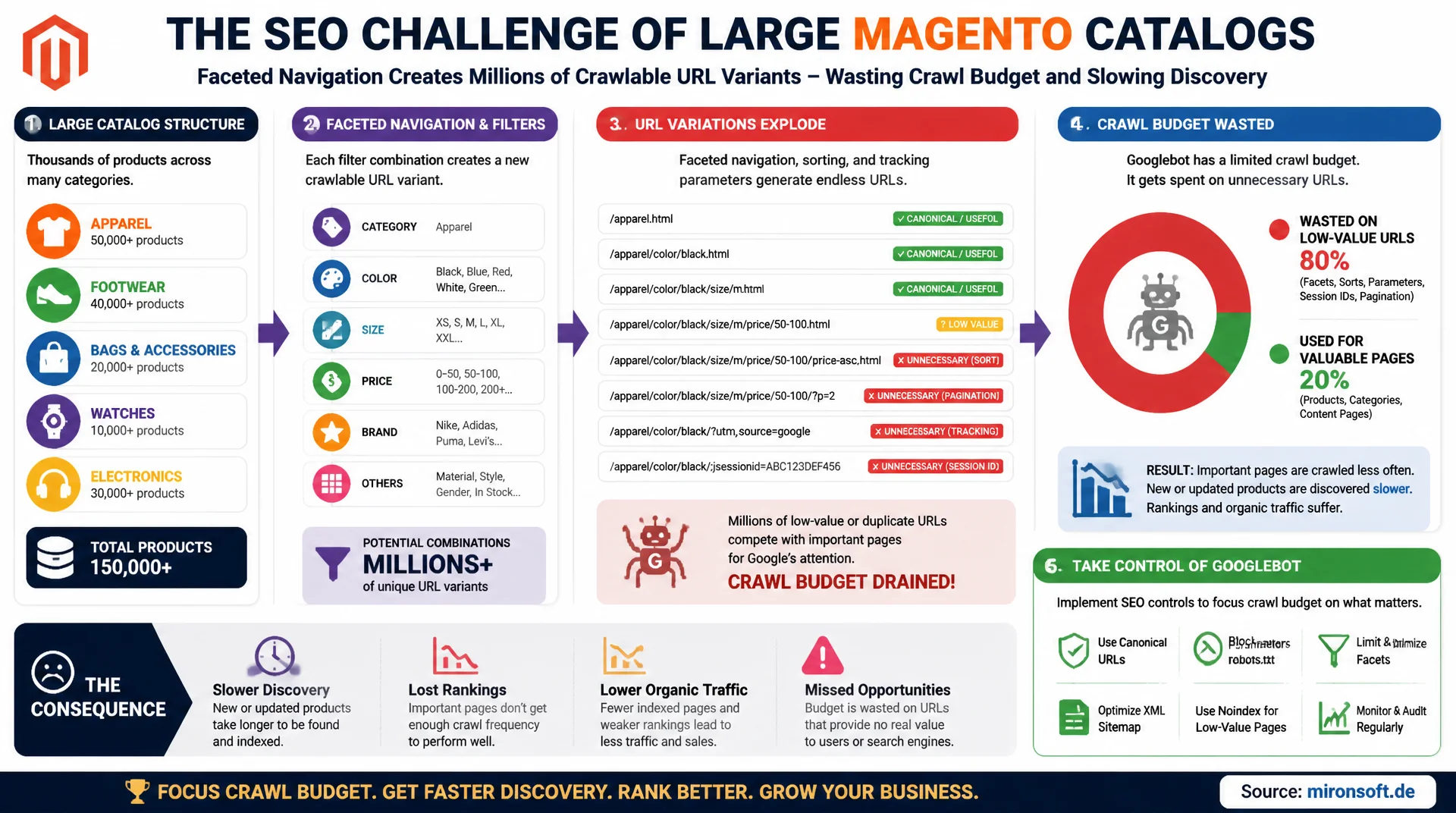
Large Magento catalogs with thousands of products and faceted navigation often generate millions of crawlable URL variants, most of which carry no standalone SEO value. Without deliberate control over Googlebot, crawl budget gets wasted on filter combinations, sort parameters, and session IDs, while important new or updated product pages get discovered less often and later.
Table of Contents
- 1. What is crawl budget? Google's own definition
- 2. Crawl rate limit vs. crawl demand in detail
- 3. Using the Crawl Stats report in Google Search Console
- 4. Analyzing server log files: exposing crawl waste
- 5. Faceted navigation as a crawl trap
- 6. Reducing Magento parameters: pagination, sorting, store switcher
- 7. Internal linking and site architecture for crawl efficiency
- 8. Practical tactics: robots.txt, canonical, noindex
- 9. Crawl budget wasters compared to their fix
- 10. Summary
- 11. FAQ
1. What is crawl budget? Google's own definition
Google's own documentation (Search Central) does not define crawl budget as a single metric, but as the interplay of two factors: the crawl rate limit and crawl demand. For most small to medium websites, crawl budget is not a relevant topic according to Google, because Googlebot already captures all important pages in a timely manner. Google itself names two thresholds above which crawl budget optimization becomes worthwhile: websites with more than roughly one million unique pages, or websites with more than 10,000 pages that change frequently. A Magento store with a few thousand products but faceted navigation often crosses this threshold unnoticed, because the number of crawlable URLs generated by filter combinations can be many times the number of actual product pages.
The practical effect of a limited crawl budget rarely shows up as pages never being discovered at all, but as delay: new products get discovered later, updated prices or availability get picked up later, and changes to important category pages take longer to reach search results. For stores with seasonal assortments or frequent price changes, that translates directly into lost revenue, because Google serves outdated information or simply indexes new products too late.
2. Crawl rate limit vs. crawl demand in detail
The crawl rate limit is the technical ceiling: how many parallel connections and how many requests per second Googlebot sends to a server without overloading it. This ceiling adapts dynamically to server response times. If the server responds quickly and reliably with low error rates, Googlebot gradually raises the rate. If response times increase or 5xx errors accumulate, Googlebot lowers the crawl rate immediately, sometimes noticeably for several days afterward. A Magento store with slow time to first byte or frequent 503 errors under load throttles itself this way, regardless of how many resources the server actually has available.
Crawl demand is the content side: how much Google actually wants to crawl a given URL, based on perceived popularity, freshness, and the ratio of known URLs to genuinely valuable ones. If a store contains many near-identical filter URLs with no standalone content, average crawl demand per URL drops, because Google learns from experience that a large share of a host's URLs deliver no new content. This learning effect harms the entire host, not just the affected filter URLs, and is one of the main reasons crawl budget problems arise structurally in Magento catalogs.
3. Using the Crawl Stats report in Google Search Console
The Crawl Stats report in Google Search Console, found under Settings and Crawl Stats, is the most important data source for an initial assessment without needing server access. It shows the total number of crawl requests over the last 90 days, the average response time, and a breakdown by response code, file type, crawl purpose (discovery of new URLs versus refresh of known URLs), and Googlebot type. A high share of refresh requests versus discovery requests, combined with a stagnating number of newly indexed pages, is a strong indicator that Googlebot is spending time repeatedly crawling known but low-value URLs instead of finding new content.
The report also shows example URLs per category, which allows a rough first grouping but does not replace a full URL list. If response time rises continuously over 90 days, that should not be ignored: a rising trend alone is enough for Google to preemptively lower the crawl rate limit, even before actual server problems occur. The report is a good starting point, but it does not replace real log file analysis, since it aggregates and reports with a delay.
# Query the Search Console URL Inspection API for a specific low-value filter URL
curl -s -X POST \
  "https://searchconsole.googleapis.com/v1/urlInspection/index:inspect" \
  -H "Authorization: Bearer ${ACCESS_TOKEN}" \
  -H "Content-Type: application/json" \
  -d '{
    "inspectionUrl": "https://shop.example.com/womens/dresses.html?color=red&size=m",
    "siteUrl": "https://shop.example.com/"
  }' | jq '.inspectionResult.indexStatusResult'

# Loop through a list of suspected crawl-waste URLs and log their coverage state
while read -r url; do
  echo "Checking: $url"
  curl -s -X POST "https://searchconsole.googleapis.com/v1/urlInspection/index:inspect" \
    -H "Authorization: Bearer ${ACCESS_TOKEN}" -H "Content-Type: application/json" \
    -d "{\"inspectionUrl\":\"${url}\",\"siteUrl\":\"https://shop.example.com/\"}" \
    | jq -r '.inspectionResult.indexStatusResult.coverageState'
done < suspected-filter-urls.txt
4. Analyzing server log files: exposing crawl waste
Search Console shows aggregated trends, but no complete URL-by-URL breakdown. Only raw server log files show exactly which URL was requested how often by which verified Googlebot client and when, including status code and response time per request. Verification matters: the user agent string "Googlebot" can be spoofed, so every IP address must be checked via reverse DNS lookup against Google's official IP ranges before a request is counted as genuine Googlebot traffic. Tools like the Screaming Frog Log File Analyser, JetOctopus, or Botify handle this verification automatically and aggregate hits by URL pattern.
In practice, a combination of grep and awk on the raw access logs is often enough for a first overview, filtering requests by user agent and grouping them by URL path or query parameter. What matters is not just looking at the top URLs by request frequency, but specifically grouping by individual query parameters, because that's exactly where the largest volumes of crawl requests hide across technically different but content-identical URLs.
# Filter genuine Googlebot requests from an nginx access log and count hits per URL path
grep -i "Googlebot" /var/log/nginx/access.log \
  | awk -F'"' '{print $2}' \
  | awk '{print $2}' \
  | cut -d'?' -f1 \
  | sort | uniq -c | sort -rn | head -30

# Isolate requests that carry query parameters (typical crawl waste candidates)
grep -i "Googlebot" /var/log/nginx/access.log \
  | awk -F'"' '{print $2}' \
  | awk '{print $2}' \
  | grep -oE '\?[a-zA-Z0-9_=&%-]+' \
  | awk -F'&' '{for(i=1;i<=NF;i++) print $i}' \
  | cut -d'=' -f1 \
  | sort | uniq -c | sort -rn

# Verify a client IP is a genuine Googlebot via reverse DNS before trusting the log line
host 66.249.66.1
5. Faceted navigation as a crawl trap
Faceted navigation is the most common crawl budget killer in Magento stores, because it creates a combinatorial explosion of URLs. If a category offers five filter attributes with six values each, the theoretical result is up to 6 to the power of 5, over 7,700 combinations for that single category alone, provided each combination exists as its own crawlable URL. Most of these combinations produce no unique assortment at all, just an empty or near-identical result list compared to neighboring filter combinations, which is exactly what Google classifies as duplicate content or thin content.
Google itself names faceted navigation explicitly in its own crawling documentation as an example of unintentional "crawler traps" created by relative URLs, session parameters, or near-infinite filter combinations. A default, unmodified Magento layout generates its own HTML-linked link for every filter combination, which Googlebot finds and crawls, even if no user ever actively searches for that exact combination. Without intervention, this URL volume grows not linearly but potentially with every additional filter attribute.
<!-- Category page with two active layered navigation filters -->
<!-- URL: https://shop.example.com/womens/dresses.html?color=blue&size=38 -->
<link rel="canonical" href="https://shop.example.com/womens/dresses.html">

<!-- Only canonicalize to the base category if the filtered view has no
     unique content value. If a specific filter combination has real
     search demand and should stay indexable, use a self-referencing
     canonical instead of pointing back to the base category. -->
6. Reducing Magento parameters: pagination, sorting, store switcher
Beyond the filter combinatorics, Magento generates a number of built-in query parameters that add crawl volume without any SEO value. Pagination via "?p=2", "?p=3", and so on adds several additional URLs for every category page, and especially deep pages like "?p=15" barely contain any relevant products anymore. The sort parameters "product_list_order" and "product_list_dir" generate an arbitrary number of URL variants for the same product set, differing only in order but content-wise fully identical. The store switcher parameter "___store=" shows up whenever internal links get generated without consistent URL cleanup, and it multiplies every affected URL by the number of configured store views.
Internal search result pages under "/catalogsearch/result/?q=" are also served crawlable, and partially indexable, by Magento by default, even though they are structurally thin content and generate arbitrarily many variants depending on the entered search term. The "product_list_limit=" parameter, for the number of products shown per page, behaves the same way as the sort parameters: identical content, different URL. Together, these built-in parameters alone often generate more crawl volume than the actual filter combinatorics, because they apply to every single category page in the store.
<!-- catalogsearch_result_index.xml: keep internal search results out of the
     index without blocking Googlebot from crawling them entirely -->
<page xmlns:xsi="http://www.w3.org/2001/XMLSchema-instance"
      xsi:noNamespaceSchemaLocation="urn:magento:framework:View/Layout/etc/page_configuration.xsd">
    <head>
        <meta name="robots" content="noindex,follow"/>
    </head>
</page>
7. Internal linking and site architecture for crawl efficiency
Site architecture determines how efficiently Googlebot spreads a given crawl budget across the pages that actually matter. A flat category structure with a maximum of three to four clicks from the homepage to every product page ensures that PageRank and crawl priority are distributed evenly. Deeply nested category trees with five or more levels dilute this effect: products in deep subcategories get crawled less often and updated less often, even when they are just as relevant as products in flatter categories.
Orphan pages, meaning products or landing pages that are only reachable via the XML sitemap but have no internal link pointing to them at all, are structurally rated lower by Google and revisited less often, even if they were initially indexed. Pagination chains in categories with many products make the problem worse: Googlebot visits the first result page regularly, but loses priority with every subsequent page, so products on page eight or nine end up effectively decoupled from the crawl frequency of the homepage. Consistent cross-linking between related products and categories, combined with a limited click depth, are the most effective structural countermeasures.
8. Practical tactics: robots.txt, canonical, noindex
The three central technical tools against crawl budget waste are robots.txt, canonical tags, and noindex, and they solve different problems. robots.txt prevents crawling of certain URL patterns outright, and it's suited to parameters guaranteed to carry no SEO value, such as session IDs or the store switcher parameter. Important caveat: a URL blocked via robots.txt can still appear in search results if it's linked externally, though without a snippet and without Google knowing the content, which in rare cases produces an unattractive result entry with no description.
Canonical tags are suited to filter combinations that represent a content subset of the base category and should still be crawled, but whose ranking signals should be consolidated onto the base URL. Noindex is the right choice for pages that are allowed to be crawled but should definitely not appear in the search index, such as internal search result pages. It's essential never to apply robots.txt and noindex to the same URL at the same time: a page blocked via robots.txt can never be crawled by Googlebot in the first place, so the noindex tag on it can never be read, which means the page can remain in the index despite the noindex intent.
User-agent: *
# Store-switcher and session parameters carry zero unique SEO value
Disallow: /*?*___store=
Disallow: /*?*___from_store=
Disallow: /*?*SID=

# Sort and display-mode parameters duplicate the same product set
Disallow: /*?*product_list_order=
Disallow: /*?*product_list_dir=
Disallow: /*?*product_list_mode=
Disallow: /*?*product_list_limit=

# Internal search result pages are handled via noindex,follow, not blocked here
Allow: /catalogsearch/result/

Sitemap: https://shop.example.com/sitemap.xml
9. Crawl budget wasters compared to their fix
The table below maps the most common crawl budget wasters in Magento stores to their matching countermeasure, based on the typical share they can take up of a store's total crawl volume.
| URL pattern | Example | Problem | Recommended fix |
|---|---|---|---|
| Faceted filter combinations | ?color=red&size=m&material=leather | Up to 90% of total crawl volume | robots.txt + canonical to base category |
| Sort parameters | ?product_list_order=price&dir=asc | Identical content, unlimited URLs | robots.txt disallow + canonical |
| Store switcher / session | ?___store=default&SID=abc123 | Multiplies every URL per store view | robots.txt disallow, clean up links |
| Deep pagination chains | ?p=17 in a thin category | Falling crawl priority, thin content | Limit click depth, cross-link |
| Internal search result pages | /catalogsearch/result/?q=... | Thin content, unlimited variants | Noindex,follow instead of robots.txt |
In practice, the tactics from the table work best in combination: robots.txt reduces volume at the root, canonical consolidates remaining signals, and cleaned-up internal linking ensures the freed-up crawl budget actually reaches important product and category pages instead of seeping right back into parameter variants.
Mironsoft
SEO engineering, crawl budget analysis, and log file audits for Magento stores
Ready to optimize your crawl budget?
We analyze your Magento store's server log files, identify the exact URL patterns that cost Googlebot unnecessary crawl budget, and implement targeted tactics, from robots.txt rules to cleaned-up internal linking.
Log file audit
Verified Googlebot analysis and URL pattern reporting by crawl volume
Technical SEO tactics
Configuring robots.txt, canonical, and noindex specifically for Magento parameters
Architecture review
Optimizing internal linking and category depth for efficient crawl distribution
10. Summary
Crawl budget optimization for Magento stores addresses a structural problem: without intervention, the number of crawlable URLs grows faster than the number of genuinely valuable pages, driven by faceted navigation and built-in parameters. The Crawl Stats report in Search Console provides the first overview, while real log file analysis reveals the exact URL patterns where Googlebot spends most of its requests. Only with that data foundation can robots.txt, canonical tags, and noindex be applied deliberately instead of blanket-wide.
The effect doesn't show up immediately, but over weeks: as crawl volume on worthless parameter URLs drops, Googlebot's attention visibly shifts toward new and updated product pages, which shows up in Search Console as a rising number of discovered and refreshed URLs. A flat, consistently linked site architecture reinforces this effect further, because it prevents the newly freed crawl budget from getting lost again in deep pagination chains or orphan pages.
Crawl Budget for Magento Stores - The Essentials at a Glance
Crawl rate limit vs. demand
Server stability sets the technical ceiling, content quality drives Googlebot's actual demand to crawl.
Log file analysis
Raw server logs show exactly which URL patterns cost Googlebot the most requests, verified via reverse DNS.
Faceted navigation
Filter combinations create combinatorial URL growth, usually with no standalone SEO value.
robots.txt, canonical, noindex
Three different tools for three different problems, never combine robots.txt and noindex on the same URL.