Protect crawl budget, consolidate ranking signals
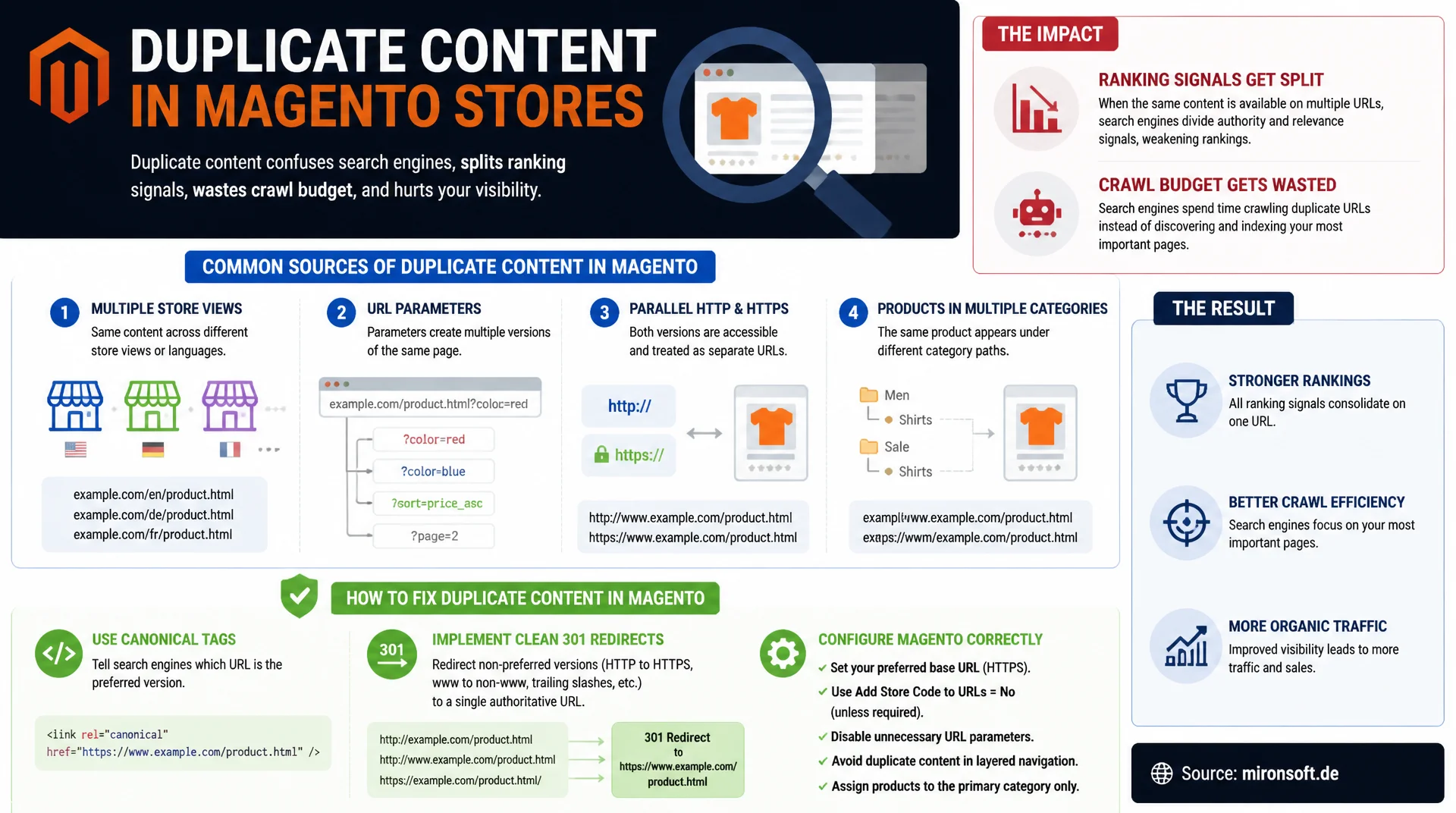
Duplicate content in Magento stores splits ranking signals across multiple URLs, wastes crawl budget, and keeps the right page from showing up in search. Multiple store views, URL parameters, parallel HTTP and HTTPS, and products assigned to several categories create typical duplicates that can be fixed with canonical tags, clean 301 redirects, and the right Magento configuration.
Table of Contents
- 1. Why duplicate content specifically hurts Magento stores
- 2. Multi-store and multi-website setups as a duplicate content source
- 3. URL parameters: sorting, pagination, and tracking
- 4. HTTP vs. HTTPS and www vs. non-www: protocol and domain duplicates
- 5. Products in multiple categories and the canonical tag strategy
- 6. Magento system configuration for canonical tags
- 7. Detection: Search Console, Screaming Frog, and Sitebulb
- 8. Prioritization: redirect, canonical, noindex, or consolidation
- 9. Duplicate content sources compared
- 10. Summary
- 11. FAQ
1. Why duplicate content specifically hurts Magento stores
Duplicate content in Magento stores rarely comes from deliberately copying someone else's content. It comes from the platform's technical architecture itself: store views, URL parameters, and category assignments automatically generate multiple URLs with identical or near-identical content. For stores with several thousand products, this quickly adds up to tens of thousands of extra URLs that Googlebot has to crawl without producing any new, unique content. The crawl budget, the number of pages Google crawls per domain in a given time frame, gets consumed by duplicates instead of new products or updated category pages.
The second, often underestimated effect is the splitting of ranking signals. When the same product page is reachable under three different URLs, inbound links, internal linking, and user signals like clicks and time on page get spread across three separate URLs instead of consolidating on a single one. Google decides for itself which version to treat as canonical in these cases, and that decision doesn't always favor the URL the store actually prefers. The result: a page that should rank well loses visibility to its own duplicates.
2. Multi-store and multi-website setups as a duplicate content source
Magento installations with multiple store views, for example for different languages or customer groups within the same website, generate a separate URL per store view for every product. If the base URL configuration isn't cleanly separated, or if identical content is served across multiple store views without any language variance, say a German B2B and a German B2C store view sharing the same product copy, classic duplicate content results. Google sees two completely separate URLs with identical text, with no linguistic or content difference to justify the duplication.
In multi-website setups with multiple domains, for example for different countries or brands, the problem gets worse still because of the domain layer. Without a correct hreflang setup and a clear canonical strategy per store view, multiple domains compete for the same search terms with nearly identical content. The fix is a combination of store-view-specific canonical tags pointing to the preferred language version, plus hreflang attributes that explicitly tell Google how the variants relate to each other, instead of leaving that assignment to the whims of crawl prioritization.
3. URL parameters: sorting, pagination, and tracking
Category pages with sorting, filter, and pagination parameters are the most common source of duplicate content in Magento stores. A category with 200 products can generate hundreds of URL variants through combinations of ?product_list_order=price, ?product_list_dir=asc, and pagination parameters like ?p=2, all showing the same product set in a different order or slice. Technically, these are distinct URLs to Googlebot with heavily overlapping content, all of which get crawled without offering any independent search value.
Tracking parameters such as utm_source, gclid, or Magento's own ___store parameter for switching store views make the problem worse still, since they can be appended to practically any internal or external URL. Without consistent canonical tags that always point back to the parameter-free base URL, Google can, in the worst case, index the same page under dozens of separate parameter combinations. Google Search Console together with clean canonical tag logic is the right lever to keep this parameter flood under control instead of letting it crawl unchecked.
# Apache .htaccess: force HTTPS and non-www as the canonical variant
RewriteEngine On

# 1. Redirect HTTP to HTTPS (permanent, 301)
RewriteCond %{HTTPS} off
RewriteRule ^(.*)$ https://%{HTTP_HOST}%{REQUEST_URI} [L,R=301]

# 2. Redirect the www subdomain to the non-www domain
RewriteCond %{HTTP_HOST} ^www\.mironsoft\.de$ [NC]
RewriteRule ^(.*)$ https://mironsoft.de/$1 [L,R=301]

# 3. Do not carry tracking parameters into the canonical for bots,
# solve this instead via the Magento canonical config and rel=canonical
4. HTTP vs. HTTPS and www vs. non-www: protocol and domain duplicates
HTTP and HTTPS versions of the same page count as two completely different URLs to search engines, even though the content is identical. If a Magento store remains reachable under both protocols after an SSL migration, without the old HTTP version being consistently redirected to HTTPS, both versions can end up indexed in parallel and compete for the same ranking positions. The same pattern applies to www and non-www variants of the same domain: both are technically independent hostnames, and without a redirect, Google treats them as two separate sites with identical content.
The most reliable fix is a server-side 301 redirect that permanently sends the non-preferred variant to the canonical version, combined with the base URL configuration in Magento under Stores > Configuration > General > Web, which must consistently point to the desired protocol and domain variant. A 301 redirect is preferable to a plain canonical tag because it steers not just search engines but also real users and inbound backlinks to the correct URL, fully consolidating link equity rather than only bundling it for indexing purposes.
5. Products in multiple categories and the canonical tag strategy
If a product is assigned to multiple categories, for example both "Women > Shoes > Sneakers" and "Sale > Summer Deals" at once, Magento by default generates a separate URL variant of the product page for each category assignment, provided the category URL structure is used in the product path. The product content itself stays identical; only the URL path and often the breadcrumb and contextual category copy differ. To Google, this is a classic duplicate content case where multiple URLs compete for the same search intent instead of forming a single strong page.
The standard fix is a canonical tag on every product page that consistently points to a single, preferred URL, regardless of which category path the user arrived through. That preferred URL should be determined via the product's assigned base category, rather than left to chance based on whichever variant was crawled last. Alternatively, a category-specific canonical value can be configured when category pages themselves are differentiated enough in content to warrant independent indexing, though in practice that's less often the right call than a single canonical product URL.
<?php
// app/code/Mironsoft/SeoSuite/Plugin/CanonicalUrlPlugin.php
// Plugin: always force the base category URL for multi-category products
// in the canonical tag, instead of the most recently visited category.

namespace Mironsoft\SeoSuite\Plugin;

use Magento\Catalog\Block\Product\View;
use Magento\Catalog\Model\Product;

class CanonicalUrlPlugin
{
    /**
     * Replaces the default canonical URL with the product's base category URL.
     *
     * @param View $subject
     * @param string $result
     * @return string
     */
    public function afterGetCanonicalUrl(View $subject, string $result): string
    {
        /** @var Product $product */
        $product = $subject->getProduct();
        $baseCategoryUrl = $product->getData('base_category_canonical_url');

        return $baseCategoryUrl ?: $result;
    }
}
6. Magento system configuration for canonical tags
Magento ships with a native system configuration for canonical tags that gets underestimated or misconfigured in most installations. Under Stores > Configuration > Catalog > Catalog > Search Engine Optimization, you'll find the toggles "Use Canonical Link Meta Tag For Categories" and "Use Canonical Link Meta Tag For Products". When both are set to "Yes", Magento automatically inserts a rel=canonical tag into the head of every category and product page, pointing to the respective base URL without parameters, with zero additional development required.
This native solution reliably covers the most common cases like sorting and pagination parameters, but it doesn't handle more complex scenarios such as multi-category products with a desired preferred URL that deviates from the default. For those cases, a plugin on the responsible canonical URL class is the right approach for targeted overriding of the default logic, rather than preferencing the core class. After changing these settings, the config cache should be cleared and a sample of affected pages checked in the page source for the correct rel=canonical tag before considering the change complete.
<!-- app/code/Mironsoft/SeoSuite/etc/di.xml -->
<!-- Register the plugin for canonical URL resolution on product pages -->
<config xmlns:xsi="http://www.w3.org/2001/XMLSchema-instance"
        xsi:noNamespaceSchemaLocation="urn:magento:framework:ObjectManager/etc/config.xsd">
    <type name="Magento\Catalog\Block\Product\View">
        <plugin name="mironsoft_seosuite_canonical_url"
                type="Mironsoft\SeoSuite\Plugin\CanonicalUrlPlugin"
                sortOrder="10"/>
    </type>
</config>
7. Detection: Search Console, Screaming Frog, and Sitebulb
The most reliable starting point for detecting duplicate content is the Coverage, or Pages, report in Google Search Console. Under exclusion reasons like "Duplicate without user-selected canonical" or "Alternate page with proper canonical tag", Google lists exactly which URLs it has identified as duplicates, including the canonical version it chose. This list is often more informative than any manual check, because it shows how Google is actually evaluating the situation, not just how it's theoretically configured to be.
For proactive, technical analysis ahead of the next Google crawl, a full crawl with Screaming Frog or Sitebulb is a good fit, filtered for duplicate title tags, duplicate meta descriptions, and a comparison of canonical URL against actual URL. Both tools automatically flag pages whose canonical tag doesn't point to itself, which quickly reveals where consolidation is missing or misconfigured. A manual site: search using a distinctive text fragment from a product description also helps confirm how many URL variants Google has actually indexed.
{
  "crawlTool": "Screaming Frog SEO Spider",
  "filter": "duplicate_content",
  "clusters": [
    {
      "canonicalUrl": "https://mironsoft.de/women/sneaker-model-x.html",
      "duplicateUrls": [
        "https://mironsoft.de/sale/sneaker-model-x.html",
        "https://mironsoft.de/women/sneaker-model-x.html?product_list_order=price",
        "https://www.mironsoft.de/women/sneaker-model-x.html"
      ],
      "issueType": "multi_category_and_domain_variant",
      "titleDuplicate": true,
      "canonicalSelfReferencing": false
    }
  ]
}
8. Prioritization: redirect, canonical, noindex, or consolidation
Not every duplicate content source calls for the same fix, and picking the wrong one can do more harm than good. As a rule of thumb: a 301 redirect is the right call whenever one URL variant should be permanently and completely replaced by another, such as protocol or domain duplicates. A canonical tag is the right choice when both URL variants should remain reachable from a user's perspective, such as sorting parameters or multi-category products where the navigation path matters for user experience.
Noindex should only be used selectively, for pages with no independent search value at all that also can't be consolidated via a canonical, such as internal search result pages. URL rewrite consolidation in the Magento admin under Marketing > SEO & Search > URL Rewrites is the final piece: duplicate or orphaned rewrites pointing to outdated product or category paths should be cleaned up rather than simply ignored. Prioritization should always start with the data volume from Search Console, tackling the biggest clusters first instead of chasing symptoms one at a time without a system.
# bin/magento CLI: rebuild URL rewrites after cleanup
bin/magento indexer:reindex catalog_url_rewrite_product

# Identify legacy session ID URLs (an outdated risk, should return 0 rows)
bin/mysql -e "SELECT request_path FROM url_rewrite WHERE request_path LIKE '%SID=%';"

# robots.txt: exclude internal search results and comparison pages from crawling
# instead of letting them get indexed uncontrolled
echo "Disallow: /catalogsearch/result/
Disallow: /catalog/product_compare/" >> pub/robots.txt

bin/magento cache:flush config full_page
9. Duplicate content sources compared
The table below summarizes the most common duplicate content sources in Magento stores, including the wrong reflex fix and the actually recommended approach.
| Source | Symptom | Wrong fix | Correct fix |
|---|---|---|---|
| Multi-store / multi-website | Same product indexed under multiple store-view URLs | Block store views via robots.txt | Canonical to the preferred store view + hreflang |
| URL parameters (sorting/pagination) | Endless URL variants, wasted crawl budget | Noindex on every parameterized page | Canonical to the parameter-free base URL |
| HTTP vs. HTTPS | Both protocol versions indexed separately | Leave both versions live unchanged | 301 redirect HTTP to HTTPS + canonical |
| www vs. non-www | Ranking signals split between the two domain variants | Run both variants in parallel without a redirect | 301 redirect to the chosen canonical domain |
| Product in multiple categories | Multiple URLs for the same product, one per category path | Duplicate the product content per category | Canonical to a single preferred product URL |
In practice, several of these causes often overlap at once: a multi-category product in a multi-store setup can easily end up with ten or more indexable URL variants once sorting parameters are added on top. Consistently combining the fixes from the table and monitoring continuously via Search Console consolidates ranking signals back onto a single strong URL instead of spreading them across dozens of duplicates.
Mironsoft
Duplicate content audits, canonical strategy, and URL consolidation for Magento stores
Ready to clean up duplicate content?
We analyze your Magento store's duplicate content situation, identify the concrete causes across multi-store, parameters, and category assignment, and implement a solid redirect and canonical strategy.
Duplicate content audit
Full crawl, coverage report analysis, prioritized by data volume
Redirect and canonical strategy
301 redirects, canonical plugins, and Magento configuration implemented cleanly
Search Console monitoring
Continuous monitoring of coverage reports and regression alerts
10. Summary
Duplicate content in Magento stores rarely results from deliberate missteps. It comes from the platform's technical architecture: multiple store views, URL parameters, parallel protocol and domain variants, and products assigned to several categories all automatically generate competing URLs. Each cause has a clear, specific fix: 301 redirects for permanent consolidation of protocol and domain duplicates, canonical tags for cases where multiple URL variants should stay reachable from a user's perspective, and a cleaned-up URL rewrite table for orphaned or duplicate entries.
Magento's native canonical settings under Catalog > Search Engine Optimization reliably cover the standard cases, but more complex scenarios like multi-category products need targeted plugin extensions. The decisive success factor is continuous monitoring: Google Search Console reliably shows how Google actually evaluates the duplicates, while crawlers like Screaming Frog proactively surface new duplicate content sources before they show up in the rankings.
Duplicate Content in Magento Stores - The Essentials at a Glance
Protect crawl budget
Don't let parameter URLs, session IDs, and print versions get crawled uncontrolled. Combine robots.txt and canonical.
Canonical tag strategy
Enable "Use Canonical Link Meta Tag" for categories and products, cover multi-category cases with a plugin.
301 redirects for protocol/domain
Consistently redirect HTTP to HTTPS and www to non-www (or vice versa) via 301 to a single canonical variant.
Monitoring via Search Console
Check the coverage report regularly, use Screaming Frog/Sitebulb for proactive crawls ahead of Google.