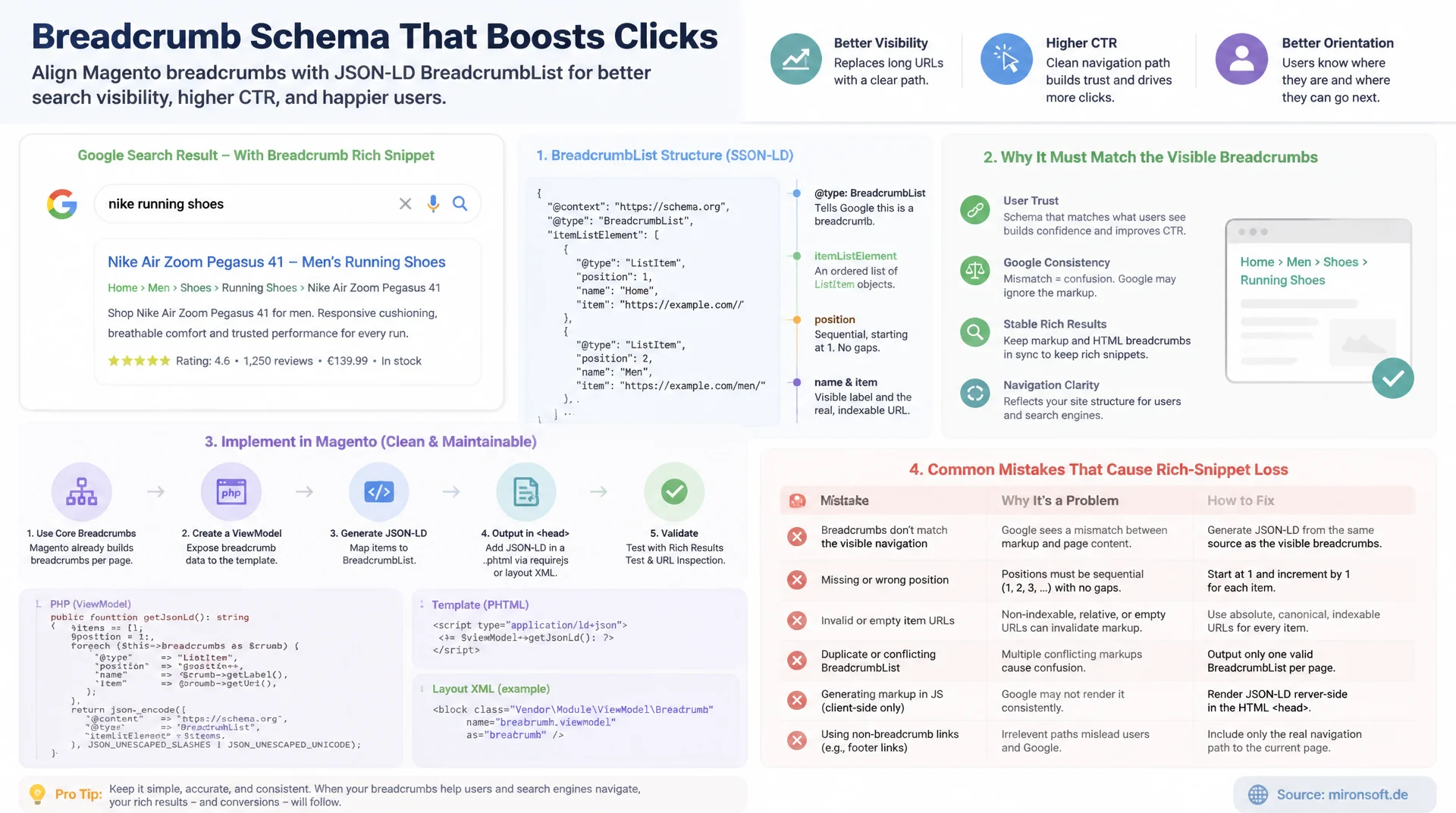
Implementing BreadcrumbList correctly and keeping it in sync with navigation
Breadcrumb schema replaces the displayed URL in Google search results with a page's actual navigation path, improving click-through rate and user orientation. This article explains the BreadcrumbList structure, why it must stay tightly linked to the visible Magento breadcrumb navigation, how to hook JSON-LD generation into it cleanly via a ViewModel, and which implementation mistakes cause rich-snippet losses.
Table of Contents
- 1. Why breadcrumb schema determines visibility in search
- 2. The BreadcrumbList structure in detail: position, name, item
- 3. How Google replaces the displayed URL with the breadcrumb path
- 4. Visible navigation and schema data must match exactly
- 5. Magento's breadcrumb block and the Hyva template
- 6. Hooking JSON-LD into the same data source via a ViewModel
- 7. Layout XML: wiring the ViewModel and template cleanly
- 8. Common breadcrumb schema implementation mistakes
- 9. Breadcrumb schema compared: mistakes vs. correct implementation
- 10. Summary
- 11. FAQ
1. Why breadcrumb schema determines visibility in search
BreadcrumbList schema is one of the most underrated structured data types in e-commerce SEO, yet it has a direct, visible effect on search results: instead of the long, technical URL, Google shows the actual navigation path for pages with correctly implemented breadcrumb schema, for example "mironsoft.de > Women's Fashion > Jackets & Coats" instead of "https://mironsoft.de/womens-fashion/jackets-coats/winter-jacket-alpine.html". For Magento stores with deep category hierarchies, this effect is especially valuable, because users can tell at a glance where a result sits in the store, before they even click.
The effect is more than cosmetic. A clearly recognizable category placement in the snippet increases trust in a result's relevance and has a measurable impact on click-through rate, especially for generic search terms with many similar competing results. At the same time, breadcrumb schema is technically simple to implement compared to more complex types like Product or Review, which makes it one of the best effort-to-benefit ratios in technical SEO for Magento stores.
2. The BreadcrumbList structure in detail: position, name, item
The BreadcrumbList schema from schema.org consists of a single array called itemListElement, which holds an ordered list of ListItem objects. Each ListItem needs three core fields: position as a sequential integer starting at 1, name as the visible text of that navigation level, and item as the absolute URL for that level. The order of the array must match the actual hierarchy, from the homepage down to the current page, without gaps or duplicate position values.
A special case applies to the last element in the list, i.e. the page currently being displayed: per Google's documentation, the item field is optional for the final ListItem, since a link to the page itself provides no extra value. The page still needs to appear as its own ListItem with the correct position, though, otherwise the path is missing exactly where it matters most. Many implementations mistakenly drop this final entry entirely.
{
  "@context": "https://schema.org",
  "@type": "BreadcrumbList",
  "itemListElement": [
    {
      "@type": "ListItem",
      "position": 1,
      "name": "Home",
      "item": "https://mironsoft.de/"
    },
    {
      "@type": "ListItem",
      "position": 2,
      "name": "Womens Fashion",
      "item": "https://mironsoft.de/womens-fashion.html"
    },
    {
      "@type": "ListItem",
      "position": 3,
      "name": "Jackets & Coats",
      "item": "https://mironsoft.de/womens-fashion/jackets-coats.html"
    },
    {
      "@type": "ListItem",
      "position": 4,
      "name": "Winter Jacket Alpine"
    }
  ]
}
3. How Google replaces the displayed URL with the breadcrumb path
In mobile search results, and increasingly on desktop too, Google replaces the classic green URL line with the path generated from the BreadcrumbList schema, provided the structure is valid and matches the actual page. This presentation isn't a rich snippet in the classic sense with extra visual elements like star ratings, but a change to the baseline presentation of every single organic result, which makes the effect especially far-reaching.
Important to understand: this presentation is not a guarantee, but an option Google uses situationally. With broken or missing schema, Google falls back to the plain URL structure, which often looks cluttered for deeply nested Magento category trees. A cleanly implemented schema therefore significantly raises the likelihood of the better presentation, even though Google retains the final say over how a snippet is displayed.
4. Visible navigation and schema data must match exactly
The most important rule for breadcrumb schema is this: the structure declared in the schema must match the visible breadcrumb navigation on the page exactly, in labeling, order, and target pages. Google actively checks whether structured data reflects the actual page content, and that applies to BreadcrumbList just as much as it does to Product or FAQPage. If the schema path diverges from the displayed navigation, for example through outdated category names after a structure change, the affected page loses its rich-snippet eligibility.
This consistency requirement is exactly why breadcrumb schema should never be maintained as a separate, static block of code. Once schema data and visible navigation come from different sources, say a hardcoded JSON-LD template and a dynamic breadcrumb block, the two are guaranteed to drift apart at the next category restructuring. The only robust solution is a shared data source that generates both the visible navigation and the schema.
// WRONG: schema breadcrumb path does not match the visible navigation
{
  "@context": "https://schema.org",
  "@type": "BreadcrumbList",
  "itemListElement": [
    {
      "@type": "ListItem",
      "position": 1,
      "name": "Home",
      "item": "https://mironsoft.de/"
    },
    {
      "@type": "ListItem",
      "position": 3,
      "name": "Winter Jackets",
      "item": "https://mironsoft.de/winter-jackets.html"
    }
  ]
}
// Visible breadcrumb on the page actually shows:
// Home > Womens Fashion > Jackets & Coats > Winter Jacket Alpine
// Problems: position jumps from 1 to 3 (gap in the sequence), the
// category name and URL do not match the real category ("Winter
// Jackets" instead of "Jackets & Coats"), and the current product
// page is missing entirely from the list.
5. Magento's breadcrumb block and the Hyva template
Magento renders the visible breadcrumb navigation through the Magento\Theme\Block\Html\Breadcrumbs block, which manages the individual navigation levels as an associative array in the crumbs property. Controllers and layout handlers populate this block via the addCrumb() method, for example in the category controller for category pages or in the CMS page controller for static pages. Each entry contains the fields label for the visible text, title for the tooltip attribute, link for the target URL, and optionally first or last as boolean markers.
In the classic Luma theme, Magento_Theme/templates/html/breadcrumbs.phtml renders this data as an HTML list. Hyva themes use the same data model but replace the template with a lean, Knockout.js-free variant, usually also under Magento_Theme/templates/html/breadcrumbs.phtml in the theme override. What matters is that the data source stays identical in both cases: the block supplies the same crumbs regardless of the rendering approach, which makes it the ideal anchor point for schema generation.
6. Hooking JSON-LD into the same data source via a ViewModel
To structurally rule out divergence between visible navigation and schema, the JSON-LD should not be generated in its own template, but via a ViewModel that gets the same breadcrumbs block injected and translates its getCrumbs() data directly into the BreadcrumbList structure. The ViewModel implements ArgumentInterface, is wired via layout XML into the same template instance that also renders the visible navigation, and is therefore guaranteed access to exactly the same data at exactly the same point in the page build.
Also important is special handling for the homepage and single crumbs: if the crumbs array contains only one element or is empty, the ViewModel should deliberately emit no schema, since a single-item breadcrumb list offers no navigational value and is explicitly discouraged by Google. This check belongs directly inside the ViewModel method, not as an afterthought condition in the template, so it can never be forgotten at any call site.
<?php
declare(strict_types=1);

namespace Mironsoft\SeoSuite\ViewModel;

use Magento\Framework\View\Element\Block\ArgumentInterface;
use Magento\Theme\Block\Html\Breadcrumbs;
use Magento\Framework\Serialize\Serializer\Json;

/**
 * Builds BreadcrumbList JSON-LD from the same crumb data the visible
 * breadcrumb navigation renders, so schema and page can never diverge.
 */
class BreadcrumbSchema implements ArgumentInterface
{
    /**
     * @param Breadcrumbs $breadcrumbsBlock Native breadcrumb block instance
     * @param Json $jsonSerializer Serializer for the final JSON-LD payload
     */
    public function __construct(
        private readonly Breadcrumbs $breadcrumbsBlock,
        private readonly Json $jsonSerializer
    ) {
    }

    /**
     * Returns the serialized BreadcrumbList JSON-LD, or null when the page
     * has one crumb or fewer (e.g. the homepage), where schema should be omitted.
     *
     * @return string|null
     */
    public function getSchemaJson(): ?string
    {
        $crumbs = $this->breadcrumbsBlock->getCrumbs();
        if (!is_array($crumbs) || count($crumbs) <= 1) {
            return null;
        }

        $items = [];
        $position = 1;
        $lastIndex = count($crumbs) - 1;

        foreach (array_values($crumbs) as $index => $crumb) {
            $listItem = [
                '@type' => 'ListItem',
                'position' => $position,
                'name' => $crumb['label'] ?? '',
            ];

            // Omit "item" only for the current page, the final crumb
            if ($index !== $lastIndex && !empty($crumb['link'])) {
                $listItem['item'] = $crumb['link'];
            }

            $items[] = $listItem;
            $position++;
        }

        $schema = [
            '@context' => 'https://schema.org',
            '@type' => 'BreadcrumbList',
            'itemListElement' => $items,
        ];

        return $this->jsonSerializer->serialize($schema);
    }
}
7. Layout XML: wiring the ViewModel and template cleanly
The wiring happens through standard Hyva layout XML: in the relevant page layout, for example catalog_category_view.xml or cms_page_view.xml, the ViewModel is bound to the breadcrumbs template via a viewModel argument. Since Magento already references the breadcrumbs block globally in the default layout, a single additional argument declaration is enough in the vast majority of cases, without duplicating or overriding the block itself. That keeps the change minimally invasive and compatible with future core updates.
For page types with divergent breadcrumb logic, such as search result pages or manufacturer pages from third-party extensions, a centralized plugin approach on addCrumb() is worth the investment, writing extra metadata like a stable position ID so the ViewModel always produces a consistent order regardless of which module called it. That keeps schema generation correct no matter whether the breadcrumbs were populated by core, by Magefan Blog, or by a third-party extension.
<?php
/** @var \Magento\Framework\View\Element\Template $block */
/** @var \Magento\Framework\Escaper $escaper */
/** @var \Hyva\Theme\Model\ViewModelRegistry $viewModels */
/** @var \Mironsoft\SeoSuite\ViewModel\BreadcrumbSchema $breadcrumbSchema */
$breadcrumbSchema = $viewModels->require(\Mironsoft\SeoSuite\ViewModel\BreadcrumbSchema::class);
$crumbs = $block->getCrumbs();
$schemaJson = $breadcrumbSchema->getSchemaJson();
?>
<?php if ($crumbs): ?>
<nav class="text-sm text-gray-500 mb-4" aria-label="Breadcrumb">
    <ol class="flex flex-wrap items-center gap-1">
        <?php foreach ($crumbs as $crumbName => $crumbInfo): ?>
        <li class="flex items-center gap-1">
            <?php if (!empty($crumbInfo['link'])): ?>
                <a href="<?= $escaper->escapeUrl($crumbInfo['link']) ?>" class="hover:text-primary">
                    <?= $escaper->escapeHtml($crumbInfo['label']) ?>
                </a>
            <?php else: ?>
                <span class="text-gray-700"><?= $escaper->escapeHtml($crumbInfo['label']) ?></span>
            <?php endif; ?>
            <?php if (!($crumbInfo['last'] ?? false)): ?>
                <span aria-hidden="true">/</span>
            <?php endif; ?>
        </li>
        <?php endforeach; ?>
    </ol>
</nav>
<?php if ($schemaJson): ?>
<script type="application/ld+json"><?= /* @noEscape */ $schemaJson ?></script>
<?php endif; ?>
<?php endif; ?>
8. Common breadcrumb schema implementation mistakes
The most common mistake is the mismatch between schema and visible navigation already described, usually caused by hardcoded or cached JSON-LD fragments that don't get updated when a category is renamed. The second most common mistake is an incomplete position chain: either the current page is missing entirely as the final ListItem, or the position values contain gaps, for example because an intermediate level was skipped while filtering the navigation but not renumbered in the schema.
A third, often overlooked mistake is breadcrumb schema on the homepage itself, which makes no sense per Google's guidelines because there is no parent path. Fourth, inconsistent implementations between category pages and CMS pages frequently cause problems, for instance when categories go through the native breadcrumbs block but editorial landing pages go through a completely separate CMS widget with its own, independently maintained logic. A single ViewModel source for all page types prevents exactly this kind of drift.
// WRONG: BreadcrumbList schema rendered on the homepage itself
{
  "@context": "https://schema.org",
  "@type": "BreadcrumbList",
  "itemListElement": [
    {
      "@type": "ListItem",
      "position": 1,
      "name": "Home",
      "item": "https://mironsoft.de/"
    }
  ]
}
// A single-item trail adds no navigational value in search results.
// Google's guidelines recommend omitting BreadcrumbList entirely on
// the homepage, since there is no parent path left to display.

// CORRECT: the ViewModel only emits schema when the crumb count is > 1,
// see getSchemaJson() in the BreadcrumbSchema class above, which
// returns null for the homepage and any other single-level page.
9. Breadcrumb schema compared: mistakes vs. correct implementation
The table below lines up the most common breadcrumb schema implementation mistakes against their correct counterparts, ordered by how often they actually show up in Magento store audits.
| Area | Typical mistake | Correct implementation | Why it matters |
|---|---|---|---|
| Schema path | Diverges from the visible navigation | Comes from the same data source as the navigation | Otherwise the page loses rich-snippet eligibility |
| Current page | Final ListItem missing entirely | Final position present, item optional | Path must extend all the way to the current page |
| Homepage | Breadcrumb schema included on the homepage | Schema starts only from the first category level | No parent path exists |
| Category vs. CMS | Separate, independently maintained logic per page type | One ViewModel source for all page types | Prevents drift when the structure changes |
| Position values | Gaps or duplicate position values | Sequential integers starting at 1 | An invalid order is ignored by Google |
In practice, nearly all of these mistakes can be avoided with the same structural decision: generating schema and visible navigation from one shared, block-bound data source instead of maintaining both independently. Once that single principle is applied consistently, there's hardly any need to check the individual failure modes from the table one by one.
Mironsoft
SEO structured data, breadcrumb schema, and Hyva optimization for Magento stores
Ready to implement breadcrumb schema properly?
We analyze your Magento store's breadcrumb structure, check it against the visible navigation path, and implement a robust ViewModel-based schema that stays consistent automatically with every category change.
Schema audit
Rich Results Test, Search Console cross-check, and prioritization by page type
ViewModel implementation
Deriving BreadcrumbList schema directly from the existing breadcrumbs block
Consistency monitoring
Automated checks for divergence between schema and navigation
10. Summary
Breadcrumb schema for Magento stores solves a concrete visibility problem in search: it replaces the technical URL with the actual navigation path, making search results more tangible and trustworthy. The BreadcrumbList structure itself is simple, three fields per level, but nearly all of the failure risk lies in keeping it synchronized with the visible navigation. Anyone who maintains schema data separately from the actual breadcrumbs logic will sooner or later produce inconsistencies that Google penalizes by revoking the rich-snippet presentation.
The robust solution is structural, not content-based: a ViewModel that reads directly from the same breadcrumbs block that also renders the visible navigation rules out divergence from the start. Combined with clear rules for edge cases like the homepage or a missing final position, breadcrumb schema can be implemented in a way that stays correct permanently, even as the store's category structure changes over time.
Breadcrumb Schema for Magento Stores - The Essentials at a Glance
BreadcrumbList structure
itemListElement with position, name, and item per level. Final item optional, position mandatory.
SERP effect
Replaces the displayed URL with the navigation path, no guarantee, but a significantly higher likelihood.
Consistency requirement
Schema must match the visible breadcrumb navigation exactly, otherwise rich-snippet eligibility is revoked.
Magento hook
ViewModel reads directly from the breadcrumbs block (getCrumbs()), no separate data source.