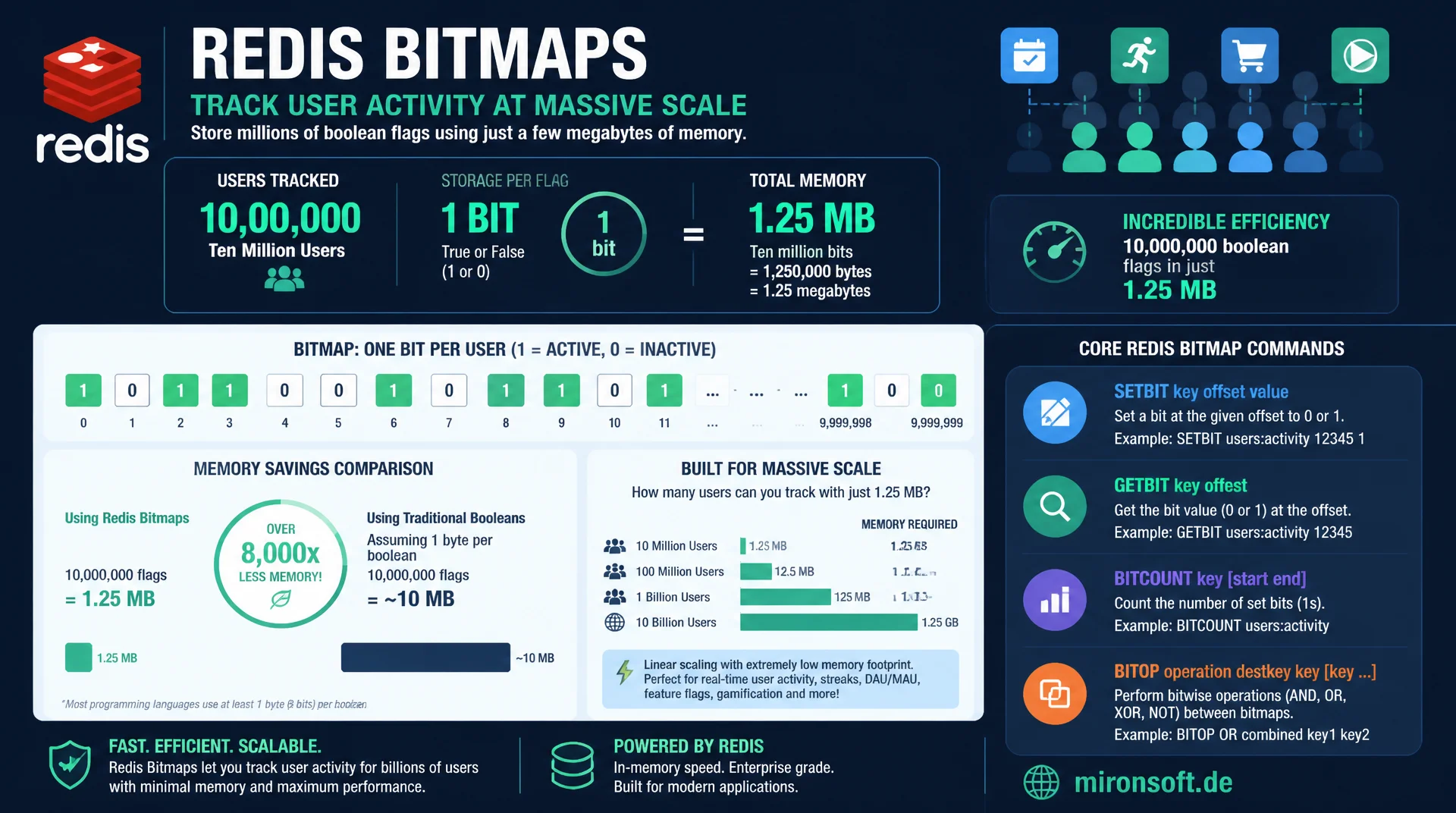
efficient flag storage at massive scale
Ten million boolean flags, one flag per user, need just 1.25 megabytes of memory as a Redis bitmap, because every flag occupies exactly one bit instead of an entire set entry. SETBIT, GETBIT, BITCOUNT and BITOP make bitmaps the most compact tool for daily active user tracking and similar counting problems at huge user scale.
Table of Contents
- 1. Why bitmaps for boolean flags at massive scale
- 2. SETBIT and GETBIT: the basic operations
- 3. BITCOUNT: counting set bits efficiently
- 4. BITOP: combining bitmaps with AND, OR, XOR
- 5. Practical example: daily active users with bitmaps
- 6. BITFIELD: encoding multiple values in one string
- 7. Memory efficiency: bitmap vs. set in detail
- 8. Limits and pitfalls in production
- 9. Bitmap compared to set and HyperLogLog
- 10. Summary
- 11. FAQ
1. Why bitmaps for boolean flags at massive scale
A bitmap in Redis is not its own data type, but a view on the already familiar string type: a string gets interpreted as a sequence of individually addressable bits instead of as a piece of text. This reinterpretation is the key to one of the most memory efficient techniques in Redis, because a single bit literally occupies one eighth of a byte, while an entry in a set carries several dozen bytes of overhead for hash table management and pointers.
The strength of bitmaps shows up for problems that can be phrased as "is flag X set for user Y?", applied to millions of users. Classic examples are daily active user tracking, storing which users have activated a certain feature flag, or marking which of millions of IDs have already been processed. For all these cases, one bit per user is enough, and Redis offers a compact set of commands, SETBIT, GETBIT, BITCOUNT and BITOP, to implement exactly that efficiently.
This post walks through the bitmap commands in detail, shows the concrete memory comparison against an equivalent set, and works through a complete practical example for daily active user tracking, including the typical pitfalls that show up in production use of bitmaps.
Important for understanding: bitmaps and bitmap commands in Redis are not an exception or an extension, they have been a fixed part of the string since the earliest versions. Anyone already familiar with SET and GET needs no new mental model for bitmaps, just to learn to address the same string with bit level precision through an additional command family.
2. SETBIT and GETBIT: the basic operations
SETBIT key offset value sets the bit at position offset to 0 or 1. The offset is zero based and can get very large, Redis allows bitmaps up to a maximum size of 512 megabytes, which corresponds to 4.3 billion individual bits. If you set a bit at a high offset, Redis automatically extends the underlying string and fills the gap with zero bits, without the application having to worry about it.
GETBIT key offset returns the value of a single bit, 0 or 1, in constant time O(1). This constant time property is decisive: whether the bitmap spans a thousand or a billion bits, reading a single bit always costs the same, minimal amount of work. In practice this means: a user ID gets interpreted as the offset, for example the numeric user ID directly as the bit position, and SETBIT dau:2026-07-23 42 1 marks user 42 as active on July 23, 2026.
A detail that is easy to overlook in practice: SETBIT returns the previous value of the bit as its return value, not the new one. That allows detecting whether a flag was already set before, for example to distinguish whether a user became active for the first time today or was already marked before, without needing an extra GETBIT call before setting.
# Bitmaps: setting and reading individual bits
redis-cli SETBIT dau:2026-07-23 42 1
redis-cli SETBIT dau:2026-07-23 1007 1
redis-cli GETBIT dau:2026-07-23 42
redis-cli GETBIT dau:2026-07-23 99
redis-cli STRLEN dau:2026-07-23
redis-cli SETBIT feature:dark-mode 42 1
redis-cli GETBIT feature:dark-mode 42
3. BITCOUNT: counting set bits efficiently
BITCOUNT key counts all set bits, meaning all bits with the value 1, in a bitmap, directly returning the number of users for whom a flag is active, without the application having to iterate itself. This count runs in O(n) relative to the size of the bitmap in bytes, but is extremely fast due to a highly optimized popcount implementation in Redis, even for bitmaps with several million bits.
With the optional byte range argument BITCOUNT key start end, the count can be limited to a slice of the bitmap, which is relevant for sharding scenarios where different user ID ranges map to different application logic. Since Redis 7.0, the range can additionally be specified with the BIT modifier directly in bit units instead of byte units, allowing more precise partial queries without manual conversion.
# Counting set bits: total, byte range, and bit range
redis-cli BITCOUNT dau:2026-07-23
redis-cli BITCOUNT dau:2026-07-23 0 127
redis-cli BITCOUNT dau:2026-07-23 0 999 BIT
redis-cli BITPOS dau:2026-07-23 1
redis-cli BITPOS dau:2026-07-23 0
4. BITOP: combining bitmaps with AND, OR, XOR
BITOP performs bitwise operations between multiple bitmaps and stores the result in a new key. BITOP AND result key1 key2 returns a bitmap in which only the bits set in both source bitmaps are set, useful for the question "which users were active both yesterday and today?". BITOP OR returns the union, useful for "which users were active on at least one of the last seven days?". BITOP XOR returns the bits set in exactly one of the two sources, useful for detecting differences between two states.
The decisive advantage of these operations over an equivalent calculation with sets is speed: a bitwise AND operation on two bitmaps with ten million bits each runs in a few milliseconds, because the CPU can process multiple bits at once in a single machine word. An equivalent SINTER operation on two sets with ten million elements would be orders of magnitude slower, because it has to perform hash comparisons for every single element.
Combining BITOP with BITCOUNT on the result allows answering complex cohort questions in two commands: first BITOP AND to compute the intersection of multiple daily bitmaps, then BITCOUNT on the result for the concrete number. This combination is the foundation of many retention and engagement analyses in product analytics systems.
# BITOP: combine bitmaps to answer cohort questions
redis-cli SETBIT dau:2026-07-22 42 1
redis-cli SETBIT dau:2026-07-22 55 1
redis-cli SETBIT dau:2026-07-23 42 1
redis-cli SETBIT dau:2026-07-23 88 1
redis-cli BITOP AND retained:22-23 dau:2026-07-22 dau:2026-07-23
redis-cli BITCOUNT retained:22-23
redis-cli BITOP OR active:22-23 dau:2026-07-22 dau:2026-07-23
redis-cli BITCOUNT active:22-23
5. Practical example: daily active users with bitmaps
The classic among bitmap use cases is tracking daily active users. On every login or relevant event, SETBIT dau: gets called, with the numeric user ID directly serving as the bit offset. At the end of the day, BITCOUNT dau: immediately returns the number of active users, without a list of individual IDs ever having to be materialized.
For users returning across multiple days, a central retention indicator, one combines multiple daily bitmaps with BITOP AND: users active on Monday and Tuesday and Wednesday result from the AND combination of all three daily bitmaps. This pattern scales to any number of days and delivers exact, not approximate, results, unlike a HyperLogLog based solution.
An important advantage over HyperLogLog for this use case: bitmaps allow not just counting, but also identifying individual users via GETBIT and iterating over set bit positions. Anyone who needs to know which concrete user IDs participate in a retention cohort filter, for example to message them specifically, can achieve that with bitmaps, while HyperLogLog is fundamentally unsuitable for that.
For retention, it is recommended to bound every daily bitmap with EXPIRE to a sensible retention window, so old days disappear automatically. Since bitmap size depends on the highest set bit position and does not automatically shrink when bits are set back to 0, a fixed retention duration is the most reliable way to keep memory usage predictable across many days.
# Multi-day retention: users active on all three consecutive days
redis-cli SETBIT dau:2026-07-21 42 1
redis-cli SETBIT dau:2026-07-22 42 1
redis-cli SETBIT dau:2026-07-23 42 1
redis-cli BITOP AND retained:3day dau:2026-07-21 dau:2026-07-22 dau:2026-07-23
redis-cli BITCOUNT retained:3day
redis-cli GETBIT retained:3day 42
redis-cli EXPIRE dau:2026-07-21 7776000
6. BITFIELD: encoding multiple values in one string
While SETBIT and GETBIT are limited to individual bits, BITFIELD allows reading and writing multiple bit fields of defined width in a single string, in a single atomic operation. That allows packing, for example, several small counters, each 8 bits wide with a value range of 0 to 255, tightly into a single Redis key, instead of creating a separate string for every counter.
A practical example: a score system with multiple categories, such as endurance, strength and agility, each an 8-bit value, fits into a single 3-byte string. BITFIELD also supports INCRBY for atomic increment of individual fields, as well as OVERFLOW WRAP, SAT or FAIL, to control the behavior when a field overflows, useful for game mechanics or rate limiting counters with fixed upper bounds.
# BITFIELD: multiple packed counters in a single key
redis-cli BITFIELD player:501 SET u8 0 10 SET u8 8 25 SET u8 16 5
redis-cli BITFIELD player:501 GET u8 0 GET u8 8 GET u8 16
redis-cli BITFIELD player:501 INCRBY u8 0 5 OVERFLOW SAT INCRBY u8 8 250
redis-cli STRLEN player:501
7. Memory efficiency: bitmap vs. set in detail
The memory advantage of a bitmap over a set can be calculated concretely. For ten million users, where a single flag needs to be stored for each, a bitmap needs exactly 10,000,000 bits, meaning 1,250,000 bytes or roughly 1.25 megabytes. An equivalent set with ten million numeric IDs as members needs, depending on internal representation and ID length, typically 80 to 150 megabytes, because every set entry carries pointers, hash bucket management and the actual value.
This factor of roughly 60 to 100 between bitmap and set scales linearly with the number of users, making bitmaps especially attractive for very large user bases. The downside shows up with sparse ID spaces though: if an application has only a few thousand active users but IDs that theoretically reach into the billions, a bitmap reaching up to the highest ID would be less efficient than a set with the few actually active IDs. Bitmaps pay off mainly when the ID space is dense and the activation rate is high.
Bitmaps also play to their strength in CPU efficiency: popcount operations for BITCOUNT use dedicated machine instructions on modern processors that can process multiple bytes in a single clock cycle. An equivalent count over a set would instead require hash bucket traversal for every single element, causing significantly higher CPU cost at millions of entries.
8. Limits and pitfalls in production
A common mistake when using bitmaps is directly using very large, non-numeric or very widely spread IDs as the bit offset. Interpreting a UUID directly as an offset is impossible, and a very large numeric ID, say in the billions, without dense occupancy leads to a bitmap that theoretically contains only a few set bits but still allocates the full memory range up to the highest ID. For such cases, it is recommended to use a compact, sequential internal ID as the offset instead of the external ID directly.
A second pitfall concerns the maximum bitmap size of 512 megabytes, corresponding to roughly 4.3 billion bit positions. For applications with even larger ID spaces, sharding across multiple bitmap keys is necessary, for example by ID range or hash modulo, combined with BITCOUNT across all shards and summation on the client. A third point: bitmaps offer no natural iteration over set positions, BITPOS only finds the first set or unset position, for a complete list the application has to query repeatedly with an advancing start offset.
A fourth, often underestimated point concerns replication and network traffic for very large bitmaps: a single SETBIT operation on a 500 megabyte bitmap by default replicates the entire changed string to all replicas, not just the changed bit. At very high write frequency on huge bitmaps, that can lead to noticeable replication load, which should be factored into capacity planning for replica connections.
9. Bitmap compared to set and HyperLogLog
The table below compares bitmap to the two alternatives set and HyperLogLog for flag-like counting and membership problems.
| Criterion | Set | Bitmap | HyperLogLog |
|---|---|---|---|
| Accuracy | Exact | Exact | Approx. 0.81% error |
| Memory at dense IDs | High | Very low | Constant, approx. 12 KB |
| Check a single flag | O(1) via SISMEMBER | O(1) via GETBIT | Not possible |
| Combining multiple sets | SINTER, slower | BITOP, very fast | PFMERGE |
Bitmaps win whenever flags need to be stored for densely packed numeric IDs and both single lookups and fast set combinations are required. For very sparse ID spaces, or when only an approximation is needed, set or HyperLogLog are frequently the better choice.
Mironsoft
Redis bitmaps, analytics pipelines and feature flag systems
Still tracking daily active users with expensive sets?
We migrate flag based counting and feature flag systems to bitmaps, build retention and cohort analyses with BITOP, and optimize existing Redis keyspaces for minimal memory footprint.
Bitmap Migration
Switch set based flags to SETBIT and BITCOUNT
Retention Analysis
Build cohort and return-rate analyses with BITOP AND/OR
Feature Flags
Implement scalable feature flag storage with BITFIELD
10. Summary
Redis bitmaps solve a very specific memory problem: managing boolean flags for millions of densely packed numeric IDs with minimal memory footprint. SETBIT and GETBIT set and read individual bits in constant time, BITCOUNT counts set bits efficiently, and BITOP combines multiple bitmaps with AND, OR and XOR for cohort and retention analyses. BITFIELD extends the concept with densely packed multi-bit counters in a single string.
The memory advantage over an equivalent set typically lies at a factor of 60 to 100, which makes bitmaps the first choice for daily active user tracking, feature flags and similar use cases with dense ID spaces. For sparse ID spaces, or when only an approximation is needed, set or HyperLogLog remain the more suitable alternatives.
Redis Bitmaps: The Essentials at a Glance
Basic Operations
SETBIT and GETBIT set and read individual bits in O(1), regardless of bitmap size.
Counting
BITCOUNT counts set bits efficiently via popcount, with an optional byte or bit range.
Combining
BITOP AND/OR/XOR combines multiple bitmaps in milliseconds for cohort analyses.
Memory Savings
Factor of 60 to 100 versus an equivalent set at dense numeric IDs.