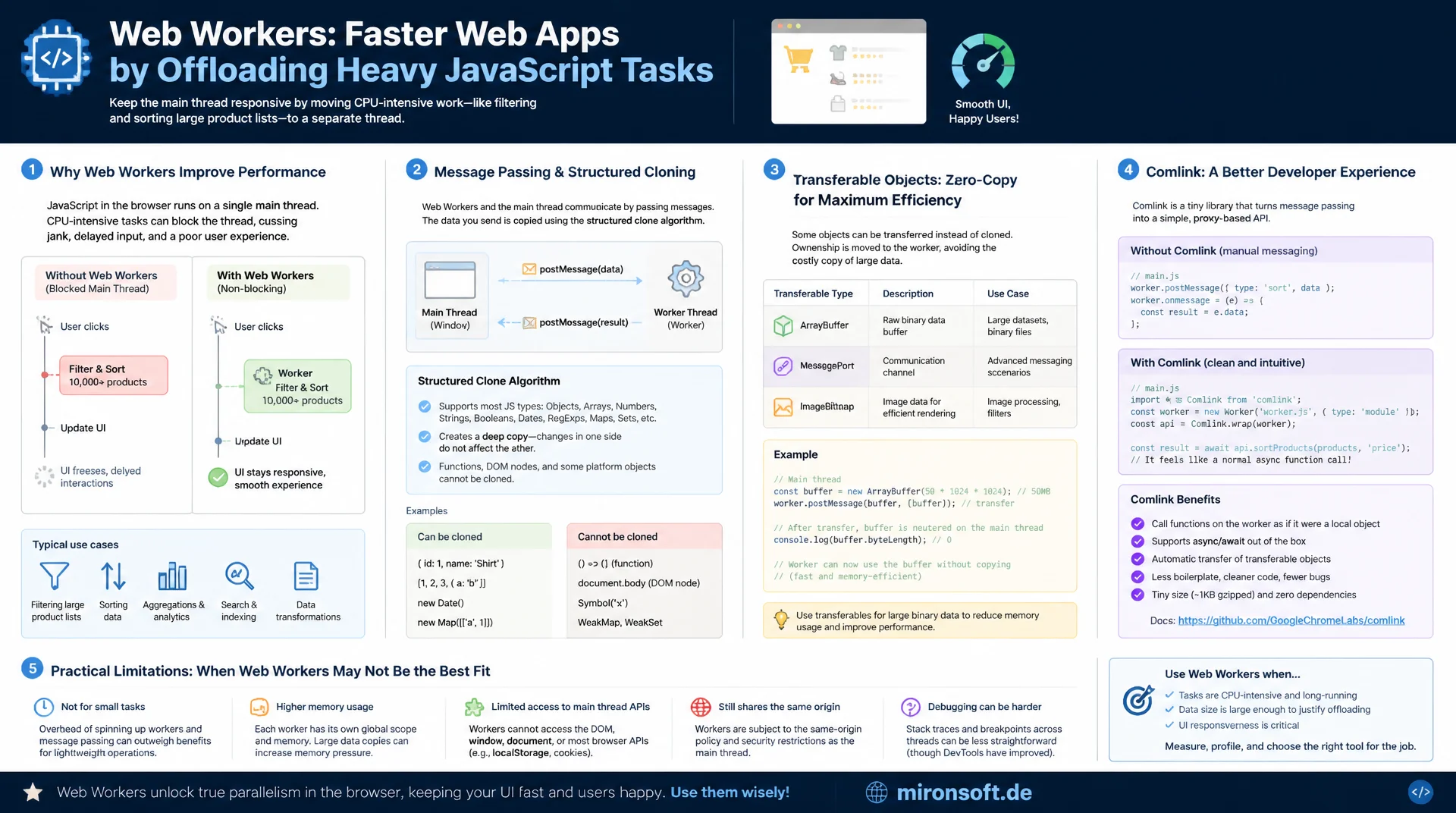
When multithreading in JavaScript actually pays off
Web Workers move CPU-heavy JavaScript tasks such as filtering and sorting large product lists into a separate thread, without blocking the main thread. This article explains how message passing and structured clone work, when transferable objects make the difference, how Comlink simplifies the API, and where the practical limits of Web Workers lie.
Table of Contents
- 1. When the main thread blocks on CPU-heavy tasks
- 2. How Web Workers work: a separate thread, no DOM access
- 3. Message passing: postMessage and the cost of structured clone
- 4. Transferable objects: transferring ownership instead of copying
- 5. Practical example: product list filtering in a Hyvä storefront
- 6. Comlink: an RPC abstraction over raw postMessage
- 7. Worker lifecycle: startup cost, pooling, and reuse
- 8. Limits of Web Workers: no DOM access, serialization, when not to use them
- 9. Main thread vs. Web Worker compared side by side
- 10. Summary
- 11. FAQ
1. When the main thread blocks on CPU-heavy tasks
By default, JavaScript in the browser runs on a single thread that is shared by script execution, style calculation, layout, paint, and user interaction handling. Any task that takes longer than roughly 50 milliseconds counts as a "long task" under the Long Tasks API and noticeably blocks everything else for that duration: clicks get processed late, scroll events stutter, animations freeze. Concrete numbers from practice: sorting an array of 10,000 objects with a complex comparator can synchronously take 150 to 300 milliseconds, JSON.parse() on a response over 1 MB often lands at 30 to 60 milliseconds, and pixel manipulation on a canvas can consume several hundred milliseconds depending on image size.
The direct consequence is a measurably worse INP score (Interaction to Next Paint), because the browser can only respond to the next user input after the running task finishes. A PerformanceObserver with entryTypes: ['longtask'] surfaces these blockages during development, before they show up as jank in the field. This is exactly where Web Workers come in: they move pure computation logic that needs no DOM access into a separate thread and keep the main thread free for rendering and interaction.
2. How Web Workers work: a separate thread, no DOM access
A dedicated worker runs in its own DedicatedWorkerGlobalScope and has no access to window, document, or any DOM API. It does have access to fetch, IndexedDB, WebSocket, timer functions, and can load additional scripts via importScripts() or as an ES module. Memory is not shared by default: the main thread and the worker are two separate address spaces that communicate exclusively through messages, unless you explicitly use SharedArrayBuffer with Atomics, which requires additional cross-origin isolation headers.
Instantiating a worker via new Worker(url) costs time: the script has to be fetched from network or cache, parsed, and executed, and the browser also spins up a new OS thread. For small, lean worker scripts this startup typically falls in the 3 to 15 millisecond range; for larger bundles with heavy top-level imports it can climb to several dozen milliseconds. This cost is paid once at creation, not on every message, which is exactly why reusing a worker structurally pays off.
<!-- Hyvä phtml: instantiate a worker as an ES module, CSP-compliant without inline script -->
<script type="module">
  const productWorker = new Worker(
    "<?= $block->escapeJs($block->getViewFileUrl('Mironsoft_Catalog/js/product-filter.worker.js')) ?>",
    { type: 'module', name: 'product-filter' }
  );

  // the worker-src directive must allow the store's own origin so the browser
  // can load the worker under the shop's Content Security Policy
  window.addEventListener('beforeunload', () => productWorker.terminate());
</script>
3. Message passing: postMessage and the cost of structured clone
Communication between the main thread and a worker runs through postMessage() and the message event handler. By default the browser uses the structured clone algorithm for this: it deep-copies data, including nested objects, arrays, Map, Set, and Date, but cannot clone functions, DOM nodes, or class instances with a prototype chain. The cost scales not just with byte size but above all with structural complexity: a flat array of 10,000 numbers clones in one to two milliseconds, while a deeply nested array of 10,000 complex product objects can cost 20 to 40 milliseconds per direction, meaning 50 to 80 milliseconds for a full round trip.
This cost is exactly why Web Workers are not a silver bullet but a tool with its own overhead: the savings on the main thread have to exceed the sum of serialization costs for both directions plus any worker startup. With chatty communication patterns involving many small messages, the event loop overhead of each individual postMessage round also adds up, which is why in practice a few large messages almost always beat many small ones.
// main.js: send one message with the full dataset instead of many small calls
const worker = new Worker('/js/product-filter.worker.js');

worker.postMessage({
  type: 'SORT_PRODUCTS',
  products: productList,          // structured clone copies the entire array
  sortKey: 'price',
  direction: 'asc'
});

worker.onmessage = (event) => {
  const { type, sortedIds } = event.data;
  if (type === 'SORT_RESULT') {
    applySortOrder(sortedIds);    // send back only an ID list, not the full objects
  }
};

worker.onerror = (error) => {
  console.error('Worker error:', error.message, error.filename, error.lineno);
};
4. Transferable objects: transferring ownership instead of copying
For certain types, the web platform offers a much cheaper alternative to structured clone: transferable objects such as ArrayBuffer, MessagePort, ImageBitmap, and OffscreenCanvas are not copied, their ownership is transferred to the receiver instead. Technically the browser just moves a memory pointer, regardless of data size, which is why transferring a 50 MB ArrayBuffer takes under a millisecond, while a full structured clone of the same amount of data could cost several dozen milliseconds.
The price for that: after the transfer, the original buffer is "neutered" in the sending context, its byteLength becomes 0, and any further access fails. For bulk numeric data such as product prices, stock levels, or IDs, it therefore pays to route through typed arrays: instead of an array of JavaScript objects, you transfer a Float64Array or Uint32Array, whose underlying ArrayBuffer is explicitly passed as the transfer list in the second argument of postMessage().
// main.js: send prices as a typed array via transfer instead of clone
const prices = new Float64Array(productCount);
products.forEach((product, index) => { prices[index] = product.price; });

worker.postMessage(
  { type: 'RANK_BY_PRICE', prices },
  [prices.buffer]   // ownership of the ArrayBuffer is transferred, no copy
);

// after the transfer, "prices" is neutered on the main thread:
console.log(prices.buffer.byteLength); // 0, the buffer now belongs to the worker

// worker.js: reuse the transferred buffer directly
self.onmessage = (event) => {
  const { prices } = event.data;         // same memory, no copy
  const rankedIndexes = rankByValue(prices);
  self.postMessage({ type: 'RANK_RESULT', rankedIndexes });
};
5. Practical example: product list filtering in a Hyvä storefront
A typical scenario in a Hyvä store: a category page preloads several thousand items client side so that facet filters powered by Alpine.js respond instantly without a server round trip. If filtering and sorting that list runs synchronously inside an Alpine x-data method, every click on a filter chip blocks the main thread for the duration of the computation. For 5,000 items with a multi-key sort (relevance, then price, then availability), that duration realistically lands at 80 to 150 milliseconds on a mid-range mobile device, noticeably above the 50-millisecond long-task threshold.
The fix: the main thread sends the product data as typed arrays (IDs, prices as a Float64Array) plus the filter criteria to a worker, which handles filtering and sorting and sends back only a sorted index list, not full product objects. That return trip is small and cheap to clone, while the actual computational load sits entirely off the main thread. The click handler itself returns almost immediately, the browser keeps rendering frames between request and response, and once the index list arrives, Alpine reactively updates only the DOM order of the already-rendered cards.
It is essential that only pure, DOM-free logic ends up in the worker: comparator functions, price calculations, text search over product names. Rendering the product cards themselves must stay on the main thread, because workers have no DOM access, more on that in section 8.
// product-filter.worker.js: pure computation logic with no DOM access
self.onmessage = (event) => {
  const { ids, prices, filterCriteria, sortKey, direction } = event.data;

  let matchingIndexes = [];
  for (let i = 0; i < ids.length; i++) {
    if (matchesFilters(i, prices, filterCriteria)) {
      matchingIndexes.push(i);
    }
  }

  matchingIndexes.sort((a, b) => {
    const diff = prices[a] - prices[b];
    return direction === 'asc' ? diff : -diff;
  });

  const sortedIds = matchingIndexes.map((i) => ids[i]);

  // send back only the narrow ID list, not the full product objects
  self.postMessage({ type: 'FILTER_RESULT', sortedIds });
};

function matchesFilters(index, prices, criteria) {
  if (criteria.maxPrice && prices[index] > criteria.maxPrice) return false;
  return true;
}
6. Comlink: an RPC abstraction over raw postMessage
Manual postMessage/onmessage handling gets unwieldy fast once several operations run in parallel, since you have to wire up message IDs, promise resolution, and error handling yourself. Comlink from Google Chrome Labs solves this with a proxy-based RPC layer: worker functions can be called like normal async functions, worker.sortProducts(list) internally returns a promise that resolves via postMessage, without hand-writing the message exchange.
That convenience comes with a small, measurable price: every proxy call adds a thin layer of reflection and promise bookkeeping, typically under a millisecond of extra overhead per call in practice, barely relevant compared to the cost of the actual structured clone. Important: Comlink does not replace the structured clone algorithm, transferable objects still need to be passed explicitly via Comlink.transfer(data, [buffer]), otherwise the more expensive clone path kicks in automatically. For a single, simple worker interface the added dependency is rarely worth it, but with several methods and more complex return values, Comlink noticeably cuts boilerplate.
// worker.js: expose functions directly instead of manual onmessage handling
import * as Comlink from 'comlink';

const api = {
  sortProducts(products, sortKey) {
    return [...products].sort((a, b) => a[sortKey] - b[sortKey]);
  },
  filterByPrice(products, maxPrice) {
    return products.filter((product) => product.price <= maxPrice);
  }
};

Comlink.expose(api);

// main.js: call worker methods like normal async functions
import * as Comlink from 'comlink';

const worker = new Worker('/js/catalog.worker.js', { type: 'module' });
const api = Comlink.wrap(worker);

const sorted = await api.sortProducts(productList, 'price');
renderProductGrid(sorted);
7. Worker lifecycle: startup cost, pooling, and reuse
Because every new Worker() instantiation costs network or cache access, parsing, and thread creation, it is inefficient to spin up a fresh worker for every single filter operation. It makes more sense to instantiate a worker once when entering a category page, keep it alive for the entire lifetime of the page, and reuse it for every filter or sort action. Only when leaving the page, or on genuine inactivity, should worker.terminate() be called to free the associated thread and its memory.
For workloads that genuinely benefit from running in parallel across multiple cores, such as computing several independent facet aggregations at the same time, a worker pool is a good fit: a fixed number of workers, typically navigator.hardwareConcurrency - 1 to leave one core free for the main thread and rendering, round-robins tasks across them. Too many concurrent workers, on the other hand, create context-switching overhead and additional memory pressure, especially on mobile devices with limited RAM, which is why a pool almost always scales better than unbounded worker spawning per action.
8. Limits of Web Workers: no DOM access, serialization, when not to use them
The most important restriction remains the lack of DOM access: a worker cannot read or write elements, cannot bind events directly, and cannot call getComputedStyle. The exception is OffscreenCanvas, which genuinely allows canvas rendering inside a worker, but for classic DOM-update rendering such as Alpine reactivity, the restriction applies without exception. Results always have to travel back to the main thread, where they get applied.
Equally important: not every task benefits from a worker. If a computation only takes a few milliseconds anyway, such as validating a single form field or filtering a list of 50 entries, the overhead from worker startup and the message round trip frequently exceeds the time saved on the main thread. A practical rule of thumb: offloading is only worth considering once a task would otherwise take upward of 50 milliseconds synchronously. Below that, the pure communication overhead, typically between 1 and 5 milliseconds for small messages, dominates the cost, and a worker actually makes the interaction slower overall instead of faster.
9. Main thread vs. Web Worker compared side by side
Not every CPU-heavy task automatically belongs in a worker, and not every small task should stay on the main thread. The table below uses typical tasks from a Magento/Hyvä storefront to show when offloading pays off and when the overhead outweighs it.
| Task | Main thread (synchronous) | With a Web Worker | Recommendation |
|---|---|---|---|
| Sorting, 5,000 products | ~80-150 ms blocking | < 5 ms main-thread share | Offload to a worker |
| Parsing JSON, > 1 MB | ~30-60 ms blocking | Parsing inside the worker | Offload to a worker |
| Canvas pixel manipulation | Several hundred ms | OffscreenCanvas in worker | Offload to a worker |
| Single field validation | < 1 ms, uncritical | Overhead > savings | Keep on main thread |
| DOM update / rendering | Strictly required here | No DOM access possible | Always main thread |
The table makes the real decision criterion visible: the goal is not to move as much as possible into workers, but to pinpoint the specific tasks whose synchronous main-thread duration clearly exceeds the overhead of serialization and worker communication.
Mironsoft
Web performance engineering for Magento and Hyvä stores
Ready to unblock your main thread?
We analyze CPU-heavy JavaScript paths in your store, identify genuine offloading candidates, and implement worker architectures that measurably improve INP scores instead of adding new overhead.
Main thread audit
Long-task analysis and prioritization by INP impact
Worker architecture
Comlink integration, transferable objects, worker pooling
Hyvä integration
Alpine.js wiring and CSP-compliant worker bundling
10. Summary
Web Workers solve a very specific problem: they prevent CPU-heavy, DOM-free computation from blocking the main thread and degrading INP scores and perceived responsiveness. The structured clone algorithm behind postMessage deep-copies data and costs noticeable time for large, complex objects, which is why transferable objects like ArrayBuffer are the far cheaper alternative for bulk numeric data. Comlink cuts the boilerplate of worker handling, but it does not remove the need to consciously manage serialization cost.
The decisive rule of thumb: only offload tasks that would otherwise take upward of 50 milliseconds synchronously, instantiate a worker once and reuse it instead of recreating it per action, and never try to push DOM access into the worker. In a Magento/Hyvä context, product list filtering, sorting, and larger JSON processing are the most realistic, measurable candidates for this approach.
Web Workers in the Storefront - The Essentials at a Glance
Offload above 50 ms
Only move tasks into a worker that would otherwise exceed the long-task threshold synchronously.
Transferable over clone
Transfer bulk numeric data as an ArrayBuffer instead of copying it via structured clone.
Reuse the worker
Instantiate once, keep it alive for the page's lifetime, terminate deliberately with terminate().
No DOM access
Send results back as a narrow data structure, rendering stays on the main thread.