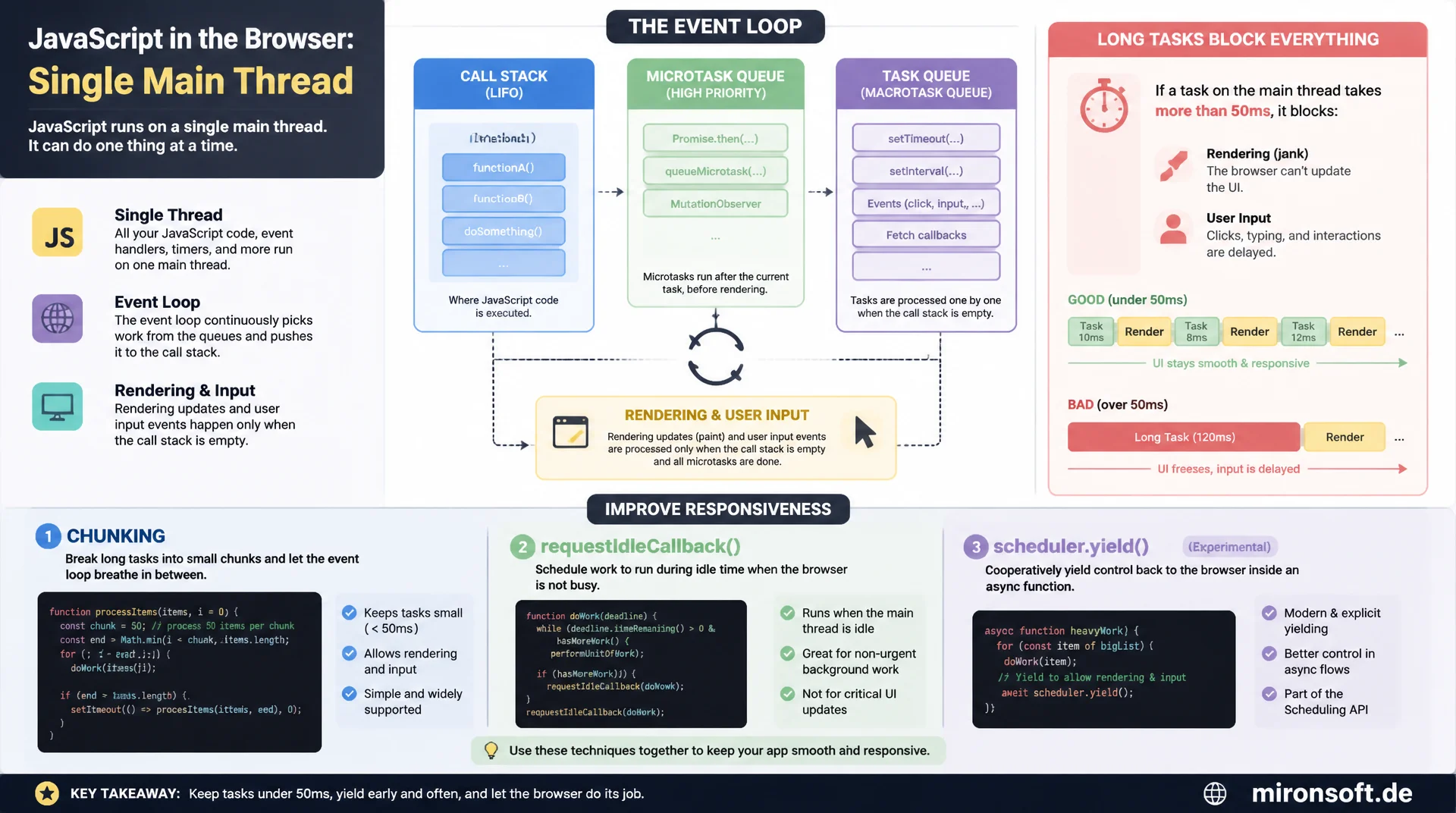
How long JavaScript tasks block rendering and clicks
JavaScript runs in browsers on a single main thread that also handles rendering, layout, and user input. This article explains the call stack, task queue, and microtask queue in detail, shows why tasks longer than fifty milliseconds block rendering and clicks, and provides concrete techniques such as chunking, requestIdleCallback, and scheduler.yield to break long work into responsive pieces.
Table of Contents
- 1. Why the single-threaded model shapes every performance decision
- 2. The call stack: a synchronous, single-threaded execution model
- 3. The task queue: macrotasks from setTimeout, events, and I/O
- 4. The microtask queue: promises, queueMicrotask, and priority
- 5. Long tasks: the 50-millisecond threshold and its consequences
- 6. Breaking up long tasks: yielding patterns in practice
- 7. requestIdleCallback, scheduler.yield, and isInputPending
- 8. The connection to INP: the main thread as a scheduling metric
- 9. Spotting long tasks in the DevTools Performance panel
- 10. Summary
- 11. FAQ
1. Why the single-threaded model shapes every performance decision
Every click, every scroll event, and every keystroke in a Magento frontend is processed by exactly one thread: the browser's main thread. On this single thread, JavaScript execution, style computation, layout, most painting steps, and the handling of user input all run strictly one after another, never in parallel. This architectural decision by browser vendors is not an implementation detail, it is the foundation every frontend performance optimization builds on: understanding how the main thread schedules work also explains why a page freezes during heavy JavaScript execution even though the CPU technically still has spare capacity.
For a smooth user experience at 60 frames per second, the browser must paint a new frame every 16.67 milliseconds while still being able to respond to input. Any task that blows through this tight window delays either the next frame or the response to a click, usually both at once. This exact interplay of call stack, task queue, and microtask queue determines whether a Hyva store feels responsive or whether add-to-cart clicks appear to do nothing.
2. The call stack: a synchronous, single-threaded execution model
The call stack is a simple last-in-first-out structure onto which the JavaScript engine pushes every function call as a new frame. When one function calls another, a new frame is placed on top of the stack; only once that frame is removed through a return or the function's end can the function beneath it continue. This principle is called run-to-completion: once a synchronous function starts, it always runs all the way through before the engine takes any other work off the stack.
Run-to-completion is both a blessing and a curse. It guarantees that two functions can never mutate the same DOM node at the same time and cause the kind of race conditions that real multithreaded environments have to fight with locks. The price: as long as the call stack is not empty, the browser can neither render nor respond to input, no matter how urgent that input is. A single, deeply nested function call with a loop over ten thousand elements blocks for exactly as long as it takes to run to completion.
3. The task queue: macrotasks from setTimeout, events, and I/O
Once the call stack is empty, the event loop pulls the next pending item off the task queue, also called the macrotask queue. Typical sources of macrotasks are setTimeout and setInterval callbacks, DOM events like clicks or key presses, parsing of newly received HTML, and completed I/O operations such as XHR callbacks. The event loop processes exactly one macrotask to completion per iteration before it checks again whether rendering work or another macrotask is due.
The ordering within a single loop tick matters: after every macrotask, the browser gets a chance to render a new frame, provided there is time and something visible has changed. Queuing many small macrotasks back to back, for instance through nested setTimeout calls, creates several potential rendering opportunities along the way. A single, enormous macrotask, by contrast, blocks that opportunity entirely until it finishes, because the event loop cannot interrupt a running task to render in between.
4. The microtask queue: promises, queueMicrotask, and priority
Alongside the task queue, the JavaScript engine maintains a second, higher-priority queue: the microtask queue. It holds Promise callbacks from .then(), .catch(), and .finally(), functions explicitly queued via queueMicrotask(), and internal reactions such as MutationObserver callbacks. The crucial difference from the task queue: after every single executed unit of work, whether a synchronous script block or a macrotask, the event loop drains the entire microtask queue before moving on to the next macrotask or any rendering work.
This full drain has an unpleasant consequence: if a microtask creates another microtask while it runs, for example a chained promise, the draining phase extends accordingly without any rendering happening in between. Recursive promise chains or a queueMicrotask that re-queues itself can block the main thread just as effectively as a classic long task, even though technically no single macrotask ever runs long. This form of microtask starvation is harder to spot in practice, because the Performance panel does not flag it as a single long task by default.
5. Long tasks: the 50-millisecond threshold and its consequences
The Long Tasks API defines a clear threshold: any task on the main thread that runs uninterrupted for longer than 50 milliseconds counts as a long task. This value is not arbitrary, it derives from the RAIL heuristic, which calls for user input to be answered within 100 milliseconds. Subtracting the time the browser needs for its own internal processing leaves roughly 50 milliseconds as a practical budget for a single task before it is perceived as noticeably blocking.
Long tasks can be observed programmatically through a PerformanceObserver with the entry type "longtask", which reports start time, duration, and attribution data about the involved scripts. In practice, a long task of, say, 180 milliseconds means: any click that happens during that window is processed only after the task finishes, and any pending rendering update waits as well. In Magento stores, long tasks typically come from large product list renders, unfiltered JSON processing of big API responses, or expensive layout calculations inside event handlers.
6. Breaking up long tasks: yielding patterns in practice
The most reliable countermeasure against long tasks is chunking: a large amount of work is broken into smaller batches, and between batches the code deliberately hands control back to the event loop so it can render and handle input. Classically, this yielding happens via setTimeout(fn, 0), which queues the continuation as a new macrotask instead of letting it keep running within the same call-stack frame. It's worth knowing that from the fifth nested setTimeout call onward, most browsers enforce a minimum delay of 4 milliseconds, which measurably slows the yielding down.
For work that also includes visual updates, requestAnimationFrame is a good yield point, since its callback runs exactly before the next rendering step. Batch size itself is a trade-off: chunks that are too small create overhead from frequent queueing, chunks that are too large edge back toward the 50-millisecond threshold. In practice, a time budget of 5 to 10 milliseconds per chunk, measured with performance.now() inside the loop rather than a fixed element count, has proven effective.
// Blocking main thread with a heavy synchronous loop (BAD)
function renderAllProductRows(products) {
  // This single call stack frame can run for hundreds of milliseconds
  for (let i = 0; i < products.length; i++) {
    const row = document.createElement('tr');
    row.innerHTML = buildRowMarkup(products[i]);
    productTableBody.appendChild(row);
  }
  // Nothing else can run on the main thread until this loop returns,
  // including click handlers, scroll, or the next paint
}

renderAllProductRows(largeProductList); // 20,000 rows, ~180ms Long Task
// Chunked rendering that yields the main thread between batches (GOOD)
async function renderAllProductRowsChunked(products) {
  const chunkSize = 100;
  let index = 0;

  while (index < products.length) {
    const end = Math.min(index + chunkSize, products.length);
    for (; index < end; index++) {
      const row = document.createElement('tr');
      row.innerHTML = buildRowMarkup(products[index]);
      productTableBody.appendChild(row);
    }

    // Yield back to the browser so it can paint and handle input
    if ('scheduler' in window && 'yield' in scheduler) {
      await scheduler.yield(); // modern, no 4ms clamp
    } else {
      await new Promise((resolve) => setTimeout(resolve, 0));
    }
  }
}
7. requestIdleCallback, scheduler.yield, and isInputPending
requestIdleCallback schedules work specifically for periods when the main thread has nothing else to do. The callback receives a deadline object with timeRemaining(), reporting the idle time left in the current frame, typically just a few milliseconds. The API is a great fit for non-urgent work like prefetching or analytics, but it has a downside: under sustained main-thread load, the callback can be delayed for a long time or not run at all, which is why a timeout option should always be set.
The newer Scheduler API with scheduler.yield() removes the 4-millisecond throttling of nested timers by re-scheduling the continuation with high priority and no artificial delay. Complementing it, navigator.scheduling.isInputPending() provides a synchronous check for whether user input is already waiting in the queue. Inside a chunking loop, this lets processing stop immediately once a click is pending, instead of stubbornly finishing the current batch and unnecessarily delaying the response.
// Demonstrates microtask queue draining before the next macrotask
console.log('1: synchronous');

setTimeout(() => console.log('4: macrotask (setTimeout)'), 0);

Promise.resolve().then(() => console.log('3: microtask (Promise.then)'));

queueMicrotask(() => console.log('3b: microtask (queueMicrotask)'));

console.log('2: synchronous');

// Actual output order:
// 1: synchronous
// 2: synchronous
// 3: microtask (Promise.then)
// 3b: microtask (queueMicrotask)
// 4: macrotask (setTimeout)
// Defer non-critical work to browser idle time
function prefetchRelatedProducts(productIds) {
  function idleStep(deadline) {
    while (deadline.timeRemaining() > 0 && productIds.length > 0) {
      const id = productIds.shift();
      fetch(`/rest/V1/products/${id}`, { priority: 'low' });
    }
    if (productIds.length > 0) {
      // Not finished in this idle period, schedule the remainder
      requestIdleCallback(idleStep, { timeout: 2000 });
    }
  }
  requestIdleCallback(idleStep, { timeout: 2000 });
}
8. The connection to INP: the main thread as a scheduling metric
Purely from an engineering standpoint, Interaction to Next Paint (INP) is not an independent quantity, it is the sum of three main-thread-bound phases: input delay (time until the event handler even starts), processing time (the handler's own runtime), and presentation delay (time until the updated frame is painted). Each of these three phases depends directly on what the main thread happens to be doing at the moment of interaction. If a long task is already sitting in the task queue ahead of the event handler, the input inevitably waits until that task finishes, regardless of how fast the actual handler code would have been.
This causal chain makes INP a direct measurement of scheduling quality, not an isolated dial to turn. A store with many short, well-chunked tasks has structurally lower input delay than a store with a few large tasks, even if the total amount of JavaScript work is identical. That is exactly why chunking, scheduler.yield(), and isInputPending() don't just fix individual long tasks, they systematically improve how often the main thread is even in a position to respond to an interaction immediately.
9. Spotting long tasks in the DevTools Performance panel
The Chrome DevTools Performance panel is the most reliable tool for tracing long tasks back to concrete lines of code. After a recording, Chrome flags every task over 50 milliseconds in the main thread track with a red triangle in the top-right corner of the bar, and the red portion of the bar itself shows the share of time above the threshold. Clicking the bar opens the flame chart below it, showing the nested function calls inside the task, from the outermost function down to the deepest, actually time-consuming level.
For root-cause analysis, the Bottom-Up and Call Tree tabs in the lower panel are the tools of choice: Bottom-Up groups by the function that consumed the most self time, regardless of where in the stack it was called. In addition, the interactions track shows, per recorded user interaction, a color-coded breakdown into input delay, processing time, and presentation delay, making it obvious at a glance which of the three phases is responsible for a specific slow interaction. CPU throttling in the panel additionally simulates mid-range mobile devices and surfaces long tasks that stay invisible on a developer laptop.
// Bail out of a long-running chunk early if the user is trying to interact
function processSearchIndex(entries) {
  let index = 0;

  function step() {
    const start = performance.now();
    while (index < entries.length) {
      indexEntry(entries[index]);
      index++;

      // Stop early if input is waiting, or after a 5ms budget
      if (
        (navigator.scheduling && navigator.scheduling.isInputPending()) ||
        performance.now() - start > 5
      ) {
        break;
      }
    }
    if (index < entries.length) {
      setTimeout(step, 0);
    }
  }

  step();
}
The table below compares typical main-thread scheduling patterns and shows which behavior costs responsiveness in practice and which alternative has become the recommended approach.
| Pattern / API | Recommended behavior | Risk without adjustment | Recommended action |
|---|---|---|---|
| Long task threshold | < 50 ms per task | > 50 ms blocks input and rendering | Split the task into 5-10 ms chunks |
| setTimeout(fn, 0) | Works fine for the first 4 levels | 4 ms throttling from the 5th nesting on | Use scheduler.yield() where available |
| scheduler.yield() | No timer throttling, high priority | Only available in Chromium browsers | Progressive enhancement with fallback |
| requestIdleCallback | Uses genuine idle time | Can be delayed for a long time under load | Always set a timeout option |
| isInputPending() | Allows early exit on pending input | Without it, input waits until task end | Check it on every chunk iteration |
Mironsoft
Main thread analysis and long-task refactoring for Magento and Hyva stores
Ready to get the main thread and event loop under control?
We analyze your Magento store's main thread using DevTools traces, identify the concrete long tasks, and implement targeted refactorings, from chunking to offloading work into web workers.
Main thread audit
Performance trace analysis, prioritized by the costliest long tasks
Long-task refactoring
Chunking, scheduler.yield, and streamlining Alpine.js handlers
Monitoring setup
Long Tasks API tracking and regression alerts in the CI/CD pipeline
10. Summary
The main thread and the event loop address a core problem in browser architecture: JavaScript, rendering, and user input all share a single thread and must strictly take turns using its capacity. The call stack executes synchronous code under the run-to-completion principle, the task queue manages macrotasks like setTimeout and events, and the microtask queue holding promises is fully drained after every task before anything else proceeds. Within this structure, long tasks over 50 milliseconds inevitably block both the next render and any pending input.
The most effective countermeasure is rarely a single big optimization, but the consistent use of chunking, modern yield points like scheduler.yield(), and early-exit conditions via isInputPending(). INP itself is not an isolated number, it is the directly measurable consequence of input delay, processing time, and presentation delay, all three tied to the main thread. Systematically finding and resolving long tasks in the DevTools Performance panel automatically improves the responsiveness of the entire page, not just a single metric.
Main Thread and Event Loop - The Essentials at a Glance
Call stack & run-to-completion
Synchronous code always runs to completion before the browser can render or handle input.
Task queue vs. microtask queue
Microtasks (promises) take priority and are fully drained after every task before the next macrotask runs.
Long tasks over 50 ms
Tasks over 50 ms block rendering and input. Observable via PerformanceObserver with the "longtask" entry type.
Yielding patterns
Chunking, scheduler.yield(), requestIdleCallback, and isInputPending() keep the main thread responsive.