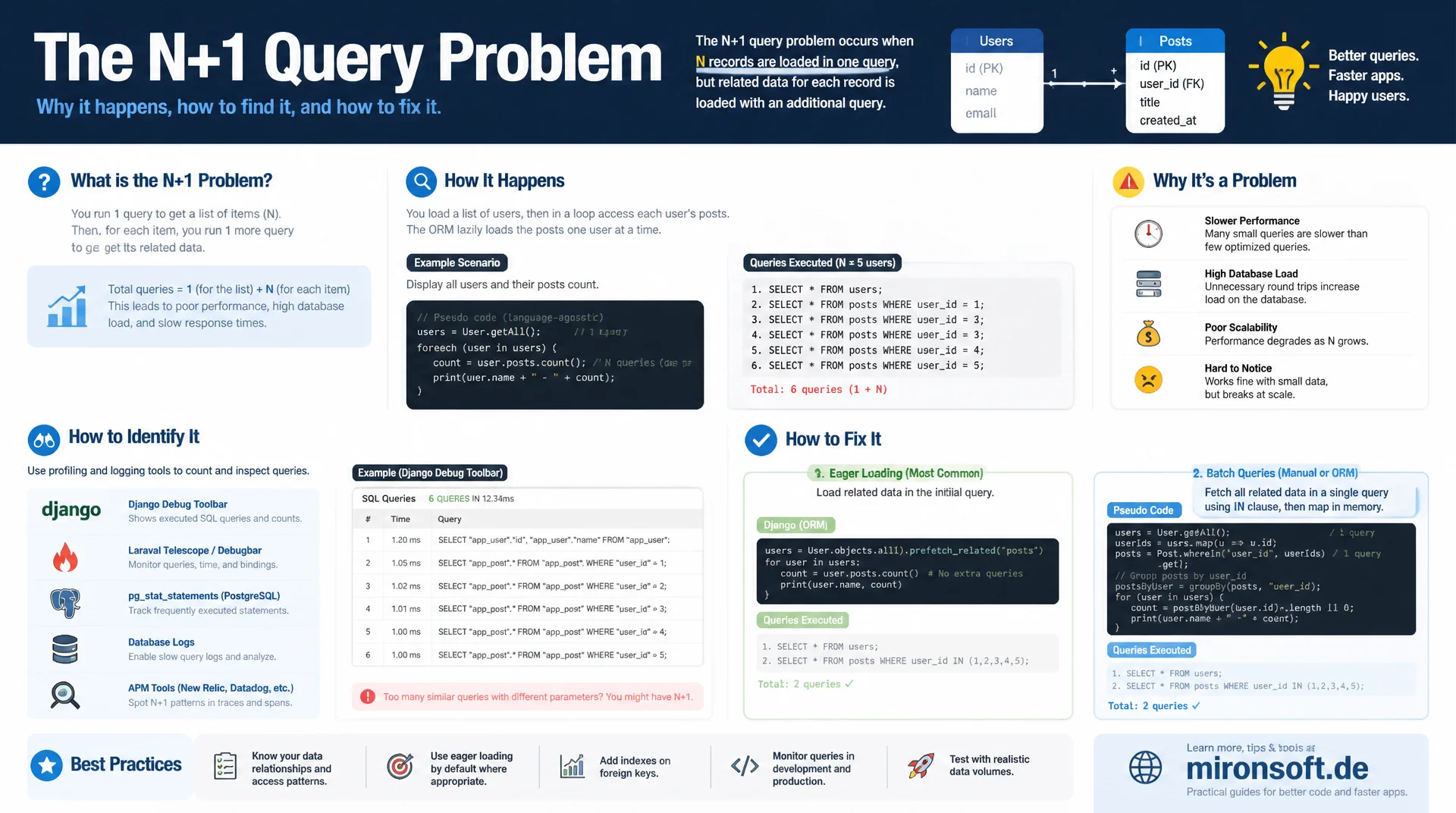
From hidden query explosion to an eager loading fix
A single list query followed by one query per item inside a loop looks harmless during development, yet turns into hundreds or thousands of database calls per page request under production load. This article shows how to spot the N+1 query problem in ORM and collection code, fix it with eager loading and batch queries, and keep it from returning with profiling tools.
Table of Contents
- 1. What the N+1 query problem is and why it gets so expensive
- 2. How N+1 hides inside ORM and collection code
- 3. Before/after: a concrete PHP example
- 4. Eager loading strategies: JOIN and batch loading
- 5. Eager loading vs. lazy loading: the tradeoffs
- 6. Detecting N+1: query logging and profiling tools
- 7. N+1 in Magento-specific contexts
- 8. Caching as a complement, not a substitute
- 9. Prevention: code review and automated query-count tests
- 10. Summary
- 11. FAQ
1. What the N+1 query problem is and why it gets so expensive
The N+1 query problem describes a recurring antipattern when accessing relational data: a first query loads a list of N records, for example all the orders on a page. The code then loops over that list, and for every single record another query fetches related data, such as the associated customer or shipping address. Instead of two queries in total, N+1 queries are issued: one for the list, N for the details. With ten records this barely registers. With a thousand records the overhead adds up to a delay that is noticeable, often only surfacing under load tests or in production once user numbers rise.
The reason this pattern is so widespread lies in the convenience of modern data access APIs. A line like $order->getCustomer()->getName() reads harmlessly but hides a full database query behind a simple method call. Developers see an object access in the code, not a query, and therefore easily miss that every iteration of the loop triggers an additional database round trip. Every query carries a constant overhead from connection setup, parsing, execution planning, and network latency between the application and the database server, independent of the result size. Multiplied by the length of the list, that constant overhead turns into a linearly growing bottleneck that dominates the entire request.
2. How N+1 hides inside ORM and collection code
ORMs like Doctrine or Eloquent-style query builders default to lazy loading: a relation is only fetched from the database once it is actually accessed. That makes sense in isolation, because not every loaded entity needs every relation. It becomes a problem the moment a collection of entities is iterated and a lazily loaded relation is accessed inside that loop. Each iteration then triggers its own query, because the lazy proxy decides per object instance whether the relation is already loaded, not per collection. The ORM itself cannot detect this pattern, because it has no view of the entire loop, only of individual accesses.
Magento collections hide the same problem behind a different facade. A foreach over a ProductCollection, combined with $product->getResource()->load($product) or an extra repository call per product inside the loop, produces exactly the same N+1 pattern, just without a classic ORM lazy proxy. Even seemingly harmless helper methods that internally call a repository, for example to look up stock or an EAV attribute group, reproduce the pattern when called once per list item. Code reviews miss this easily, because each individual line looks correct and idiomatic in isolation.
3. Before/after: a concrete PHP example
The following example shows the classic case: a list of orders is loaded, and the customer name is fetched separately for each order. With 200 orders that produces 201 queries, even though the customer data could easily be loaded together in a single additional query.
<?php
declare(strict_types=1);

// BEFORE: classic N+1 pattern - one query for the list, one query per item in the loop
final class OrderListService
{
    public function __construct(
        private readonly OrderRepositoryInterface $orderRepository,
        private readonly CustomerRepositoryInterface $customerRepository
    ) {
    }

    /**
     * @return array<int, array{order_number: string, customer_name: string}>
     */
    public function getOrderSummaries(SearchCriteriaInterface $criteria): array
    {
        $orders = $this->orderRepository->getList($criteria)->getItems(); // 1 query

        $summaries = [];
        foreach ($orders as $order) {
            // N additional queries: one customer lookup per order
            $customer = $this->customerRepository->getById($order->getCustomerId());

            $summaries[] = [
                'order_number' => $order->getIncrementId(),
                'customer_name' => $customer->getFirstname() . ' ' . $customer->getLastname(),
            ];
        }

        return $summaries; // 200 orders = 201 queries
    }
}
The fix is to collect the IDs of all required customers up front and load them in a single query using an IN-clause before the loop even starts. Inside the loop, the code then only reads from an array already held in memory, with no further database access. 201 queries become two: one for the orders, one for all affected customers together. The response time does not drop merely in proportion to the number of saved queries, it often drops even more, because connection overhead and network latency per round trip disappear entirely.
<?php
declare(strict_types=1);

// AFTER: batch load all customers in a single IN-clause query
final class OrderListService
{
    public function __construct(
        private readonly OrderRepositoryInterface $orderRepository,
        private readonly CustomerRepositoryInterface $customerRepository,
        private readonly SearchCriteriaBuilder $searchCriteriaBuilder
    ) {
    }

    /**
     * @return array<int, array{order_number: string, customer_name: string}>
     */
    public function getOrderSummaries(SearchCriteriaInterface $criteria): array
    {
        $orders = $this->orderRepository->getList($criteria)->getItems(); // 1 query

        // Collect all customer IDs before entering the loop
        $customerIds = array_unique(array_map(
            static fn (OrderInterface $order): int => (int) $order->getCustomerId(),
            $orders
        ));

        // Single batch query using an IN-clause instead of N single lookups
        $searchCriteria = $this->searchCriteriaBuilder
            ->addFilter('entity_id', $customerIds, 'in')
            ->create();
        $customers = $this->customerRepository->getList($searchCriteria)->getItems();

        // Index customers by ID for O(1) in-memory lookup inside the loop
        $customersById = [];
        foreach ($customers as $customer) {
            $customersById[$customer->getId()] = $customer;
        }

        $summaries = [];
        foreach ($orders as $order) {
            $customer = $customersById[(int) $order->getCustomerId()] ?? null; // no query here

            $summaries[] = [
                'order_number' => $order->getIncrementId(),
                'customer_name' => $customer !== null
                    ? $customer->getFirstname() . ' ' . $customer->getLastname()
                    : 'unknown',
            ];
        }

        return $summaries; // 200 orders = 2 queries total
    }
}
4. Eager loading strategies: JOIN and batch loading
There are two fundamental strategies for avoiding N+1 through eager loading. The first is JOIN-based eager loading: the relation is loaded directly via a SQL JOIN in the same query, so the list and its details come back in a single result set. This reduces the query count to one, but with several one-to-many relations it can produce a cartesian product that unnecessarily inflates the result set and increases network traffic plus deduplication effort in the application code.
The second strategy is batch loading via an IN-clause, as shown in the previous example: the main list is loaded first, then all required foreign keys are collected and fetched together in a second, separate query. This strategy scales better with several independent relations, because each relation gets its own batch query instead of multiplying inside a JOIN. Magento's addAttributeToSelect() and joinField() on collections implement essentially this same principle: attributes and joined tables are pulled into the main query deliberately, instead of being loaded separately per product.
<?php
declare(strict_types=1);

// WRONG: loads the "manufacturer" attribute per product inside the loop
$collection = $this->productCollectionFactory->create();
$collection->addAttributeToSelect(['name', 'sku']);

foreach ($collection as $product) {
    // Triggers a separate EAV lookup for every product in the collection
    $manufacturer = $product->getResource()->getAttribute('manufacturer')
        ->getFrontend()
        ->getValue($product);
}

// RIGHT: pull the attribute into the collection's main query up front
$collection = $this->productCollectionFactory->create();
$collection->addAttributeToSelect(['name', 'sku', 'manufacturer']);

// Join stock data via a single JOIN instead of a per-product resource load
$collection->joinField(
    'qty',
    'cataloginventory_stock_item',
    'qty',
    'product_id=entity_id',
    '{{table}}.stock_id=1',
    'left'
);

foreach ($collection as $product) {
    $manufacturer = $product->getData('manufacturer'); // already in memory, no query
    $qty = $product->getData('qty');                   // already in memory, no query
}
5. Eager loading vs. lazy loading: the tradeoffs
Eager loading is not a silver bullet. Anyone who preemptively eager loads every possible relation just to rule out N+1 altogether ends up loading far more data than a given request actually needs. An order list meant to show only the order number and status, but which eagerly loads full customer, address, and line item data, wastes memory and network bandwidth on data that never gets rendered. The tradeoff runs between query count and the volume of data loaded, not between good and bad.
Lazy loading is entirely legitimate when a relation is only needed in a handful of exceptional cases, for example on a detail page for a single item rather than a list. There, no N+1 problem arises, because there is no loop over N elements, at most a single additional access. The rule of thumb: lazy loading is harmless for single objects, but becomes dangerous the moment access to a lazy relation sits inside a loop over a collection. That is exactly where targeted eager loading pays off, rather than a blanket rewrite of the entire application.
6. Detecting N+1: query logging and profiling tools
N+1 can rarely be spotted reliably just by reading code, because the loop and the hidden query call often live in different methods or even different classes. It is far more reliable to actually count executed queries. Magento's built-in database profiler, enabled via the MAGE_PROFILER environment variable, logs every single query with its execution time and call site, making repeated, near-identical queries with different WHERE IDs visible at a glance.
Xdebug with function tracing shows the full call stack and reveals which method repeatedly triggers a query, while Blackfire additionally visualizes query count and time share per code path in a flame graph, where N+1 patterns often stand out directly as conspicuous, repeating bars. For database-level diagnosis, the MySQL general query log or the slow query log with a low long_query_time threshold works well: if the same query structure with varying parameters gets logged dozens of times within a few milliseconds, that is a clear signal of N+1.
# Enable the MySQL general query log temporarily to spot N+1 patterns
mysql -u root -p -e "SET GLOBAL general_log = 'ON'; SET GLOBAL general_log_file = '/var/log/mysql/general.log';"

# Reproduce the request under investigation, then inspect the log
tail -n 2000 /var/log/mysql/general.log | grep "SELECT" > queries.log

# Group near-identical queries by their normalized structure and count occurrences
sed -E 's/[0-9]+/?/g' queries.log | sort | uniq -c | sort -rn | head -n 10

# Typical N+1 signature: one query pattern repeated hundreds of times
#   487 SELECT * FROM customer_entity WHERE entity_id = ?
# versus the expected single batch query:
#     1 SELECT * FROM customer_entity WHERE entity_id IN (?, ?, ?, ...)

# Disable the general log again once done, it has noticeable overhead in production
mysql -u root -p -e "SET GLOBAL general_log = 'OFF';"
7. N+1 in Magento-specific contexts
Magento's EAV model (Entity-Attribute-Value) is a particularly susceptible candidate for N+1, because every additional product attribute can potentially live in its own table. If a custom attribute like color or manufacturer is not pulled into the collection via addAttributeToSelect() but instead loaded afterwards per product via getResource()->getAttribute(), classic N+1 emerges directly in the core system. Custom repositories that internally use get() instead of getList() with search criteria reproduce the same pattern when called inside a loop over a list of IDs, instead of using a single batched query with an IN-filter.
A less obvious case arises from plugins and observers: an around plugin on a frequently called method that internally executes an additional query, for example to check a customer group or a store-specific price, automatically multiplies with every call to the original method. Because plugins are wired declaratively via di.xml, their performance impact is invisible in the calling code and is especially easy to miss during code review. The same applies to event observers reacting to an event that fires repeatedly inside a loop.
8. Caching as a complement, not a substitute
An object or result cache like Redis can temporarily soften the noticeable impact of N+1, because repeated identical queries after the first call are served from the cache instead of the database. That reduces latency for subsequent requests, but does not remove the root cause: the number of cache lookups still remains proportional to the list size, and on the first cold call, after a cache flush, or with individual filter combinations, the full query load reappears unchanged.
Relying on caching as the sole fix for N+1 shifts the problem into cache warmup phases, deployments, and edge cases with a low hit rate, such as personalized prices or customer-specific sorting, which are inherently hard to cache well. The more robust order of operations is therefore: fix the query structure first through eager loading or batch loading, and only then add caching to further speed up the already reduced, already optimized query count. Layering caching on top of a structurally broken access pattern only masks the problem until cache size or hit rate collapse under load.
9. Prevention: code review and automated query-count tests
The most effective prevention starts in code review with a targeted question: does this code path, inside a loop over a collection, trigger an additional database or repository call? Reviewers who consistently ask this question for every foreach over a collection of entities catch most N+1 cases before they are even merged. Linting rules or static analysis scripts that search for repository or resource model calls inside known loop constructs and flag them automatically are a useful complement.
Even more reliable are automated tests that count the actual number of queries executed during a test run and assert them against a fixed threshold. An integration test that loads a list with a variable number of items and asserts that the query count stays constant instead of growing with the list size reliably catches regressions long before they become visible in production. Such tests are especially valuable in CI pipelines, because they don't just fix N+1 once, they guard against it permanently across future refactorings.
<?php
declare(strict_types=1);

// Integration test that asserts query count stays constant regardless of list size
final class OrderListServiceQueryCountTest extends TestCase
{
    public function testQueryCountDoesNotGrowWithOrderCount(): void
    {
        $queryCounter = $this->objectManager->get(QueryCountCollector::class);

        $queryCounter->reset();
        $this->orderListService->getOrderSummaries($this->buildCriteria(limit: 10));
        $queriesForTen = $queryCounter->getCount();

        $queryCounter->reset();
        $this->orderListService->getOrderSummaries($this->buildCriteria(limit: 200));
        $queriesForTwoHundred = $queryCounter->getCount();

        // The fixed implementation issues a constant number of queries (2),
        // independent of how many orders are returned
        self::assertSame(
            $queriesForTen,
            $queriesForTwoHundred,
            'Query count must not scale with result set size, this indicates an N+1 regression'
        );
        self::assertLessThanOrEqual(2, $queriesForTwoHundred);
    }
}
The table below compares query count and response time for three typical list sizes, each contrasting the naive N+1 access with the eager-loaded fix from section 3. The values are based on a typical round trip of a few milliseconds between the application and database server and illustrate why the problem only becomes dramatically noticeable as the list size grows.
| List size | Naive queries (N+1) | Naive response time | Eager-loaded queries | Eager-loaded response time |
|---|---|---|---|---|
| 10 items | 11 | ~45 ms | 2 | ~9 ms |
| 100 items | 101 | ~410 ms | 2 | ~14 ms |
| 1000 items | 1001 | ~4100 ms | 2 | ~85 ms |
The difference is barely noticeable for small lists, but grows linearly with the number of items, while the eager-loaded variant stays nearly constant, increasing only slightly due to the somewhat larger IN-clause and result set. This linear growth is exactly why N+1 often goes undetected in development environments with small test datasets and only becomes a noticeable problem in production with real data volumes.
Mironsoft
Performance audits, query optimization, and Magento backend engineering
Ready to track down and fix N+1 queries in your Magento store?
We analyze collections, repositories, and plugins for N+1 patterns, fix them with eager loading and batch queries, and set up query-count tests that permanently guard against regressions.
Query profiling
Systematic analysis with the DB profiler, Xdebug, and Blackfire to identify every N+1 spot
Eager loading refactoring
Converting collections, repositories, and EAV access to batch loading and JOINs
CI safeguards
Automated query-count tests against future regressions in the pipeline
10. Summary
The N+1 query problem arises when a list is loaded with one query and a subsequent loop triggers a further query per item instead of fetching the needed data in a batch. It hides especially easily inside ORM lazy loading and Magento collections, because individual lines of code look unremarkable on their own and the query call stays hidden behind a simple method access. Reliable detection does not come from reading code, but from actually counting executed queries with the Magento DB profiler, Xdebug, Blackfire, or the MySQL query log.
The fix lies in targeted eager loading: collect IDs before the loop and fetch them together via an IN-clause, a JOIN, or Magento's addAttributeToSelect()/joinField(), instead of preemptively loading every relation just in case. Caching softens the symptoms but does not fix the cause, and should only be layered on after the structural fix. Automated tests that check query count against list size reliably prevent N+1 from quietly returning through future refactorings.
Identifying and Solving the N+1 Query Problem - The Essentials at a Glance
Spotting the pattern
One query per loop iteration instead of a batched fetch. Visible through query logging, Xdebug traces, or the Magento DB profiler log.
Root cause in the ORM
Lazy loading fetches relations per object instance, not per collection. Magento collections reproduce the same pattern via resource model calls inside a loop.
Fix: eager & batch loading
Collect IDs before the loop and batch-fetch with an IN-clause or addAttributeToSelect()/joinField().
Prevention
Code reviews with a targeted question about repository calls inside loops, plus automated tests that check query count against list size.