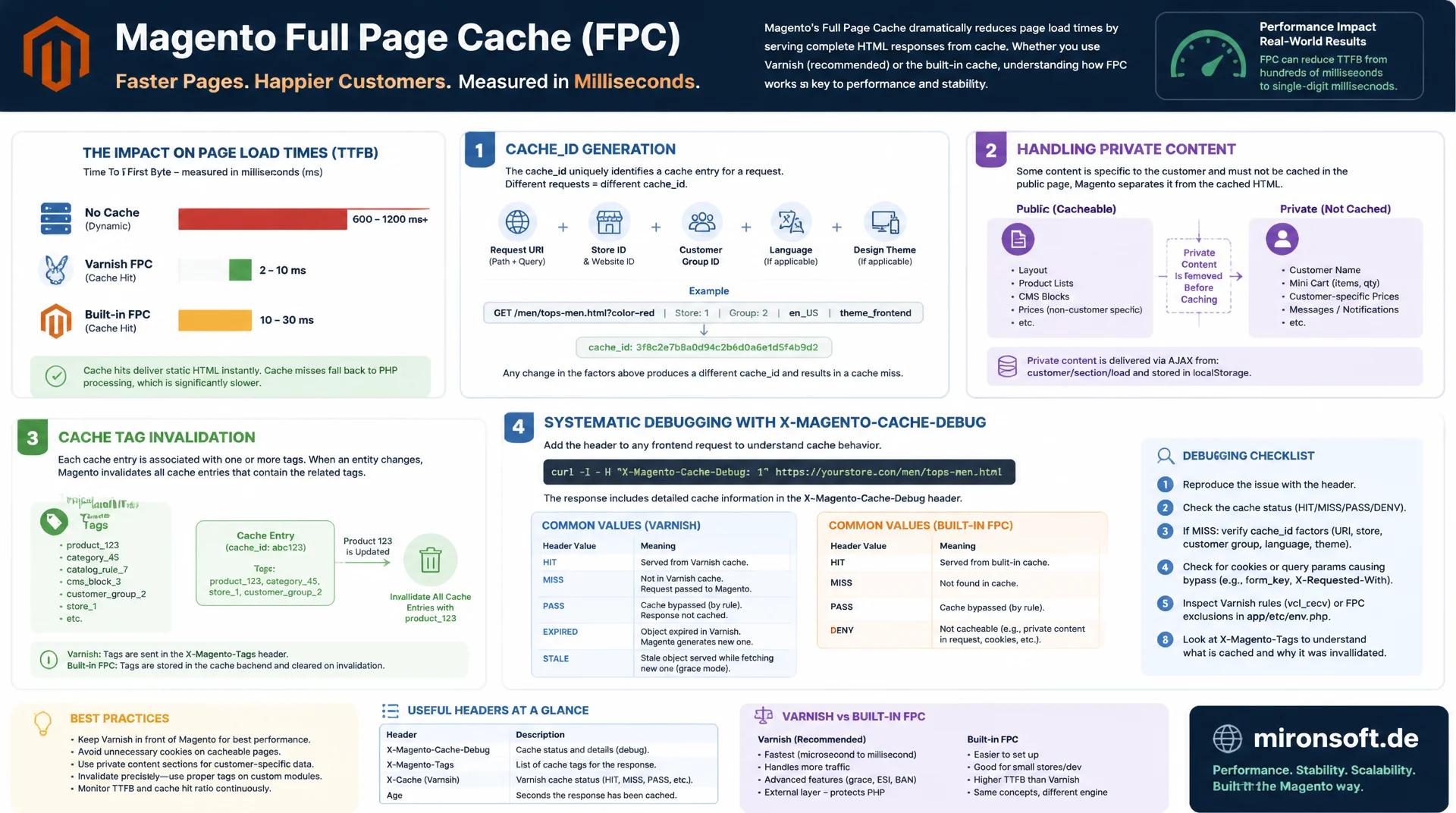
cache_id, private content, and cache tags from the inside
Magento's Full Page Cache decides entire page load times in milliseconds, yet most developers only know the symptoms of cache misses, not the mechanics behind them. This article explains cache_id generation, private content, cache tag invalidation, and systematic debugging with X-Magento-Cache-Debug, regardless of whether Varnish or the built-in cache is in use.
Table of Contents
- 1. Magento's Full Page Cache overview: built-in vs. Varnish
- 2. Request lifecycle: how a page ends up in the cache at all
- 3. Cache ID generation: how Magento uniquely identifies a page
- 4. Private content: blocks with cacheable=false and customer data
- 5. Cache tags: how invalidation on save actually works
- 6. Varnish as a backend: bans and Magento's role
- 7. X-Magento-Cache-Debug: making cache hits and misses visible
- 8. Custom cache tags: IdentityInterface, plugins, and observers
- 9. Systematically debugging cache misses
- 10. Summary
- 11. FAQ
1. Magento's Full Page Cache overview: built-in vs. Varnish
Magento's Full Page Cache (FPC) stores a page's fully rendered HTML as a finished HTTP response and serves it on subsequent requests without running through the whole layout and block rendering process again. Magento supports two operating modes: the built-in cache, which stores and serves the response through the regular cache backend (Redis, file, Memcached) inside the PHP process, and the Varnish integration, where a reverse proxy in front of the application holds the response entirely outside of PHP.
The difference is more than gradual. With the built-in cache, PHP-FPM still has to boot on every request, run through bootstrap, and execute the cache lookup logic before returning the stored response. That saves the expensive rendering step, but not the PHP overhead itself. Varnish, on the other hand, answers a cache hit directly in the reverse proxy without any PHP-FPM call at all, which in practice enables response times under ten milliseconds and keeps significantly more capacity free under load spikes. Magento explicitly recommends Varnish for production systems, while the built-in cache is sufficient mainly for smaller stores or staging environments without extra infrastructure.
2. Request lifecycle: how a page ends up in the cache at all
The cache lookup happens early in the request cycle, before the full layout tree is even built. Magento\Framework\App\PageCache\Kernel is responsible for this: its load() method computes a cache ID from the request and checks whether a response is already stored under that key in the cache backend. If it is, the stored response is returned directly and the rest of the application, including layout rendering and block construction, is skipped entirely. That's exactly where the performance gain comes from: not faster rendering, but no rendering at all.
On a cache miss, the request runs through the full Magento pipeline. At the end, the response itself decides whether it's cacheable: via the Cache-Control header and the X-Magento-Tags header, which Kernel::process() evaluates after rendering. Only responses with Cache-Control: public and a positive TTL actually get stored. Controller actions that deliberately call setNoCacheable() or require an active customer session will never end up in the FPC, no matter how often they're called.
3. Cache ID generation: how Magento uniquely identifies a page
The cache ID is not a simple URL hash. Magento\Framework\App\PageCache\Identifier assembles the key from several components: the full request URL including the query string, the store view, the scheme (http vs. https), and a so-called vary value. That vary value comes from Magento\Framework\App\Http\Context and contains every value that could influence the HTML output without being part of the URL: customer group, currency, active price rules, and any additional values that modules inject into the context via a plugin.
This is exactly where the most common surprises happen. Every additional value in Http\Context multiplies the number of possible cache variants for the same URL. A module that writes, say, an A/B test result or a geolocation lookup into the context causes the same product page to be stored under different cache IDs for different visitors, and the effective hit rate drops. The vary value is also sent to the client as a base64-encoded X-Magento-Vary cookie, so Varnish can compute the same key without a PHP call.
<?php
declare(strict_types=1);

namespace Mironsoft\Pricing\Plugin;

use Magento\Framework\App\Http\Context;

/**
 * Adds a custom context value that influences the FPC cache_id.
 * Every additional context key increases the number of stored
 * page variants for the same URL, so this should be used sparingly.
 */
class AddCustomerSegmentToContext
{
    private const CONTEXT_SEGMENT = 'customer_segment';

    /**
     * Injects the resolved customer segment into the HTTP context.
     *
     * @param Context $subject Original HTTP context instance.
     * @return void
     */
    public function beforeGetVaryString(Context $subject): void
    {
        if (!$subject->hasData(self::CONTEXT_SEGMENT)) {
            // Cheap default: avoid computing an expensive segment on every request
            $subject->setValue(self::CONTEXT_SEGMENT, 'default', 'default');
        }
    }
}
4. Private content: blocks with cacheable=false and customer data
Not every part of a page can be identical for all visitors when served from cache. The mini cart, a greeting with the customer's name, and a wishlist counter are private content: block data that differs per visitor even though the rest of the page looks the same for everyone. In layout XML, such blocks are marked with cacheable="false". With the built-in FPC, this means the block gets replaced with an empty placeholder during rendering, and the entire page still stays cacheable.
The placeholder only gets filled in the browser, via customer data (Section.js): an AJAX call to customer/section/load loads the private data after the initial render, and Alpine.js or the section data binding replaces the placeholder on the client. This pattern fully decouples cacheability from personalization: the page itself stays identically cacheable for every visitor, only the small dynamic fragments get loaded asynchronously. With Varnish, the same effect can additionally be achieved via ESI (Edge Side Includes) directly in the reverse proxy, without an extra client request.
<!-- Layout XML: explicitly mark a block as non-cacheable -->
<page xmlns:xsi="http://www.w3.org/2001/XMLSchema-instance"
      xsi:noNamespaceSchemaLocation="urn:magento:framework:View/Layout/etc/page_configuration.xsd">
    <body>
        <referenceContainer name="header.panel">
            <!-- cacheable="false" replaces the block output with an
                 empty placeholder that gets filled client-side after
                 load via Customer Data (Section.js) -->
            <block class="Mironsoft\Loyalty\Block\PointsBalance"
                   name="loyalty.points.balance"
                   template="Mironsoft_Loyalty::points-balance.phtml"
                   cacheable="false"/>
        </referenceContainer>
    </body>
</page>
5. Cache tags: how invalidation on save actually works
A cached product page doesn't stay valid forever, it needs to be purged as soon as the underlying product changes. To make that possible, Magento collects all cache tags of the entities involved while rendering: every model that implements Magento\Framework\DataObject\IdentityInterface returns a list of tags via getIdentities(), such as cat_p_123 for product 123 or cat_c_45 for category 45. All tags from all blocks on a page get collected into the X-Magento-Tags response header and stored alongside the HTML in the cache entry.
When an entity gets saved, Magento triggers invalidation through the clean_cache_by_tags event: Magento\Framework\App\CacheInterface::clean() is called with exactly the tags the saved object returns. The cache backend then removes only the entries that carry that tag, not the entire cache. With Redis this happens via a tag index, with Varnish via a BAN request with a regex on the tag. That granularity is exactly what separates a price change that invalidates a single product page from a full cache flush that discards every cached page at once.
{
  "_comment": "Debug view: aggregated cache tags for one rendered page",
  "url": "/catalog/product/view/id/123",
  "cache_id": "e4a1c9...b02f",
  "x_magento_tags": [
    "cat_p_123",
    "cat_p",
    "cat_c_45",
    "cat_c",
    "block_html_price_123",
    "FPC"
  ],
  "note": "Saving product 123 triggers clean_cache_by_tags with cat_p_123, invalidating only entries that carry this tag"
}
6. Varnish as a backend: bans and Magento's role
Even though Varnish serves the response, the decision logic still lives in Magento. Varnish itself knows nothing about products, categories, or price rules, it only knows HTTP headers. That's why Magento doesn't send a plain cache flush when invalidating, but a BAN request via Magento\PageCache\Model\Varnish\ProxyList to every configured Varnish host, with the collected tag as a regex in the X-Magento-Tags-Pattern header. Varnish internally matches that pattern against the stored X-Magento-Tags header of every cache entry and discards only the matches.
Important operationally: if a Varnish host in the list is unreachable, Magento only logs it, the request itself doesn't fail. In multi-server setups with several Varnish instances behind a load balancer, all hosts must therefore be correctly configured in varnish.host or the corresponding system configuration, otherwise part of the fleet keeps serving stale data while other instances have already been invalidated. A classic symptom of this: a price gets updated but shows old or new depending on which instance the load balancer routes to.
7. X-Magento-Cache-Debug: making cache hits and misses visible
The X-Magento-Cache-Debug header is the fastest way to distinguish HIT from MISS without digging through server logs. It gets enabled via Varnish's default.vcl, or with the built-in cache, automatically through Magento\Framework\App\Response\Http\Interceptor. A HIT means the response came directly from the cache backend without any rendering, a MISS means the full Magento pipeline ran.
In practice, a simple curl call is enough to systematically check whether a page is cacheable at all, and whether repeated requests actually turn into a HIT. If a page stays on MISS permanently even though it should be cacheable, that points to a vary problem, a missing or wrong Cache-Control header, or a session that gets restarted on every request.
#!/usr/bin/env bash
# Check FPC hit/miss status for a product page, two requests in sequence

URL="https://shop.example.com/catalog/product/view/id/123"

echo "First request (expected MISS on cold cache):"
curl -sI "$URL" | grep -i -E "x-magento-cache-debug|cache-control|age"

echo ""
echo "Second request (expected HIT):"
curl -sI "$URL" | grep -i -E "x-magento-cache-debug|cache-control|age"

# Compare the X-Magento-Vary cookie across requests with different sessions
echo ""
echo "Vary cookie check:"
curl -sI -H "Cookie: X-Magento-Vary=" "$URL" | grep -i set-cookie
8. Custom cache tags: IdentityInterface, plugins, and observers
For custom modules it's usually not enough to rely on the built-in tags from products and categories. A custom model whose changes affect a cached page, say a loyalty points balance or an individual discount, should implement IdentityInterface itself and return its own tag prefix via getIdentities(). That makes the model part of the same invalidation pipeline as products and categories, without having to rebuild the cache logic by hand.
For cases where no standard save event fires, such as bulk updates via direct SQL statements or external imports, invalidation can also be triggered explicitly through a plugin on the resource model that calls CacheInterface::clean() directly with the matching tags. It's important to keep the tag names consistent: the same tag that gets set during rendering via getIdentities() must be called exactly the same way on save, otherwise the cache entry becomes orphaned and never gets invalidated.
<?php
declare(strict_types=1);

namespace Mironsoft\Loyalty\Model;

use Magento\Framework\DataObject\IdentityInterface;
use Magento\Framework\Model\AbstractModel;

/**
 * Loyalty points balance model, participates in FPC tag invalidation.
 */
class PointsBalance extends AbstractModel implements IdentityInterface
{
    private const CACHE_TAG = 'mironsoft_loyalty_points';

    /**
     * Returns cache tags identifying this entity for FPC invalidation.
     *
     * @return string[]
     */
    public function getIdentities(): array
    {
        return [self::CACHE_TAG . '_' . $this->getCustomerId()];
    }
}

/**
 * Plugin on the resource model: explicit invalidation for bulk updates
 * that bypass the standard save() event (e.g. direct SQL imports).
 */
class InvalidateCacheOnBulkUpdate
{
    public function __construct(
        private readonly \Magento\Framework\App\CacheInterface $cache
    ) {
    }

    /**
     * Cleans FPC entries for affected customers after a bulk update.
     *
     * @param mixed $subject Bulk update resource.
     * @param mixed $result Original method result.
     * @param array $customerIds Affected customer IDs.
     * @return mixed
     */
    public function afterBulkUpdate($subject, $result, array $customerIds)
    {
        $tags = array_map(
            static fn (int $id): string => 'mironsoft_loyalty_points_' . $id,
            $customerIds
        );
        $this->cache->clean(\Zend_Cache::CLEANING_MODE_MATCHING_ANY_TAG, $tags);

        return $result;
    }
}
9. Systematically debugging cache misses
Guessing anew at every single symptom wastes time. A repeatable workflow saves debugging rounds: first check whether the FPC is even enabled, under Admin, System, Cache Management, Page Cache status. Then query the X-Magento-Cache-Debug header several times in a row to see whether a HIT ever occurs at all. If it stays on MISS consistently, the cause is usually Cache-Control: no-cache or a missing TTL value, often triggered by a controller calling setNoCacheable(), or by a session that restarts on every request, for example because a module accesses CustomerSession in a block's constructor.
If HIT and MISS alternate irregularly, the cause is usually the cache ID itself: an extra value in Http\Context, an A/B testing cookie, or a geolocation lookup creates more variants than are actually necessary. bin/magento cache:status shows the activation status, while varnishlog or varnishstat show live, with Varnish, which requests are treated as HIT, MISS, or PASS. A frequently overlooked edge case: developer browsers with an active cookie for a logged-in admin preview force a dedicated, mostly unreused cache entry per user through the X-Magento-Vary logic, which looks like a low hit rate in monitoring dashboards even though nothing is actually broken.
| Symptom | Wrong assumption | Actual cause | Fix |
|---|---|---|---|
| Permanent MISS | Cache backend is broken | Controller calls setNoCacheable() | Check the Cache-Control header |
| Low hit rate | TTL is too short | Too many values in Http\Context | Reduce vary values to the essentials |
| Stale prices shown | A cache flush was needed | Missing tag on bulk import | IdentityInterface + plugin invalidation |
| Private data visible to everyone | Random race condition | Block rendered without cacheable=false | Fix the layout XML |
| Inconsistent values per server | Database replication lag | Varnish host missing from ProxyList | List all hosts in varnish.host |
Mironsoft
Full Page Cache architecture, Varnish configuration, and performance engineering for Magento
Ready to get cache misses reliably under control?
We analyze your Magento store's cache hit rate, identify vary problems and missing cache tags, and implement a clean FPC architecture, whether you're running the built-in cache or Varnish.
Cache audit
Hit rate analysis, checking the vary context, evaluating X-Magento-Cache-Debug
Tag invalidation
IdentityInterface for custom modules, granular invalidation instead of full flushes
Varnish setup
Multi-host configuration, ProxyList hardening, and building out monitoring
10. Summary
The Full Page Cache architecture in Magento solves one central problem: entire pages don't need to be re-rendered on every request. Magento\Framework\App\PageCache\Kernel decides early in the request cycle whether a stored response can be served. The cache ID combines the URL, store, and a vary value from Http\Context, where every additional context value lowers the hit rate. Private content via cacheable="false" and customer data cleanly separates personalization from cacheability. Cache tags via IdentityInterface enable granular invalidation instead of a full cache flood on every change.
The decisive lever is rarely a single setting, but the interplay of all these mechanisms: a correctly set cache tag is useless if a controller excludes the page from caching entirely via setNoCacheable() anyway. Consistently building X-Magento-Cache-Debug into your own debugging routine, and checking with every new module whether it unnecessarily extends Http\Context or forgets tags, prevents the slow erosion of cache hit rate that affects many Magento stores after months in production.
Full Page Cache Architecture in Magento, The Essentials at a Glance
Cache ID
URL, store, and Http\Context vary values determine the key. Every additional context value creates more cache variants.
Private content
cacheable="false" plus customer data (Section.js) separates personalized fragments from the cacheable page.
Cache tags
IdentityInterface::getIdentities() plus clean_cache_by_tags enable granular instead of full invalidation.
Debugging
Check X-Magento-Cache-Debug with curl, keep Http\Context minimal, configure all Varnish hosts correctly.