Skip rendering work entirely instead of just speeding it up
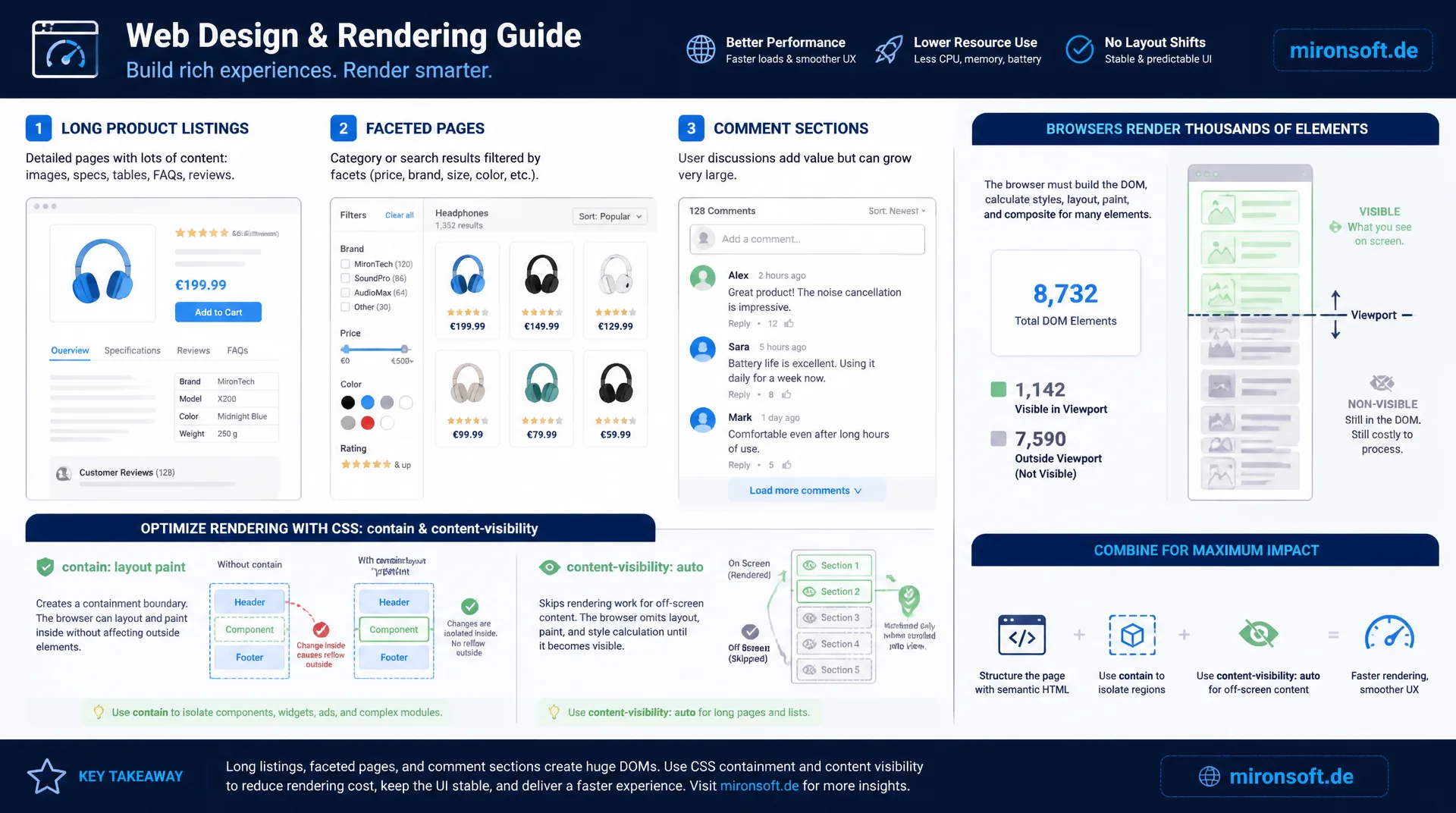
Long product listings, faceted pages, and comment sections force the browser to lay out and paint thousands of elements even though only a fraction of them are visible. The CSS properties contain and content visibility give the rendering engine explicit context about which regions can be isolated and which can be skipped entirely, without causing layout shifts along the way.
Table of Contents
- 1. Why rendering work is the real bottleneck
- 2. The contain property: layout, paint, size, and strict in detail
- 3. content-visibility: auto: skipping rendering work for off-screen content
- 4. contain-intrinsic-size against layout shifts
- 5. Practical use cases: long product listings and comment sections
- 6. Integration into Hyva components and Tailwind CSS
- 7. Browser support and fallback strategies
- 8. Measuring with Chrome DevTools: the Rendering panel and performance traces
- 9. Containment values compared side by side
- 10. Summary
- 11. FAQ
1. Why rendering work is the real bottleneck
After parsing the HTML, every browser runs through the same pipeline: style recalculation, layout, paint, and composite. On a page with thousands of DOM nodes, such as a long product listing or a comment section with hundreds of entries, this pipeline becomes the bottleneck, because by default the browser assumes that any change to an element could affect an arbitrary number of other elements. A single display toggle or a late-loading image can therefore trigger a layout pass of the entire document, even when the change only affects a small, clearly bounded area.
This is exactly where CSS Containment comes in: it lets developers explicitly tell the browser that an element and its subtree are independent from the rest of the document. It is not a visual property like display or overflow, but a pure optimization directive: it doesn't change how an element looks, it changes how expensive it is for the browser to process changes to it. Combined with content-visibility, this becomes a tool that not only isolates but skips rendering work for non-visible regions entirely.
2. The contain property: layout, paint, size, and strict in detail
The contain property accepts several values that can be set individually or combined. contain: layout turns an element into its own layout root: floats, margin collapsing, and positioning contexts from inside the element no longer affect sibling elements outside of it, and layout changes inside the box no longer force the browser to recompute layout for the rest of the document. contain: paint clips visible content at the box boundary, similar to overflow: hidden, additionally creates a new stacking and containing-block context, and signals to the browser that nothing outside the box needs to be painted.
contain: size decouples an element's size from its content: the browser no longer has to render the children to know the box's height, but this requires an explicit height via CSS or contain-intrinsic-size, otherwise the box collapses to zero. contain: strict is shorthand for layout paint size style and delivers maximum isolation, while contain: content uses the same combination without size, making it safer when the height isn't known ahead of time. This content variant is exactly the foundation content-visibility builds on.
/* Basic containment: isolate layout and paint for an independent widget */
.sidebar-widget {
  contain: layout paint;
}

/* Full isolation including size, requires an explicit height */
.chat-panel {
  contain: strict;
  height: 480px;
}

/* Content containment (layout + paint + style), height stays flexible */
.comment-thread {
  contain: content;
}

/* Style containment prevents CSS counters/quotes from leaking,
   use with caution since it also isolates counter-reset scopes */
.faq-item {
  contain: style;
}
3. content-visibility: auto: skipping rendering work for off-screen content
content-visibility: auto builds directly on contain: content and takes it a decisive step further: as long as the element is not near the visible viewport, the browser skips layout, paint, and all associated rendering work for its content entirely, as if visibility were set to hidden. As soon as the element scrolls near the viewport, the browser automatically switches back into normal rendering mode, recomputes layout and paint, and displays the content, with no JavaScript intervention required.
The difference from display: none matters: with display: none, the element is completely removed from rendering and must be fully rebuilt when shown again. content-visibility: auto instead retains an internal state, the DOM tree remains fully intact, form inputs and scroll positions inside the region survive, and only the expensive rendering work is deferred. For manually showing and hiding whole regions, there's also the value content-visibility: hidden, which offers the same state preservation but doesn't automatically toggle based on viewport visibility.
/* Skip rendering work for product cards far outside the viewport */
.product-list-item {
  content-visibility: auto;
  contain-intrinsic-size: auto 480px;
}

/* Manual show/hide that preserves internal state, unlike display: none */
.accordion-panel[data-collapsed="true"] {
  content-visibility: hidden;
}

.accordion-panel[data-collapsed="false"] {
  content-visibility: visible;
}
4. contain-intrinsic-size against layout shifts
Once an element is not rendered because of content-visibility: auto, the browser doesn't know its actual height, since it hasn't computed the content. Without further information it assumes a height of zero, which causes the scrollbar to jump the moment elements enter the viewport and suddenly take on their real height, a textbook Cumulative Layout Shift case. contain-intrinsic-size solves this by defining a placeholder size for the unrendered state, usually the average height of the component measured from real data.
The modern syntax contain-intrinsic-size: auto 480px combines the auto keyword with a fallback value: once an element has been rendered visibly at least once, the browser remembers the actually measured size and uses it as a more precise placeholder the next time the element leaves the viewport, instead of falling back to the static fallback value again. This reduces layout shifts particularly in heterogeneous lists with entries of varying height, such as product cards with a variable number of badges or comments with differing text lengths.
5. Practical use cases: long product listings and comment sections
The classic use case in Magento and Hyva stores is the product listing page (PLP) with several hundred results, either server-rendered or loaded incrementally via infinite scroll. Without containment, the browser potentially recomputes layout for the entire list on every DOM change, for example when loading more products or toggling a filter. With content-visibility: auto on every single product card, the initial rendering time drops noticeably, because only the cards actually visible in the viewport get laid out and painted, the rest stays inactive until needed.
A second strong use case is comment sections and review lists with deeply nested replies. These regions often contain hundreds of text blocks with avatar images, timestamps, and nested reply threads that together cause substantial layout work, even though only a few comments are actually visible on initial page load. Containment at the thread level ensures the page's time-to-interactive isn't dragged down by deeply nested, invisible comments.
<!-- Hyva phtml: product grid item with content-visibility applied -->
<?php foreach ($block->getProductCollection() as $product): ?>
    <div class="product-card [content-visibility:auto] [contain-intrinsic-size:auto_480px] rounded-xl border border-gray-200 p-4">
        <img
            src="<?= $escaper->escapeUrl($product->getImageUrl()) ?>"
            width="280"
            height="280"
            loading="lazy"
            class="w-full h-auto object-cover rounded-lg"
            alt="<?= $escaper->escapeHtmlAttr($product->getName()) ?>"
        >
        <p class="mt-3 font-semibold text-sm"><?= $escaper->escapeHtml($product->getName()) ?></p>
        <p class="text-red-700 font-bold"><?= $block->getFormattedPrice($product) ?></p>
    </div>
<?php endforeach; ?>
6. Integration into Hyva components and Tailwind CSS
Tailwind CSS v4 uses a CSS-first approach, so contain and content-visibility can either be applied as arbitrary values directly in class names, e.g. [content-visibility:auto], or defined as a reusable utility class in the theme's CSS file. For Hyva components, the latter is preferable, since product cards, comment items, and facet lists usually exist as their own phtml templates that reuse the class in multiple places across the theme.
It's important not to apply containment indiscriminately to every element: a container with contain: layout must not contain children that are meant to intentionally overflow its bounds, such as tooltips or dropdown menus with position: absolute, since those would otherwise be positioned relative to the card's containment block instead of the viewport. For interactive elements inside a product card, like a quick-view overlay, the overlay should therefore live outside the containment-isolated container in the DOM, or be teleported to document.body via Alpine.js.
/* Tailwind v4 CSS-first: reusable containment utility for Hyva components */
@layer components {
  .cv-card {
    content-visibility: auto;
    contain-intrinsic-size: auto 420px;
  }

  .cv-comment {
    content-visibility: auto;
    contain-intrinsic-size: auto 180px;
    contain: content;
  }
}

/* Facet sidebar: layout containment prevents filter toggles
   from triggering a reflow of the whole product grid */
.facet-sidebar {
  contain: layout paint;
}
7. Browser support and fallback strategies
The base property contain has been supported by all current browsers for several years and can be used in production without concerns. content-visibility is fully implemented in all Chromium-based browsers (Chrome, Edge, Opera), has been available in Firefox since version 125, and only landed in Safari in more recent WebKit versions with limited scope. The key advantage: browsers without support simply ignore the unknown property and render the content normally, there is no functional break, only a difference in performance.
For browsers without content-visibility support, the same effect can be recreated manually with an IntersectionObserver: elements outside a defined root margin get display: none or reduced rendering as soon as they leave the viewport. This solution is considerably more effort to maintain and doesn't reach the same performance as the native browser implementation, but it works as an interim solution for projects that still need to support older Safari versions. CSS.supports('content-visibility', 'auto') reliably detects the feature at runtime.
// Feature detection and IntersectionObserver fallback
// for browsers without native content-visibility support
if (!CSS.supports('content-visibility', 'auto')) {
  const items = document.querySelectorAll('.product-card');

  const observer = new IntersectionObserver((entries) => {
    entries.forEach((entry) => {
      // Toggle a class instead of display:none to keep layout stable
      entry.target.classList.toggle('is-offscreen', !entry.isIntersecting);
    });
  }, {
    root: null,
    rootMargin: '600px 0px',
    threshold: 0,
  });

  items.forEach((item) => observer.observe(item));
}
8. Measuring with Chrome DevTools: the Rendering panel and performance traces
The most reliable way to prove the effect of containment is the Performance panel in Chrome DevTools: a trace taken before and after applying content-visibility: auto shows directly in the flame chart how much the cumulative time spent on Layout and Recalculate Style drops. On long product listings, reductions in initial rendering time of 50% or more are not unusual, because the browser only processes the cards actually visible instead of laying out the entire list upfront.
Additionally, the Rendering panel (reachable via the DevTools command palette with "Show Rendering") offers a "Layout Shift Regions" option: colored overlays mark every detected layout shift directly in the viewport, making it visible whether a poorly estimated contain-intrinsic-size value is causing a scrollbar jump. The "Paint flashing" option additionally shows which areas of the page are actually being repainted, direct visual proof that containment prevents paint work outside the box.
9. Containment values compared side by side
Each containment variant isolates a different aspect of rendering and carries its own risk if applied carelessly. The table below summarizes when each value makes sense.
| Property | Rendering effect | Risk if misused | Recommended use |
|---|---|---|---|
| contain: layout | Isolates layout computation | Absolutely positioned children get clipped | Widgets with their own layout context |
| contain: paint | No paint outside the box | Tooltips/dropdowns appear clipped | Cards with a clearly defined box |
| contain: size | No reflow from child content | Box collapses to 0 without a fixed height | Always combine with an explicit height |
| contain: strict | Maximum isolation (layout+paint+size+style) | Style containment breaks counters/quotes | Fully independent components |
| content-visibility: auto | Skips rendering for off-screen content | Scrollbar jumps without contain-intrinsic-size | Long lists, comment sections |
| contain-intrinsic-size | Reserves a stable placeholder size | A wrong estimate causes CLS | Always set a realistic average height |
In practice these values are almost always combined: content-visibility: auto implicitly applies contain: layout paint style, so only contain-intrinsic-size still needs to be set for a stable placeholder size. Plain contain without content-visibility still makes sense for regions that should be isolated but not removed from rendering, such as interactive widgets that stay permanently visible.
Mironsoft
Rendering performance and Hyva optimization for Magento stores
Ready to cut down rendering work?
We analyze your Magento store's rendering pipeline, identify expensive layout and paint regions, and implement containment and content-visibility in your Hyva components where it matters most.
Rendering audit
Performance trace analysis, identifying expensive layout regions
Content-visibility integration
contain and content-visibility in product listings and comments
Hyva component optimization
Tailwind utilities and Alpine.js interactions without layout shift
10. Summary
CSS Containment and content-visibility address a structural problem in the browser rendering pipeline: without explicit boundaries, the browser has to assume, on any change, that it might need to re-layout the entire document, even when only a small, isolated region is affected. contain: layout paint size style marks elements as independent, content-visibility: auto goes a step further and skips rendering work for off-screen content entirely, without JavaScript having to manually remove elements from the DOM.
The decisive building block for stable layouts is contain-intrinsic-size: without a realistic placeholder size for unrendered regions, content-visibility: auto causes layout shifts itself instead of preventing them. Combined with correctly set placeholders, this technique delivers noticeable, measurable improvements in initial rendering time on long product listings and comment sections, verifiable with Chrome DevTools, with no extra JavaScript or virtualization libraries required.
CSS Containment and content-visibility, the essentials at a glance
contain isolates rendering
layout, paint, size, and style individually or combined via strict/content.
content-visibility skips work
Off-screen regions aren't laid out or painted until they are near the viewport.
contain-intrinsic-size against CLS
Reserve a placeholder size, ideally with the auto keyword for measured values.
Measurement & fallback
Chrome DevTools Performance panel for proof, IntersectionObserver as a fallback for older browsers.