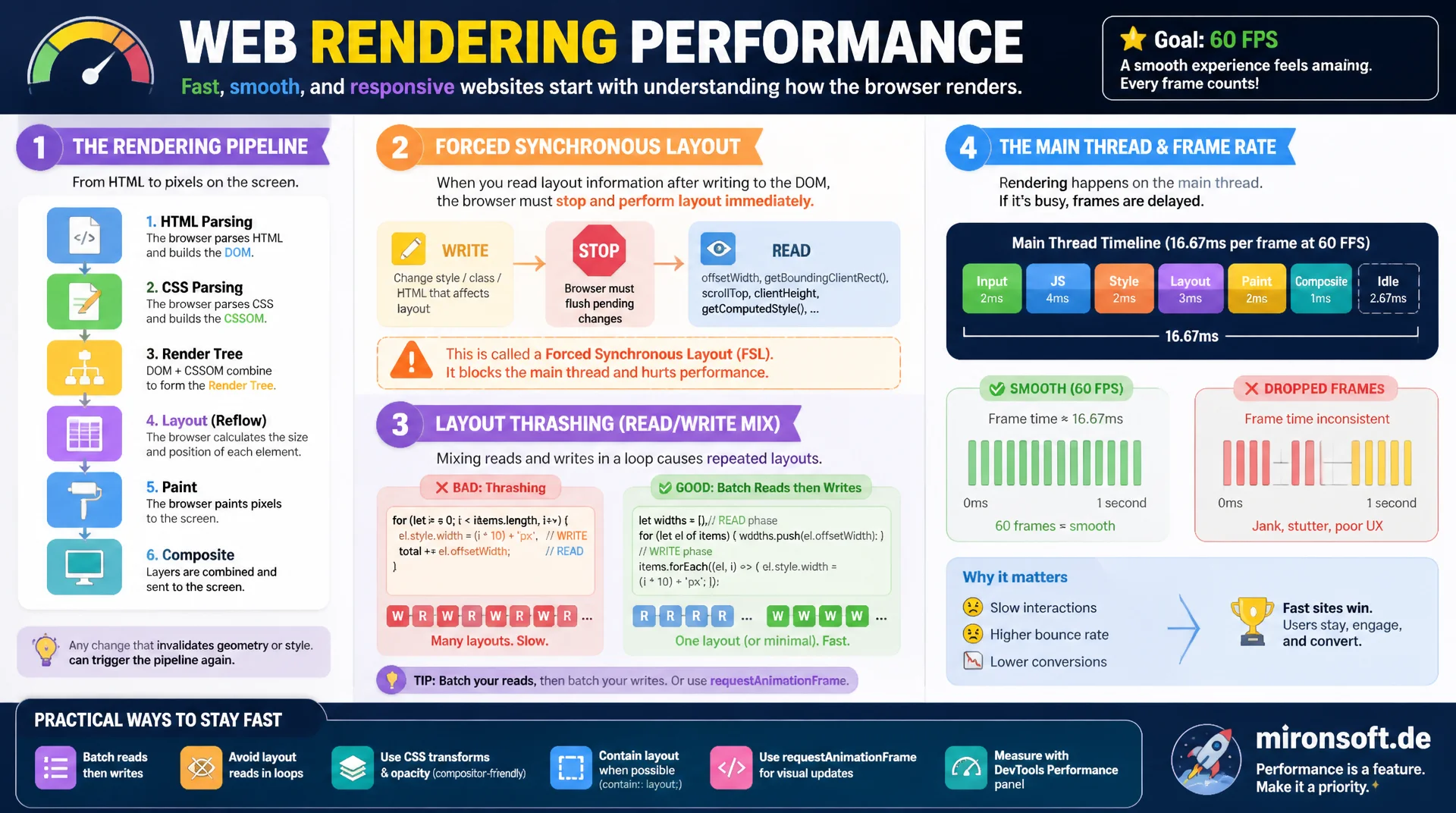
Understanding the rendering pipeline and freeing up the main thread
Every DOM access that reads a layout property can force a complete recalculation of the page geometry before the browser even gets to paint. Mixing reads and writes inside a loop creates layout thrashing and blocks the main thread for hundreds of milliseconds. This article explains the rendering pipeline, forced synchronous layout, and the batching patterns that keep interfaces running at a smooth 60 frames per second.
Table of Contents
- 1. Why layout cost determines interactivity
- 2. The rendering pipeline: layout, paint, and composite cost compared
- 3. What specifically triggers a reflow
- 4. What triggers only a repaint, without layout
- 5. Forced synchronous layout: the mechanics of layout thrashing
- 6. Batching reads and writes: the FastDOM pattern
- 7. Practical patterns against thrashing in loops
- 8. Diagnosing with the Chrome DevTools Performance panel
- 9. Checklist: composite-only properties as prevention
- 10. Summary
- 11. FAQ
1. Why layout cost determines interactivity
At 60 frames per second, a browser has only 16.66 milliseconds per frame to run JavaScript, compute style, determine layout, paint, and composite, all combined. Once that budget is exceeded, the page drops below 60fps and users perceive scrolling, hover effects, and click feedback as janky. Layout calculations are by far the most expensive phase, because they can propagate through the entire affected subtree of the DOM instead of touching a single element.
The critical part: layout, paint, and composite run synchronously on the main thread, except for certain composite-only properties. An expensive reflow therefore blocks not just rendering, but also the processing of click and scroll events waiting on the same thread. That is exactly what turns layout cost into an interactivity problem rather than just a visual stutter: input feels delayed because the main thread is busy computing geometry instead of running the event handler.
2. The rendering pipeline: layout, paint, and composite cost compared
A browser's rendering pipeline runs through four phases: style calculation, layout, paint, and composite. The style phase determines which CSS rules apply to which element. The layout phase, often called reflow, computes the exact geometry: position, width, height, and how that ripples into sibling and parent elements. This phase is algorithmically the most expensive, because a change on one element can cascade across the entire visible subtree.
Paint rasterizes the computed geometry into pixels on one or more layers. Composite finally combines those layers into the final image, usually directly on the GPU compositor thread. The cost difference is significant: layout on a medium-sized DOM subtree can cost several milliseconds, paint a similar amount depending on complexity, while pure compositing of composite-only properties like transform or opacity often stays under one millisecond and runs entirely without main-thread involvement.
3. What specifically triggers a reflow
A reflow is triggered by two kinds of operations: writes that change geometry, and reads that need up-to-date geometry. Writes include changes to width, height, margin, padding, border, display, position, top, left, font-size, as well as adding or removing DOM nodes. These changes mark the layout tree as dirty, but the browser normally schedules a single recalculation at the end of the frame instead of reacting immediately.
It gets critical with reads: properties like offsetHeight, offsetWidth, offsetTop, offsetLeft, clientHeight, clientWidth, clientTop, clientLeft, scrollHeight, scrollWidth, scrollTop, scrollLeft, and methods like getBoundingClientRect(), getComputedStyle(), and even focus() require guaranteed current geometry. If a layout is pending, the access forces an immediate, synchronous recalculation before the read value is returned. This combination of a deferred write and a forcing read is the root of every layout thrashing problem.
4. What triggers only a repaint, without layout
Not every visual change costs the same. Properties that do not change an element's geometry but do affect its appearance trigger only a repaint, skipping the expensive layout phase entirely. These include color, background-color, background-image, visibility, outline, box-shadow, and border-radius. The browser knows from the CSS specification that these properties have no effect on the position or size of other elements, so it can skip layout calculation completely.
Still, repaint is not free: on large or complex areas, for example a box-shadow with a soft blur radius spanning a wide surface, rasterizing into pixels can itself take several milliseconds, because every affected pixel has to be recalculated. The practical difference from layout still matters: repaint only affects the element's own paint area, does not propagate through the DOM tree, and in many cases can be accelerated further by putting the element on its own compositor layer.
5. Forced synchronous layout: the mechanics of layout thrashing
Layout thrashing happens when code alternates between writing and reading without separating the two operations. A single write to style.height marks the tree dirty, but costs little on its own because the browser normally defers the recalculation until the end of the frame. If a read like offsetHeight follows right after, though, the browser can no longer use the stale geometry and forces an immediate, synchronous layout calculation, known as forced synchronous layout or forced reflow.
In a loop with a hundred elements that each write and immediately read afterward, this produces a hundred full, synchronous layout passes instead of a single one at the end of the frame. Each of these passes can cost several milliseconds on a larger DOM tree, quickly turning what looks like a cheap operation into a main-thread block of hundreds of milliseconds. The tricky part: the individual read or write call looks completely harmless in the code, it is only the order across the iteration that creates the problem.
// BAD: forced synchronous layout inside a loop (classic layout thrashing)
function resizeCardsToTallest(cards) {
  cards.forEach((card) => {
    // READ: offsetHeight forces the browser to flush any pending layout work
    const currentHeight = card.offsetHeight;

    // WRITE: changing height invalidates layout again
    card.style.height = (currentHeight + 24) + 'px';

    // The next iteration's READ (offsetHeight) now forces a fresh
    // synchronous layout recalculation, because the previous WRITE
    // dirtied the tree again right before it.
  });
}
6. Batching reads and writes: the FastDOM pattern
The fix for layout thrashing is structurally simple: run all reads for an operation first, then all writes. That produces at most a single synchronous layout calculation per batch, no matter how many elements are involved. This separation became known as the FastDOM pattern, named after the JavaScript library of the same name that collects read and write callbacks in separate queues and flushes them in a batch on the next animation frame.
The principle can be implemented without an external library: instead of mixing read-write-read-write inside a loop, all needed values are first written into an array, followed by a second loop that only writes. requestAnimationFrame works well as a scheduler for pushing writes into the next frame deliberately, syncing with the browser's natural rendering cadence instead of spreading layout work uncontrollably across multiple event handlers.
// GOOD: separate the read phase from the write phase completely
function resizeCardsToTallest(cards) {
  // READ PHASE: collect all layout values first, one synchronous layout total
  const heights = cards.map((card) => card.offsetHeight);

  // WRITE PHASE: apply all writes only after every read is done
  cards.forEach((card, index) => {
    card.style.height = (heights[index] + 24) + 'px';
  });
}
7. Practical patterns against thrashing in loops
Beyond the basic read-then-write separation, a few more patterns help avoid layout thrashing systematically. A central scheduler that collects measure and mutate callbacks and flushes them in a single requestAnimationFrame prevents multiple independent components from unknowingly reading and writing in alternation. This exact problem shows up often in component-based frontends: component A reads offsetHeight, component B writes style.width, component C reads again, with none of the three components aware of the others.
For bulk DOM changes, a DocumentFragment or detaching an element from the document before multiple writes is a proven pattern, because a detached node does not trigger layout in the visible tree. Also helpful: instead of assigning individual styles in a loop, define a CSS class with all needed properties upfront and assign it once via classList.add(), rather than accumulating several style.xyz writes. A central scheduler modeled after section six is the most robust approach for larger applications.
// Minimal FastDOM-style read/write scheduler for a component-based frontend
class DomScheduler {
  constructor() {
    this.reads = [];
    this.writes = [];
    this.scheduled = false;
  }

  measure(fn) {
    this.reads.push(fn);
    this._schedule();
  }

  mutate(fn) {
    this.writes.push(fn);
    this._schedule();
  }

  _schedule() {
    if (this.scheduled) return;
    this.scheduled = true;
    requestAnimationFrame(() => this._flush());
  }

  _flush() {
    const reads = this.reads.splice(0, this.reads.length);
    const writes = this.writes.splice(0, this.writes.length);

    // Run all pending reads first, in a single synchronous layout pass
    reads.forEach((fn) => fn());

    // Then run all pending writes, after every measurement is captured
    writes.forEach((fn) => fn());

    this.scheduled = false;
  }
}

const scheduler = new DomScheduler();
export default scheduler;
8. Diagnosing with the Chrome DevTools Performance panel
The Chrome DevTools Performance panel visualizes the rendering pipeline in the main thread flame chart. Layout work shows up as a purple bar labeled "Layout", paint work as a green bar labeled "Paint". A single, wide purple bar at the end of a frame is not a problem, that is the expected, batched reflow. It becomes critical when many narrow purple bars show up alternating with script execution, a clear pattern for forced synchronous layout inside a loop.
Chrome additionally flags forced reflows explicitly: a small red warning triangle above the layout bar with the tooltip "Forced reflow" or "Forced synchronous layout is a possible performance bottleneck" points directly at the problematic spot in the code, including a stack trace down to the triggering line. The Bottom-Up view can then be filtered by "Layout" to see which function cumulatively causes the most layout time. The summary bar at the bottom additionally shows total rendering time relative to scripting, painting, and idle time across the whole recording.
9. Checklist: composite-only properties as prevention
The most effective prevention against layout and paint cost is restricting animations to composite-only properties from the start. transform and opacity can be animated entirely on the compositor thread, with no main-thread involvement at all, provided the element gets its own compositor layer, for example through will-change: transform or an existing 3D transform. Motion that used to be built with top/left can almost always be replaced one to one with transform: translate(), and size changes built with width/height with transform: scale().
The CSS contain property also helps by deliberately isolating a subtree from the rest of the layout tree: contain: layout prevents layout changes inside the container from affecting sibling elements outside it, limiting the scope of every recalculation. content-visibility: auto goes even further and fully pauses rendering work for content that is not currently visible in the viewport. A short checklist before every new UI feature: which property is being animated, does it trigger layout, only paint, or only composite, and is there a composite-only alternative available.
/* BAD: animating layout-triggering properties forces reflow every frame */
.card-bad {
  position: relative;
  transition: top 0.3s ease, left 0.3s ease, width 0.3s ease;
}
.card-bad:hover {
  top: -8px;
  left: 4px;
  width: 110%;
}

/* GOOD: transform and opacity are composite-only, no layout, no paint */
.card-good {
  position: relative;
  transition: transform 0.3s ease, opacity 0.3s ease;
  will-change: transform;
}
.card-good:hover {
  transform: translateY(-8px) scale(1.1);
  opacity: 0.95;
}

/* Isolate a subtree so its layout changes never leak into siblings */
.widget-isolated {
  contain: layout paint;
}
<!-- Hyva phtml: batch reads and writes across an Alpine component -->
<div x-data="stickyHeaderHeight()" x-init="init()">
    <header x-ref="header" class="sticky top-0"></header>
</div>

<script>
    function stickyHeaderHeight() {
        return {
            init() {
                // First rAF batches this component's READ with any other
                // component's READ scheduled in the same animation frame
                requestAnimationFrame(() => {
                    const headerHeight = this.$refs.header.offsetHeight; // READ

                    // Second rAF defers the WRITE to the following frame,
                    // so it never interleaves with a READ from this or
                    // another component in the same pass
                    requestAnimationFrame(() => {
                        document.documentElement.style.setProperty(
                            '--header-height',
                            headerHeight + 'px'
                        );
                    });
                });
            }
        };
    }
</script>
The following overview shows which common animation goals are reached through which property at what cost, and which composite-only alternative delivers the same visual effect without layout or paint cost.
| Goal | Layout-triggering | Composite-only alternative | Effect |
|---|---|---|---|
| Change position | top / left |
transform: translate() |
Only the compositor thread runs |
| Change size | width / height |
transform: scale() |
No reflow, GPU-accelerated |
| Hide an element | display: none |
opacity: 0 + visibility |
No layout trigger |
| Increase spacing | margin-top |
transform: translateY() |
No sibling recalculation |
| Render offscreen content | Normal rendering of every node | content-visibility: auto |
Layout and paint cost paused |
In practice, switching to composite-only properties pays off especially for animations that trigger frequently, such as hover effects on product cards in a long list or scroll-bound sticky elements. The difference between a top transition and a transform transition is barely noticeable on a single element, but adds up to a clearly measurable difference in frame rate once hundreds of elements animate at the same time.
Ready to hunt down layout thrashing in your store?
We analyze your frontend's rendering pipeline in the DevTools Performance panel, find forced-synchronous-layout spots, and batch DOM access using the FastDOM pattern, for smooth interactions at 60fps.
Rendering audit
Performance panel recording, identifying forced-reflow spots in the code
DOM batching
Integrating a FastDOM-style read/write scheduler into Alpine.js components
Animation refactoring
Replacing layout-triggering CSS properties with composite-only alternatives
10. Summary
Avoiding reflow, repaint, and layout thrashing solves a core interactivity problem: the main thread only has 16.66 milliseconds per frame for script, layout, paint, and composite combined. Layout is the most expensive phase because it propagates through the DOM tree. Reflow is triggered by geometry-changing writes and by reads like offsetHeight or getBoundingClientRect(), repaint by purely visual changes like color or box-shadow. Mixing reads and writes inside a loop produces forced synchronous layout, also known as layout thrashing, resulting in hundreds of milliseconds of main-thread blocking.
The fix lies in consistent separation: all reads first, then all writes, ideally through a central scheduler modeled on the FastDOM pattern using requestAnimationFrame. For animation, transform and opacity are the composite-only properties of choice, because they run entirely on the compositor without main-thread involvement. The Chrome DevTools Performance panel makes the missing separation clearly visible through purple layout bars and the "Forced reflow" warning triangle.
Avoiding Reflow, Repaint, and Layout Thrashing - The Essentials at a Glance
Cost hierarchy
Layout > paint > composite. Layout propagates through the DOM tree, composite often runs entirely on the GPU thread.
Forced synchronous layout
A read after a write inside a loop forces an immediate, synchronous recalculation instead of a single batched one at frame end.
FastDOM pattern
Collect all reads first, then run all writes. A central scheduler using requestAnimationFrame batches both.
Composite-only
transform and opacity instead of top/left/width/height for smooth animation without layout cost.