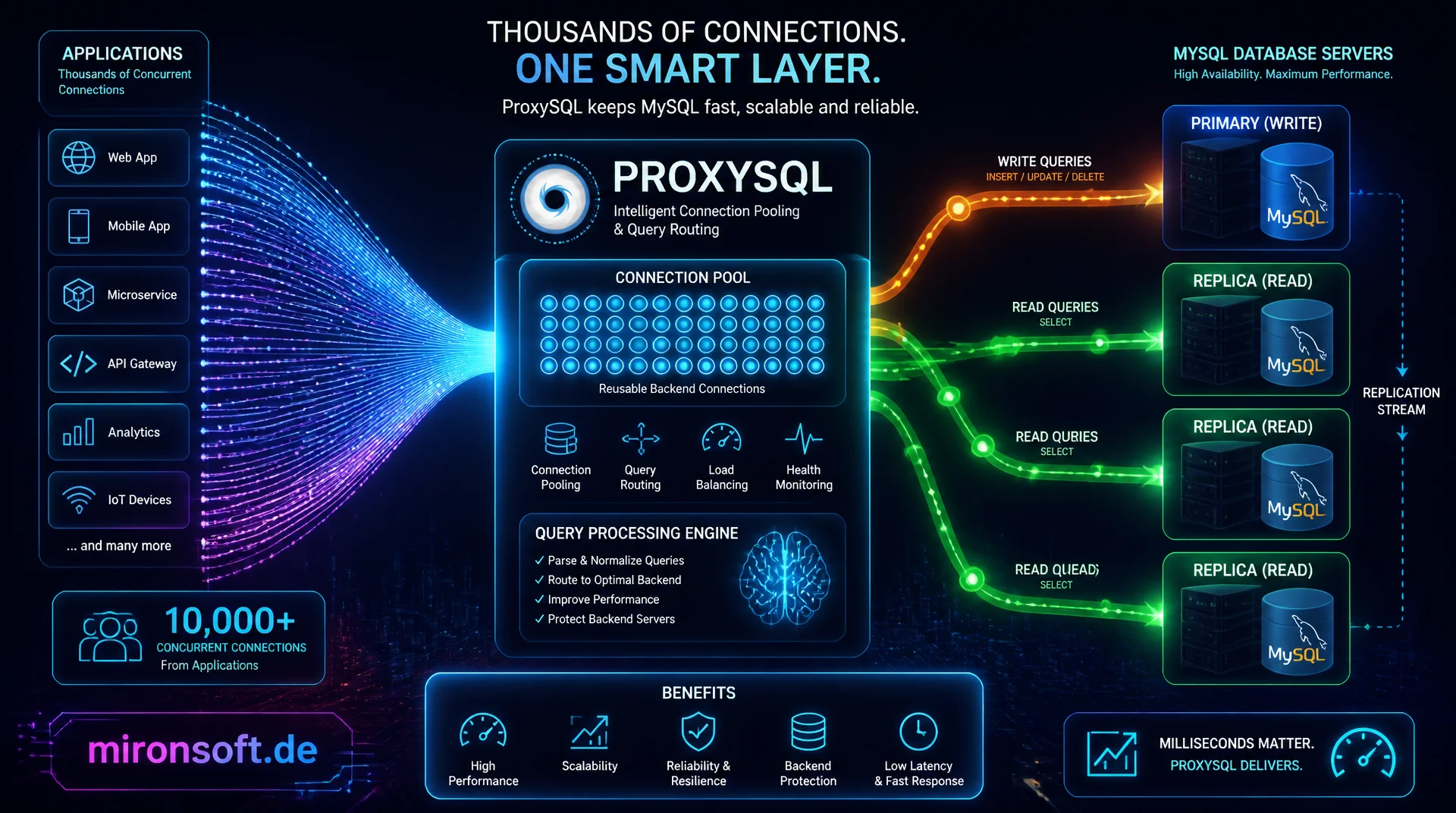
fewer connections, targeted read/write split, more control
Thousands of concurrent application connections overwhelm MySQL faster than the actual query load does. ProxySQL sits between application and database, pools connections through connection pooling and routes reads and writes to the right servers using query routing rules, without the application noticing anything.
Table of contents
- 1. Why a proxy between application and MySQL
- 2. Architecture: threads, backends and admin interface
- 3. Installation and basic configuration
- 4. Understanding connection pooling and multiplexing
- 5. Query routing rules for read/write split
- 6. Hostgroups and replication detection
- 7. Monitoring and statistics in ProxySQL
- 8. Failover behavior and health checks
- 9. Performance comparison with and without ProxySQL
- 10. Summary
- 11. FAQ
1. Why a proxy between application and MySQL
ProxySQL solves a problem that arises almost inevitably as an application landscape grows: too many simultaneously open connections to the database. Every PHP-FPM instance, every Kubernetes pod and every cron job opens its own connections, and MySQL has to keep a dedicated thread with its own memory area for each one. Across several hundred application servers this quickly adds up to thousands of connections, even though the actual query load would not require anything close to that.
ProxySQL places itself as an independent layer between application and database and speaks the MySQL protocol on both sides, so neither the application nor the database server needs any modification. The application connects to ProxySQL as usual through a standard MySQL client library, and ProxySQL decides behind the scenes over which connection and to which server a query is actually forwarded. This turns ProxySQL into the central control point for connection pooling, query routing and load distribution in a production MySQL setup.
2. Architecture: threads, backends and admin interface
Internally, ProxySQL consists of several worker threads that accept incoming client connections, plus a separate pool of backend connections to the actual MySQL servers. This separation is the core of connection pooling: client connections and backend connections are two independent resources that ProxySQL scales separately. A query processing layer between both sides evaluates every incoming query against configurable rules before it is forwarded to a backend.
ProxySQL is not configured through a classic configuration file but through its own SQL admin interface on port 6032, which understands MySQL syntax and exposes tables such as mysql_servers, mysql_users and mysql_query_rules. Changes are first loaded into a runtime configuration and only persisted permanently into a SQLite database after confirmation, which allows testing without risk to the running configuration.
# Install ProxySQL and start the service (Debian/Ubuntu)
wget https://repo.proxysql.com/ProxySQL/proxysql-2.6.x/apt/proxysql_2.6.0-debian12_amd64.deb
apt install -y ./proxysql_2.6.0-debian12_amd64.deb
systemctl enable --now proxysql

# Check open ports: 6033 data traffic, 6032 admin interface
ss -tlnp | grep proxysql

# Check the current configuration state in the admin interface
mysql -u admin -p -h 127.0.0.1 -P 6032 -e "SELECT * FROM runtime_mysql_servers;"
3. Installation and basic configuration
Installing ProxySQL happens through the official packages for Debian, Ubuntu or RHEL and starts a system service that immediately opens two ports: one for the actual data traffic, usually 6033, and one for the admin interface on 6032. After installation, you connect with a MySQL client to the admin interface and first register the backend servers in the table mysql_servers, followed by the application credentials in mysql_users.
It is important to run the matching LOAD ... TO RUNTIME command after every change to a runtime table, since ProxySQL otherwise keeps using the previously loaded configuration. Only SAVE ... TO DISK makes the change permanent across a restart. This two-stage mechanism of runtime and disk is a common stumbling block for newcomers, but essential for testing misconfigurations in a controlled way before they become permanently active.
-- Connect to the ProxySQL admin interface
-- mysql -u admin -p -h 127.0.0.1 -P 6032

-- Register backend servers: writer and two readers
INSERT INTO mysql_servers (hostgroup_id, hostname, port, weight)
VALUES (10, 'db-writer.internal', 3306, 1000),
       (20, 'db-reader-1.internal', 3306, 900),
       (20, 'db-reader-2.internal', 3306, 900);

-- Create the application user and assign the default hostgroup
INSERT INTO mysql_users (username, password, default_hostgroup)
VALUES ('shop_app', 'strong_password_here', 10);

-- Activate configuration and persist it
LOAD MYSQL SERVERS TO RUNTIME;
LOAD MYSQL USERS TO RUNTIME;
SAVE MYSQL SERVERS TO DISK;
SAVE MYSQL USERS TO DISK;
4. Understanding connection pooling and multiplexing
The central advantage of ProxySQL is connection multiplexing: many client connections share a considerably smaller number of backend connections to the actual MySQL server. As long as no transaction or locked session variable forces a fixed assignment, ProxySQL can release the backend connection again after every query and reuse it for the next request from a different client. This often reduces the number of simultaneously open MySQL connections by an order of magnitude.
This reuse saves not only memory on the database server but also the overhead of establishing the connection itself, which is noticeable with TLS-encrypted connections that require a full handshake. Multiplexing is automatically disabled as soon as a session enters a transaction or issues SET commands with session scope, because in that case the state of the connection must stay bound to exactly that one client session until the transaction completes.
5. Query routing rules for read/write split
The table mysql_query_rules is the centerpiece of query routing in ProxySQL: every incoming query is checked against the defined rules in order, usually through a regular expression on the SQL text. A typical rule routes every query starting with SELECT to the read hostgroup with the replicas, while INSERT, UPDATE and DELETE automatically land on the write hostgroup with the primary server, without any change to the application code.
For more complex cases, rules can be combined with priorities and a chain of apply flags, for example to specifically route SELECT queries carrying the comment /* force_master */ to the writer anyway, when an application needs to read consistently right after a write. This flexibility makes query routing in ProxySQL considerably more capable than a static read/write split implemented only in the application layer.
-- Create query rules for read/write split
INSERT INTO mysql_query_rules (rule_id, active, match_pattern, destination_hostgroup, apply)
VALUES
  (100, 1, '^SELECT.*FOR UPDATE', 10, 1),        -- writing selects go to the writer
  (200, 1, '^SELECT.*/\\*force_master\\*/', 10, 1),  -- explicitly forced writer reads
  (300, 1, '^SELECT', 20, 1),                     -- all remaining selects go to the readers
  (400, 1, '^(INSERT|UPDATE|DELETE|REPLACE)', 10, 1); -- write commands go to the writer

LOAD MYSQL QUERY RULES TO RUNTIME;
SAVE MYSQL QUERY RULES TO DISK;
6. Hostgroups and replication detection
Hostgroups are logical groups of backend servers to which ProxySQL assigns independent roles, typically a writer hostgroup with the primary server and a reader hostgroup with all replicas. Through the module mysql_replication_hostgroups, ProxySQL can automatically monitor the replication status of every server through SHOW SLAVE STATUS and move servers between the writer and reader hostgroup on its own if needed, for example after a manual failover.
This automatic detection reduces manual intervention considerably: if the current writer fails and a replica gets promoted to the new primary server, ProxySQL recognizes the changed replication topology and adjusts hostgroup membership on its own, without the query routing rules themselves needing to be changed. The rules stay stable, only the assignment of servers to hostgroups changes in the background.
7. Monitoring and statistics in ProxySQL
Besides the admin interface, ProxySQL provides its own statistics database, reachable over the same connection with USE stats;. Tables such as stats_mysql_query_digest show aggregated execution times per query pattern, and stats_mysql_connection_pool shows the current state of every backend connection including the number of active, free and failed connections per hostgroup.
These built-in statistics make ProxySQL a valuable observation point for the entire database load, because it already shows, before the actual database, which query patterns run most frequently and how long they take on average. Combined with Prometheus exporters, which ProxySQL supports natively, these values can be integrated directly into existing monitoring dashboards without requiring additional agents on the database servers themselves.
-- Check connection state per backend server
SELECT hostgroup, srv_host, status, ConnUsed, ConnFree, ConnOK, ConnERR
FROM stats_mysql_connection_pool
ORDER BY hostgroup;

-- The ten slowest query patterns of the last hour
SELECT digest_text, count_star, sum_time, sum_time / count_star AS avg_time_us
FROM stats_mysql_query_digest
ORDER BY sum_time DESC
LIMIT 10;
8. Failover behavior and health checks
ProxySQL continuously monitors every backend server with configurable health checks: a simple connection test, a check for read-only state through read_only, and optionally custom scripts for more complex state checks. If a server fails or stops responding within the configured time limit, ProxySQL automatically marks it as OFFLINE_SOFT or OFFLINE_HARD and routes new queries to the remaining servers of the hostgroup.
The decisive advantage over a failover handled purely at the application level is that running connections from the client pool are preserved, while only the backend assignment behind them changes. In the best case, the application only notices a brief spike in latency during the switch, but no complete connection drop, which noticeably lowers the error rate especially for long running application processes.
-- Configure health check intervals and time limits
SET mysql-monitor_connect_interval = 2000;
SET mysql-monitor_ping_interval = 3000;
SET mysql-monitor_read_only_interval = 1500;
SET mysql-shun_on_failures = 3;
LOAD MYSQL VARIABLES TO RUNTIME;

-- Check current server status after a simulated failure
SELECT hostgroup_id, hostname, status
FROM mysql_servers
WHERE status != 'ONLINE';
9. Performance comparison with and without ProxySQL
The performance effect of ProxySQL depends heavily on the connection behavior of the application. With short-lived connections, as classic PHP applications without persistent connections tend to produce, the biggest gain shows up: instead of establishing a new TCP and TLS connection to the database server for every request, the application uses an already open connection to ProxySQL, while ProxySQL itself maintains far fewer, but longer-lived, backend connections.
The table below summarizes how typical metrics differ between a direct connection and a connection routed through ProxySQL, based on experience from production setups with several hundred application instances.
| Metric | Direct connection | With ProxySQL |
|---|---|---|
| Active MySQL backend connections | One per application process | Pooled, often 5 to 10 percent of the client count |
| Connection setup per request | Full TCP/TLS handshake | Reuse of an existing backend connection |
| Read/write split | Manual in application code | Centralized through query rules, no code change |
| Failover visibility to the application | Complete connection drop | Brief latency spike, connection stays alive |
| Additional latency per query | None | Usually under 1 millisecond from the proxy hop |
Mironsoft
MySQL scaling, connection management and query routing for production load
Too many MySQL connections, unused replicas?
We design and operate ProxySQL setups for your application landscape, set up query routing rules for a clean read/write split and connect monitoring to your existing dashboards.
ProxySQL rollout
Installation, hostgroups and connection pooling matched to your existing replication topology
Query routing rules
Read/write split without application code changes, including edge cases like forced writer reads
Monitoring integration
Wire ProxySQL statistics into your existing Prometheus and Grafana dashboards
10. Summary
ProxySQL solves two problems at once: the number of real MySQL connections drops drastically through connection multiplexing, and reads and writes can be routed to the right servers centrally through query rules, without any application code change. The two-stage configuration of runtime and disk allows low-risk testing of new rules before they become permanently active.
The biggest benefit shows up in environments with many short-lived application connections and multiple read replicas, where ProxySQL both reduces backend load and makes failover almost invisible to the application. Anyone introducing ProxySQL should roll out query rules gradually and wire the built-in statistics tables into an existing monitoring setup from the start.
ProxySQL for Connection Pooling and Query Routing: the essentials at a glance
Connection pooling
Multiplexing pools many client connections onto few backend connections, saving memory and handshake overhead.
Query routing
Regex-based rules in mysql_query_rules automatically route SELECT and write commands to the right hostgroup.
Hostgroups
Automatic replication detection adjusts writer and reader assignment on its own after a failover.
Configuration
Always separate LOAD TO RUNTIME and SAVE TO DISK to test changes risk-free first.