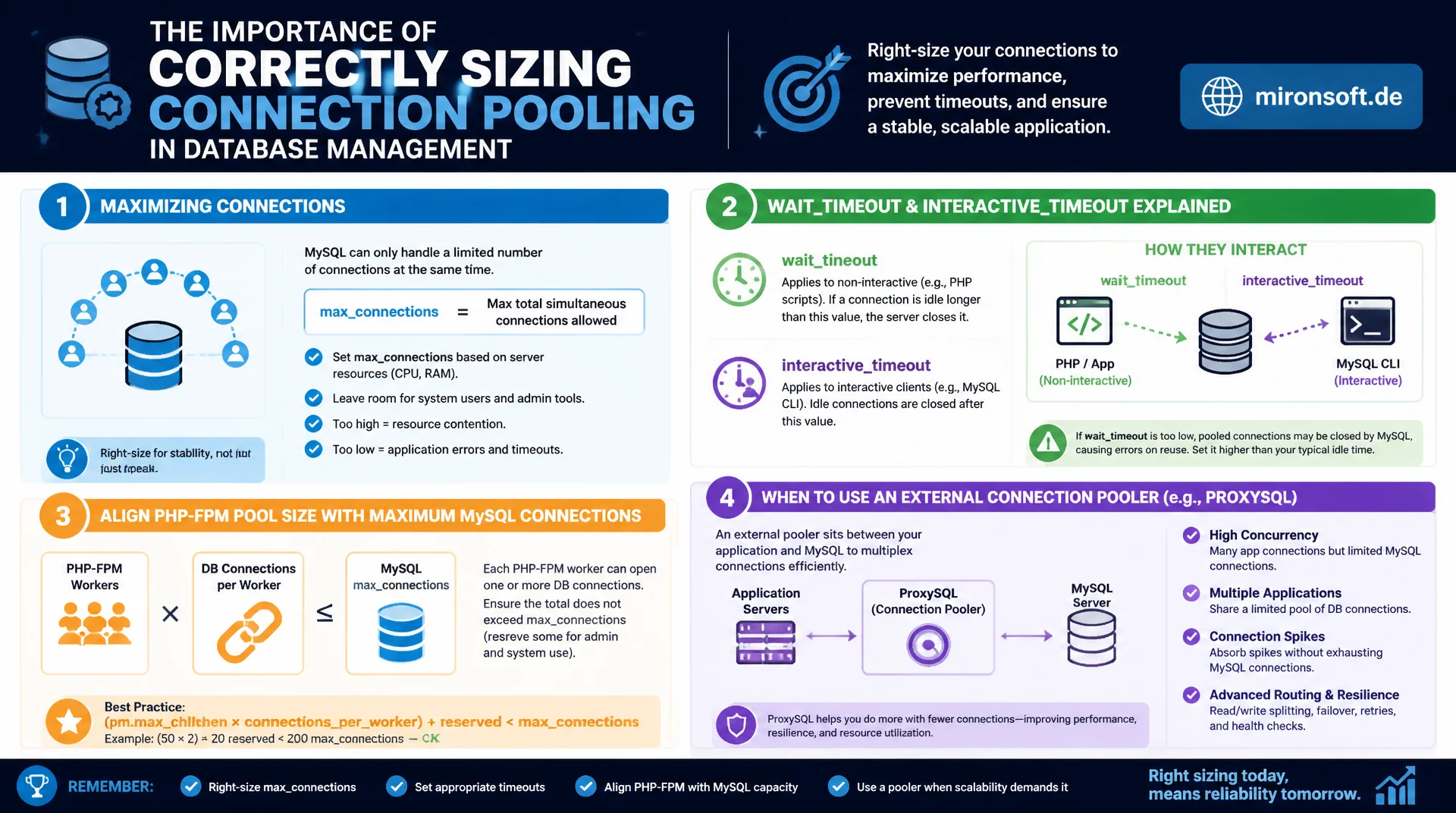
limits and timeouts that fit the application
Poorly sized connection pooling leads either to too many connections errors under load or to wasted resources from thousands of unused idle connections. This article shows how to correctly size max_connections, how wait_timeout and interactive_timeout work together, how to align PHP-FPM pool size with the MySQL connection limit, and when an external connection pooler such as ProxySQL makes sense.
Table of Contents
- 1. Why Every TCP Connection to MySQL Costs Something
- 2. Sizing max_connections Correctly
- 3. Understanding and Setting wait_timeout and interactive_timeout
- 4. PHP-FPM Pool Size and MySQL Connections Working Together
- 5. Persistent Connections with PDO: Benefits and Risks
- 6. External Connection Poolers: ProxySQL as a Middle Layer
- 7. Detecting Connection Leaks with SHOW PROCESSLIST
- 8. Connection Pooling in Cloud and Kubernetes Environments
- 9. Pooling Strategies at a Glance
- 10. Summary
- 11. FAQ
1. Why Every TCP Connection to MySQL Costs Something
Every new connection to MySQL requires a TCP handshake, authentication, and the allocation of memory for session buffers, thread stack, and connection state on the server. Without connection pooling, every incoming request to a web application opens a new connection and closes it again at the end of the request, which produces noticeable overhead under high request frequency, even before the actual database query runs at all.
Connection pooling solves this problem by reusing already open connections instead of building them anew for every request. The effect is twofold: latency per request drops, because the connection setup is skipped, and the MySQL server has to manage fewer concurrent connections, because many application processes share a smaller pool of persistent connections. The following sections show how the relevant parameters on the server and application sides are aligned with each other.
2. Sizing max_connections Correctly
The server parameter max_connections limits the number of concurrent connections to the MySQL server. The default of 151 is too low for many production setups, especially when several application servers or PHP-FPM pools access the same database concurrently. Once the limit is reached, MySQL rejects new connections with the error ERROR 1040: Too many connections, which surfaces as a visible error to end users in the application.
Setting max_connections too high is risky as well: every open connection reserves memory, typically several megabytes depending on the session buffer configuration, so thousands of concurrent connections can exhaust the server's available RAM long before the CPU hits its limits. The sensible upper bound follows from available RAM divided by the memory footprint per connection, not from a flat, high number.
-- Check current connection limit and usage
SHOW VARIABLES LIKE 'max_connections';
SHOW STATUS LIKE 'Threads_connected';
SHOW STATUS LIKE 'Max_used_connections';

-- Estimate per-connection memory footprint
SHOW VARIABLES LIKE 'thread_stack';
SHOW VARIABLES LIKE 'sort_buffer_size';
SHOW VARIABLES LIKE 'join_buffer_size';

-- Set a production-appropriate limit
SET GLOBAL max_connections = 500;
-- Persist across restarts in my.cnf: max_connections = 500
3. Understanding and Setting wait_timeout and interactive_timeout
The parameter wait_timeout determines how long MySQL keeps a non-interactive connection open before automatically closing it when no activity takes place. The default of 28800 seconds, that is eight hours, is far too high for most web applications, because unused connections from aborted requests or faulty connection pooling stay in the server as active connections for that long and block capacity within the connection pooling limit.
The related parameter interactive_timeout applies specifically to connections that set the CLIENT_INTERACTIVE flag, typically interactive sessions through the mysql client. For application connections, only wait_timeout is relevant. A reasonable value for web applications lies between 60 and 300 seconds, depending on how aggressively the application-side pool already returns unused connections on its own.
-- Check current timeout values
SHOW VARIABLES LIKE 'wait_timeout';
SHOW VARIABLES LIKE 'interactive_timeout';

-- Tighten wait_timeout for non-interactive application connections
SET GLOBAL wait_timeout = 120;

-- Session-level override for a specific connection type
SET SESSION wait_timeout = 60;
4. PHP-FPM Pool Size and MySQL Connections Working Together
With PHP-FPM as the application server, the number of PHP worker processes directly corresponds to the maximum number of concurrent MySQL connections from that one server, provided each worker opens its own connection. If pm.max_children is set to 100 in PHP-FPM and five such application servers are running, the theoretical peak demand is 500 concurrent connections to MySQL, from a single application alone, without any headroom for batch jobs, monitoring, or administrative sessions.
For clean connection pooling, max_connections on the MySQL server must therefore cover at least the sum of the pm.max_children values across all application servers plus a safety margin. If this relationship is overlooked, too many connections errors appear exactly when the application needs the most connections during load spikes, which makes the problem particularly painful.
; PHP-FPM pool configuration: www.conf
; pm.max_children directly caps concurrent MySQL connections from this pool
[www]
pm = dynamic
pm.max_children = 50
pm.start_servers = 10
pm.min_spare_servers = 5
pm.max_spare_servers = 20

; Rule of thumb: sum of pm.max_children across all pools + buffer
; must stay below MySQL's max_connections
5. Persistent Connections with PDO: Benefits and Risks
PDO supports persistent connections through the PDO::ATTR_PERSISTENT option. A persistent connection stays alive inside the PHP-FPM worker process after the PHP request ends and is reused on the next request handled by the same worker, instead of being rebuilt. This noticeably reduces connection setup time, especially for TLS-encrypted connections, whose handshake is comparatively expensive.
The downside of persistent connections lies in their session state: if temporary tables were created, locks held, or session variables set during a previous request, they can leak into the next request unless they are cleanly reset. Persistent connections are therefore particularly well suited to applications with consistent connection behavior, while complex applications with variable session usage tend to benefit more from a clean external connection pooling mechanism.
<?php
declare(strict_types=1);

$dsn = 'mysql:host=db.internal;dbname=shop;charset=utf8mb4';

// Persistent connection: reused across requests within the same worker
$pdo = new PDO($dsn, 'app_user', $password, [
    PDO::ATTR_PERSISTENT => true,
    PDO::ATTR_ERRMODE => PDO::ERRMODE_EXCEPTION,
    PDO::ATTR_EMULATE_PREPARES => false,
]);

// Always reset session state explicitly at request start
// to avoid leaking state from a previous request on this worker
$pdo->exec('SET SESSION sql_mode = "STRICT_TRANS_TABLES,NO_ENGINE_SUBSTITUTION"');
6. External Connection Poolers: ProxySQL as a Middle Layer
With a very large number of application servers or microservices, each running its own application-side connection pooling, the individual pools quickly add up to a connection count that MySQL itself can no longer manage efficiently. ProxySQL sits as a middle layer between application and database, terminating thousands of client connections itself while internally maintaining a much smaller number of real connections to MySQL and reusing them dynamically.
This architecture fully decouples the connection count of the application layer from the actual load on MySQL. In addition, ProxySQL offers features such as query routing between primary and replicas as well as connection multiplexing, where multiple client requests use the same backend connection one after another without the application noticing anything. For environments with many small, short-lived application processes, ProxySQL is often the more robust solution compared to purely application-side pooling.
-- ProxySQL admin interface: define backend MySQL server
INSERT INTO mysql_servers (hostgroup_id, hostname, port)
VALUES (0, 'mysql-primary.internal', 3306);

-- Configure connection multiplexing pool size to the backend
UPDATE global_variables
SET variable_value = '200'
WHERE variable_name = 'mysql-max_connections';

LOAD MYSQL SERVERS TO RUNTIME;
LOAD MYSQL VARIABLES TO RUNTIME;
SAVE MYSQL SERVERS TO DISK;
7. Detecting Connection Leaks with SHOW PROCESSLIST
A connection leak occurs when application code opens connections but does not reliably release them again, so idle connections accumulate over time until the connection pooling limit is exhausted. SHOW PROCESSLIST and the more detailed table information_schema.processlist show all currently open connections with their state, idle time, and the last executed query.
A telltale pattern of a connection leak is a large number of connections in the Sleep state with a long time since the last activity, often coming from the same user and host. This suggests that the application does not close connections cleanly, or that a connection pool with a misconfigured size does not return unused connections in time.
-- Find idle connections that may indicate a leak
SELECT id, user, host, db, command, time, state
FROM information_schema.processlist
WHERE command = 'Sleep'
  AND time > 300
ORDER BY time DESC;

-- Count connections grouped by application user
SELECT user, COUNT(*) AS connection_count
FROM information_schema.processlist
GROUP BY user
ORDER BY connection_count DESC;
8. Connection Pooling in Cloud and Kubernetes Environments
In containerized environments with horizontally scaling pods, the connection pooling problem is further aggravated, because the number of application instances fluctuates dynamically. A Kubernetes deployment that scales from five to fifty pods under load multiplies the number of potential MySQL connections accordingly if every pod maintains its own connection pool, even if the actual database load barely increases in the process.
A central connection pooler such as ProxySQL or a managed database pooling service from the respective cloud provider becomes almost a necessity in such environments, because it acts as a stable middle point, independent of how the application layer scales. In addition, readiness and liveness probes in Kubernetes should be configured so that a pod cleanly closes its database connections when terminating, instead of leaving them behind as zombie connections against the connection limit.
9. Pooling Strategies at a Glance
The following table compares the common approaches to connection pooling and maps them to a matching use case.
| Strategy | Managed where | Scalability | Ideal for |
|---|---|---|---|
| No pooling strategy | New connection per request | Very low | Small scripts, infrequent access |
| Persistent connections (PDO) | PHP-FPM worker process | Medium | Single application server, consistent sessions |
| ProxySQL as middle layer | Dedicated proxy layer | Very high | Many application servers, microservices |
| Managed cloud pooler | Cloud provider managed | Very high | Kubernetes, dynamically scaling environments |
The right strategy depends heavily on the number of independent application instances. For a single server, persistent connections are often sufficient, while distributed architectures with many instances benefit considerably from a central connection pooling layer such as ProxySQL.
10. Summary
Correctly configured connection pooling balances three layers at once: the server parameter max_connections, which defines the absolute upper limit, the timeout value wait_timeout, which releases unused connections in time, and the application configuration, for example pm.max_children in PHP-FPM, which determines the actual connection demand per application server. If these three layers are not aligned, the result is either too many connections errors under load or wasted server resources from oversized limits.
For environments with many application instances, especially in Kubernetes or microservice architectures, a central connection pooler such as ProxySQL replaces the decentralized connection management of every individual instance with a shared, efficiently reused connection layer. Regular monitoring with SHOW PROCESSLIST uncovers connection leaks before they cause production outages.
Configuring connection pooling correctly, the essentials at a glance
max_connections
Size it based on available RAM, not gut feeling. Cover the sum of all application pools plus a buffer.
wait_timeout
Lower the default of 28800 seconds to 60 to 300 seconds for web applications.
Aligning PHP-FPM
The combined pm.max_children across all application servers must stay below max_connections.
At scale: ProxySQL
With many instances or in Kubernetes, use a central connection pooler as a middle layer.