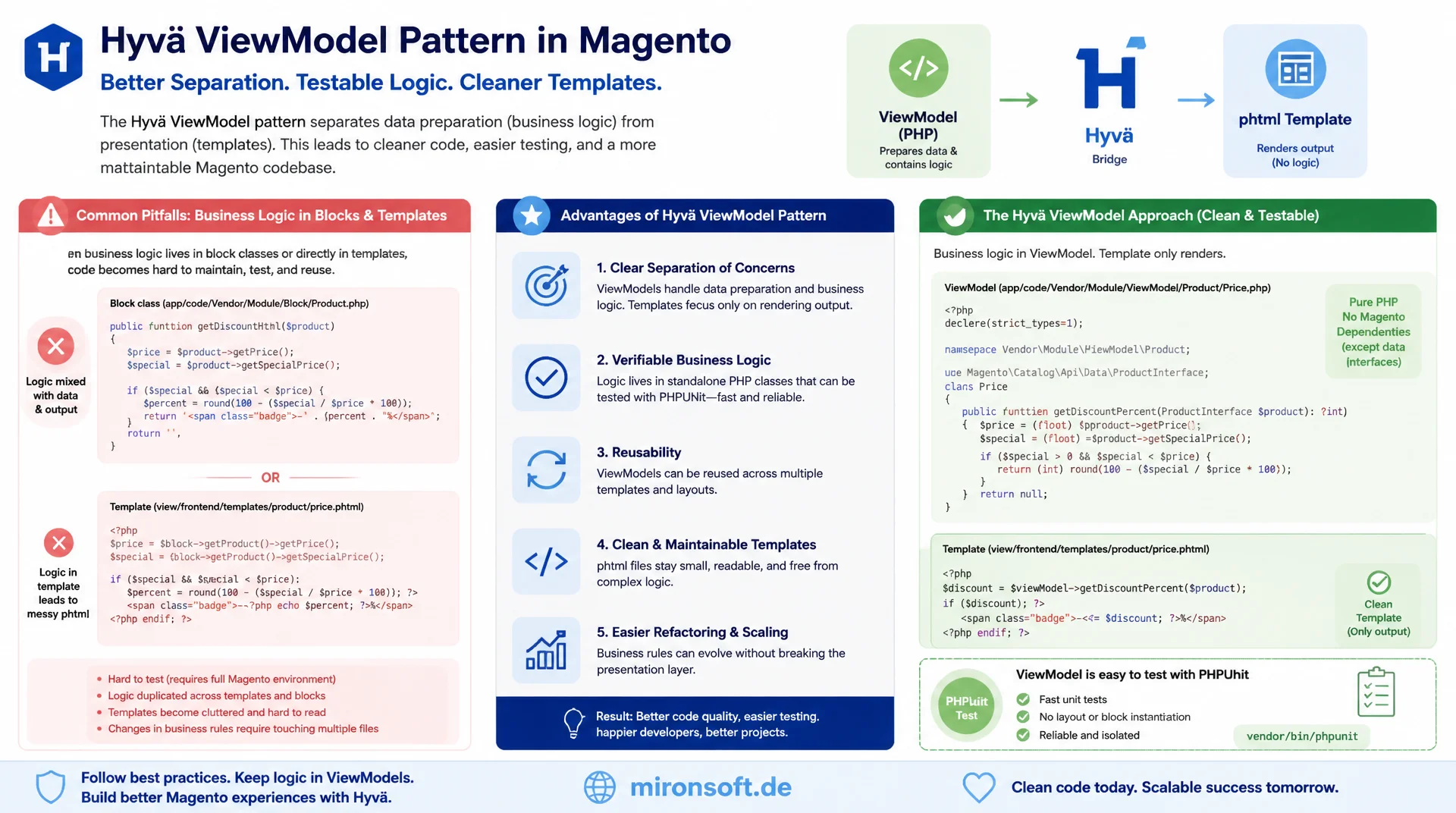
Keeping data cleanly separated from blocks
Anyone who writes business logic directly into block classes ends up with Magento templates that can neither be tested in isolation nor reused cleanly. The Hyvä ViewModel pattern strictly separates data preparation from presentation, makes every rule verifiable as a plain PHP class with PHPUnit, and keeps phtml templates limited to pure output.
Table of Contents
- 1. Why Hyvä pushes ViewModels instead of block logic
- 2. The ArgumentInterface: the contract behind every Hyvä ViewModel
- 3. Registering a ViewModel: di.xml and $block->getViewModel()
- 4. Practical example: a Hyvä ViewModel with repository injection
- 5. Presentation logic in the ViewModel, pure output in the template
- 6. Combining multiple ViewModels in one template
- 7. Testability: a Hyvä ViewModel as a plain PHP class
- 8. Caching pitfalls: ViewModels and block HTML cache
- 9. Migration: from block class to ViewModel
- 10. Summary
- 11. FAQ
1. Why Hyvä pushes ViewModels instead of block logic
In classic Luma templates it was common to write formatting logic, price calculations and visibility rules directly into the block class that extends \Magento\Framework\View\Element\Template. The result was block classes with dozens of methods mixing business logic, data access and presentation details. Hyvä deliberately breaks with this pattern: instead of adding new methods to the block class, Hyvä consistently demands the Hyvä ViewModel pattern, where every business rule lives in a standalone, injectable PHP class.
The reasoning is single responsibility: a block class should connect layout XML, child blocks and the template, not implement business rules. A Hyvä ViewModel takes on exactly that one job, preparing data for a template so that the phtml file only has to output it. Because a ViewModel has no dependency on Context, Registry or the full block constructor graph, it can be instantiated in isolation, tested in isolation, and reused across multiple blocks without side effects.
This separation pays off especially in growing projects. Without Hyvä ViewModel discipline, business logic quietly creeps into block classes, into layout XML arguments, or even directly into the phtml template, where it can neither be reused nor tested in isolation. With the ViewModel pattern, every rule stays in exactly one place, with a clear constructor contract and no hidden coupling to Magento's rendering cycle.
2. The ArgumentInterface: the contract behind every Hyvä ViewModel
Technically, a Hyvä ViewModel is nothing more than a PHP class that implements \Magento\Framework\View\Element\Block\ArgumentInterface. This interface already exists in the Magento core framework, it is a pure marker interface without a single method. Its only purpose: the object manager and the argument resolution in di.xml use it to recognize that a class is a valid block argument of type "ViewModel".
That is exactly why nobody should invent their own ViewModelInterface. A custom interface breaks compatibility with Hyvä core templates, with PHPStorm inspections built for Hyvä projects, and with every convention other modules and extensions expect. The core's ArgumentInterface is deliberately kept empty so it functions as a pure type marker, without forcing a method that would be unsuitable for every conceivable ViewModel use case.
<?php

declare(strict_types=1);

namespace Magento\Framework\View\Element\Block;

/**
 * Marker interface every Hyvä ViewModel must implement.
 * It intentionally declares no methods - it exists solely so that
 * di.xml can resolve the "view_model" argument against a stable, framework-owned contract.
 */
interface ArgumentInterface
{
}

// --------------------------------------------------------------------------

<?php

declare(strict_types=1);

namespace Vendor\Module\ViewModel;

use Magento\Framework\View\Element\Block\ArgumentInterface;

/**
 * Minimal Hyvä ViewModel skeleton.
 * No parent class, no coupling to the block or the template - just a plain
 * PHP class that fulfills the framework's ArgumentInterface contract.
 */
class ProductBadge implements ArgumentInterface
{
}
Because ArgumentInterface prescribes no methods, every Hyvä ViewModel defines its own public API freely, according to its business need. That is intentional: a ViewModel for product prices needs different methods than a ViewModel for customer context. The only convention Hyvä projects should follow is a descriptive class name and a namespace that clearly signals responsibility, such as Vendor\Module\ViewModel\ProductBadge instead of a generic Helper or Util.
3. Registering a ViewModel: di.xml and $block->getViewModel()
A Hyvä ViewModel is not hardwired into the block class constructor, it is registered via di.xml as a block argument. The target block type that renders the template is configured with an argument named view_model and xsi:type="object". Magento resolves this argument through the object manager when the block is built and automatically hands over the finished ViewModel instance, complete with all of its own constructor dependencies.
<!-- File: app/code/Vendor/Module/etc/frontend/di.xml -->
<?xml version="1.0"?>
<config xmlns:xsi="http://www.w3.org/2001/XMLSchema-instance"
        xsi:noNamespaceSchemaLocation="urn:magento:framework:ObjectManager/etc/config.xsd">
    <type name="Magento\Catalog\Block\Product\View">
        <arguments>
            <!-- Registers the Hyvä ViewModel as a constructor argument named "view_model" -->
            <argument name="view_model" xsi:type="object">Vendor\Module\ViewModel\ProductBadge</argument>
        </arguments>
    </type>
</config>
In the template you access the Hyvä ViewModel through $block->getViewModel(), even though the block class itself defines no such method. The reason lies in \Magento\Framework\DataObject, which every block class ultimately extends: its magic __call() mechanism translates getViewModel() into getData('view_model') automatically, by converting the CamelCase method name to snake_case. This exact mechanism returns the instance injected via di.xml, without any custom getter on the block class.
<?php
/** @var \Magento\Catalog\Block\Product\View $block */
/** @var \Magento\Framework\Escaper $escaper */
/** @var \Vendor\Module\ViewModel\ProductBadge $productBadge */
$productBadge = $block->getViewModel();
$sku = $block->getProduct()->getSku();
?>
<?php if ($productBadge->hasBadge($sku)): ?>
    <span class="inline-flex items-center rounded-full bg-orange-100 px-3 py-1 text-xs font-semibold text-orange-700">
        <?= $escaper->escapeHtml($productBadge->getBadgeLabel($sku)) ?>
    </span>
<?php endif; ?>
4. Practical example: a Hyvä ViewModel with repository injection
The real value of a Hyvä ViewModel only shows once it gets real dependencies injected, such as a repository. The following example loads a product via ProductRepositoryInterface, checks whether it was recently created or has an active special price, and hands the template a fully formatted badge label. With PHP 8.4, constructor property promotion and readonly properties make this particularly compact and readable.
<?php

declare(strict_types=1);

namespace Vendor\Module\ViewModel;

use Magento\Catalog\Api\Data\ProductInterface;
use Magento\Catalog\Api\ProductRepositoryInterface;
use Magento\Framework\Exception\NoSuchEntityException;
use Magento\Framework\Locale\CurrencyInterface;
use Magento\Framework\View\Element\Block\ArgumentInterface;
use Magento\Store\Model\StoreManagerInterface;

/**
 * Prepares product badge data (New / Sale) for the product view template.
 * All aggregation and formatting happens here - the phtml template only renders
 * the value this class returns.
 */
class ProductBadge implements ArgumentInterface
{
    private const NEW_PRODUCT_DAYS = 30;

    /**
     * @param ProductRepositoryInterface $productRepository Loads the product entity by SKU.
     * @param StoreManagerInterface $storeManager Provides the current store context.
     * @param CurrencyInterface $currency Formats prices in the current store currency.
     */
    public function __construct(
        private readonly ProductRepositoryInterface $productRepository,
        private readonly StoreManagerInterface $storeManager,
        private readonly CurrencyInterface $currency,
    ) {
    }

    /**
     * Determines whether the given product should show a badge at all.
     *
     * @param string $sku SKU of the product currently rendered by the block.
     * @return bool True if a badge label should be displayed.
     * @throws NoSuchEntityException If no product exists for the given SKU.
     */
    public function hasBadge(string $sku): bool
    {
        $product = $this->productRepository->get($sku);

        return $this->isNew($product) || $this->hasDiscount($product);
    }

    /**
     * Builds the human-readable badge label for the current product.
     *
     * @param string $sku SKU of the product currently rendered by the block.
     * @return string The badge text, e.g. "New" or "-20%".
     * @throws NoSuchEntityException If no product exists for the given SKU.
     */
    public function getBadgeLabel(string $sku): string
    {
        $product = $this->productRepository->get($sku);

        if ($this->hasDiscount($product)) {
            $percent = $this->calculateDiscountPercent($product);
            return sprintf('-%d%%', $percent);
        }

        return __('New')->render();
    }

    /**
     * Checks whether the product was created within the configured "new" window.
     *
     * @param ProductInterface $product The product entity to inspect.
     * @return bool True if the product counts as new.
     */
    private function isNew(ProductInterface $product): bool
    {
        $createdAt = strtotime((string) $product->getCreatedAt());
        $threshold = strtotime(sprintf('-%d days', self::NEW_PRODUCT_DAYS));

        return $createdAt !== false && $createdAt >= $threshold;
    }

    /**
     * Checks whether the product currently has a special price lower than its regular price.
     *
     * @param ProductInterface $product The product entity to inspect.
     * @return bool True if a special price discount is active.
     */
    private function hasDiscount(ProductInterface $product): bool
    {
        $specialPrice = (float) $product->getData('special_price');

        return $specialPrice > 0.0 && $specialPrice < (float) $product->getPrice();
    }

    /**
     * Calculates the discount percentage between regular price and special price.
     *
     * @param ProductInterface $product The product entity to inspect.
     * @return int Rounded discount percentage.
     */
    private function calculateDiscountPercent(ProductInterface $product): int
    {
        $price = (float) $product->getPrice();
        $specialPrice = (float) $product->getData('special_price');

        if ($price <= 0.0) {
            return 0;
        }

        return (int) round((1 - $specialPrice / $price) * 100);
    }
}
Notice that none of the three injected dependencies, ProductRepositoryInterface, StoreManagerInterface and CurrencyInterface, has anything to do with rendering. That is exactly the core idea behind Hyvä ViewModel: the class receives precisely the business building blocks it needs for data preparation, injected via constructor property promotion, without dragging along the full block constructor with Context, Registry and a dozen other legacy dependencies.
5. Presentation logic in the ViewModel, pure output in the template
The central rule of the Hyvä ViewModel pattern is: formatting, aggregation and visibility rules belong in the ViewModel, the phtml template is only allowed to output the result. A typical anti-pattern looks like calculating a discount directly in the template with <?php $percent = round((1 - $special / $price) * 100); ?>. That puts business logic into a file that neither PHPStan can analyze cleanly nor PHPUnit can test in isolation.
With the Hyvä ViewModel approach, the same code section in the template shrinks to a single method call: $productBadge->getBadgeLabel($sku). Every change to the discount logic, such as a new rounding rule or an additional visibility criterion like a store-view restriction, happens exclusively inside the ViewModel class. The template stays unchanged as long as the public method signature does not change, which considerably reduces merge conflicts and frontend regression testing.
This separation also eases teamwork: frontend developers who primarily work with Tailwind classes and Alpine.js interactions do not need to understand the discount calculation to adjust the markup. Backend developers who change the business rule in a Hyvä ViewModel risk no accidental breakage of the template structure, because they work exclusively inside the PHP class.
6. Combining multiple ViewModels in one template
In practice, a single Hyvä ViewModel per template is rarely enough. A product detail page often needs one ViewModel for price data, another for customer context, for example whether the logged-in customer belongs to a special price group, and possibly yet another for stock display. Since the default argument name view_model can only be assigned once per block, every additional ViewModel needs its own, descriptive argument name in di.xml.
Naming conflicts are avoided by giving each additional Hyvä ViewModel its own argument name, such as price_view_model or customer_context_view_model. Thanks to the same CamelCase-to-snake_case mechanism that already maps getViewModel() to view_model, price_view_model becomes reachable in the template via $block->getPriceViewModel(), and customer_context_view_model via $block->getCustomerContextViewModel(). This way, any number of ViewModels can be registered on a single block without their responsibilities overlapping or one instance overwriting another.
A proven convention is to register exactly one Hyvä ViewModel per business concept and to avoid building catch-all ViewModels that bundle several independent responsibilities. A ViewModel that simultaneously manages price formatting, customer context and stock display violates the same single responsibility rule that the pattern was supposed to banish from the block class in the first place, just one level deeper.
7. Testability: a Hyvä ViewModel as a plain PHP class
The biggest practical advantage of a Hyvä ViewModel shows up in testing. Instantiating a block class normally requires a full Context object graph with request, layout, cache state and dozens of other collaborators, which makes genuine unit tests practically impossible and forces most teams into slow integration tests with a full Magento bootstrap. A ViewModel, on the other hand, only needs its own interfaces declared in the constructor, which can be fully replaced with PHPUnit mocks.
<?php

declare(strict_types=1);

namespace Vendor\Module\Test\Unit\ViewModel;

use Magento\Catalog\Api\Data\ProductInterface;
use Magento\Catalog\Api\ProductRepositoryInterface;
use Magento\Framework\Locale\CurrencyInterface;
use Magento\Store\Model\StoreManagerInterface;
use PHPUnit\Framework\MockObject\MockObject;
use PHPUnit\Framework\TestCase;
use Vendor\Module\ViewModel\ProductBadge;

/**
 * Verifies the badge logic of ProductBadge without booting the Magento framework.
 */
class ProductBadgeTest extends TestCase
{
    private ProductRepositoryInterface&MockObject $productRepository;
    private ProductBadge $viewModel;

    /**
     * Builds the ViewModel with mocked collaborators before each test.
     *
     * @return void
     */
    protected function setUp(): void
    {
        $this->productRepository = $this->createMock(ProductRepositoryInterface::class);
        $storeManager = $this->createMock(StoreManagerInterface::class);
        $currency = $this->createMock(CurrencyInterface::class);

        $this->viewModel = new ProductBadge(
            $this->productRepository,
            $storeManager,
            $currency,
        );
    }

    /**
     * Ensures a product with an active special price is reported as discounted.
     *
     * @return void
     */
    public function testHasBadgeReturnsTrueForDiscountedProduct(): void
    {
        $product = $this->createMock(ProductInterface::class);
        $product->method('getPrice')->willReturn(100.0);
        $product->method('getData')->with('special_price')->willReturn(80.0);
        $product->method('getCreatedAt')->willReturn('2020-01-01 00:00:00');

        $this->productRepository->method('get')->with('TEST-SKU')->willReturn($product);

        self::assertTrue($this->viewModel->hasBadge('TEST-SKU'));
        self::assertSame('-20%', $this->viewModel->getBadgeLabel('TEST-SKU'));
    }
}
This test runs in milliseconds, with no database connection, no Magento bootstrap and no test fixtures. That speed makes the difference in daily development: a Hyvä ViewModel can be verified instantly on every change, while an equivalent test for the same logic inside a block class would almost always have to fall back on expensive integration tests using Magento\TestFramework\TestCase\AbstractController.
8. Caching pitfalls: ViewModels and block HTML cache
A Hyvä ViewModel itself usually holds no state beyond a single request, the real risk lies in the full page cache and the block HTML cache of the block that references the ViewModel. If a block with cacheable="true" in layout XML renders a template whose ViewModel delivers customer-specific data, such as individual discounts or the logged-in customer's name, that personalized HTML ends up in the shared cache and gets served to the next visitor.
The solution does not lie in the ViewModel itself, but in the block's cache configuration. Either the block is excluded from the full page cache with cacheable="false", which costs performance on high-traffic pages, or the dynamic parts are filled in afterwards via typical Hyvä Alpine.js components through a private AJAX call, while the rest of the markup stays cached. A third option is extending getCacheKeyInfo() on the block class so that customer group or another segmentation becomes part of the cache key, which reduces the cache hit rate though.
As a rule of thumb: a Hyvä ViewModel that only delivers product- or catalog-related data is uncritical for the block cache, because the same response applies to every visitor. As soon as a ViewModel processes customer session, cart contents or personalized prices, the caching strategy of the surrounding block must be explicitly reviewed, regardless of how cleanly the ViewModel itself is implemented.
9. Migration: from block class to ViewModel
A typical refactoring starts with an existing block class that directly implements a method like getBadgeLabel(), pulling a repository either from the object manager itself or injecting it via constructor, on top of the full Context object graph. When moving it into a Hyvä ViewModel, exactly this method, along with its business dependencies, moves into the new class, while the block class itself can stay unchanged if it only ever served as a template wrapper anyway.
In the template, only the access path changes: $block->getBadgeLabel($sku) becomes $block->getViewModel()->getBadgeLabel($sku). This minimal change makes the actual migration low-risk in existing projects, because the template and the business logic can be adjusted independently of one another. The following table summarizes the key differences between the old block approach and the new Hyvä ViewModel approach.
| Aspect | Before: block class | After: Hyvä ViewModel | Benefit |
|---|---|---|---|
| Data preparation | Directly in Block::getBadgeLabel() | Extracted into ProductBadge::getBadgeLabel() | Single responsibility per class |
| Testability | Full Context, Registry, bootstrap required | Plain PHPUnit class with mocks | Fast unit tests without Magento |
| Reuse | Bound to a single block class | Registrable on any block via di.xml | No code duplication |
| Cache control | Logic invisible inside the block HTML cache | Explicitly controllable via block cache configuration | No silent customer-specific caching |
| Coupling | Inherits the full block constructor graph | Implements only ArgumentInterface | Minimal, explicit dependency graph |
After the migration, the block class remains almost empty in many cases, it only supplies the product context to the template, while every formatting and visibility rule lives inside the Hyvä ViewModel. This step-by-step refactoring can be done method by method, without having to rewrite an entire module at once.
10. Summary
The Hyvä ViewModel pattern solves a structural problem that Luma templates carried around for years: business logic inside block classes that was neither testable in isolation nor clearly scoped. With ArgumentInterface as an empty, framework-owned contract, registration via di.xml as a block argument, and access through $block->getViewModel(), a clear, repeatable structure emerges for every new business rule in the frontend.
The nine aspects covered, from the underlying idea through registration, repository injection, the separation of presentation logic and output, multiple ViewModels per template, testability with PHPUnit, caching pitfalls, all the way to concrete migration, together form a complete picture of how a Hyvä ViewModel should be used in everyday project work. Anyone who applies this structure consistently reduces block classes to their actual job and gains a testable, reusable business logic layer.
Hyvä ViewModel Pattern in the Frontend: The Essentials at a Glance
ArgumentInterface
Empty marker interface from the core. Never invent your own interface, it breaks compatibility with Hyvä conventions.
di.xml registration
Register the view_model argument of type object on the block, access it via $block->getViewModel().
Testability
Plain PHP class with injected interfaces, testable with PHPUnit in milliseconds, without a Magento bootstrap.
Watch caching
Personalized ViewModel data inside cacheable blocks carries the risk of stale, customer-specific HTML.
11. FAQ: Hyvä ViewModel
1What exactly is a Hyvä ViewModel?
2Why no custom ViewModelInterface?
3How do I register a ViewModel for a block?
4Why does getViewModel() work without a custom method?
5Multiple ViewModels on one block?
6How do I test a ViewModel with PHPUnit?
7Does a ViewModel fully replace the block class?
8Caching with customer-specific ViewModel data?
9Does a ViewModel always need a repository?
10How do I migrate block logic step by step?
Mironsoft
Hyvä frontend architecture and Magento 2 development
Want a Hyvä frontend that is cleanly architected?
We analyze existing block classes, consistently pull business logic into clean ViewModels, and build a PHPUnit test suite that permanently safeguards your Hyvä ViewModel layer.
Code review
Audit of existing block and ViewModel architecture against Hyvä conventions
Refactoring
Extracting business logic from block classes into testable ViewModels
Test coverage
PHPUnit test suites for ViewModels without a full Magento bootstrap