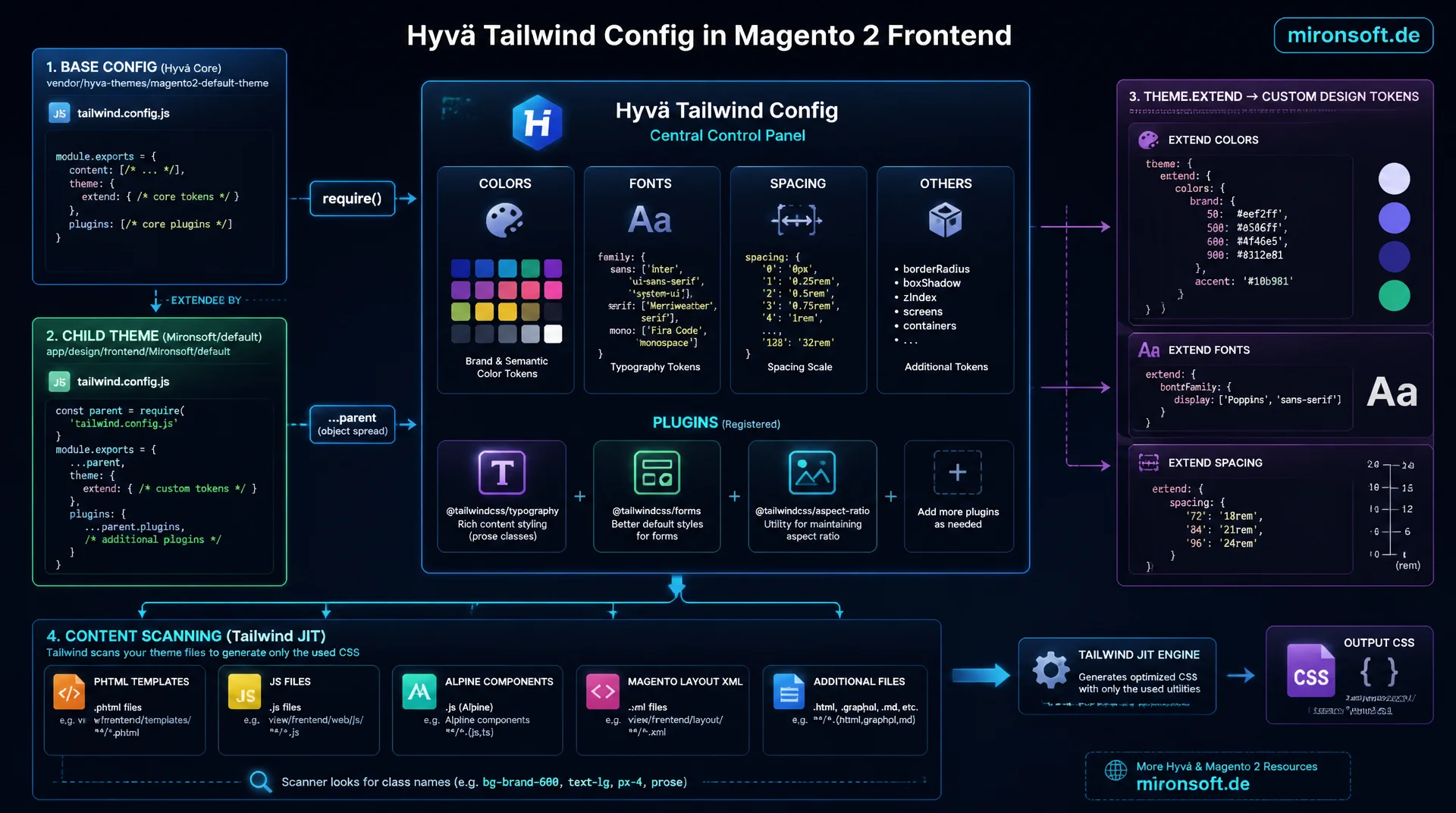
Getting theme values, plugins and purge paths right
The Hyvä Tailwind config is the central control point for colors, fonts, spacing and plugins in a Magento 2 frontend, but it also decides whether Tailwind actually finds every used class in the built CSS or whether styles suddenly go missing on the storefront. This article shows how a child theme like Mironsoft/default extends the tailwind.config.js of the Hyvä parent theme via require() and object spread, how theme.extend picks up custom design tokens for colors, fonts and spacing, how plugins like Typography, Forms and Aspect Ratio get registered, and how content paths are configured so Tailwind reliably scans every phtml, JS and Alpine file in the theme and in Hyvä modules.
Table of contents
- 1. Why a custom Hyvä Tailwind config is necessary
- 2. Structure and inheritance of tailwind.config.js in the theme
- 3. theme.extend: colors, fonts and spacing from design tokens
- 4. Registering plugins: typography, forms, aspect-ratio
- 5. Configuring content paths and purge globs correctly
- 6. Safelist for dynamic class names
- 7. Tailwind v3 JS config vs. v4 CSS-first @theme
- 8. Build integration in the Mark Shust Docker setup
- 9. Common mistakes and the Hyvä Tailwind config compared
- 10. Summary
- 11. FAQ
1. Why a custom Hyvä Tailwind config is necessary
Every Hyvä theme ships a ready-made tailwind.config.js in its parent theme, defining base values for colors, fonts and spacing and already containing the most important content paths for the storefront. For a production project, though, this default rarely suffices: as soon as a client brings custom brand colors, an individual font family, or a different spacing system from their design system, the child theme needs its own Hyvä Tailwind config that builds on top of the parent theme instead of replacing it. This is exactly where the difference lies between a generic Hyvä installation and a theme that consistently carries a client's handwriting.
Without a cleanly structured Tailwind configuration in Hyvä, inconsistencies appear quickly: developers enter color values as hex codes directly in class names instead of maintaining them centrally in theme.extend, or a plugin is missing because nobody documented that it needs to be registered. A well thought out configuration solves this problem structurally: design tokens are maintained in one place, plugins are explicitly declared, and content paths reliably cover all templates. The following sections show step by step how this configuration is structured in app/design/frontend/Mironsoft/default/web/tailwind/tailwind.config.js and which pitfalls typically occur when customizing it.
2. Structure and inheritance of tailwind.config.js in the theme
The Hyvä parent theme hyva-themes/magento2-default-theme-csp ships a base config under web/tailwind/tailwind.config.js that defines font sizes, default colors and a base set of content globs. A child theme like Mironsoft/default does not overwrite this file, it extends it: the child theme's own tailwind.config.js loads the parent config via require() and merges it with its own customizations via object spread. This pattern is the foundation of every clean Hyvä Tailwind config, because updates to the parent theme automatically keep flowing in, without the custom adjustments needing to be manually reapplied on every theme update.
In practice this means: the child theme's theme.extend.colors is merged with the parent's colors object, plugins arrays are concatenated, and content paths are added rather than replaced. The order of the spread matters here: if the parent config comes first and the custom extension comes after, the custom values win on conflicts. Anyone who does not understand this inheritance logic risks accidentally overwriting the entire parent config and suddenly losing all Hyvä default classes in the built CSS, which usually only becomes noticeable as missing styles after the static content deploy.
// app/design/frontend/Mironsoft/default/web/tailwind/tailwind.config.js
// Extends the Hyvä parent theme config instead of replacing it

const parentConfig = require(
  '../../../../Hyva/default/web/tailwind/tailwind.config.js'
);

module.exports = {
  ...parentConfig,

  // Merge content globs: parent paths + child-specific paths
  content: [
    ...parentConfig.content,
    '../../Magento_Theme/templates/**/*.phtml',
  ],

  theme: {
    ...parentConfig.theme,
    extend: {
      ...parentConfig.theme.extend,
      // Child-specific design tokens are added below (see section 3)
    },
  },

  // Concatenate plugins instead of overwriting them
  plugins: [
    ...parentConfig.plugins,
  ],
};
3. theme.extend: colors, fonts and spacing from design tokens
theme.extend is the central place where design tokens from a client's corporate design flow into the Hyvä Tailwind config. Instead of replacing Tailwind's default palette, extend.colors adds custom brand colors like brand.primary or brand.accent, which become available throughout the theme as bg-brand-primary or text-brand-accent. The advantage over inline hex values in templates: if a brand color changes, one adjustment in a single central place is enough, instead of searching through dozens of phtml files.
Similarly, fontFamily entries for custom font families and spacing values for a different grid system are added. It is important to name design tokens so they describe function rather than appearance, for example brand.primary instead of orange-500, so a later rebrand does not lead to semantically incorrect class names. Spacing values should follow a consistent scale, for example multiples of 4px, so they integrate seamlessly into Tailwind's existing spacing scale. This structure makes the Hyvä Tailwind config the single source of truth for the storefront's visual appearance.
// theme.extend block inside tailwind.config.js
// Brand design tokens, kept separate from Tailwind defaults

theme: {
  extend: {
    colors: {
      brand: {
        primary: '#b3294f',
        accent: '#fb8570',
        dark: '#5c1a2e',
      },
    },
    fontFamily: {
      sans: ['"Inter"', 'system-ui', 'sans-serif'],
      display: ['"Sora"', 'system-ui', 'sans-serif'],
    },
    spacing: {
      18: '4.5rem',
      22: '5.5rem',
    },
    borderRadius: {
      card: '1.25rem',
    },
  },
},
4. Registering plugins: typography, forms, aspect-ratio
Hyvä themes commonly use three official Tailwind plugins that must be explicitly registered in the plugins array of the Hyvä Tailwind config: @tailwindcss/typography for automatically styled rich text content from CMS blocks and product descriptions, @tailwindcss/forms for consistently styled form elements without extra CSS, and @tailwindcss/aspect-ratio for responsive image and video containers without JavaScript. Each plugin must first be installed as a dev dependency via npm and then referenced in the plugins list of tailwind.config.js, otherwise the associated utility classes like prose or aspect-video remain unused in the built CSS.
The order of the plugins usually does not matter, but version compatibility does: Tailwind v4 plugins use a different registration format than v3 plugins, which is why plugin versions from package.json should be checked when moving to Hyvä's v4-compatible themes. A commonly overlooked point: the typography plugin generates its own default color values for headings and links by default, which can collide with custom theme.extend.colors. The modifiers option lets you specifically align the typography color with the brand colors from the Hyvä Tailwind config.
{
  "name": "mironsoft-default-tailwind",
  "private": true,
  "scripts": {
    "build": "tailwindcss -i ./tailwind-source.css -o ../css/styles.css --minify",
    "watch": "tailwindcss -i ./tailwind-source.css -o ../css/styles.css --watch"
  },
  "devDependencies": {
    "tailwindcss": "^3.4.10",
    "@tailwindcss/typography": "^0.5.13",
    "@tailwindcss/forms": "^0.5.7",
    "@tailwindcss/aspect-ratio": "^0.4.2"
  }
}
5. Configuring content paths and purge globs correctly
The content array in the Hyvä Tailwind config determines which files are scanned for used class names during the build, making it one of the most error-prone parts of the whole configuration. If a path is missing, classes disappear from the built CSS even though they are written correctly in the template. For a Mironsoft theme, at minimum app/design/frontend/Mironsoft/default/**/*.phtml, the inherited templates from app/design/frontend/Hyva/default/**/*.phtml, and all JavaScript files under web/js/**/*.js must be listed in the content globs, so both custom and inherited templates are correctly captured.
In addition, Alpine.js expressions need to be considered: classes that are dynamically assembled as a string inside x-data, x-bind:class or :class attributes are only found by Tailwind's scanner if the complete class name appears somewhere as a literal in the source code. Vendor modules like Magefan_Blog or third-party Hyvä modules that ship their own phtml templates must also be covered in the content paths of the Hyvä Tailwind config, otherwise their utility classes remain unused in the final build. A glob like vendor/hyva-themes/**/*.phtml covers this but noticeably slows down the build, which is why it should only be added for modules that are actually in use.
// content array: scans phtml, JS and Alpine expressions for used classes
content: [
  '../../Magento_Theme/templates/**/*.phtml',
  '../../Magento_Catalog/templates/**/*.phtml',
  '../../Magento_Checkout/templates/**/*.phtml',
  '../../Magefan_Blog/templates/**/*.phtml',
  './web/js/**/*.js',
  // Inherited Hyvä parent-theme templates
  '../../../../Hyva/default/Magento_Theme/templates/**/*.phtml',
  '../../../../Hyva/default/Magento_Catalog/templates/**/*.phtml',
  // Third-party Hyvä modules shipping their own templates
  '../../../../../../vendor/hyva-themes/magento2-catalog-graphql/**/*.phtml',
],
6. Safelist for dynamic class names
Dynamically assembled class names are the most common problem when configuring a Hyvä Tailwind config: a PHP view model that builds a color class as a variable, for example 'bg-' . $color, does not produce a complete string at build time that Tailwind's scanner could recognize. The result: the class is not generated in the built CSS and the color is missing on the frontend, even though the PHP code is syntactically correct. The safelist option in the config solves this problem by forcing certain class names or patterns regardless of whether they appear as a literal in the source code.
For a limited number of known values, for example badge colors from a CMS attribute, an explicit list of class names in the safelist is enough. For larger value ranges, for example dynamic grid columns from a product slider, a regex pattern in the safelist is more efficient than dozens of individual entries. Important: the safelist should be kept as small as possible, because every additional entry increases the CSS output size. The better approach is usually to write dynamic class names in PHP or Alpine code entirely as literals, for example via a mapping array, instead of permanently relying on the safelist of the Hyvä Tailwind config.
7. Tailwind v3 JS config vs. v4 CSS-first @theme
Tailwind v3 configures theme values exclusively in the JavaScript file tailwind.config.js: colors, font sizes and spacing are defined as nested objects and read in by PostCSS during the build. Tailwind v4 moves a large part of this configuration into CSS itself, via the @theme directive directly inside the main CSS file. Instead of defining colors.brand.primary in the JS config, in v4 you write --color-brand-primary: #b3294f; inside an @theme block, and Tailwind automatically generates the matching utility classes from it. For Hyvä themes this means: current Hyvä parent themes often support both approaches in parallel, which can cause confusion when customizing your own Hyvä Tailwind config.
The practical bridge between both worlds: tailwind.config.js remains responsible for plugins, content paths and more complex JavaScript logic, for example dynamic values from an external configuration file, while @theme in the CSS file is used for pure design token values that need no logic. Tailwind v4 reads both sources together, so a Hyvä Tailwind config with theme.extend and an @theme directive can coexist in the same project. Anyone migrating an existing v3 theme to v4 should proceed step by step: first leave the JS config unchanged, then move individual design tokens into @theme, and only afterward remove redundant entries from tailwind.config.js.
8. Build integration in the Mark Shust Docker setup
In the Mark Shust Docker setup, the Tailwind build does not run on the host but inside the container, which is why npm commands are always executed through the bin/npm wrapper. After every change to the Hyvä Tailwind config, the build must be triggered again so new design tokens, plugins or content paths actually land in the built CSS. The command bin/npm --prefix app/design/frontend/Mironsoft/default/web/tailwind run build compiles the final CSS file once, while watch mode continuously monitors changes to the config and templates and rebuilds automatically.
Because Tailwind reads the content paths of the Hyvä Tailwind config at startup, the watcher only picks up new glob patterns after the watcher process is restarted, not while it is running. So anyone adding a new path to the content globs must stop and restart the running bin/npm watch process. Before a production deploy, var/view_preprocessed and pub/static/frontend should also be cleared, because otherwise Magento keeps serving the old, cached CSS file even though the config and the build have already been updated.
# One-off production build after changing tailwind.config.js
bin/npm --prefix app/design/frontend/Mironsoft/default/web/tailwind run build

# Watcher mode: rebuilds on template and config changes
bin/npm --prefix app/design/frontend/Mironsoft/default/web/tailwind run watch

# Restart required after adding a new glob to the content array
# (the watcher only re-reads content paths on startup)

# Clear caches before deploying so Magento serves the freshly built CSS
cd src && rm -rf var/view_preprocessed/* pub/static/frontend/*
bin/magento setup:static-content:deploy de_DE -t Mironsoft/default -f
bin/magento cache:flush
9. Common mistakes and the Hyvä Tailwind config compared
The most common mistake when working with a Hyvä Tailwind config is accidentally overwriting the parent theme instead of extending it: if theme.extend gets replaced by theme, all Hyvä base values are lost and the storefront silently loses spacing and colors that previously came from the parent theme. A second classic mistake concerns forgotten content paths after adding a new vendor module: the templates render correctly, but without styling, because Tailwind simply does not know about the new phtml files during the scan.
The following table contrasts unstructured ad hoc adjustments with the recommended patterns of a cleanly maintained Hyvä Tailwind config. The difference usually only becomes visible at the next theme update or when onboarding a new developer, when it is unclear where a certain color or a certain path was even defined.
| Task | Without a structured config | With a Hyvä Tailwind config | Benefit |
|---|---|---|---|
| Changing a brand color | Search for hex value across dozens of phtml files | Adjust once in theme.extend.colors | Central source, no inconsistencies |
| Adding a new vendor module | Templates render unstyled | Add a content glob for the module templates | Complete class detection |
| Applying a parent theme update | Custom config gets overwritten | require() + object spread of the parent config | Updates flow in automatically |
| Dynamic classes from PHP | Class missing from the built CSS | Safelist or literal mapping | Reliable utility generation |
| Using a plugin (e.g. Typography) | prose classes remain unstyled | Register the plugin in the plugins array | Utility classes available immediately |
10. Summary
A well structured Hyvä Tailwind config always solves the same underlying problem: without a clear separation between parent theme and child theme customization, inconsistent colors, missing plugins and unstyled templates appear. require() and object spread extend the parent config instead of replacing it. theme.extend picks up design tokens for colors, fonts and spacing. Plugins like Typography, Forms and Aspect Ratio are explicitly registered in the plugins array, and content paths reliably capture all phtml, JS and Alpine files in the theme.
The biggest lever is treating the Hyvä Tailwind config as a living document: every new vendor module, every new Alpine component and every new design token belongs in the configuration right away, instead of ending up as an ad hoc exception in a template. The difference between Tailwind v3 and v4 shifts parts of the configuration from JavaScript to CSS, but it does not change this underlying principle: structure, inheritance and complete content paths determine whether the built CSS on the storefront actually contains every class that is used.
Hyvä Tailwind Config Customization: Key Takeaways
Inheritance
require() loads the parent config, object spread merges it with custom adjustments instead of replacing it.
Design tokens
theme.extend.colors, fontFamily and spacing bundle brand values in one central place instead of inline hex codes.
Plugins
typography, forms and aspect-ratio must be installed via npm and registered in the plugins array.
Content & safelist
Complete content globs capture all templates, the safelist secures dynamically generated class names.
11. FAQ: Hyvä Tailwind Config Customization
1What is a Hyvä Tailwind config?
2How does a child theme extend the parent config?
3Where do I add custom brand colors?
4Which plugins do Hyvä themes use?
5Why are utility classes missing from the CSS?
6What is the safelist for?
7Tailwind v3 vs. v4: what changes?
8How do I build inside the Docker setup?
9Why doesn't the watcher pick up new paths?
10Do I need to clear the cache afterward?
Mironsoft
Hyvä theme development, Tailwind configuration and frontend performance
A Hyvä Tailwind config that matches your design system?
We restructure tailwind.config.js for Hyvä themes, align theme.extend with your design tokens, and make sure content paths, plugins and safelist work together reliably.
Config audit
Reviewing an existing tailwind.config.js for inheritance, plugins and content paths
Design token migration
Moving brand colors, fonts and spacing cleanly into theme.extend
Build integration
Anchoring the Tailwind build in the Docker setup and the CI pipeline