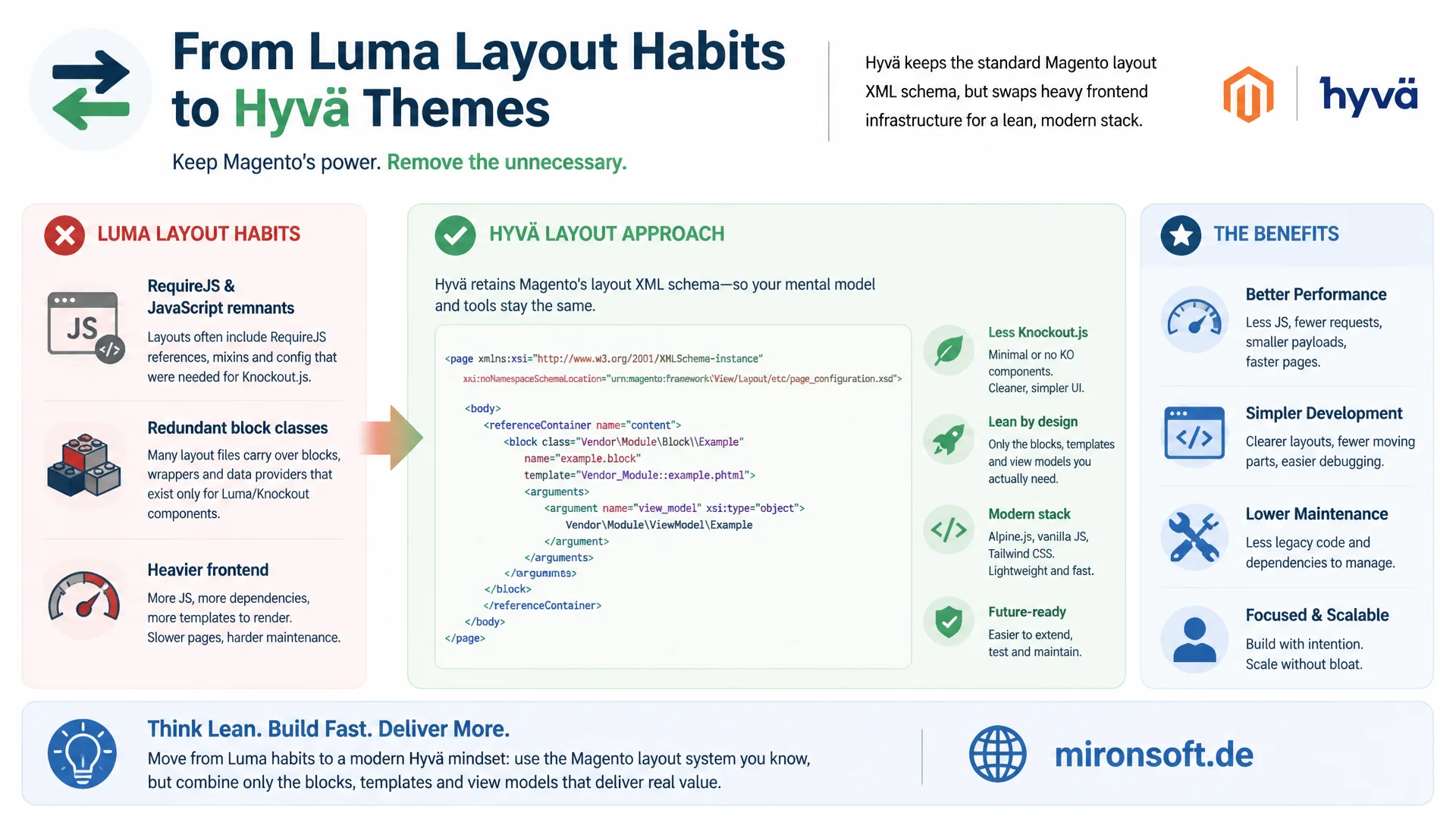
from the jsLayout removal to the view_model convention
Anyone who carries Luma layout habits unreflected into a Hyvä theme drags along jsLayout leftovers, RequireJS references and unnecessary block classes. Hyvä layout XML still uses the regular Magento schema, but replaces Luma's Knockout-heavy conventions with lean block, template and view model combinations.
Table of Contents
- 1. The foundation: regular schema, leaner conventions
- 2. Removal of jsLayout and UI component blocks
- 3. RequireJS mixins and requirejs-config.js disappear
- 4. Block argument convention: view_model as the default
- 5. Template overrides via layout XML
- 6. Container structure stays compatible with Luma
- 7. CSS/JS asset references in the layout
- 8. Before and after: jsLayout becomes view_model
- 9. Common mistakes when writing Hyvä layout XML
- 10. Summary
- 11. FAQ
1. The foundation: regular schema, leaner conventions
The most important point up front: Hyvä layout XML is not its own layout format. Hyvä themes use exactly the same layout XML schema as any other Magento 2 theme: page_layout definitions, container nodes, block declarations and referenceBlock/referenceContainer directives work technically identically to Luma. XSD validation, handle inheritance via default.xml, product-specific handles like catalog_product_view and processing through the LayoutMerge process remain unchanged. Anyone who knows Magento layout XML from Luma projects already knows the basic mechanics of Hyvä layout XML.
The difference lies in the conventions built on top of this shared foundation. Luma layout XML is historically deeply intertwined with Knockout.js, UI components and RequireJS module references, because the Luma frontend implements client-side interactivity through these layers. Hyvä layout XML forgoes all of that, because Hyvä templates handle interactivity directly through Alpine.js inside the template itself, without the layout XML having to describe a JavaScript component tree. The result: shorter, easier to read layout files that focus almost exclusively on structure, block assignment and template references.
For developers moving from Luma projects to Hyvä, this mostly means relearning habits, not syntax. The following eight sections go through the concrete differences systematically, from disappearing XML nodes to new argument conventions that should consistently show up in every Hyvä layout XML snippet.
2. Removal of jsLayout and UI component blocks
In Luma layout XML, the jsLayout argument regularly appears for interactive areas. It describes a tree of UI components that are instantiated at runtime in the browser by Magento_Ui/js/core/app, including configuration, child components and data bindings via Knockout.js. This structure is powerful but also hard to debug: errors only surface in the browser, the configuration is deeply nested, and every change requires knowledge of the respective UI component class. In Hyvä layout XML this argument practically never appears, because Hyvä themes do not load Magento UI components or Knockout.js at all.
Instead, Hyvä layout XML uses a simple <block> declaration with a template attribute and a view model argument. All the logic that in Luma was spread across nested jsLayout arrays and separate JavaScript files moves into PHP view models and the corresponding PHTML template. The comparison below shows a typical Luma pattern: a block that configures a UI component for a slider.
<!-- Luma: catalog_product_view.xml - block with jsLayout and UI component configuration -->
<referenceBlock name="product.info.details">
    <block class="Magento\Catalog\Block\Product\View"
           name="product.info.additional"
           template="Magento_Catalog::product/view/additional.phtml">
        <arguments>
            <argument name="jsLayout" xsi:type="array">
                <item name="components" xsi:type="array">
                    <item name="additionalInfoSlider" xsi:type="array">
                        <item name="component" xsi:type="string">Magento_Catalog/js/view/product-additional-slider</item>
                        <item name="config" xsi:type="array">
                            <item name="autoplay" xsi:type="boolean">false</item>
                            <item name="slidesPerView" xsi:type="number">3</item>
                        </item>
                    </item>
                </item>
            </argument>
        </arguments>
    </block>
</referenceBlock>
This jsLayout construct forces anyone who wants to understand the block to read layout XML, a RequireJS module and Knockout bindings in the template all at once. A clean Hyvä layout XML equivalent replaces all of that with a view model argument, see section 4 and the complete before/after example in section 8. Important for migrations: if you find jsLayout leftovers in a Hyvä theme, for example from a third-party extension with a Luma focus, replace them consistently with block, template and view model instead of carrying them along.
3. RequireJS mixins and requirejs-config.js disappear
A second, closely related feature of Luma layout XML is references to RequireJS modules and mixins. Luma themes often contain layout handles that insert additional <script> nodes in the <head> to make sure a specific RequireJS module gets loaded, or references that, together with requirejs-config.js, register mixins on core modules such as Magento_Catalog/js/product/list. This combination of layout XML and JavaScript module configuration is the technical foundation for almost every interactive component in Luma.
Hyvä layout XML almost never contains such references. There is no requirejs-config.js file playing a comparable role in Hyvä themes, because Hyvä deliberately does without RequireJS as a module loader for frontend interactivity. Alpine.js components are declared directly in the template via x-data and need no module registration, no mixin mechanism, and no extra layout node that loads a script. Concretely, this means a layout XML snippet that in Luma had to ship together with a requirejs-config.js change often has no equivalent at all in Hyvä, because the functionality lands directly in the PHTML template.
When reviewing existing layout files, this is an important check: if a supposed Hyvä layout XML file still contains a <script src="..."> node pointing at a RequireJS module, that is almost always a sign of incompletely ported Luma code. Exceptions only apply to very specific third-party libraries that offer no Alpine.js equivalent themselves, for example some payment SDKs that must be loaded via a global script tag.
4. Block argument convention: view_model as the default
The central naming convention in Hyvä layout XML is the argument view_model. Any class that implements Magento\Framework\View\Element\Block\ArgumentInterface is referenced in the block through exactly this argument, whether it holds product data, category information, or a plain utility class. This convention is firmly established across the Hyvä community: templates consistently access the instance in PHTML code via $block->getViewModel(), because Hyvä_Theme extends the template block class with exactly this access method.
There is no comparably consistent naming convention for ArgumentInterface implementations in Luma layout XML. Argument names there vary a lot from module to module, because view models play a minor role in Luma, and most logic ends up in block classes or UI components anyway. Hyvä layout XML turns view_model into the default name, which creates consistency across the whole theme: any developer reading a new layout XML fragment knows immediately that argument name="view_model" points to the central PHP logic of this block.
<!-- Hyvä: catalog_product_view.xml - the "view_model" default convention -->
<referenceBlock name="product.info.details">
    <block class="Magento\Framework\View\Element\Template"
           name="product.info.additional"
           template="Mironsoft_Catalog::product/view/additional.phtml">
        <arguments>
            <argument name="view_model" xsi:type="object">Mironsoft\Catalog\ViewModel\Product\AdditionalInfo</argument>
        </arguments>
    </block>
</referenceBlock>
What stands out in this pattern is the generic block class: in a great many Hyvä layout XML declarations, Magento\Framework\View\Element\Template is enough as the block class, because all of the business logic lives in the view model rather than in the block itself. This drastically reduces the number of custom block classes in the theme. Multiple view_model arguments can also be combined through a composite view model that itself receives several individual view models injected in its constructor, so a template can bundle several business concerns behind a single argument.
5. Template overrides via layout XML
There is also a difference in notation when it comes to overriding templates, though a smaller one than with jsLayout. Classic Luma layout XML almost always uses the <action method="setTemplate"> syntax inside a referenceBlock node to assign a different template to an existing block. This syntax still works technically, including in Hyvä layout XML, because it is part of the general layout XML schema and was not specifically removed for Hyvä.
Modern Hyvä layout XML, however, mostly prefers the more compact shorthand notation: the template attribute directly on the referenceBlock node. This notation has been available for several Magento versions but is rarely used consistently in Luma projects, while Hyvä themes and the Hyvä community documentation establish it as the preferred form, because it produces less nested XML and is recognizable at a glance. How the chosen template is subsequently resolved through the theme inheritance fallback chain is a separate topic and is deliberately not covered in depth here.
<!-- Older notation: explicit action node -->
<referenceBlock name="product.info.overview">
    <action method="setTemplate">
        <argument name="template" xsi:type="string">Magento_Catalog::product/view/description.phtml</argument>
    </action>
</referenceBlock>

<!-- Common Hyvä shorthand: template as an attribute -->
<referenceBlock name="product.info.overview" template="Mironsoft_Catalog::product/view/description.phtml"/>
Both variants are valid in Hyvä layout XML and produce the same result. The shorthand is preferred because it needs fewer lines and reads noticeably clearer when several template overrides live in the same file, especially when a theme bundles many referenceBlock adjustments into a single catalog_product_view.xml.
6. Container structure stays compatible with Luma
An important, often underestimated point: the container structure in Hyvä layout XML stays largely identical to that of Luma. Container names such as page.main.title, content, sidebar.main, sidebar.additional, header.container or columns exist in Hyvä themes under the same identifiers as in Luma. This is not a coincidence but a deliberate design decision by the Hyvä Themes team, made to maximize compatibility with third-party modules.
Many Magento extensions ship their own layout XML updates that reference these container names, for example to hook an extra block into sidebar.additional or to place a banner in content.top. Because Hyvä layout XML uses the same container names, many such third-party layout updates work without adjustment, even if the extension was originally built only for Luma. This significantly reduces migration effort, because not every single extension needs its own Hyvä layout update just to appear in the right place in the page scaffold.
So the real differences are not in the structure of the page scaffold, but in what gets declared as blocks inside these containers: instead of UI component heavy blocks with jsLayout, Hyvä layout XML uses lean template plus view model combinations. A developer who knows the container names from a Luma project can reuse them almost unchanged in a Hyvä layout update.
7. CSS/JS asset references in the layout
Luma layout XML very often references individual CSS and JS assets directly in the layout, usually via <css src="Magento_Catalog::css/styles.css"/> or <script src="Magento_Catalog::js/product-gallery.js"/> inside the head handles. This lets every module load its own bundle assets, which in aggregate leads to many individual HTTP requests and a hard to oversee amount of CSS rules from different sources.
Hyvä layout XML avoids this practice almost entirely. The central Tailwind build produces a single, purged CSS file for the entire theme, so there is generally no reason to add an extra <css src="..."> node in the layout XML for a single module. New utility classes are simply used in the template instead and appear automatically in the next Tailwind build, because the build process scans the templates for the classes actually used.
The same principle applies to JavaScript: instead of additional <script src="..."> references in the layout XML for every small interaction, Hyvä layout XML relies on the Alpine.js instance already loaded in the theme. A new interactive element gets its behavior through x-data directly in the template, without an extra layout line pulling in another script. This keeps the number of assets small and makes page loading more predictable, because not every module contributes its own mini bundle.
8. Before and after: jsLayout becomes view_model
To show the differences described so far in one continuous example, here is a complete transformation of a realistic layout handle. The scenario: a related products carousel that in Luma is implemented via a UI component with jsLayout, and in Hyvä layout XML becomes a simple block, template and view model combination.
<!-- BEFORE: Luma - catalog_product_view.xml -->
<?xml version="1.0"?>
<page layout="1column" xmlns:xsi="http://www.w3.org/2001/XMLSchema-instance"
      xsi:noNamespaceSchemaLocation="urn:magento:framework:View/Layout/etc/page_configuration.xsd">
    <body>
        <referenceContainer name="content">
            <block class="Magento\Catalog\Block\Product\ProductList\Related"
                   name="catalog.product.related"
                   template="Magento_Catalog::product/list/related.phtml">
                <arguments>
                    <argument name="jsLayout" xsi:type="array">
                        <item name="components" xsi:type="array">
                            <item name="relatedCarousel" xsi:type="array">
                                <item name="component" xsi:type="string">Magento_Catalog/js/view/related-carousel</item>
                                <item name="config" xsi:type="array">
                                    <item name="itemsPerRow" xsi:type="number">4</item>
                                    <item name="enableAutoplay" xsi:type="boolean">true</item>
                                </item>
                            </item>
                        </item>
                    </argument>
                </arguments>
            </block>
        </referenceContainer>
    </body>
</page>

<!-- AFTER: Hyvä layout XML - catalog_product_view.xml -->
<?xml version="1.0"?>
<page layout="1column" xmlns:xsi="http://www.w3.org/2001/XMLSchema-instance"
      xsi:noNamespaceSchemaLocation="urn:magento:framework:View/Layout/etc/page_configuration.xsd">
    <body>
        <referenceContainer name="content">
            <block class="Magento\Catalog\Block\Product\ProductList\Related"
                   name="catalog.product.related"
                   template="Mironsoft_Catalog::product/list/related.phtml">
                <arguments>
                    <argument name="view_model" xsi:type="object">Mironsoft\Catalog\ViewModel\Product\RelatedCarousel</argument>
                </arguments>
            </block>
        </referenceContainer>
    </body>
</page>
The block class Magento\Catalog\Block\Product\ProductList\Related deliberately stays the same in this example, because it loads the product collection that the view model then consumes. What matters is the removal of the entire jsLayout array in favor of the one-line view_model argument. The corresponding PHTML template shows how Hyvä layout XML and the template work together: the template calls getViewModel() on the block and renders the carousel logic directly with Alpine.js, without needing a separate RequireJS module.
<?php
/**
 * @var \Magento\Framework\View\Element\Template $block
 * @var \Mironsoft\Catalog\ViewModel\Product\RelatedCarousel $viewModel
 */
$viewModel = $block->getViewModel();
$relatedProducts = $viewModel->getRelatedProducts();
?>
<?php if (!empty($relatedProducts)): ?>
<div class="mt-10" x-data="{ active: 0, itemsPerView: 4 }">
    <h3 class="text-xl font-bold text-gray-900 mb-4"><?= $block->escapeHtml(__('Related Products')) ?></h3>
    <div class="grid grid-cols-2 sm:grid-cols-4 gap-4">
        <?php foreach ($relatedProducts as $product): ?>
        <a href="<?= $block->escapeUrl($product->getProductUrl()) ?>"
           class="block rounded-lg border border-gray-200 p-3 hover:shadow-md transition-shadow">
            <span class="block text-sm font-semibold text-gray-800"><?= $block->escapeHtml($product->getName()) ?></span>
        </a>
        <?php endforeach; ?>
    </div>
</div>
<?php endif; ?>
This comparison shows the basic pattern that repeats in practically every migration from Luma layout XML to Hyvä layout XML: the jsLayout array goes away, the view_model argument comes in, and JavaScript logic moves out of separate RequireJS modules directly into the template as an Alpine.js expression.
9. Common mistakes when writing Hyvä layout XML
In practice, a few typical mistakes keep repeating when writing Hyvä layout XML, mostly because developers unconsciously carry over Luma reflexes. The most common one: copied jsLayout arguments from a Luma reference implementation or an old third-party extension that nobody ever removed. Hyvä templates simply ignore this argument, because no code looks for it, but it stays behind as dead, confusing clutter in the file and suggests functionality that does not exist.
A second common mistake is choosing the wrong block class. Instead of the generic Magento\Framework\View\Element\Template class with a view model argument, a specific block class, often copied from Luma, gets used even though the actual logic has long since moved into the view model. This leads to split responsibility: part of the logic sits in the block, part in the view model, with no clear separation. Clean Hyvä layout XML sticks strictly to the combination of generic block, template, and one or more view model arguments.
A third mistake concerns the argument naming itself: instead of the view_model convention, migrated code sometimes shows names like data_provider, helper, or module-specific identifiers. This works technically, because the argument simply carries a different name, but it breaks the readability that Hyvä layout XML gains precisely through consistency. Mixing several naming conventions in one theme forces every new developer to look up, block by block, how the view model access is resolved in the respective template.
| Task | Luma convention (old) | Hyvä layout XML (recommended) | Benefit |
|---|---|---|---|
| Embed a UI component | jsLayout with components array |
block + view_model argument |
Logic in PHP, no Knockout overhead |
| Reference a JS module | requirejs-config.js + <script src> |
Alpine.js x-data in the template |
No module loader, no extra request |
| Override a template | <action method="setTemplate"> |
referenceBlock template="..." |
More compact, less nesting |
| Load a single CSS file | <css src="..."/> in the head handle |
Central Tailwind build, no layout entry | One CSS bundle instead of many single files |
| Reference an ArgumentInterface | Inconsistent names per module | Convention argument name="view_model" |
Consistency across the whole theme |
This table summarizes the core differences that show up in almost every Hyvä layout XML review. Applying these five patterns consistently avoids the typical pitfalls of moving on from Luma and produces layout XML that reads the same across every Hyvä project.
10. Summary
Hyvä layout XML is at its core the same Magento layout schema as in Luma, but differs fundamentally in the conventions built on top of that schema. The removal of jsLayout and UI component arguments is the most visible difference, followed by the complete absence of RequireJS mixins and requirejs-config.js references in the layout. In their place comes the view_model argument convention, which anchors every ArgumentInterface implementation under the same predictable name in the block.
Template overrides in Hyvä layout XML still work via <action method="setTemplate">, but are mostly replaced by the more compact template attribute notation. The container structure stays largely identical to Luma, which preserves compatibility with third-party layout updates, while individual CSS and JS asset references in the layout are almost entirely dropped in favor of the central Tailwind build and the Alpine.js instance already loaded. The before and after example with the related products carousel shows how these principles combine in a real layout file.
Hyvä layout XML compared to Luma - the essentials at a glance
No more jsLayout
UI component arguments and Knockout configuration disappear in favor of simple block declarations with a template and a view model.
No RequireJS mixins
No requirejs-config.js references in the layout, no <script src> nodes for module loading, Alpine.js runs directly in the template.
view_model as the default
Every ArgumentInterface implementation is consistently called view_model and retrieved in the template via getViewModel().
Containers stay compatible
Names like content, sidebar.additional or page.main.title match Luma, so third-party layout updates mostly work unchanged.
11. FAQ: Hyvä Layout XML
1Is Hyvä layout XML its own layout format?
2Why no more jsLayout?
3What is the view_model convention?
4Does requirejs-config.js still exist?
5Does setTemplate still work?
6Are container names identical to Luma?
7Why so few individual CSS references?
8Which block class for new fragments?
9Most common mistake when writing?
10Do I need to rewrite Luma layout updates?
Mironsoft
Hyvä theme development and layout XML migration from Luma
Clean Hyvä layout XML instead of Luma leftovers?
We analyze existing layout XML files, remove jsLayout leftovers and RequireJS references, and bring block declarations consistently onto the view_model convention, so your Hyvä theme stays maintainable.
Layout audit
Check existing layout XML for jsLayout leftovers and outdated conventions
View model refactoring
Move business logic consistently into view models using the view_model convention
Extension migration
Adjust third-party layout updates to Hyvä conventions