Magento 2 Variant Images with Gallery Switch
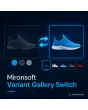
SKU: VARIANTGALLERYSWITCH1
- gallery switches to matching images on colour and size selection
- driving attributes selectable, fallback to parent product
- start by link or category with the right variant
- zoom and swipe gestures of the Hyvä gallery are kept
Einmaliger Kauf · inkl. 12 Monate Updates · zzgl. MwSt.
Magento 2 Variant Images: the gallery changes with colour and size
With the Magento 2 variant images module from Mironsoft, the product gallery immediately shows the photos that match the chosen variant. When a customer picks the colour blue on a configurable product, main image and thumbnails are swapped for the blue shots without a page reload. The Magento 2 Variant Images module works with the Hyvä gallery and Alpine.js, needs no extra library and falls back cleanly to the images of the parent product when a variant has no photos of its own.
Gallery switches instantly
With every colour or size selection the gallery shows the matching images.
Rules per attribute
You decide which attributes drive the gallery, for example colour only, not size.
Fallback to main images
If a variant has no images, the images of the parent product stay visible.
Preselected variant
Variants opened from the category or by link start with the right photos right away.
Fast switching
Variant images are prepared in advance so the change happens without waiting.
Maintenance in the product
Images are assigned on the variant products or by tagging, without double maintenance.
Why Magento 2 Variant Images make the buying decision easier
For clothing, furniture and accessories the photo decides. If the gallery keeps showing the blue product after red was chosen, customers doubt and leave or order the wrong variant. Merchants therefore look for Magento 2 variant images, a gallery that changes on colour selection, or images per variant on configurable products.
Magento 2 Variant Images solve this without a catalogue rebuild. You use the photos you maintain on the variant products anyway, and the module makes sure they appear at the right time. That reduces returns, because customers see exactly what they are ordering beforehand.
Magento 2 Variant Images in the Hyvä gallery
As soon as the customer chooses an option, the module determines the matching variant and swaps main image and thumbnails. The position in the gallery is kept if a corresponding image exists, otherwise the gallery starts at the first photo. The change runs client-side with Alpine.js and needs no server call. Zoom, swiping on the smartphone and fullscreen keep working as usual.
- Main image and thumbnails are replaced without reload
- Zoom, swipe gestures and fullscreen are kept
- No server call when switching
Which attributes drive the variant images
Not every attribute needs its own images. Usually photos differ by colour, not by size. In the admin you choose the driving attributes and the order of the check. With two attributes, such as colour and material, the module looks for the exact combination first, then only the main attribute and finally the images of the parent product. That way the gallery is never empty, even with incomplete maintenance.
- Driving attributes and order configurable
- Search by combination, then main attribute, then parent product
- Size and other attributes can be excluded
Assign images to variants without double maintenance
The module reads images from the variant product itself first. Where you prefer working on the parent product, you tag images there with a variant value, for example blue. Both ways can be mixed. In the admin an overview per product shows which variant has how many images and where the fallback still applies, so gaps become visible. Existing image roles such as base and thumbnail stay unchanged.
- Images from variant products or by tag on the parent product
- Overview shows gaps and fallback per variant
- Image roles and sorting stay unchanged
Right images on first load and in the link
When a product is opened from the category with a chosen colour or shared by link, the gallery starts at once with the matching images. For that the module reads the selection from the address and applies it before display. Search engines see the images of the parent product in the delivered HTML, visitors those of the variant. Alt texts come from the image descriptions you maintain.
- Variant preselected from link or category
- Main view images in the delivered HTML
- Alt texts from your image descriptions
Where Magento 2 Variant Images help day to day
Typical situations with configurable products.
Fashion and shoes
With Magento 2 Variant Images every colour has its own shots, size only changes availability.
Furniture with covers
Magento 2 Variant Images let fabric and wood tone change the images so customers see the combination.
Electronics with accessory colours
Case colours have their own photos, technical variants use the shared images.
Gift items
Motifs and colours become visible in the gallery at once, without a detour via a sample.
Magento 2 Variant Images compared: without and with the module
The difference to the rigid default gallery.
| Topic | Without module | With Mironsoft Variant Gallery Switch |
|---|---|---|
| Colour selection | Gallery stays unchanged | Gallery shows photos of the variant |
| Control | All attributes treated alike | Driving attributes selectable |
| Missing images | Wrong or no photos | Fallback to parent product |
| Start by link | Default image despite selection | Matching images from the start |
| Maintenance | Upload images twice | Variant product or tagging |
How we set up your Magento 2 Variant Images
The process after you place the order.
Briefing
You name product types, driving attributes and how images are maintained.
Catalogue check
We check which variants have images and where the fallback should apply.
Installation
We install the module and activate the Magento 2 Variant Images for your store views.
Test
We check switching, zoom, swiping, start by link and products without variant images.
Handover
Your team gets an introduction to assignment and overview.
Differences to colour swatches and the default gallery
Colour swatches design the selection itself, for example as colour circles or image tiles. The Magento 2 Variant Images module instead takes care of the gallery that appears after the selection. The two complement each other: one makes the choice vivid, the other shows the result.
The Hyvä gallery itself stays unchanged; the module only controls its set of images. All modules can be combined.
No download, but a personal setup
The Variant Gallery Switch is not listed here as a ready-made download for self-installation. The purchase is an order: we contact you after the purchase, install the module in your shop and agree on attributes, fallback and image maintenance together with you.
Frequently asked questions
Everything important about gallery, attributes, image maintenance and how the purchase works.
How can I show images per variant in Magento 2?
How can I make the gallery change on colour selection in Magento 2?
What happens if a variant has no images?
Can colour alone drive the gallery?
Do zoom and swiping keep working?
Are images loaded later and does the page get slower?
Do Magento 2 Variant Images work with Hyvä?
How good is this for search engines?
Do I have to re-upload images for Magento 2 Variant Images?
Can I download and install the module myself?
Recently Viewed Products

Magento 2 Variant Images – Mironsoft Variant Gallery Switch