Magento 2 Custom Option Swatches: Images and Colors as Tiles
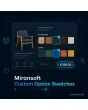
SKU: PRODUCTCUSTOMOPTIONSIMAGES1
- option values as image or color tiles instead of a dropdown
- upload an image or enter a color value per value
- price surcharge, selected state and required field stay intact
- for dropdown, radio and checkbox, built with Alpine.js
Einmaliger Kauf · inkl. 12 Monate Updates · zzgl. MwSt.
Magento 2 custom option swatches: see options instead of reading them
With the Magento 2 custom option swatches from Mironsoft, product options become clickable tiles: for every option value you store an image or a color value, and the product page shows a visual choice instead of a selection list. Price surcharges, required fields and the cart logic of Magento stay unchanged. The tiles are built with Alpine.js and adapt to your Hyvä theme.
Image per option value
For every value you upload an image, such as material, pattern or engraving typeface.
Color swatches
Instead of an image a color value is enough, and the tile shows a color field with a label.
All option types
Dropdown, radio buttons and checkbox turn into tiles, selectable singly or multiply.
Visible surcharge
The surcharge of a value sits on the tile and flows into the price as usual.
Clear selection
The chosen tile is highlighted, unavailable or disabled values are set apart.
Fallback to standard
Options without an image still appear as a normal field, so nothing gets lost.
Why Magento 2 custom option swatches improve the selection
Products with variants that are not separate items use custom options: engraving, fabric, frame color, material thickness. By default they appear as a dropdown with text. Customers cannot see the difference and have to guess. That is why merchants search for Magento 2 custom options with images, for color swatches for product options or for an image selection for options. The swatches of Magento apply only to configurable products, not to custom options.
Showing options as image or color reduces questions and returns, because customers see what they choose. At the same time the data structure stays unchanged, and orders contain the option text as before.
Maintain Magento 2 custom option swatches in the product
In the product form the Magento 2 custom option swatches give every option value a field for image and color value. You upload the file or enter a color code, and the module creates the tile size from it in the desired resolution. You switch the display on per option, so you change only the options where an image makes sense. The values of the option remain the normal Magento values with price and sort order.
- Image upload or color code per option value
- Tile display switchable per option
- Price, sort order and SKU unchanged
Selection as a tile on the product page in Hyvä
On the product page the Magento 2 custom option swatches replace the selection list with tiles. One click selects the value, the choice is highlighted at once and the price updates through the existing Magento price calculation. With multiple selection several tiles can be marked, and for required options the usual error message appears if none was chosen. Keyboard and screen reader reach the tiles as a radio or checkbox group.
- Price updates through the standard calculation
- Required field check as before
- Keyboard operable, as radio or checkbox group
Appearance: size, shape and labelling of the tiles
You choose the look of the Magento 2 custom option swatches in the configuration, namely tile size, shape and labelling: square, round or rounded, with or without text below the image, with the surcharge in the tile or in a tooltip. On small screens the tiles wrap into several rows. Images are loaded lazily and served as WebP so the page stays fast. The styling uses the Tailwind classes of your theme.
- Size, shape and labelling configurable
- Images lazy-loaded, WebP capable
- Wrapping on small screens
Cart, order and edge cases
With Magento 2 custom option swatches the option text still appears in the cart, in the order and in emails, so warehouse and accounting work unchanged. Optionally the cart additionally shows the small image of the chosen option. Options of type text field, date or file stay untouched. When a value is deleted, its tile disappears, and old orders keep the text. In addition, option values can be given images by mass action.
- Option text in cart and order unchanged
- Optionally a small image in the cart
- Text, date and file options stay untouched
Where Magento 2 custom option swatches help in the shop
Four typical situations for products with choices.
Furniture and wood
Customers choose wood type and finish from real sample images instead of interpreting names such as oiled oak.
Textile and printing
Fabric colors appear as color swatches and motifs as image tiles, with Magento 2 custom option swatches and without creating single items.
Engraving and typefaces
Every typeface is a tile with a preview, so the choice is no longer guesswork.
Accessories and configurator light
Add-on options such as handles, fittings or frames are shown as an image choice and added to the price directly.
Magento 2 custom option swatches: without and with the module compared
What changes compared with standard Magento.
| Topic | Without module | With Mironsoft Custom Option Swatches |
|---|---|---|
| Display | Dropdown with text | Tiles with image or color |
| Clarity | Customer has to guess | Customer sees the difference |
| Surcharge | In the text of the list | Visible on the tile |
| Maintenance | Only text and price | Plus image or color value per value |
| Order | Option text | Option text, optionally with a small image |
How we set up Magento 2 custom option swatches for you
The process after your order.
Agreement
You name the products and options that should appear as tiles, and your preferred appearance.
Installation
We install the Magento 2 custom option swatches and integrate the tiles into your Hyvä theme.
Images
We store images and color values for your most important options or show your team how it works.
Test
We test selection, surcharge, required field, multiple selection, cart and the mobile view.
Handover
Your team gets an introduction to maintenance and appearance.
Delimitation from swatches for configurable products
The standard swatches of Magento belong to attributes of configurable products and create their own variants with SKU and stock. Magento 2 custom option swatches concern product options instead, that is additional choices on a simple product, without variants and without separate stock. Both ways have their place: variants for stock-managed items, options for a choice without stock management.
The module needs no extra library, no jQuery and no Knockout. All tiles run with Alpine.js in the Hyvä theme.
No download, personal setup instead
Custom Option Swatches is not listed here as a ready-made download file for self-installation. The purchase is a service commission: we get in touch after the purchase, install the module in your shop and agree on appearance, options and image maintenance together with you.
Frequently asked questions
Everything about images, color swatches, price and how the purchase works.
How can I show custom options with images in Magento 2?
How do I show custom options as color swatches?
Which option types does the module support?
Does the price surcharge stay intact?
Do required options still work?
What happens to options without an image?
Do I see the image in the cart too?
Does it work with Hyvä?
How does this differ from swatches for configurable products?
Can I download and install the module myself?
Recently Viewed Products

Magento 2 Custom Option Swatches – Mironsoft