Quick View Popup for Magento 2
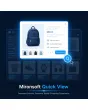
SKU: MQV
- Quick view popup on category and search pages, no reload
- Add to cart with quantity selection directly in the modal
- Built with Alpine.js, no jQuery, no extra library
Einmaliger Kauf · inkl. 12 Monate Updates · zzgl. MwSt.
Product details in one click, without leaving the page
A quick view button on category and search pages opens a popup with image, price, variants and an add-to-cart button — something Magento can't do out of the box.
Ajax Quick View
Opens as a popup, without a page reload.
Category & Search
Works on category pages and search results.
Hover Image Swap
Front and back view when hovering with the mouse.
Variant Selection
Color and size for configurable products directly in the modal.
Price & Stock Status
Both visible instantly, without opening the product page.
Short Description
Key product information directly in the popup.
Customer Reviews
Star ratings directly in the quick view window.
Add to Cart
With quantity selection, directly in the modal, no page change.
Configurable Products
Full support for products with multiple variants.
Alpine.js Implementation
No jQuery, no extra library needed.
Keyboard Navigation
Modal is accessible via keyboard (differentiation).
Wishlist Button
Available directly in the popup, no need to leave the page (differentiation).
From the category page straight into the cart
Instead of opening the detail page for every product, customers click "Quick View" on the category or search results page — a popup shows image, price, variants and stock status, without the page reloading or being left.
- Opens via Ajax, no page reload needed
- Works equally on category and search results pages
- Front and back view of the product image on hover
Choose variants without opening the product page
For products with color or size variants, the right combination can be selected directly in the popup. Stock status and price adjust automatically to the selected variant before the item is added to the cart.
- Variant selection (color/size) directly in the modal
- Built with Alpine.js, no jQuery, no external JavaScript
- Customer reviews and short description also visible in the popup
No download, but personal setup
Quick View is not listed here as a ready-made download file for self-installation. The purchase is a service order: we get in touch with you after purchase and set up the module to match your theme, in your shop.
Frequently Asked Questions
Everything you need to know about functionality, compatibility, and how the purchase works.
Does Quick View work with configurable products?
Which pages show the quick view button?
Does the page reload when I open the popup?
Can I order directly from the popup?
Is Quick View compatible with Hyvä Themes?
Are customer reviews visible in the popup?
Can the modal be operated via keyboard?
Can I download and install the module myself?
Recently Viewed Products

Mironsoft Quick View