Order Process and Checkout
The journey from the shopping cart to a completed order from your customer's point of view.
The standard Magento checkout runs through a few clear steps:
- Cart: review items, quantities, and any coupon code, then click "Proceed to Checkout".
- Shipping address: enter an address or pick one from saved addresses (for logged-in customers).
- Shipping method: select one of the available shipping methods with its price.
- Payment method: choose one of the configured payment methods (see the "Configuring Payment Methods" chapter) and confirm the billing address if needed.
- Place order: a final review, then the order is placed.
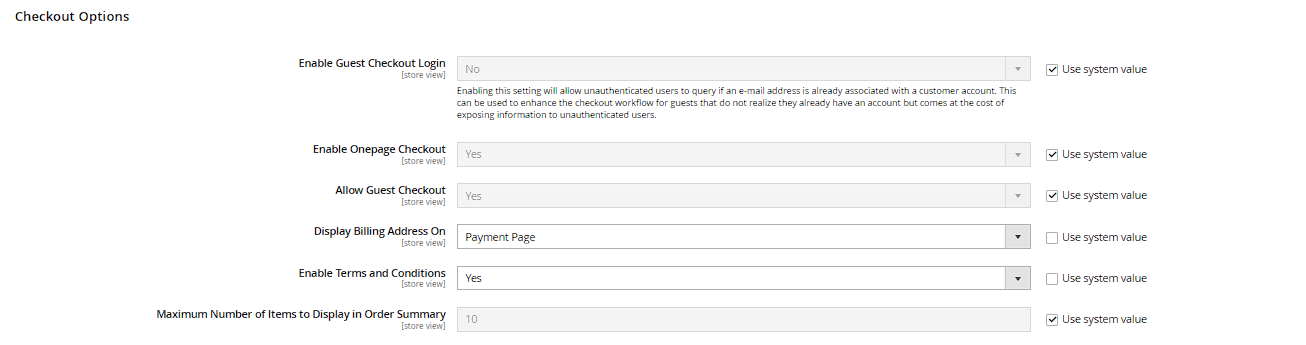
Magento supports both guest checkout (ordering without a customer account) and ordering as a registered customer — whether guest checkout is allowed is configured under Stores > Configuration > Sales > Checkout > Checkout Options. Guest checkout often lowers cart abandonment, since customers don't have to create an account first — after purchase, an account can usually still be created from the order afterwards if they choose to.
Mini Cart (Cart Drawer)
When a product is added, the Hyvä theme typically opens an Alpine.js-driven cart panel as a side drawer ("mini cart") without reloading the page. There, customers can adjust quantities, remove items, and jump straight to checkout without leaving the current page. This immediate feedback ("item added") reduces uncertainty and, with it, cart abandonment.
Applying a Coupon Code
The cart page offers a collapsible "Enter discount code" field. After entering a valid code, the discount becomes visible immediately in the totals summary. By default, Magento allows only one coupon code to be active at a time — a new code replaces the previous one rather than stacking with it. If a code is invalid or expired, a corresponding error message appears right at the field.
Required Fields and Terms and Conditions Agreement
Before finally placing the order, a required checkbox agreeing to your terms and conditions can be shown. This is enabled under Stores > Configuration > Sales > Checkout > Checkout Options > Enable Terms and Conditions; the actual text blocks are maintained under Stores > Terms and Conditions. Without the checkbox ticked, the "Place Order" button stays inactive, or the order is rejected with an error message.
Saved Payment Methods (Vault)
If your payment provider supports Magento's Vault module (e.g. certain credit card or PayPal integrations), returning customers can securely save their payment details as a token and reuse them with one click on their next order, without re-entering the data. Whether and for which payment method Vault is available depends on the specific payment module — not every payment method supports this.