Customer Account in the Shop
What customers can see and manage in their own account: orders, addresses, personal data.
Logged-in customers reach their account through the account area in the header. There they typically have access to:
- Order History: every past order with status, the option to reorder ("Reorder"), and invoice/shipment PDF downloads.
- Addresses: save multiple shipping and billing addresses and set a default one — considerably speeds up future orders.
- Account Information: change name, email address, and password.
- Wish List and, if enabled, a Compare List (see the next chapter).
- Newsletter settings: subscribe/unsubscribe directly from the account.
These areas are largely provided directly by Magento and generally need no backend configuration — your job as the store owner is mainly to make sure registration is easy and account management is easy to find (e.g. a clearly visible account link in the header).
Registration and Password Requirements
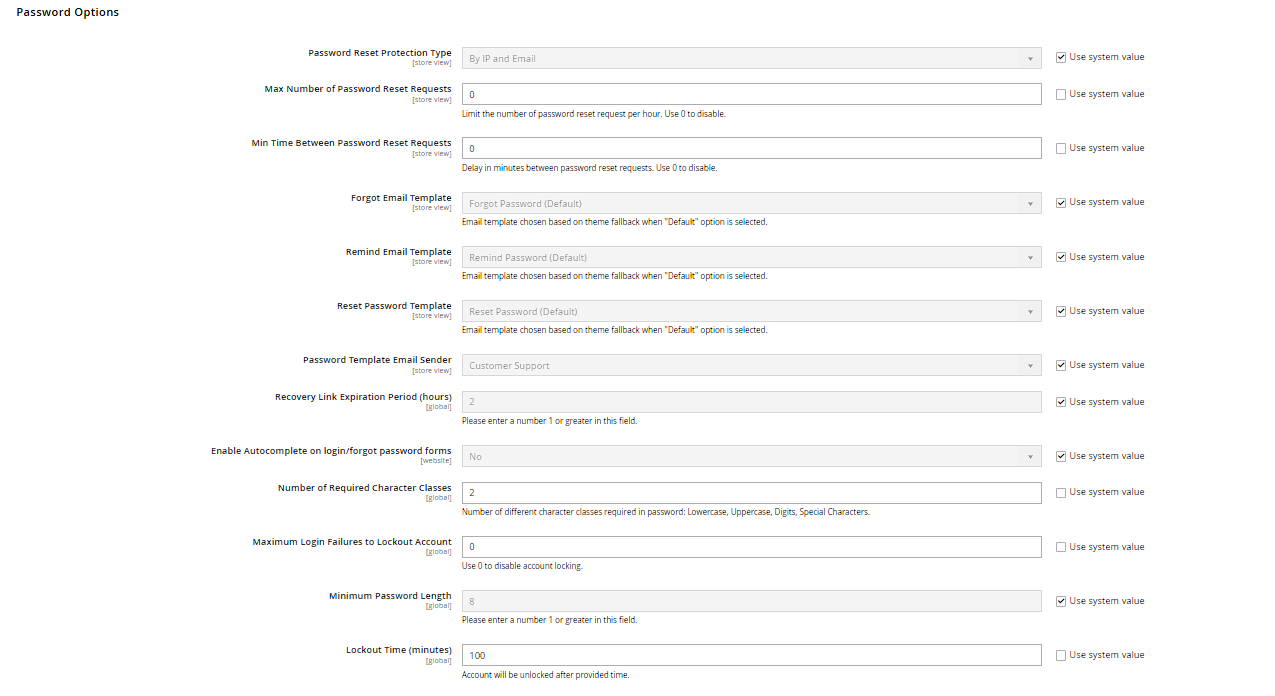
When creating an account, Magento by default asks for first and last name, email address, and password. How strict the password policy is (minimum length, required character classes) is set under Stores > Configuration > Customers > Customer Configuration > Password Options. That same section also lets you require email confirmation ("Require Emails Confirmation") — the customer then has to click a confirmation link before they can log in.
Password Reset
Via "Forgot Your Password?" on the login form, customers request a reset link by email. This link is only valid for a limited time — the validity period is likewise configured in Customer Configuration ("Recovery Link Expiration Period"). Once it expires, a new link has to be requested; for security reasons, the error message doesn't reveal whether the entered email address is actually registered.
Order Detail Page and Shipment Tracking
When a customer opens an individual order from the order history, they see every line item, price, the shipping and payment method used, and the current status. If shipment has already taken place and a tracking number was added to the shipment in the admin, a link to the carrier's tracking page appears there as well.
My Product Reviews
If the review module (Magento_Review) is active and included in the theme, customers find an overview of every product review they've submitted, including its approval status, under "My Product Reviews" — useful for them to check whether a review has already been approved by you as the store owner.