Product Search and Filters
How customers search for products in your store and use the filters in the category view.
Product search is available as a search field in the header on every storefront page. While typing, Magento (or on this project, OpenSearch as the search engine) often already shows live suggestions of matching products before the customer even submits the search.
Layered navigation (filters)
Category and search result pages usually offer a filter sidebar ("layered navigation") that lets customers narrow down results, typically by:
- Price (as a range or in price brackets)
- Attributes like color, size, material — depending on which attributes in your catalog are marked with Use in Layered Navigation (see the "Attributes and Attribute Sets" chapter)
- Categories, when a search returns hits across multiple categories
Active filters can be removed individually again, usually via a small "×" next to the filter value. The more precisely and consistently your product attributes are maintained, the more useful the filter sidebar becomes for your customers — inconsistent values (e.g. "Red" and "red" as separate options) noticeably hurt the user experience.
Sorting and View Options
A toolbar above the product list on category and search result pages lets customers adjust the display: sorting by Position (the order you defined in the admin), Name, Price, or other enabled attributes, plus the number of products shown per page and usually a switch between grid and list view. Which sort options are available is controlled per attribute under Stores > Attributes > Product via Use in Product Listing Sort By.
Practical tip: The default "Position" sort order only pays off if you actually maintain the ordering in category editing — otherwise the result list feels arbitrarily sorted to customers.
Advanced Search
Besides the quick header search, Magento provides a dedicated advanced search page where customers can search by individual attributes such as name, SKU, description, or a price range (from/to). Which attributes appear as search fields there is likewise controlled through attribute configuration (Use in Advanced Search). In many themes — including the default Hyvä theme — the link to advanced search isn't prominently placed and may need to be deliberately added to the footer or the "no results" page.
Empty Result Lists and Minimum Search Length
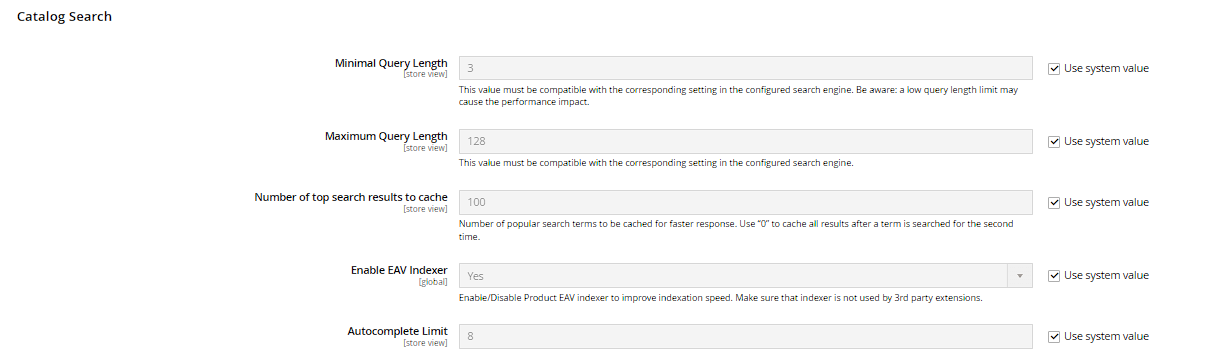
If a search returns no hits, Magento shows a corresponding message instead of the product list. How many characters a customer must type at minimum before a search is even triggered is set under Stores > Configuration > Catalog > Catalog Search > Minimum Query Length — along with the maximum length. Setting it too low produces imprecise live suggestions; setting it too high frustrates customers searching with short terms (e.g. model numbers).