Magento 2 Product SEO Check with Traffic Light and Score
SKU: PRODUCTSEOSCORE1
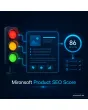
- traffic light and score in the product form
- checks meta title, description, URL key and alt texts
- column in the product grid, sortable and filterable
- CSV report with all failed rules
Einmaliger Kauf · inkl. 12 Monate Updates · zzgl. MwSt.
Magento 2 Product SEO Check: traffic light and score right in the product admin
With the Magento 2 Product SEO Check from Mironsoft Product SEO Score, editors see while editing whether a product is properly maintained for search engines. The module checks meta title, meta description, URL key, description length and image alt texts, calculates a score and displays a traffic light. The Magento 2 Product SEO Check appears as a block in the product form and as a column in the product grid, so you can sort whole assortments by need for action. Thresholds and rules are set per store view in the admin.
Traffic light in the form
Red, amber or green shows at once whether title, description and images meet the minimum requirements.
Score from 0 to 100
Every rule has an adjustable weight, which results in a total score per product and store view.
Title and description
Length in characters and pixel width are checked against your limits; empty and duplicate values are flagged.
Image alt texts
Missing alt texts on product images are counted and linked directly in the form.
Column in the product grid
The score can be sorted and filtered in the grid, for example all red products of a category.
Action list
Each product has a short list of concrete hints on what is missing and how much it contributes to the score.
Why a Magento 2 Product SEO Check is missing in daily work
In a catalogue with thousands of products several people maintain texts, often under time pressure. Meta titles are too long, descriptions are missing, images have no alt text. This is only noticed when rankings suffer. Magento shows nothing about it in the admin. Anyone searching for Magento 2 Product SEO Check, Magento 2 product SEO analysis or Magento 2 meta title length check wants exactly this feedback while writing.
A Magento 2 Product SEO Check delivers it. It does not replace an SEO expert and changes no content; it makes gaps visible and sortable by priority. The editorial team knows which product needs attention next.
Magento 2 Product SEO Check with adjustable rules
With the Magento 2 Product SEO Check you define what a good product looks like: meta title between 30 and 60 characters, description between 70 and 160 characters, a minimum length of the product description and at least one alt text per image. Each rule can be active or inactive and carries a weight. The values are presets that you adjust per store view, because languages need texts of different lengths.
- Character limits for title and description adjustable
- Weight per rule, rules can be switched off individually
- Own values per store view and language
Traffic light and hints while editing the product
In the product form a block shows the total score and the traffic light. Below are the rules with a tick or a warning, for example: meta description missing, two images without alt text. The display updates while typing without saving first. This way editors correct the texts until the light turns green.
- Live update while typing
- Rules with tick or warning and reason
- Block can be shown or hidden per role
Sort and filter assortments by SEO quality
The product grid gets a column with the score and the traffic light colour. You filter for red products, sort ascending and work your way up from the bottom. The score is updated after saving and calculated for existing products by console command or cron, so the catalogue is not re-evaluated on every request.
- Column with traffic light, sortable and filterable
- Calculation by cron or console command for existing data
- Update after every save
Exportable report for editors and agencies
The report lists all products with score, traffic light and the failed rules. It can be filtered by category, store view and period and exported as CSV. This way you hand a clear task list to agencies or copywriters. The history shows how the catalogue average develops over time, and no data leaves your shop system.
- Filter by category, store view and period
- CSV export of the task list
- Catalogue average over time
Where the Magento 2 Product SEO Check helps in daily shop work
Situations where the Magento 2 Product SEO Check beats a spreadsheet.
Creating new products
While creating a product editors see at once whether title, description and alt texts are sufficient and deliver finished products instead of drafts.
Checking an import
After an import the check shows which products arrived without meta data or alt texts.
Preparing a relaunch
Before switching the theme you prioritise the products with the worst score and edit the most important categories first.
Steering an agency
The report is a clear task list for copywriting agencies and can be evaluated again after delivery.
Magento 2 Product SEO Check: without and with the module
The difference to maintaining by gut feeling.
| Topic | Without the module | With Mironsoft Product SEO Score |
|---|---|---|
| Feedback | None, mistakes show up in the rankings | Traffic light and score while editing |
| Overview | Manual spot checks or external crawlers | Column in the product grid, filterable |
| Rules | Unspoken habits | Adjustable limits and weights |
| Task distribution | Spreadsheets maintained by hand | CSV report with the failed rules |
| History | Not measurable | Average value over time |
How we set up the Magento 2 Product SEO Check for you
The process after you place your order.
Briefing
Together we clarify which rules apply to your shop and how they are weighted.
Installation
We install the module and set up the Magento 2 Product SEO Check for your store views in the form and in the grid.
Initial calculation
We calculate the score for your existing catalogue and set up the cron run for ongoing changes.
Test
We test the Magento 2 Product SEO Check with products without images, without meta data, with special characters and with several store views.
Handover
Your editorial team gets an introduction to the traffic light, the report and role permissions.
Delimitation from the SEO Suite
The Mironsoft SEO Suite produces SEO output in the frontend: meta templates, structured data, hreflang and canonical. The Product SEO Score works at a different place, namely in the admin. It only evaluates what editors have maintained and writes no content and no meta tags into the shop. The two complement each other: the SEO Suite fills gaps automatically, the Magento 2 Product SEO Check shows where manual work remains.
The interface runs with Alpine.js without an additional library, and your Hyvä frontend stays untouched. The Magento 2 Product SEO Check is a guide and no ranking promise.
No download, but personal setup
Product SEO Score is not listed here as a ready-made download for self-installation. The purchase is a commission: after the order we get in touch, install the module in your shop and agree rules, weights and role permissions together with you.
Frequently asked questions
Everything about rules, traffic light, report and how the purchase works.
How can I check the SEO status of a product in Magento 2?
Which fields does the Magento 2 Product SEO Check examine?
How can I find products without a meta description in Magento 2?
Does the module change content or meta tags?
Do the limits apply equally to all languages?
Is the catalogue re-evaluated on every request?
Does the Magento 2 Product SEO Check work with Hyvä?
How is this different from the SEO Suite?
Does a green light guarantee better rankings?
Can I download and install the module myself?
Recently Viewed Products

Magento 2 Product SEO Check – Mironsoft Product SEO Score