Magento 2 Contact Person Widget with Photo and Phone per Category
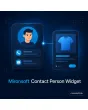
SKU: CONTACTPERSONWIDGET1
- contact person with photo, role, phone and email
- assignment per category, product or CMS page with inheritance
- visibility per customer group, fallback person if none assigned
- three layouts for Hyvä with Alpine.js, no extra library
Einmaliger Kauf · inkl. 12 Monate Updates · zzgl. MwSt.
Magento 2 Contact Person Widget: a face and a phone number instead of an anonymous form
With the Magento 2 Contact Person Widget from Mironsoft you place a box with photo, name, role, phone number and email address on product, category and CMS pages. Customers see at once who to reach with questions and do not have to dig through the imprint. Assignment works by category, attribute set or single page, the box is inserted as a widget and needs no extra JavaScript library. The module is built for Hyvä and uses Alpine.js only to expand the contact details.
Person management
In the admin you maintain contact people with photo, role, phone, mobile number, email and office hours.
Assignment by area
Assign each person to categories, products, CMS pages or customer groups, with inheritance down to subcategories.
Widget and layout block
Insert the box as a CMS widget into pages and blocks, or fix it into the product page through layout.
Direct contact paths
Phone and email are stored as tel: and mailto: links, so mobile visitors call with one tap.
Several people
Per area the box shows one person, a list or a rotation, depending on your setting.
Multilingual
Role, greeting text and office hours are maintained per store view in German and English.
Why one real person convinces more than a form
For products that need explanation, customers want to talk to someone before buying. A contact form at the bottom of the page feels like an obstacle, a photo with a name and a direct line feels like an offer. That is why merchants look for a Magento 2 Contact Person Widget that shows a different specialist per product group: the timber expert for flooring, the electrician for lighting, the inside sales team for spare parts.
Out of the box Magento knows only one global contact page. Anyone who wants to show contact people per area ends up editing text in CMS blocks by hand and forgetting them after staff changes. With the Magento 2 Contact Person Widget you change a person in one place and every assigned page is up to date.
Create a Magento 2 Contact Person Widget profile: photo, role and contact paths
Every contact person is a record of their own with picture, name, role, short text, phone number, mobile number, email address and office hours. On upload the photo is cropped to a uniform size and delivered as WebP. If a field is missing, such as the mobile number, the line simply disappears from the box without leaving a gap.
- Photo with automatic crop and WebP output
- Phone, mobile, email and office hours per store view
- Empty fields are not rendered
Assign a contact person per category and product page
You assign a person to a category and all products inside show them automatically. An assignment on a subcategory overrides the parent, and a single product can get its own person again. In addition the display can be limited to customer groups, for example a key account manager only for logged-in business customers.
- Inheritance from parent to subcategories
- Override per product or CMS page
- Visibility by customer group
The contact box in the Hyvä theme: compact, mobile, no extra JS
The box comes as a compact sidebar, as a wide row below the product description and as a card in CMS content. On a smartphone the call button comes first. The contact details expand with Alpine.js, no further library is loaded. Colours and spacing follow your Tailwind classes and can be overridden in the theme.
Configuration, cache and privacy for the Magento 2 Contact Person Widget
Under Stores › Configuration › Mironsoft you switch the module on per store view, choose the default layout and define a fallback person who appears when no assignment applies. The box is cacheable and loads no external services. Pictures and names of real employees are personal data; as the shop operator you clarify consent with those shown, and a legal review by the shop operator is recommended.
- Fallback person when no assignment exists
- Full full-page-cache support
- Flag for consent of the employees shown
Where the Magento 2 Contact Person Widget secures revenue in daily shop work
Four typical situations where the Magento 2 Contact Person Widget achieves more than a form.
Advice-heavy ranges
For machines, furniture or technology the customer sees the specialist of the product group right away and calls before buying.
B2B with key accounts
Logged-in business customers see their personal manager with a direct line, guests see the general hotline.
Spare parts and accessories
On category pages for spare parts, inside sales stands ready with an email address for fitting questions.
Landing pages and campaigns
In CMS pages for trade fairs or campaigns you place the box as a widget next to the offer.
Magento 2 Contact Person Widget: manual CMS work or module compared
What changes in upkeep and effect.
| Topic | Without the module | With Mironsoft Contact Person Widget |
|---|---|---|
| Upkeep | Text in many CMS blocks | One person, one record, all pages current |
| Assignment | Page by page by hand | By category with inheritance and override |
| Mobile | Phone number as plain text | tel: link and call button |
| Target groups | Same display for everyone | Visibility per customer group |
| Staff changes | Find and edit every block | Swap the person, assignment stays |
How we set up the Magento 2 Contact Person Widget for your shop
The process after your order.
Briefing
You name people, areas and desired layouts, and we agree the assignment logic together.
Installation
We install the module and set up the Magento 2 Contact Person Widget for all store views including a fallback person.
Data entry
We create your contact people with photos and assign them to the categories.
Testing
We test the Magento 2 Contact Person Widget for inheritance, customer groups, mobile view and cache on product and CMS pages.
Handover
Your team gets a short introduction so that staff changes take minutes from now on.
Scope compared with contact form, quick contact and team directory
The contact form and the quick contact form from Mironsoft receive messages, the team directory presents all employees on a page of its own. The Magento 2 Contact Person Widget instead shows exactly one fitting person in context, right at the product or category.
The Magento 2 Contact Person Widget complements them: the box points to the form when needed, and if you wish the profiles come from the same data set. All of them run with Alpine.js in the Hyvä theme.
No download, but a personal setup
The contact person widget is not listed here as a finished download file for self-installation. The purchase is a commission: after the purchase we get in touch, install the module in your shop and set up people, assignment and layout together with you.
Frequently asked questions
Everything important about assignment, display, privacy and how the purchase works.
How can I show a contact person per category in Magento 2?
Can I show an employee photo and phone number on the Magento 2 product page?
How do I put the box into a CMS page?
Can the contact person be shown only to logged-in customers?
What happens when no person is assigned to a page?
Does the Magento 2 Contact Person Widget work with Hyvä and full-page cache?
May I publish employee photos in the shop?
Can I show several people for one area?
How does the module differ from the team directory?
Can I download and install the module myself?
Recently Viewed Products

Magento 2 Contact Person Widget – Mironsoft