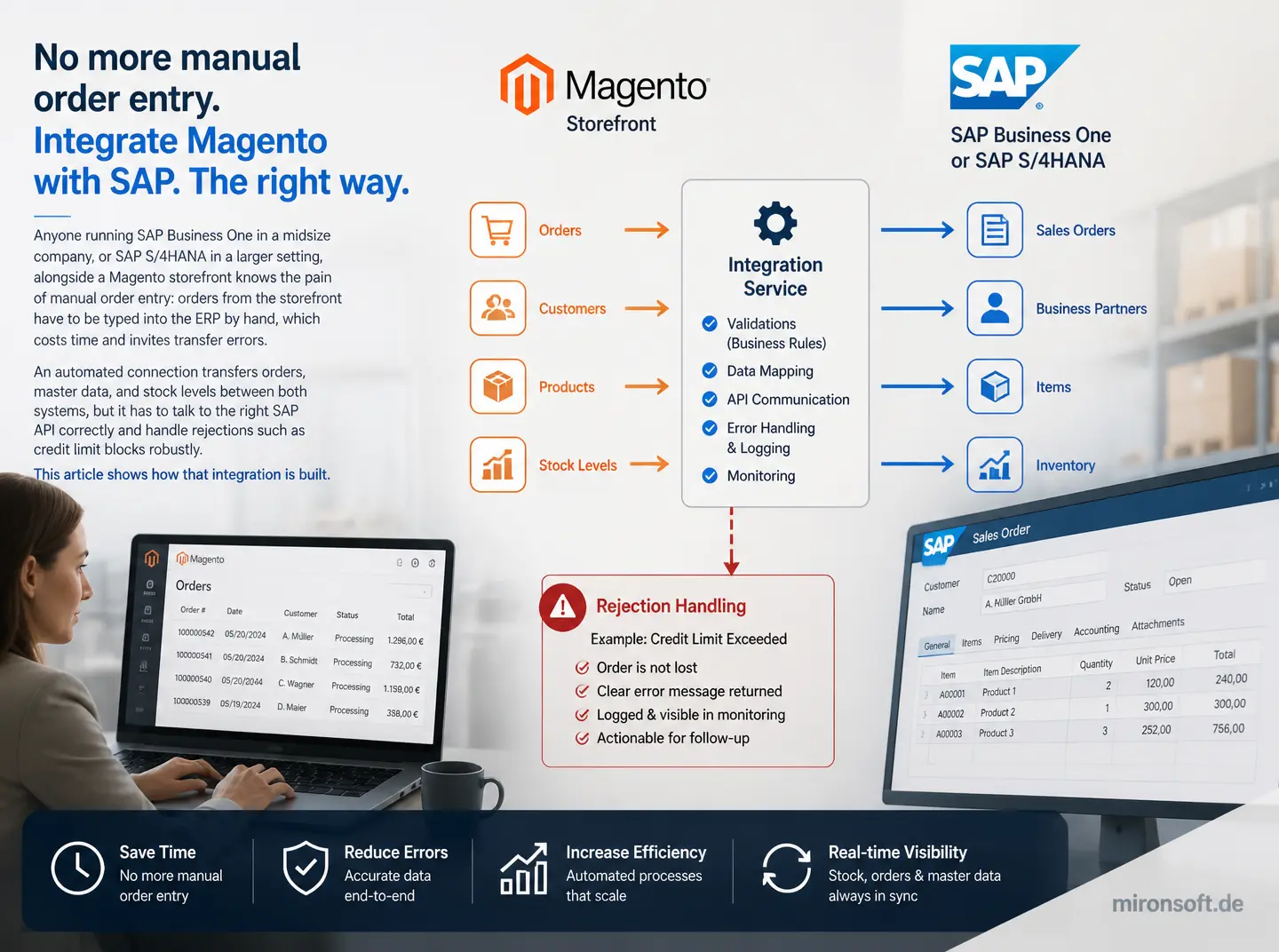
How to reliably create orders from Magento 2 as sales orders in SAP Business One or SAP S/4HANA, including master data sync and error handling
Anyone running SAP Business One in a midsize company, or SAP S/4HANA in a larger setting, alongside a Magento storefront knows the pain of manual order entry: orders from the storefront have to be typed into the ERP by hand, which costs time and invites transfer errors. An automated connection transfers orders, master data, and stock levels between both systems, but it has to talk to the right SAP API correctly and handle rejections such as credit limit blocks robustly. This article shows how that integration is built.
Table of Contents
- 1. Why manual order transfer between Magento and SAP does not scale
- 2. Placing SAP Business One and SAP S/4HANA technically
- 3. Connecting the SAP Business One Service Layer API
- 4. Importing orders automatically from Magento
- 5. Master data sync: items, price lists, and warehouse locations
- 6. Connecting SAP S/4HANA: OData services and SAP Cloud Integration
- 7. Error handling for rejected orders and credit limit blocks
- 8. Security and permission model for the interface
- 9. SAP integration approaches at a glance
- 10. Summary
- 11. FAQ
1. Why manual order transfer between Magento and SAP does not scale
As long as a storefront processes only a handful of orders a day, transferring them into the ERP by hand is still manageable. Once order volume grows or several sales channels run at once, manual entry becomes the bottleneck: staff type line items, quantities, and addresses by hand, which inevitably leads to typos, duplicate orders, and delayed shipments as volume increases.
An automated SAP connection removes exactly that bottleneck, but it demands a solid technical foundation: the integration must transfer orders reliably exactly once, even through network errors or brief outages of the SAP interface, while carrying every field the accounting department needs correctly and completely.
2. Placing SAP Business One and SAP S/4HANA technically
SAP Business One targets small and midsize companies and offers the Service Layer API, a modern, REST based interface that exposes standard objects such as orders, items, and business partners directly through HTTP calls with JSON payloads. The Service Layer API is comparatively easy to integrate because it closely mirrors the data model of the SAP Business One client and is well documented.
SAP S/4HANA, on the other hand, targets larger organizations and offers OData services, plus, depending on the setup, a connection through SAP Cloud Integration or the SAP Integration Suite as a middleware layer. Data models in S/4HANA are considerably more complex than in Business One, which is why a direct point to point connection without middleware makes less sense with S/4HANA than with Business One.
3. Connecting the SAP Business One Service Layer API
The Service Layer API of SAP Business One authenticates through a login endpoint that returns a session ID, which then has to be sent as a cookie with every subsequent call. That session has a limited lifetime, so the integration needs an automatic re login on an expired session instead of immediately returning an error to the Magento checkout on every failed call.
To create an order, the integration sends a POST request to the orders endpoint with the business partner code, line items including item number and quantity, and the desired shipping address. The Service Layer API validates credit limits and stock availability server side among other things, so a rejected order comes back with a meaningful error message the integration has to parse and report back to the shop team in an understandable way.
<?php
declare(strict_types=1);

namespace Mironsoft\SapSync\Model\Client;

/**
 * Creates an order in SAP Business One via the Service Layer API.
 */
final class ServiceLayerOrderClient
{
    public function __construct(
        private readonly ServiceLayerSession $session,
        private readonly \GuzzleHttp\ClientInterface $httpClient,
    ) {
    }

    /**
     * Creates an order for a completed Magento order.
     *
     * @param array $orderPayload
     * @return array
     */
    public function createOrder(array $orderPayload): array
    {
        $response = $this->httpClient->request('POST', 'Orders', [
            'headers' => ['Cookie' => 'B1SESSION=' . $this->session->getSessionId()],
            'json' => $orderPayload,
        ]);

        return json_decode((string) $response->getBody(), true);
    }
}
4. Importing orders automatically from Magento
Order import should always trigger only once a Magento order is actually fully paid or at least firmly authorized, instead of creating a SAP order for a still cancellable cart. An observer pattern on the order status change fits better than a plain cron job here, because the transfer then happens close to real time.
A clear reference between the Magento order number and the created SAP order, stored visibly in both systems, matters too. That reference not only makes customer support much easier when questions come up, it also prevents a retry after a failed call from accidentally creating a duplicate order in SAP.
5. Master data sync: items, price lists, and warehouse locations
Item master data such as item number, description, weight, and tax code should flow from SAP as the leading system into Magento, since accounting and warehouse management need to maintain that data there anyway. Price lists in SAP Business One can be modeled through dedicated price list objects mapped onto Magento customer groups, provided price differentiation follows a comparable logic in both systems.
With multiple warehouse locations, the integration additionally has to decide which SAP warehouse location determines the availability shown in the storefront, especially when a company holds different stock levels across multiple sites. Aggregated availability across several warehouse locations is technically possible, but it should be a deliberate decision rather than a side effect of an overly simple query.
6. Connecting SAP S/4HANA: OData services and SAP Cloud Integration
SAP S/4HANA exposes its business objects through standardized OData services, for instance for sales orders or business partners, which can in principle be called directly from Magento. In practice, connections to S/4HANA more often run through the SAP Integration Suite or a comparable middleware, because companies running S/4HANA usually already have other systems integrated and a central integration layer makes transformation rules reusable.
That middleware then handles converting the Magento order format into the OData structure S/4HANA expects, including more complex field mappings for cost centers, sales organizations, and plants that usually do not exist in that form in SAP Business One. Anyone already running middleware for other systems should extend it for the S/4HANA connection rather than building an isolated point to point link exclusively for Magento.
7. Error handling for rejected orders and credit limit blocks
If SAP rejects an order because a customer's credit limit is exceeded, the Magento order must not simply stay marked as successfully completed in the storefront, it has to be clearly flagged as under review. The integration should show the customer an understandable status message and notify inside sales so the credit limit situation can be resolved manually, instead of the order silently disappearing into an error queue.
The same applies to stock availability conflicts, for instance when an item gets reserved elsewhere between order placement in the storefront and processing in SAP. A clearly defined escalation process that makes sense to the sales team matters more here than trying to resolve every conceivable conflict fully automatically.
8. Security and permission model for the interface
The SAP service account used for the integration should get only the permissions it actually needs, such as read and write access to orders and read access to master data, instead of working with a full administrator account. That restriction significantly limits the potential damage should the integration's credentials ever get compromised.
It is also worth adding rate limiting on the Magento side of the integration, preventing a faulty retry mechanism from overloading the SAP interface with excessive requests and affecting other systems in the company that also depend on SAP.
9. SAP integration approaches at a glance
The table below compares the main integration approaches for SAP Business One and SAP S/4HANA.
| SAP System | Typical Interface | Integration Effort | Recommended Approach |
|---|---|---|---|
| SAP Business One | Service Layer API (REST/JSON) | Medium, well documented | Direct connection from Magento |
| SAP S/4HANA, simple scenario | OData services | Medium to high | Direct connection possible, middleware recommended |
| SAP S/4HANA, multiple integrated systems | SAP Integration Suite / Cloud Integration | High | Central middleware essentially mandatory |
| Credit limit and stock conflicts | System dependent status response | Medium | Clear escalation process instead of full automation |
Mironsoft
Magento development, module consulting, and system architecture
A Magento project that needs a second opinion or experienced execution?
We build custom Magento modules, advise on architecture decisions, and take on complex implementations, from service contract planning to production-ready deployment.
Architecture Consulting
Have module and system architecture thought through properly before you build.
Custom Module Development
Build custom Magento modules cleanly, following best practices.
Code Review & Audit
Have existing modules reviewed for performance, security, and maintainability.
10. Summary
SAP Integration: The Essentials at a Glance
Core idea
Orders should only be created automatically as a SAP order once payment or authorization is firm.
Key distinction
SAP Business One fits a direct Service Layer connection, S/4HANA is usually better served through middleware.
Biggest risk
A rejected order that still appears successfully completed in the storefront.
Success criterion
Every order transfers exactly once, with a clear reference between Magento and SAP.