How to build a solid PIM integration between Pimcore and Magento 2, from attribute mapping to delta sync on large catalogs
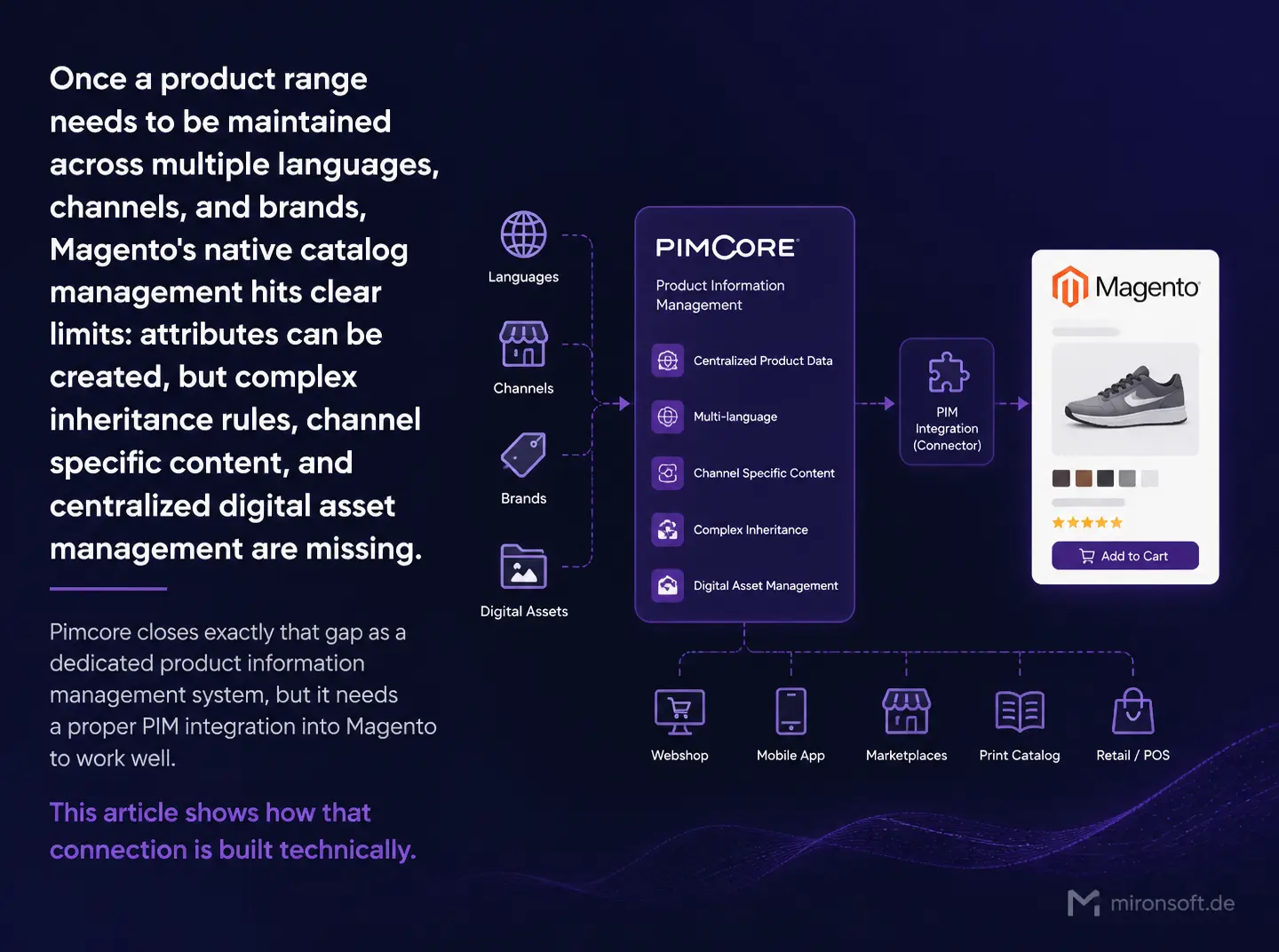
Once a product range needs to be maintained across multiple languages, channels, and brands, Magento's native catalog management hits clear limits: attributes can be created, but complex inheritance rules, channel specific content, and centralized digital asset management are missing. Pimcore closes exactly that gap as a dedicated product information management system, but it needs a proper PIM integration into Magento to work well. This article shows how that connection is built technically.
Table of Contents
- 1. Why Magento's native catalog management falls short on complex ranges
- 2. What Pimcore as a PIM adds on top of Magento's built-in tools
- 3. Integration architecture: Pimcore as master, Magento as consumer
- 4. Attribute mapping between Pimcore's data model and Magento's EAV
- 5. Syncing language variants and store view mapping
- 6. Sync mechanism: REST export from Pimcore, cron import into Magento
- 7. Connecting asset management through Pimcore's DAM
- 8. Performance on large catalogs: batch import instead of a full import
- 9. Pimcore integration versus native Magento catalog management
- 10. Summary
- 11. FAQ
1. Why Magento's native catalog management falls short on complex ranges
Magento's EAV based product management works well for a single sales channel with a modest attribute structure, but quickly gets unwieldy once the same product has to be maintained in multiple languages, for multiple brands, or with channel specific descriptions. Editors then end up working directly in the shop backend, which makes approval workflows, versioning, and a clean separation between raw data and published content much harder.
A dedicated PIM system such as Pimcore separates exactly that responsibility: product data gets maintained centrally, channel agnostically, and with clear approval stages, while Magento only receives the already enriched data published for that specific storefront. That separation cuts down on error sources considerably once more than one team works on product data.
2. What Pimcore as a PIM adds on top of Magento's built-in tools
Pimcore ships with a flexible, hierarchical data model in which attributes can be inherited and overridden per channel or language without duplicating the base data. This is complemented by a built in workflow engine for approval processes and a digital asset management system that manages images, spec sheets, and videos centrally instead of maintaining them separately in every target system.
For companies with multiple brands or country storefronts, the ability to define a base product once and automatically derive country specific variants with their own translations and adjusted attributes is particularly relevant, instead of maintaining every language variant by hand.
3. Integration architecture: Pimcore as master, Magento as consumer
In the vast majority of projects, Pimcore acts as the master for product data, while Magento works purely as a consumer and does not allow direct changes to product attributes that also exist in Pimcore. That clear separation of roles prevents editors from accidentally changing data in the shop backend that gets overwritten on the next sync anyway.
Technically the data flow usually runs through the Pimcore REST API or the Pimcore Data Hub, which exposes GraphQL endpoints for a controlled, filtered export of product data. A custom Magento module consumes that interface and translates the Pimcore object structure into Magento's product and attribute API, instead of writing Pimcore data directly into the Magento database.
4. Attribute mapping between Pimcore's data model and Magento's EAV
Pimcore classes define attributes with their own data types that do not map one to one onto Magento's EAV attribute types, for instance Pimcore's structured object relations versus Magento's flatter attribute model. An explicit mapping configuration that maps every Pimcore attribute to a Magento attribute code and target type is therefore essential, rather than relying on automatic name matching.
For complex attributes such as multi level object relations or structured tables in Pimcore, transforming them into a flat, Magento consumable JSON or text format before writing through the product API is the recommended approach. That transformation layer should sit centrally inside the sync module, not scattered across several import scripts.
<?php
declare(strict_types=1);

namespace Mironsoft\PimcoreSync\Model\Mapper;

/**
 * Maps Pimcore attributes onto Magento attribute codes and target types.
 */
final class AttributeMapper
{
    private const MAPPING = [
        'pim_short_description' => ['magento_code' => 'short_description', 'type' => 'text'],
        'pim_material' => ['magento_code' => 'material', 'type' => 'select'],
        'pim_country_of_origin' => ['magento_code' => 'country_of_manufacture', 'type' => 'select'],
    ];

    /**
     * Translates a Pimcore attribute into the Magento target structure.
     *
     * @param string $pimcoreAttribute
     * @param mixed $value
     * @return array
     */
    public function map(string $pimcoreAttribute, mixed $value): array
    {
        $target = self::MAPPING[$pimcoreAttribute]
            ?? throw new \RuntimeException(sprintf('No mapping defined for attribute %s.', $pimcoreAttribute));

        return ['attribute_code' => $target['magento_code'], 'value' => $value, 'type' => $target['type']];
    }
}
5. Syncing language variants and store view mapping
Pimcore manages translations as language variants of the same object, while Magento models language differences through store views, each holding its own attribute values for the same product ID. The integration must therefore explicitly map every Pimcore language onto a Magento store view instead of assuming an implicit one to one relationship, since store view structure and language configuration are maintained in Magento independently of Pimcore.
If a language in Pimcore is still missing a complete translation, the sync process should fall back to a default language in a controlled way rather than transferring empty attribute values to Magento, which would then show up as missing content in the storefront. A status field per language variant in Pimcore tracking translation progress helps exclude incomplete variants from export deliberately.
6. Sync mechanism: REST export from Pimcore, cron import into Magento
The usual setup is a cron job in Magento that periodically queries the Pimcore API for products changed since the last run, instead of transferring the entire catalog on every pass. Pimcore typically keeps a modification date per object that can be used as the filter criterion for the delta query.
For time sensitive changes, such as an urgent price correction, a Pimcore workflow event can additionally trigger an immediate webhook to Magento instead of waiting for the next regular cron run. That combination of a regular delta sync and event driven special cases covers most practical requirements.
<!-- app/code/Mironsoft/PimcoreSync/etc/crontab.xml -->
<config xmlns:xsi="http://www.w3.org/2001/XMLSchema-instance"
        xsi:noNamespaceSchemaLocation="urn:magento:module:Magento_Cron:etc/crontab.xsd">
    <group id="default">
        <job name="mironsoft_pimcoresync_delta_import" instance="Mironsoft\PimcoreSync\Cron\DeltaImport" method="execute">
            <schedule>*/10 * * * *</schedule>
        </job>
    </group>
</config>
7. Connecting asset management through Pimcore's DAM
Pimcore's built in digital asset management centrally manages images, spec sheets, and videos with their own metadata, versioning, and automatic image optimization for different output formats. The integration does not retransfer the raw file on every sync, instead only reloading an asset into the Magento media gallery when its checksum has changed since the last import.
For product images it is also worth generating predefined image variants for different resolutions already inside Pimcore and transferring specifically the variant Magento needs, rather than leaving Magento to scale down an oversized original image on every page view.
8. Performance on large catalogs: batch import instead of a full import
With tens of thousands of items, a full reimport on every run would put unnecessary strain on both the Pimcore API and Magento's indexers. A batch approach that imports products in groups of a few hundred items with short pauses between batches keeps the import from noticeably affecting regular storefront performance during the sync window.
After each batch, only the affected part of Magento's indexers should be updated in a targeted way, instead of triggering a full reindex of every indexer after each import. That targeted invalidation considerably reduces the overall runtime of the sync process on large catalogs.
9. Pimcore integration versus native Magento catalog management
The table below compares native Magento catalog management against a Pimcore integration in typical scenarios.
| Scenario | Native Magento Management | Pimcore PIM Integration | Recommendation |
|---|---|---|---|
| Single storefront, one language | Sufficient, low effort | Usually overkill | Native management |
| Multiple brands or countries | Gets unwieldy fast | Central data with inheritance | Pimcore integration |
| Extensive digital asset management | Media gallery only, little metadata | Full DAM with versioning | Pimcore integration |
| Very small catalog, few changes | Direct, lower operating overhead | Extra system complexity | Native management |
Mironsoft
Magento development, module consulting, and system architecture
A Magento project that needs a second opinion or experienced execution?
We build custom Magento modules, advise on architecture decisions, and take on complex implementations, from service contract planning to production-ready deployment.
Architecture Consulting
Have module and system architecture thought through properly before you build.
Custom Module Development
Build custom Magento modules cleanly, following best practices.
Code Review & Audit
Have existing modules reviewed for performance, security, and maintainability.
10. Summary
Pimcore Integration: The Essentials at a Glance
Core idea
Pimcore acts as the master for product data maintenance, Magento only consumes the published, enriched data.
Key distinction
A full import is fine for small catalogs, large catalogs need delta sync and batching.
Biggest risk
Missing attribute mapping causes product data to be silently lost or mismatched.
Success criterion
Editors maintain product data exclusively in Pimcore, Magento stays a pure consumer.