Storeview Flags for Magento 2
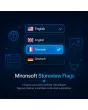
SKU: MSF
- Country flags instead of plain text in the store switcher
- Optional flag only, no text
- Also visible in the admin store grid
- Free image size and custom flag images per store view
Einmaliger Kauf · inkl. 12 Monate Updates · zzgl. MwSt.
Language recognized at a glance
Instead of plain text, the store-view switcher shows country flags — customers instantly recognize their language, no reading required.
Flags in the dropdown
Next to every store-view name in the switcher.
Flag only, no text
Optionally replace store-view names entirely with flags.
Admin store grid
Flags also shown in the store overview table in the backend.
Various image formats
Supports common formats including GIF.
Free image size
Width and height of the flag icons freely adjustable.
Per store view
Each language version gets its own configuration.
Custom images
Your own flag/icon images can be uploaded too.
No extra JavaScript
Implemented natively for Hyvä, no additional scripts.
Theme compatible
Also works with standard and custom themes.
Fast setup
No theme layout changes required.
Consistent sizing
Automatically consistent display in the dropdown (addition).
Multilingual tooltip
Hover label shown in the respective language (addition).
Flags instead of plain text
The store-view switcher in the header shows plain text names like "Deutsch" or "English" by default. With Storeview Flags, a matching country flag appears in addition to or instead of the text — customers instantly recognize their language regardless of language skills.
- Flag combined with text, or flag alone
- Custom flag images instead of default icons possible
- Image size freely adjustable to match your header design
Store management at a glance
Flags are also shown in the admin store grid — with several store views, this makes it much easier to keep track in the backend of which row belongs to which country/language, without looking up the store code every time.
- Faster orientation with many store views
- No theme layout changes required
- Configuration possible separately per store view
No download, personal setup instead
Storeview Flags is not listed here as a ready-made download file for self-installation. The purchase is a service engagement: we contact you after purchase, set up the module, and work with you to assign the right flag images to your store views.
Frequently Asked Questions
Everything important about flags, configuration, and how the purchase works.
Do I need to source flag images myself?
Can I hide the text next to the flag?
Do the flags also appear in the admin?
Which image formats are supported?
Does this work with Hyvä themes?
Can I adjust the size of the flags?
Can I download and install the module myself?
Recently Viewed Products

Mironsoft Storeview Flags