Sticky Add to Cart for Magento 2
SKU: MSAC
- Buy button stays visible no matter how far you scroll
- Image, name, price, SKU and quantity freely toggled on/off
- Position and colors set up to match your theme
- Works on mobile, tablet and desktop
Einmaliger Kauf · inkl. 12 Monate Updates · zzgl. MwSt.
The buy button that never disappears
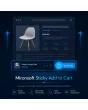
A floating bar with product image, price and buy button that stays visible while scrolling the product page — styled to match your theme.
Always visible
The bar stays in view the whole time you scroll.
Product image
A thumbnail of the product right in the bar.
Product name
The product name is shown in the bar.
Price
Current price including any special price.
SKU
The item number optionally shown in the bar as well.
Quantity box
Adjust the quantity right in the bar without scrolling back.
Position choice
Place the bar at the top or bottom of the screen.
Bar color
Background color of the bar freely matched to your theme.
Button color
The buy button color is individually configurable.
Text colors
Colors of name, price and SKU each configurable on their own.
Responsive
Works equally well on mobile, tablet and desktop.
All product types
No swatches for configurable products, no quantity box for grouped products.
Per-product switch
Optionally enable it per product individually (addition).
The button is always one tap away
With long product descriptions and many images, customers otherwise have to scroll back up to buy — that's exactly the moment many drop off. The floating bar keeps image, price and buy button visible at all times, with no reload.
- Appears automatically once the original button scrolls out of view
- Quantity changeable directly in the bar
- No reload, no external JavaScript library (Alpine.js)
Field by field, set up by you
Not every field has to appear in the bar — you decide whether image, name, price, SKU and quantity are displayed, and adjust background, button and text colors individually to match your theme. You also choose the position at the top or bottom yourself.
- Five fields individually toggled on/off
- Bar, button and text colors set separately
- Optionally enabled per product individually (addition)
No download, personal setup instead
Sticky Add to Cart is not listed here as a ready-made download file for self-installation. The purchase is a service engagement: we get in touch with you after purchase, set up the module, and align colors and displayed fields with you to match your theme.
Frequently Asked Questions
Everything important about the bar, its configuration options and how the purchase works.
When does the floating bar appear?
Which fields can I show in the bar?
Can I place the bar at the top instead of the bottom?
Do the colors match my theme?
Does this work for all product types?
Can I change the quantity directly in the bar?
Does the bar also work on smartphones?
Can I download and install the module myself?
Recently Viewed Products

Mironsoft Sticky Add to Cart