What indexers do in the background, why prices or stock sometimes appear delayed, and how to reindex.
Magento stores product data normalized across many tables. To keep storefront display fast despite that, this data is regularly transformed into pre-calculated, lean "index" tables — this job is done by the indexers, managed under System > Index Management or via bin/magento indexer:status.
The most important indexers
- Product Price: pre-calculates final prices including price rules, taxes and customer groups.
- Catalog Search: builds the search index (on this project: OpenSearch).
- Category Products / Product Categories: the mapping between products and categories.
- Stock: stock per product and source.
Update modes
Every indexer runs in either Update on Save mode (instantly on every change — fine for small catalogs) or Update by Schedule mode (via a background cron job — needed for larger catalogs, since otherwise saving a product in the backend would become noticeably slow). If a price or stock change isn't showing up in the store, an indexer is usually the culprit: check the status under System > Index Management, run bin/magento indexer:reindex if needed, or verify the cron job is actually running.
Additional indexers at a glance
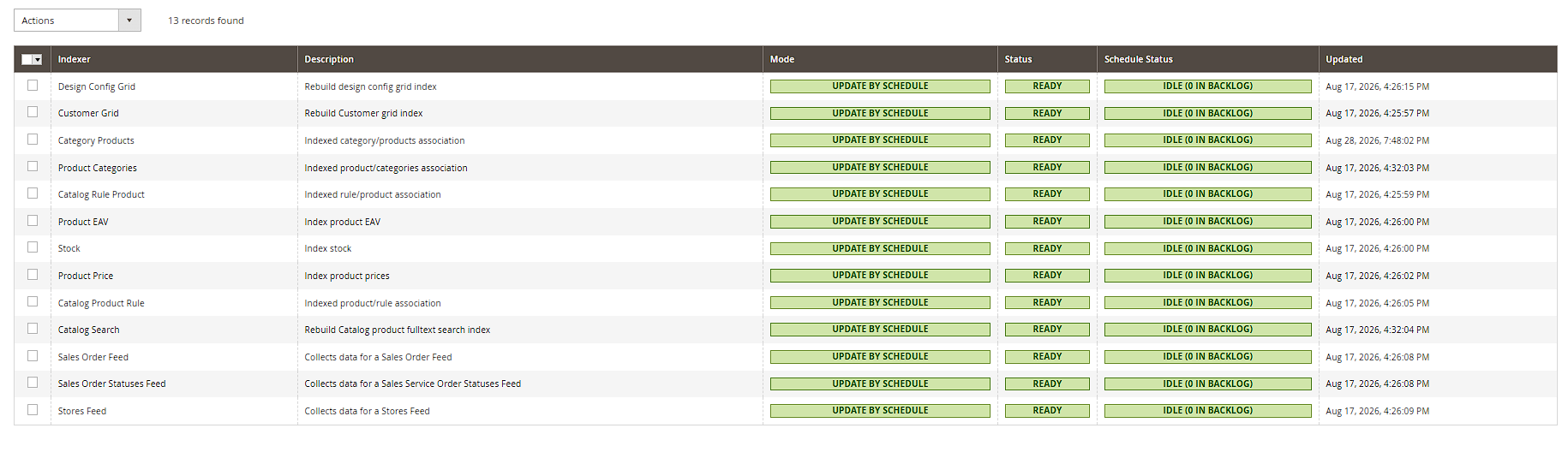
Beyond the ones already mentioned, there is, among others, the Product EAV indexer (builds flat, attribute-based tables for fast product queries), Customer Grid (feeds the backend customer grid with a fast, denormalized data source), and Design Config Grid (indexes per-store-view custom theme assignments). These indexers also appear in the table under System > Index Management and can be monitored and controlled there just like the commonly cited core indexers.
Reading the status columns correctly
The table under System > Index Management shows two separate pieces of information for each indexer: the Status column (Ready / Reindex Required / Processing) indicates whether the index is currently consistent, while Update Required (for "Update by Schedule" indexers) additionally shows whether pending changes are still waiting for the next cron run. If an indexer permanently sits at "Reindex Required" even though the cron job is running, that usually points to an error during the last indexing run — it's worth checking bin/log system.log or exception.log in that case.
Switching modes directly in the backend
Switching between Update on Save and Update by Schedule doesn't have to go through the command line: in the table under System > Index Management, you can select one or several indexers via checkbox and switch them to the other mode directly using the Actions dropdown — handy when a shop operator without SSH access needs to react quickly.
Targeted reindexing and resetting
Instead of always rebuilding every indexer at once, bin/magento indexer:reindex <indexer_id> lets you refresh a single indexer specifically (the available IDs are listed by bin/magento indexer:info). The bin/magento indexer:reset command explicitly marks an indexer as "invalid" without recalculating it — useful for forcing a clean starting state before a planned, full rebuild (e.g. after a large data import).