Elasticsearch & OpenSearch for Magento 2

SKU: MES-1
- Typo tolerance and fallback search when no exact matches exist
- Synonyms and score boost rules for targeted result control
- Faceted / color-swatch filters right in the autocomplete search
- Multi-store and GraphQL, over 15 content types searchable at once
Einmaliger Kauf · inkl. 12 Monate Updates · zzgl. MwSt.
A search your customers love and your revenue notices
Real search-engine technology instead of database lookups: forgive typos, understand word stems, know your synonyms and rank results the way a person expects.
Own search index per store view
Every store view gets its own, language-aware index on OpenSearch. Your search runs on a real search engine instead of MySQL and stays fast under heavy load.
Typo tolerance
"heder" finds Header, "newsleter" finds the newsletter. If the strict search finds nothing, a typo-tolerant search starts automatically, with a friendly notice on the results page.
Results while typing
Word beginnings are found from the second letter on (edge n-gram). Typing "hea" already shows "Header", no need to spell out the whole word.
Relevance that makes sense
Matches in the title count more than in body text, SKU and keywords carry their own weight, and every content type can be boosted up or down, for example products before blog posts.
No more noise
The minimum relevance hides results that only mention a word like "FAQ" in passing. On mironsoft.de, over 3,500 blog hits shrank to the 7 that really fit.
Synonyms from the Magento admin
Your synonym groups from Marketing > SEO & Search apply to the Suite as well. A change takes effect without a reindex, right when you save.
Word stems and stop words
"Shops" finds "shop", "the" and "and" do not get in the way. German, English, French, Spanish, Italian and Dutch are built in, matching the language of the store view.
ICU and phonetics (optional)
On request, thorough Unicode handling for special characters and sound-alike matches: "Meier" also finds "Maier" and "Mayer". Only switches on when the OpenSearch plugins are installed.
Results page with tabs
All results at a glance, split into products, categories, pages, blog, tutorials and manual, each with a count and a text excerpt with highlighted search words.
Layered navigation with live counts
Filter by category, price and any attribute with multi-select. Counts, sorting (relevance, name, price) and paging all come from the same fast query.
Everything searchable
Products, categories, attribute values like manufacturer and CMS pages are included from the start. A new content type is one PHP class and one configuration entry.
Page builder content understood
Magento PageBuilder, WYSIWYG and CMS block calls become clean search text. Inline CSS, scripts, forms and hidden elements stay out.
You decide what gets found
A per-entry "Include in search" switch for products, categories, CMS pages and posts, plus an exclusion list and the notsearchable marker for single text areas.
Always up to date
Changes to products, categories and CMS pages reach the index within a minute. A nightly full reindex catches imports and special cases.
Protection from bots and load
Per-IP rate limit, result caching, storing search terms only when they have results, and permanent redirects for the old Magento search URLs: no more endless links created by automatically generated search terms.
Settings and tools
Everything in the admin under Mironsoft > Search Suite, plus commands to rebuild the index, analyze the relevance of single search terms and clean up old search terms.
When Magento's default search hits its limits
Magento's default search only knows whole words. Mistype a word and you get an empty page, type "shop" and "shops" stays hidden. The Elasticsearch Suite relies on a real search engine: it forgives typos, understands word stems, knows your synonyms and ranks by relevance.
If the strict search finds nothing, a second, typo-tolerant round starts automatically. Visitors almost never end up on an empty page, and the "please check your spelling" message becomes unnecessary.
- Title matches beat body matches, SKU and keywords carry their own weight
- Minimum relevance: pages that only mention a word in passing stay out
- Example mironsoft.de: "FAQ" used to return over 3,500 blog hits, now the 7 that fit
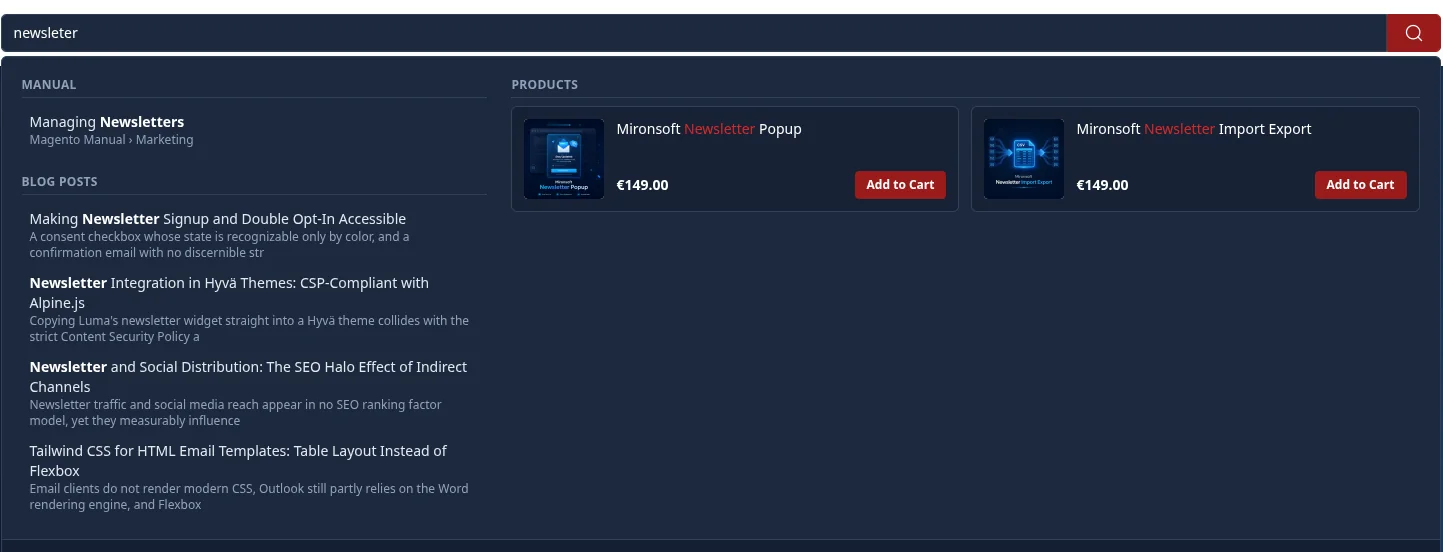
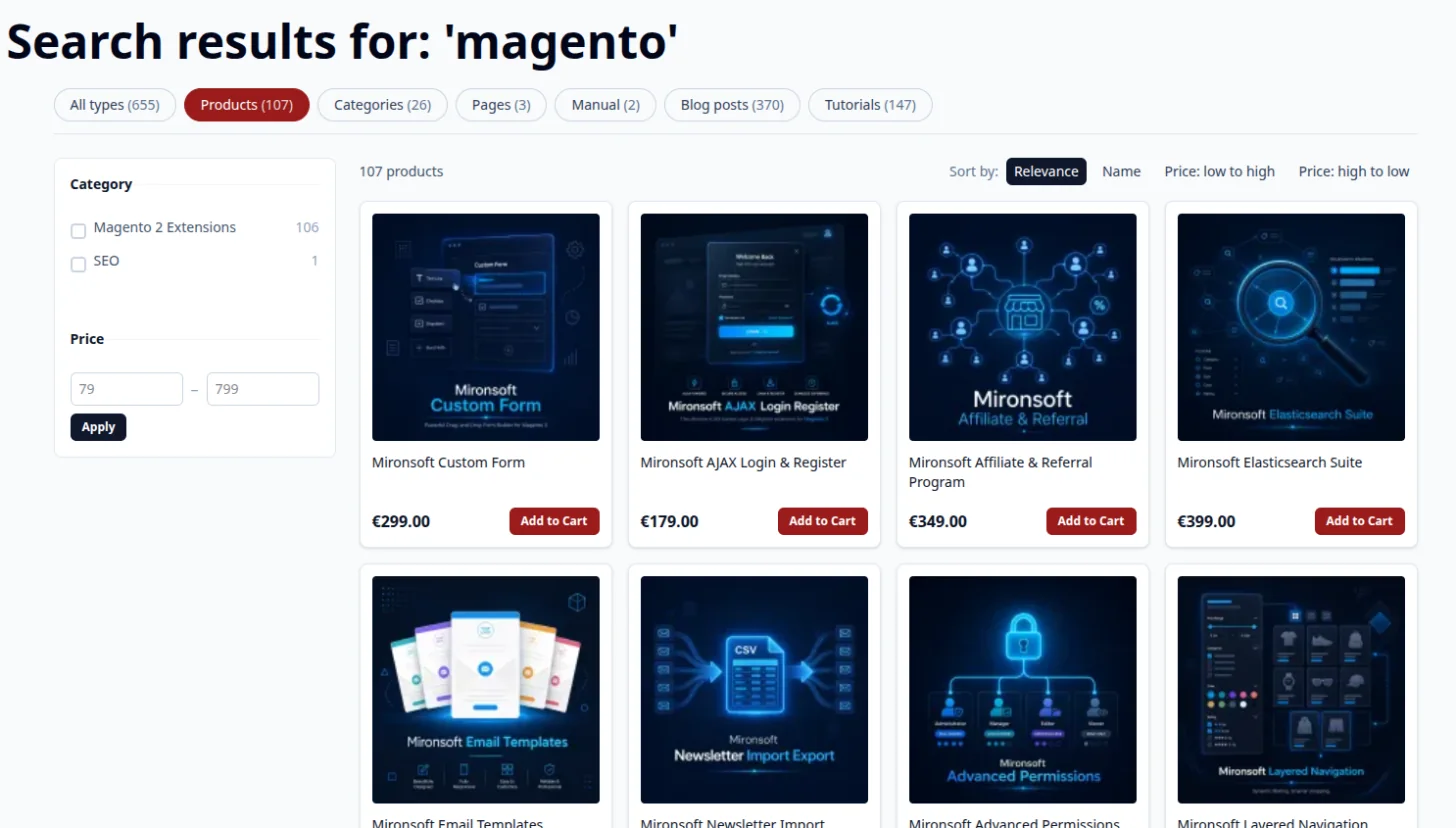
A results page that sells
Instead of one endless list, visitors get tabs for products, categories, pages, blog, tutorials and manual, each with a count. In the product tab they filter by category, price and any attribute, with multi-select and live counts.
The numbers behind the filters come from the same query as the results: fast, and they are correct. Tick several values of one filter and the other options keep showing their real counts.
- 6 to 10 filters or more, selection and order configurable in the admin
- Sorting by relevance, name and price, clean paging with a fixed page limit
- Add to cart button right in the product card
The search knows your whole shop
Products, categories, attribute values like manufacturer and CMS pages are included from the start. Custom content types such as a blog, magazine or manual are added with a small PHP class. For the Mironsoft blog, tutorials and manual, ready-made connections exist.
Texts reach the index clean: Magento PageBuilder, the WYSIWYG editor and block calls become search text, inline CSS, scripts and hidden elements stay out. For Magezon shortcodes and JSON-based builders we ship converters that we adapt to your data during setup.
- Multiple store views, each with its own index and matching language analysis
- Categories with the same name are told apart by their path, for example "SEO" with the path "Leistungen"
- Results with a text excerpt and highlighted search words
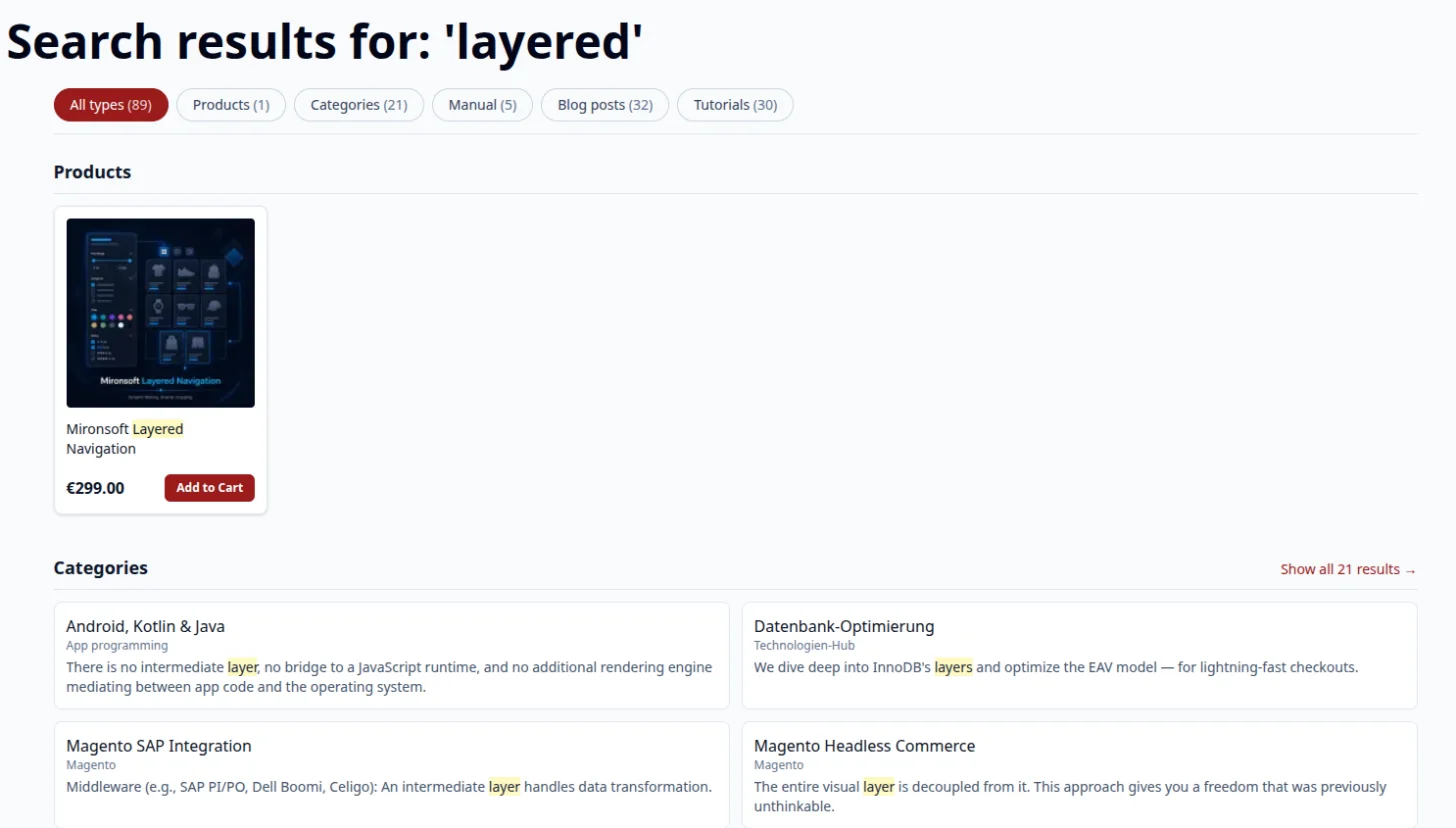
You decide what gets found
Imprint, contact page or an internal draft should not show up in search? One switch is enough. To hide just a section of text, mark it with the class notsearchable. You maintain synonyms where you are used to it, in the Magento admin.
Because only stored content is indexed, forms, widgets and modules never show up as search hits by accident. The contact page is not found just because a form offers all articles in a dropdown.
- "Include in search" switch per entry, on by default
- Synonyms from Marketing > SEO & Search take effect immediately, without a reindex
- Exclusion list for CMS pages and a marker for single text areas
Runs on the OpenSearch Magento already uses
The Suite uses the OpenSearch connection your Magento has already configured. Only one additional index per store view appears next to the Magento index, a dedicated search server is not needed. Two optional OpenSearch plugins (analysis-icu and analysis-phonetic) extend the language analysis. If they are missing, everything still works.
- Built and tested with Magento 2.4 and OpenSearch 2.x
- For Hyvä Themes: Alpine.js and Tailwind, no additional JavaScript
- Rate limit, caching and bot protection are built in
No download, but personal setup
The Elasticsearch Suite is not listed here as a ready-made file to install yourself. Buying it is a commission: after the purchase we get in touch, review your search environment, set up the index for all store views and tune weighting, filters and synonyms together with you.
Frequently asked questions
Everything important about technology, usage and how the purchase works.
Do I need an additional search server?
Does the Suite work with Elasticsearch instead of OpenSearch?
Are typos corrected automatically?
Do my Magento synonyms apply?
How up to date is the search index?
Can I remove single entries from search?
Are PageBuilder, Magezon or Hyvä CMS contents understood?
Which languages are supported?
What happens to the old Magento search pages?
Does the search show customer group prices?
How fast is the search?
Can I download and install the module myself?
Recently Viewed Products

Mironsoft Elasticsearch Suite